Have we ever wanted a laser engraver that behaves like a friendly, punctual roommate—one that shows up assembled, works fast without complaint, and doesn’t require a closet-sized workshop to feel important?
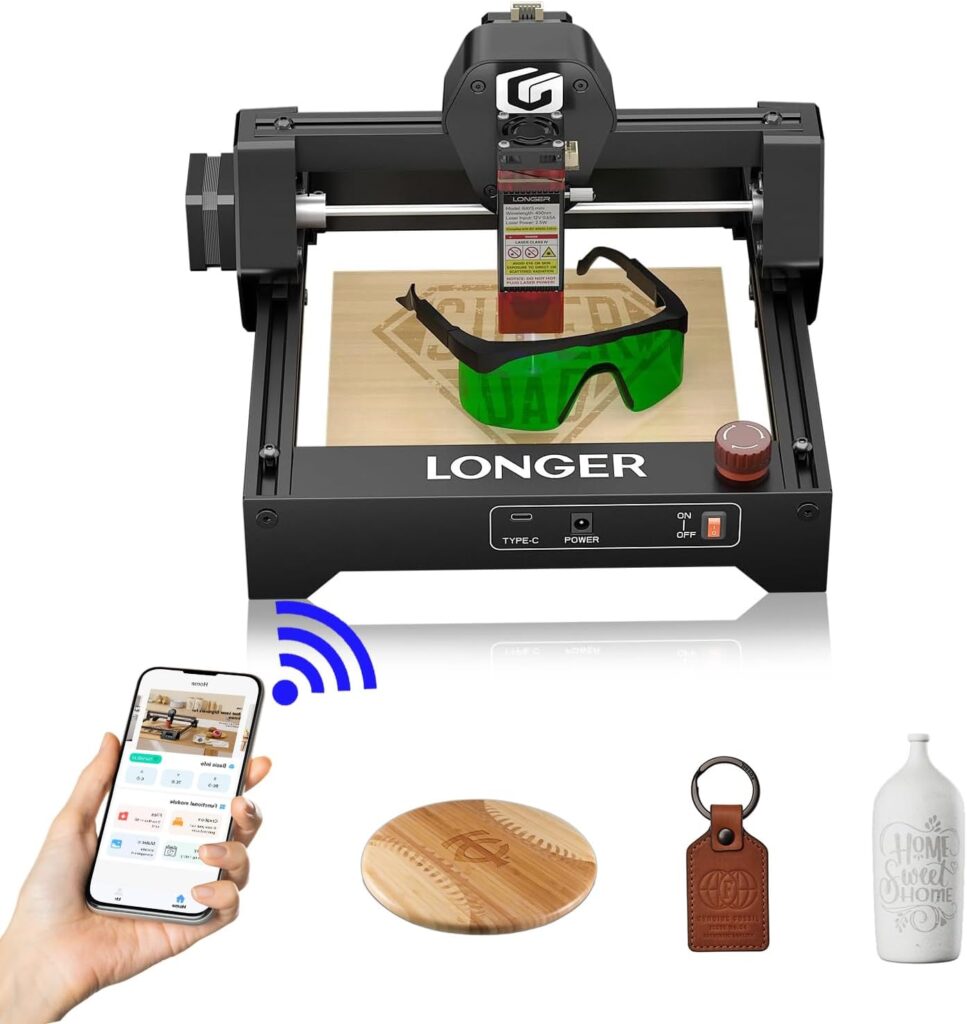

Our Hands-On Take: The LONGER Ray5 mini 2.5W Laser Engraver
We picked up the LONGER Ray5 mini to see if a compact engraver could actually deliver professional results without bristling with disclaimers and caveats. It turns out this small machine has some big-machine manners, thanks to a 32-bit controller, a surprisingly fine 0.04 mm laser spot, and a top speed of 12,000 mm/min. We didn’t expect much from something that weighs less than a family-sized cantaloupe, and yet here we are, saving little bits of wood like souvenirs.

LONGER Ray5 mini 2.5W Laser Engraver, 32-Bit High-Speed 12000mm/min, 0.04mm Compressed Spot, WiFi APP Control, 130×140mm Engraving Area, Offline Engraving, Eye Protection for Wood, Acrylic, Metal
What Stood Out Right Away
We’re used to new tools arriving with a side of weekend assembly, an Allen key that will haunt our drawers for decades, and at least one tiny screw that rolls under the fridge. The Ray5 mini comes fully assembled. We set it on the desk, plugged it in, put on our good “do not engrave your thumb” face, and got working within minutes. No wrench-based bonding rituals required.
Small Body, Big Personality
This engraver measures just 292×286×165 mm and weighs roughly 1.47 kg, so it lived on our desk without staging a turf war. Its 130×140 mm work area is enough for coasters, keychains, leather patches, phone cases, notepad covers, small plaques, and other “I made this and now I have to keep it forever” objects. We’ve owned toasters that took up more emotional space.
The 2.5W Laser That Punches Above Its Weight
At 2.5W, this is a true engraving-first machine. It’s not trying to cosplay as an industrial cutter, and honestly, we respect the honesty. It excels at engraving wood, acrylic (opaque or painted), leather, and coated or anodized metals. It can also handle paper and fabric, which is wonderful until we remember how many tote bags already live in our kitchen.
Specs and Highlights at a Glance
To make life easier, we pulled the main details into one place. We’ve lost enough instruction manuals to know that if we don’t, no one will.
| Feature | Detail |
|---|---|
| Model | LONGER Ray5 mini 2.5W Laser Engraver |
| Laser Power | 2.5W optical output (diode) |
| Controller | 32-bit motherboard |
| Max Speed | Up to 12,000 mm/min |
| Laser Spot | 0.04 mm compressed spot |
| Engraving Area | 130 × 140 mm |
| Connectivity | USB, WiFi with mobile APP control |
| Software Compatibility | LaserGRBL (Windows), LightBurn (Win/macOS/Linux) |
| Offline Engraving | Supported |
| Focus | Dovetail fixed-focus mechanism (quick height adjustment) |
| Safety | Emergency Stop, protective shield around laser head |
| Size | 292 × 286 × 165 mm |
| Weight | 1.47 kg |
| Material Compatibility | Wood, acrylic (opaque/painted), leather, coated/anodized metal, paper, fabric |
We didn’t add a “quirky personality traits” row, but if we did, we’d say the machine is eager, efficient, and a little smug about how tiny it is.
Setup: Out of the Box and Immediately Useful
We don’t have a lot of patience left over for hobby equipment that demands a relationship status. The Ray5 mini is plug-and-go. Our biggest challenge was deciding which item we wanted to mark forever with our initials. That, and peering at the laser head like someone who expects it to start speaking.
Adjusting Focus Without Drama
The dovetail fixed-focus head lets us adjust height easily to accommodate material thickness. We didn’t need to find little shims or perform interpretive dances with calipers. It was a simple, tactile adjustment, which is exactly what we want when we’re working with materials that vary from delicate paper to a stubborn block of hardwood.
Speed in Real Life: Where 12,000 mm/min Actually Matters
We’ve seen spec sheets before that felt like someone’s aspirational diary, but here the 12,000 mm/min speed isn’t marketing fluff. For vector engraving and quick marking, the difference in responsiveness is noticeable. It accelerates and decelerates smoothly, so lines come out clean rather than jittery. We watched it draw tiny type the way a meticulous librarian might sign her name.
More Time Making, Less Time Waiting
On small projects, shaving off even a minute or two per run adds up. If we’re doing a set of 20 coasters, we don’t want to spend the night babysitting a robot. The Ray5 mini’s quick motion system meant we finished batches sooner and had enough time to remember dinner exists.
Precision and Detail: That 0.04 mm Compressed Spot
The big party trick here is the 0.04 mm compressed spot. In plain terms, that means fine lines come out crisp, filled areas carry nice contrast, and small text remains legible rather than turning into a gray smudge. Our vector graphics looked sharp, and dithering on wood came out surprisingly nuanced. We didn’t expect to see that much definition in a 2.5W unit, yet there it was, staring back at us like a tiny overachiever.
Photographs and Patterns That Actually Look Intentional
While we wouldn’t use a 2.5W engraver to render every freckle of a high-resolution portrait, we did get pleasing results with well-prepped images. Wood grain plays nicely with the beam, and leather picked up subtle gradients that made our small gifts feel a notch more custom. It was the kind of accuracy that made us consider labeling our own stapler just because we could.
Material Performance: What We Engraved and How It Behaved
We tried the Ray5 mini on common materials to see where it shines and where it politely declines. Across wood, leather, coated metal, and opaque acrylics, we saw consistent contrast and good control. Paper and fabric worked as well, though we moved slowly to avoid unplanned confetti.
Wood: The Natural Match
If this engraver had a best friend, it would be wood. Basswood and birch plywood responded exactly as we hoped—dark marks, clean edges, and strong readability even for small motifs. Hardwood needed more persuasion but rewarded us with rich tone once dialed in. We also found that masking and light sanding, while optional, makes the results look tidy without any char on the surface.
Acrylic: Opaque and Painted for Best Results
Clear acrylic doesn’t play nice with diode lasers, but opaque or painted acrylics are ready to mingle. We created tags and signage with excellent definition. If we were going to make a stack of café labels, this is absolutely how we’d do it—provided we don’t drink all the coffee first.
Leather: Soft Contrast and Lovely Texture
Vegetable-tanned leather gave us a warm, classy look with logo designs and monograms. We trialed light and dark finishes, and both responded well. It’s the sort of result that convinces us leather accessories deserve little flourishes more often—discreet, tasteful, and not demanding a parade.
Coated or Anodized Metal: A Strong Yes
Bare metals aren’t the Ray5 mini’s territory, but coated or anodized aluminum and steel items turned out beautifully. Think water bottles, flasks, tools with protective finishes, and anodized dog tags. We etched text and line art without drama. If we ever start an underground club for tidy utility objects, we’ll be ready.
Paper and Fabric: The Delicate Arts
For paper goods, invitations, and cardstock designs, precision makes the difference between elegant and slightly burned. With fabric—especially felt—we were cautious but pleased with branding patches and small cut shapes. Again, the key was remembering that paper and fabric have feelings, and none of them involve fire.
Cutting Capabilities: Realistic Expectations
At 2.5W, the Ray5 mini is primarily for engraving. It can cut thinner materials like cardstock, felt, and thin wood with conservative settings and patience. If we need regular cutting of thick hardwood or clear acrylic sheets, that’s outside this machine’s mission. We don’t hold that against it, just as we don’t blame our bicycle for not being a delivery truck.
Why That’s Actually a Good Thing
Engraving-first machines like this one tend to produce more refined marks because the beam and optics are tuned for precision, not brute force. For a hobbyist shop or a small business focused on personalization and branding, that trade-off often makes sense. We prefer great lines today over charred edges tomorrow.
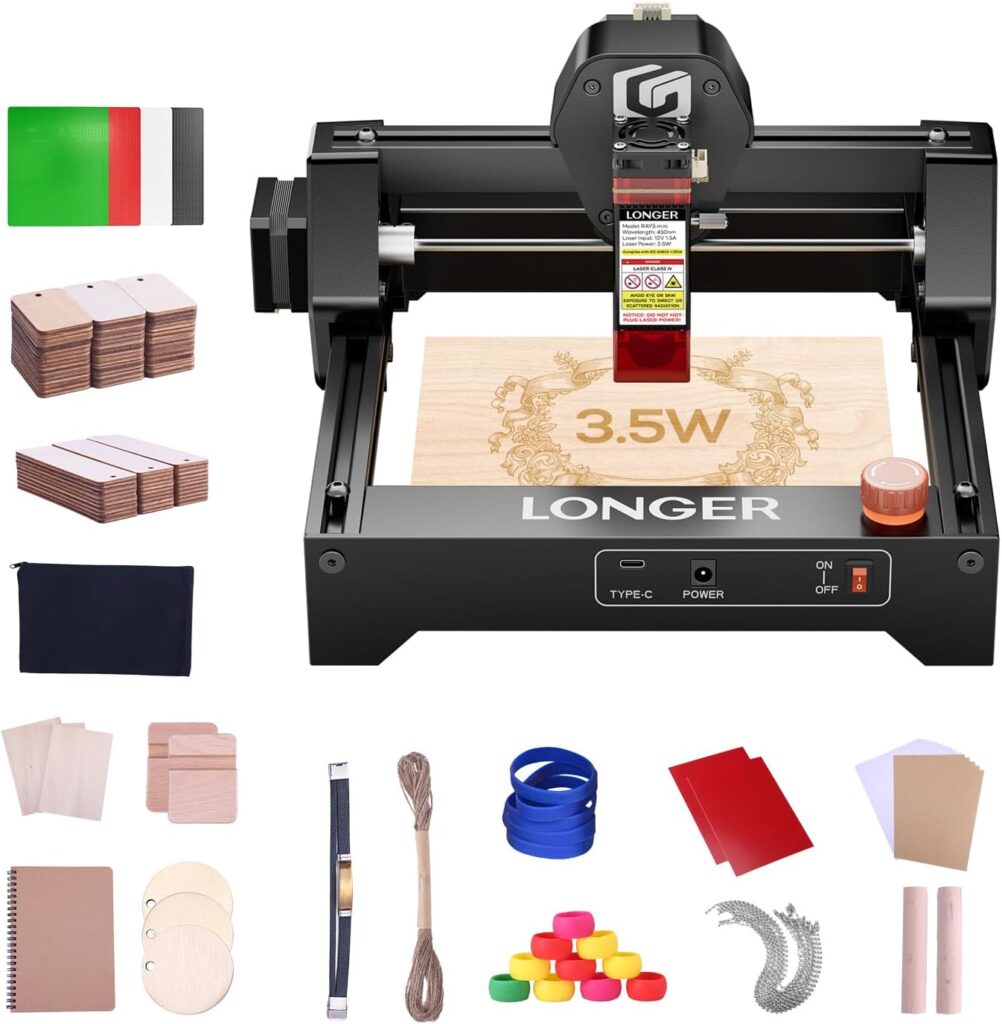
Software and Connectivity: Control Without Handcuffs
We used the Ray5 mini with LaserGRBL and LightBurn and felt right at home. Both platforms give us the control we need for vector work, photo engraving, and job organization. LightBurn’s interface feels especially polished, but LaserGRBL holds its own in all the right ways.
WiFi and APP Control That’s Genuinely Convenient
There’s built-in WiFi, and the mobile app gives us the ability to run jobs without being tethered to a laptop. We wouldn’t edit a complex design on our phone, but for running a stored job, nudging positioning, or starting a quick repeat, it’s a gift. Think of it as the remote control for our engraving habit.
Offline Engraving for Cable-Free Freedom
We loved being able to start jobs offline. Preload a design, set the material, and run it—no dangling USB leash or frantic cable hunts. For anyone working in a space where every port looks suspiciously like it came from another era, offline mode feels like a handshake between the past and the future.
Everyday Usability: The “Do We Want to Use It Again?” Test
A surprising number of tools fail this test because they involve the hassle tax. The Ray5 mini, with its small footprint and near-instant readiness, made us eager to run “just one more” project. We left it on our desk without feeling crowded, and it didn’t sound like a vacuum cleaner standing up for itself.
Maintenance That Doesn’t Become a Hobby
Basic upkeep—keeping the lens clean, wiping rails, making sure the work area is clear—was quick and obvious. The build quality feels solid enough that we’re not worried about constant tinkering. It’s nice when a machine respects our Saturday plans.
Safety Features That Actually Feel Thoughtful
We care about our eyes, and we like to think our thumbs have a bright future. The Ray5 mini’s emergency stop button and protective shield around the laser head gave us reassurance. The shield helps block stray light, but we still use proper eye protection and good ventilation, because there are certain risks that “optimism” doesn’t cover.
Sensible Working Habits Are Part of the Package
We kept the area ventilated, supervised the machine while it ran, and secured our materials. It’s a small device, not a familiar pet—it can’t be trusted alone with cardboard. With the right habits, though, we felt confident and in control.
Use Cases: Where This Machine Shines in Real Life
We could list dozens of applications, but our favorites cluster around personalization and small-batch production. The Ray5 mini is ideal for gift shops, craft sellers, small businesses that brand their packaging, and people like us who keep running out of coasters because we keep giving them away.
Projects We’d Happily Repeat
- Coasters with intricate mandalas or maps of our neighborhood
- Leather patches for hats or bags, with typography that doesn’t apologize
- Monograms on notebook covers for people who don’t want to share
- Anodized metal water bottles with logos that survive the dishwasher
- Acrylic signage and tags that look far more expensive than they are
- Custom keychains, luggage tags, and bookmarks that become instant “Where did you get that?” items
Portability and Footprint: Truly Desk-Friendly
We moved the Ray5 mini around more than we expected, sometimes to catch better light, sometimes to avoid the psychological impact of “a machine” sitting in our living room. Its light weight and compact frame meant we never dreaded the relocation. If we were traveling to a craft fair, we could see packing it without an entourage.
Fits Into a Life, Not Just a Workshop
Not everyone has a garage or studio. The Ray5 mini respects apartments, shared spaces, and kitchen tables that moonlight as studios. We appreciated that we didn’t have to rearrange our entire domestic ecosystem just to make a few gifts.
Real-World Results: The Before and After of Our Expectations
We expected “neat for a hobby tool” and got “we might sell these at the holiday market.” Clean edges, strong contrast, and repeatable positioning made our output feel professional. When the results from a small machine match the vibe of larger, pricier rigs, our respect levels go up a few notches.
A Note on Repeatability
The motion control felt consistent across jobs, so we weren’t constantly re-measuring or re-guessing placement. If we prepped a jig for multiple items—coasters, tags, patches—the machine returned to zero reliably. That means less time fussing, more time enjoying the reveal.
Who It’s For—and Who Should Consider Something Else
This engraver is perfect for makers who prioritize precision marking, personal branding, gifts, and small products. It’s also great as a dedicated engraving station even if we already own a more powerful cutter. Sometimes a specialist keeps the whole shop humming.
When to Step Up in Power
If our goal is to cut thick wood routinely or engrave bare metals deeply, we’ll need a more powerful solution. A 2.5W diode laser is not a metal engraver in the industrial sense, and it’s not a production-grade cutter. That’s not a flaw; it’s a clear design choice. Knowing that saved us from expecting it to do backflips.
The Learning Curve: Short and Kind
We spent more time choosing fonts than learning how to operate the machine. If we’re reasonably comfortable with basic design tools, we’ll be fine here. The transition from concept to artifact is quick enough to feel satisfying without being so fast we make questionable decisions just for the thrill of it.
Designing for the Ray5 mini
Vector art is the machine’s best friend—crisp logos, icons, and line drawings look stellar. Halftone photos can shine too, especially on wood and leather. We found that a bit of image prep made a visible difference; good in, good out, just like cooking.
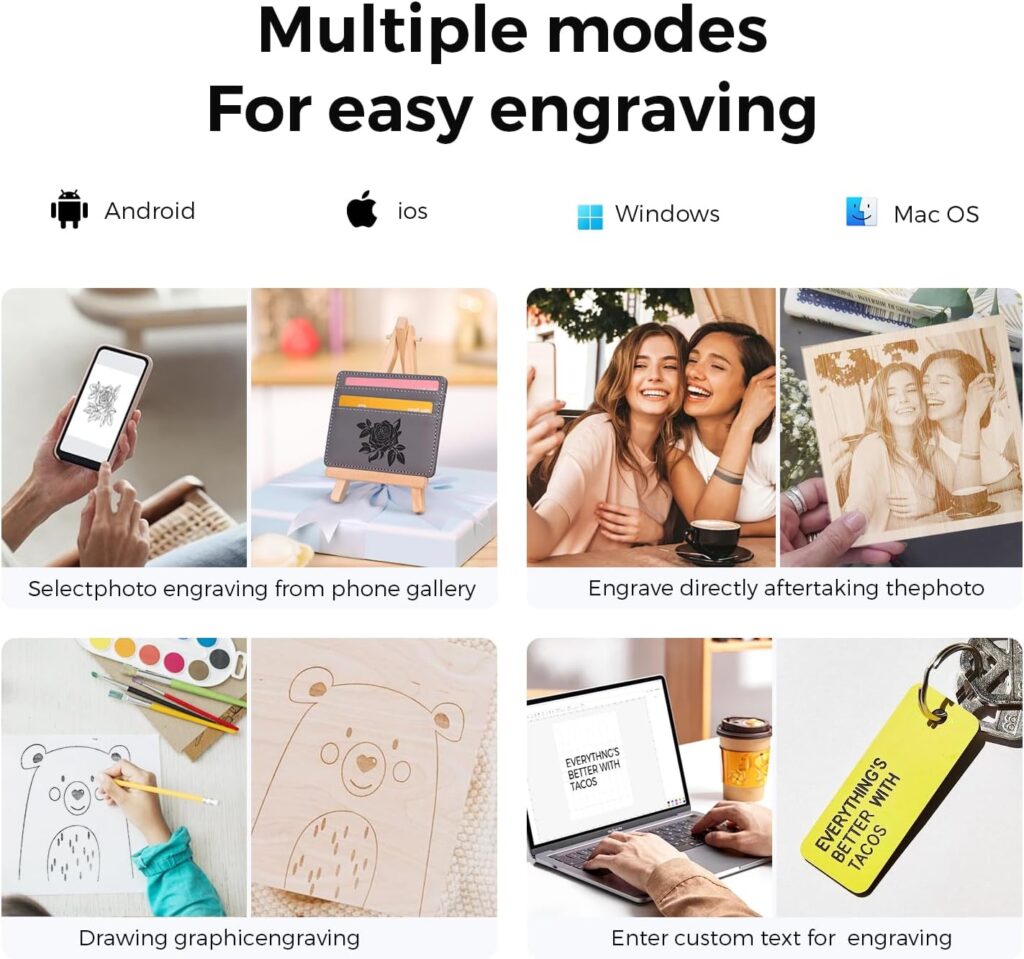
The WiFi APP: Not a Gimmick
We’ve used enough “apps” to be wary. The Ray5 mini’s WiFi connectivity and mobile control proved handy for running stored jobs and doing quick adjustments. We still preferred full software for design work, but the app kept us nimble when we were iterating on a small label or repeating a batch.
Untethered Creativity
Not being tied to a computer felt liberating, particularly for repeated jobs. We parked the laptop nearby for design work, then ran the engraver from our phone while arranging finished pieces. It felt almost like we had a tidy little production line without needing to rent a warehouse.
Build Quality and Design Choices
The frame feels sturdy for the size—no alarming flex, no odd rattles. The cable routing is sensible, which our compulsive side appreciated. The dovetail focus assembly is a highlight: simple, robust, and less fussy than some spring-loaded or screw-heavy designs we’ve endured elsewhere.
Aesthetic Notes
It looks like a real tool, not a toy someone forgot inside a cereal box. We felt comfortable giving it permanent counter space without explaining ourselves to houseguests.
Noise, Smell, and Other Realities
Engraving is not silent, but the sound level was manageable—more whir than roar. Materials matter when it comes to odor; wood is pleasantly smoky, leather can be a bit intense, and plastics vary. Good ventilation helped, along with our personal policy of not deeply inhaling anything created by a beam of light.
Workspace Considerations
We used a non-flammable, flat surface and a honeycomb panel when needed to improve results. Securing materials kept everything tidy. The Ray5 mini isn’t a drama queen, and it cooperates with a basic, well-thought-out setup.
Reliability Over Time
After repeated runs, the motion remained accurate, and we didn’t notice slop or drift. Keeping the lens clean preserved contrast, and the belt tension held up as expected. It’s the kind of machine that rewards light, regular care with months of predictability.
Spare Parts and Support
We appreciate that the brand has an ecosystem for parts and support. With compact machines, having access to consumables and basic replacements makes a difference. No one wants a great engraver turned conversation piece for lack of a small component.
Value: What We Get for the Money
Considering the speed, detail, and connectivity, the Ray5 mini feels well-priced. We’ve used more expensive machines that were slower or more needy. For creators building a small business or hobby arsenal, this model won’t devour the budget while still producing results that justify charging for our work.
The Hidden Value of Ease
Time saved in setup and rework is money saved, especially in small-batch production. We found ourselves finishing projects earlier than expected, which in our world is essentially a miracle.
Pros and Cons: The Honest Ledger
We kept a running tally as we worked, the way we do with new kitchen gadgets that either change our life or take up a shelf forever.
What We Loved
- Remarkably compact and lightweight—easy to place and move
- 32-bit controller and up to 12,000 mm/min speed for snappy performance
- 0.04 mm compressed spot for crisp, detailed engraving
- Out-of-the-box readiness with a one-piece pre-assembled design
- WiFi and APP control for quick, untethered operation
- Offline engraving to run jobs without a computer
- Good compatibility across wood, leather, opaque/painted acrylic, coated/anodized metals, paper, and fabric
- Emergency stop and protective shield for safer operation
Where We Wanted More
- 2.5W power limits cutting to thinner materials and rules out bare metal engraving
- Small work area (130×140 mm) isn’t ideal for large signage or big projects
- Ventilation is a must, especially with certain plastics and leather (typical for all diode lasers)
- Fine photo work requires a bit of image prep to shine, which is expected but worth noting
Quick Comparison to Larger or More Powerful Machines
Bigger, higher-wattage lasers can cut thicker materials and work on larger pieces, but they demand more space, more budget, and more setup. The Ray5 mini aims squarely at the maker who values precision, portability, and convenience. In many studios, that synergy is exactly what’s missing.
A Perfect Companion, Even If We Own a Bigger Rig
We could see using the Ray5 mini as a dedicated engraving station while a larger machine handles cutting. That way we avoid constant changes in setup, and keep both machines in their happy places.
Practical Tips for Better Results
We’re not here to complicate anyone’s life, so think of these as small habits that make the machine shine.
Our Favorite Habits
- Test small samples of each material first. Every batch has personality.
- Secure the workpiece. Slips are the enemy of crisp results.
- Keep the lens clean. It’s the simplest way to preserve contrast and detail.
- Ventilate well. Fresh air is good for everything except mystery odors.
- Keep designs high-contrast and well-prepped. Clear art equals clear engraves.
Frequently Asked Questions We Actually Get
We compiled the questions that pop up most often when friends see the machine and start mentally labeling their possessions.
Can it engrave metal?
Yes, coated or anodized metals engrave nicely. Bare metals are not the strong suit of a 2.5W diode laser. For deep marks on raw metal, different technology is needed.
Can it cut wood?
It can cut thinner woods and craft materials with care. If we plan to cut thick hardwoods regularly, a more powerful laser is the better tool.
Is WiFi control worth using?
We found it genuinely useful for quick repeats and running stored jobs. For complex design work, we still prefer a laptop and full software.
Which software should we use?
LaserGRBL is free and capable, LightBurn is paid and polished. Both work well with the Ray5 mini, and we enjoyed the control LightBurn offers for power users.
How big is the workspace?
The engraving area is 130×140 mm. That’s perfect for small products and personalization jobs, less so for big wall pieces unless we’re willing to work in sections.
Is it noisy?
Not loud, more of a cordial mechanical hum. Ventilation fans contribute to the sound profile more than the motion itself.
Why the Ray5 mini Worked for Our Workflow
Small shop needs often include quick personalization runs, prototyping, and making high-quality samples. The Ray5 mini’s speed, precision, and friendly setup made it fit into the cracks of our schedule without demanding dominance. We were able to run it in parallel with other tasks, the way a helpful friend holds a flashlight while we find the lost screw in the carpet.
The Unexpected Joy of “Small But Serious”
There is a particular delight in a machine that looks modest but performs like it’s auditioning for a promotion. We found ourselves looking for excuses to use it. This is how the pencil case, the phone, the notebook, and three coasters ended up monogrammed in one afternoon.
The Creative Ripple Effect
The more we used the Ray5 mini, the more ideas we scribbled down. It’s a tool that invites creative momentum—simple projects become gateways to more considered designs. Before long, we had a tidy line of items that looked cohesive enough to sell. There’s value in a machine that encourages that kind of cadence.
Gifts That Don’t Feel Like Obligations
Personalization gives even small gifts a sense of intent. We engraved initials, inside jokes, and symbols that mean something to the recipient. It’s less about the object and more about the feeling of being seen. The Ray5 mini made that easy and repeatable.
Longevity and the Road Ahead
We judge tools by how they hold up once the honeymoon phase ends. So far, the Ray5 mini has remained consistent, and nothing about the design feels precarious. As long as we keep up with sensible care, we expect it to remain part of our bench for a long time.
The Upgrade Path Question
Some of us will eventually want a larger workspace or more power for cutting. This engraver doesn’t try to be a forever solution for every need, but it’s a smart first step—and for many, a smart last step—depending on the work we do.
Summing Up the Experience
We wanted compact, quick, and precise. We got all three, with a side of convenience in the form of WiFi APP control and offline engraving. The Ray5 mini behaves like a well-trained assistant who never forgets the instructions, never leaves at five on the dot, and always shows up charged.
Why We’d Recommend It
- We want results that look professional without devoting half a room to a machine.
- We value speed for small-batch and one-off projects.
- We like the calm of pressing “Start” and getting exactly what we planned.
- We prefer engraving excellence over brute-force cutting in this size class.
Final Verdict: The Small Engraver That Earned a Big Spot on Our Desk
The LONGER Ray5 mini 2.5W Laser Engraver delivers impressive speed and detail in a compact, friendly package. With a 32-bit high-speed controller up to 12,000 mm/min, a 0.04 mm compressed spot, WiFi and APP control, and true out-of-box readiness, it’s an easy yes for makers focused on engraving quality over cutting thickness. The 130×140 mm area, offline engraving, and safety features make daily use smooth and reassuring.
If we’re after a dependable desktop engraver for wood, leather, coated metal, and opaque acrylics—something that encourages us to keep creating, rather than negotiating—we found it. It’s the kind of tool that turns good intentions into finished pieces, again and again, with a competence that made us wonder how we ever worked without it.
Disclosure: As an Amazon Associate, I earn from qualifying purchases.