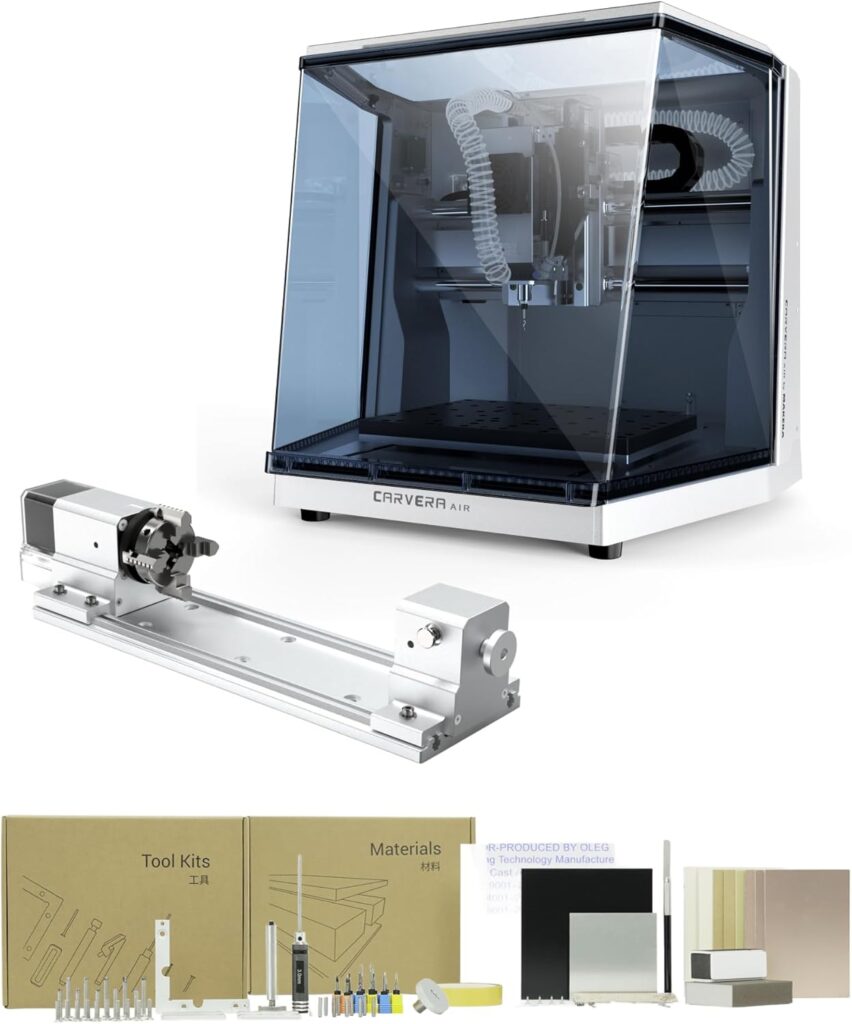

Carvera Air Desktop CNC Review: Is This 4-Axis Mini Mill Worth It in 2026?
The single biggest frustration with hobbyist-tier desktop CNCs is the choice between affordable open-frame machines that throw chips everywhere or enclosed industrial mills that cost more than a used car. Most desktop CNCs at the prosumer level force buyers to compromise on enclosure, automation, multi-axis capability, or tool-change speed. The Carvera Air Desktop CNC by Makera solves this with a fully enclosed mini mill, a true 4-axis configuration with 4th axis included, a 10-second quick tool changer, auto-probing and auto-leveling, and a closed-loop spindle running 0-13,000 rpm with runout under 0.01mm.
The package pairs that automation suite with full Makera CAM software support on Mac and Windows, controller compatibility across iOS, Android, Mac, Windows, and Linux, integration with Fusion 360, SolidWorks, and VCarve Pro, plus both WiFi and USB connectivity. The 4-Axis Standard Edition (Model CA1) ships with the 4th axis module already included, providing rotary machining of cylindrical objects up to 3.6 inch diameter x 7.9 inch length (9.2 x 20cm) for true simultaneous 4-axis work.
This review contains affiliate links. If you buy through them, we may earn a commission, at no extra cost to you.
Who should buy: Serious hobbyists producing prototype parts that need cylindrical or 3D capability, small product designers building functional prototypes in metal and plastic, jewelry makers and watchmakers needing 4-axis precision, makerspaces and educational programs teaching multi-axis CNC fundamentals, and prosumer buyers who want enclosed safety with industrial-grade automation in a desktop footprint.
Who should skip: Buyers on tight budgets who can’t justify prosumer pricing (look at the CNCTOPBAOS 3020 Plus or Genmitsu PROVerXL 6050 Plus instead), shops needing larger work envelopes than the desktop format allows, users requiring spindle speeds above 13,000 rpm, or makers focused exclusively on basic 3-axis flat work who don’t need the 4th axis or tool changer.
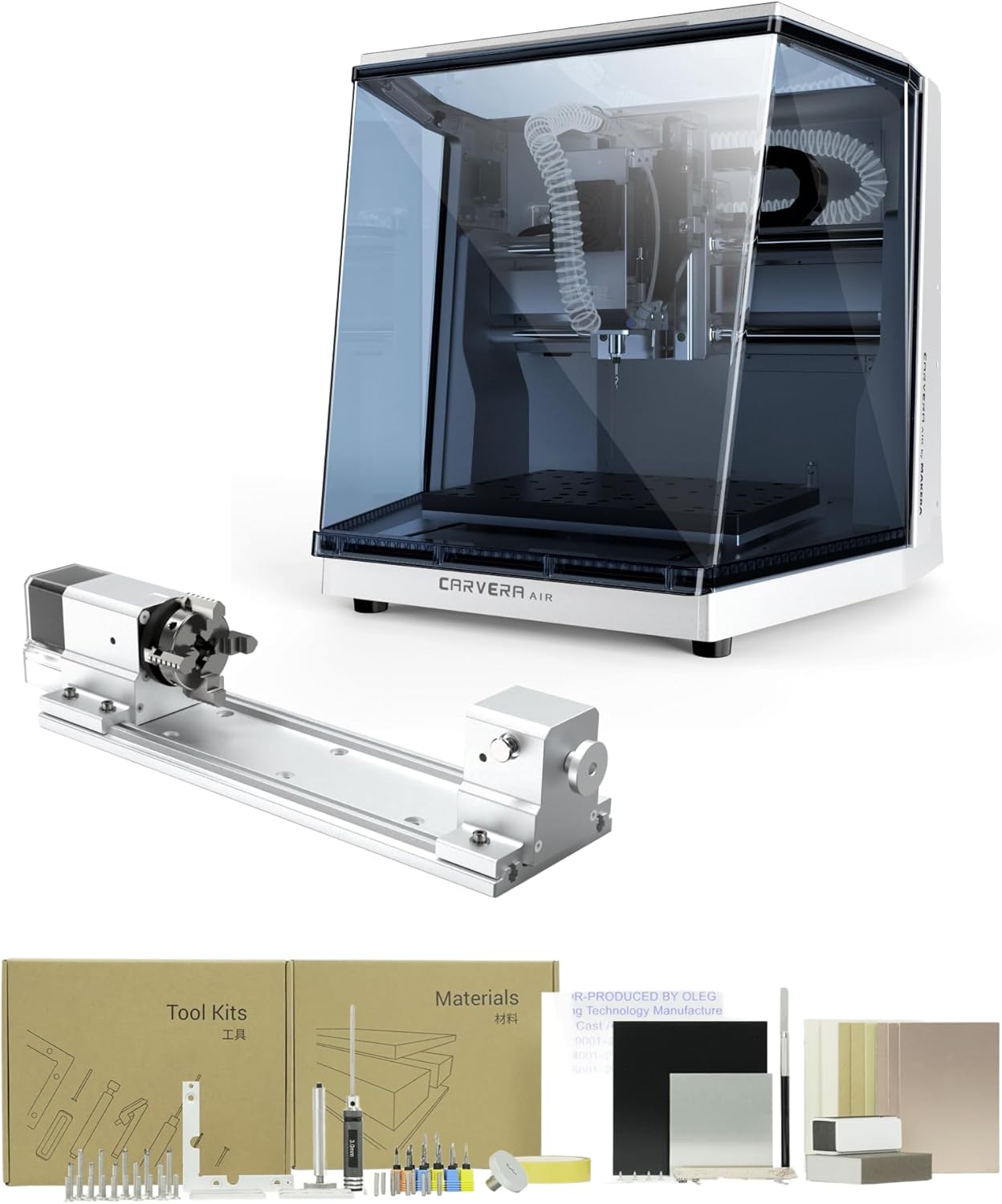
Carvera Air Desktop CNC with 4th Axis,Compact Enclosed Mini CNC Mill Industrial Precision with Makera CAM for Metal Wood,Quick Tool Changer,Closed-Loop Stepper Motor DIY Milling Carving by Makera
Quick Verdict: Carvera Air Desktop CNC with 4th Axis
The Carvera Air delivers what prosumer desktop CNC buyers actually need: a fully enclosed mini mill, true 4-axis simultaneous machining capability with the 4th axis included, a 10-second quick tool changer that eliminates manual collet swapping, closed-loop spindle control at 0-13,000 rpm with runout under 0.01mm, and auto-probing plus auto-leveling for precise calibration on uneven materials. The Makera CAM software ecosystem with Fusion 360, SolidWorks, and VCarve Pro integration covers professional workflows.
The trade-offs are honest: prosumer pricing places this firmly above hobby budget tiers, the enclosed footprint at 99.8 pounds requires solid bench mounting, the 13,000 rpm ceiling sits below industrial machining centers running at 24,000+ rpm, and the rotary work envelope of 3.6 inch x 7.9 inch limits 4th-axis project sizes. Match the machine to its scope and the value math works clearly for buyers who’ll actually use the automation features.
- Best for: Prototype machinists, jewelry makers, small product designers, makerspaces, educational programs, prosumer hobbyists
- Skip it if: Tight budget, basic 3-axis flat work only, need larger work area, or require 24,000+ rpm spindle speeds
- Standout features: 4th axis included, 10-second quick tool changer, auto-probing/leveling, closed-loop spindle, fully enclosed
- Main compromises: Prosumer pricing, 99.8 pound weight, 13,000 rpm ceiling, smaller 4-axis envelope
Carvera Air Desktop CNC Specifications
| Brand | Makera |
| Manufacturer | Huaibei Makera Technology Co., Ltd |
| Model | CA1 Standard (4-Axis Standard Edition) |
| Configuration | 4-axis (4th axis included with this version) |
| Color | Silver |
| Item weight | 99.8 pounds (45.3 kg) |
| Package dimensions | 23 x 22.5 x 21.5 inch |
| Frame | Fully enclosed desktop mill |
| Spindle | Closed-loop, 0-13,000 rpm |
| Spindle runout | Under 0.01mm |
| Tool changer | Quick tool changer, ~10 second swaps |
| 4th axis rotary envelope | 3.6 inch diameter x 7.9 inch length (9.2 x 20cm) |
| Auto features | Auto-probing, auto-leveling for uneven materials |
| Connectivity | WiFi and USB |
| Software (CAM) | Makera CAM for Mac OS and Windows |
| Controller compatibility | iOS, Android, Mac OS, Windows, Linux |
| CAD/CAM integration | Fusion 360, SolidWorks, VCarve Pro |
| Materials | Wood, plastics, soft metals (aluminum, brass, copper) |
| Power source | AC corded |
| Customer rating | 4.1/5 from 12 verified Amazon reviews |
| Best Sellers Rank | #19 in Power Milling Machines |
| Included accessories | 4th axis module, accessory kit, tool kit, material kit, user guides |
Key Features Tested: Where the Carvera Air Earns Its Price
True 4-Axis Simultaneous Machining
The 4-Axis Standard Edition includes the 4th axis module as standard equipment, eliminating the upgrade-later decision that complicates many CNC purchases. The rotary work area of 3.6 inch diameter x 7.9 inch length supports cylindrical machining, double-sided object production, and detailed 3D model creation that requires simultaneous A-axis rotation with X/Y/Z motion.
Practical applications include custom tumblers and bottles with engraved patterns, jewelry pieces requiring 360-degree detail, double-sided machining of plates and panels in single setups, complex 3D models with undercuts that 3-axis machines cannot produce, and watchmaking components requiring rotary precision. The simultaneous 4-axis capability separates this machine from “indexed 4th axis” alternatives that only rotate between operations rather than during them.
Quick Tool Changer: 10-Second Swaps
The quick tool changer is one of the Carvera Air’s standout automation features. Tool changes complete in approximately 10 seconds without manual collet wrenching or operator intervention. This matters most for multi-step projects where 3-5 different cutters work the same part: roughing end mill, finishing end mill, V-bit for engraving, drill bit for holes, and chamfer cutter for edges.
Compare this to manual tool changes on competing desktop CNCs, which typically require 2-5 minutes per swap including spindle stop, manual collet loosening, tool removal, new tool installation, collet tightening, and re-zeroing. The time savings compound dramatically across batch production runs and complex multi-tool projects.
Closed-Loop Spindle: 0-13,000 RPM
The closed-loop spindle control delivers consistent RPM under load rather than the bog-down behavior of open-loop spindles common at lower price points. The 0-13,000 rpm range covers most practical hobby and prosumer cutting scenarios for wood, plastics, and soft metals. Spindle runout under 0.01mm produces clean surface finishes and accurate dimensions that matter for prototyping and finished products.
The 13,000 rpm ceiling sits below industrial machining centers (typically 24,000+ rpm) and high-RPM spindle upgrades on machines like the HoLivoCrt 4040 5C Plus (8,000-30,000 rpm). For very small tooling and aggressive plastic finishing, higher RPM helps. For typical prosumer applications, the closed-loop control matters more than peak RPM.
Auto-Probing and Auto-Leveling
Auto-probing automates the Z-zero setting that consumes setup time on manual-zero CNCs. The probe touches off on the workpiece automatically, calculating tool length offsets and surface position without operator measurements. Auto-leveling handles uneven materials by mapping the surface and adjusting Z-depth dynamically during the cut, which produces consistent engraving depth on warped boards or uneven stock.
For PCB isolation routing, where trace depth must remain consistent across the entire board, auto-leveling delivers measurably cleaner results than manual single-point Z-zero. For engraved plaques on uneven wood, the consistency separates professional output from hobby output.
Fully Enclosed Desktop Footprint
The enclosed design contains chips, dust, and noise that open-frame desktop CNCs scatter throughout the workspace. This matters in shared environments like apartments, classrooms, makerspaces, and home offices. The enclosure also adds safety, preventing accidental contact with the spinning spindle during operation.
The 99.8 pound weight and 23 x 22.5 x 21.5 inch package dimensions require solid bench mounting. This isn’t a machine that travels easily between locations. Plan a permanent or semi-permanent installation with proper electrical access and ventilation considerations.
Performance by Material
| Material | Performance | Notes |
| Hardwood (oak, walnut, maple) | Excellent | Closed-loop spindle delivers consistent finish |
| Plywood and MDF | Excellent | Enclosed dust containment helps significantly |
| Cast acrylic and plastics | Very good | Variable RPM control prevents melting |
| Aluminum 6061 | Capable | Conservative feeds, sharp tools, multiple light passes |
| Brass and copper | Capable | Closed-loop spindle handles softer metals well |
| 4th axis cylindrical work | Standout capability | Tumblers, jewelry, double-sided plates |
| PCB (FR-4) | Excellent | Auto-leveling produces consistent trace depth |
| Steel and hard metals | Not supported | Wrong machine class |
| Carbon fiber | Possible with care | Dust extraction critical, PPE non-negotiable |
Wood and Plastics: Confident Performance
Wood and plastics represent the comfort zone for the Carvera Air. The closed-loop spindle delivers consistent RPM under load, producing clean cuts and predictable surface finishes. The enclosed dust containment makes MDF and plywood work substantially less messy than open-frame alternatives. Cast acrylic produces glossy edges with single-flute O-flute bits at appropriate RPM and feed rates.
Aluminum and Soft Metals: Capable With Patience
Aluminum work on the Carvera Air requires sharp single-flute or two-flute carbide bits, conservative feeds, shallow stepdowns, and proper chip evacuation. The closed-loop spindle and rigid enclosed frame produce cleaner results than open-frame budget machines, but this isn’t a high-throughput aluminum production tool. Realistic capability covers brackets, plates, custom fixtures, jewelry pieces, and prototype components.
4th Axis Work: The Standout Use Case
The 4-axis simultaneous machining capability separates this machine from typical desktop CNCs. Cylindrical projects like custom tumblers, engraved baseball bats, decorative columns, jewelry rings with detailed patterns, and watch components become genuinely viable. The 3.6 inch diameter x 7.9 inch length envelope accommodates most prosumer rotary projects without forcing tile-and-rotate workflows.
PCB Prototyping: Auto-Leveling Advantage
The auto-leveling feature delivers a measurable advantage for PCB isolation routing. Hobbyist boards typically have minor warpage that produces inconsistent trace depths on manual-zero machines. The Carvera Air’s surface mapping and dynamic Z-adjustment produces consistent isolation depth across the entire board, which means cleaner traces, better continuity, and fewer board failures.
Software and Workflow
The software ecosystem covers professional workflows comprehensively:
- Makera CAM (free): Cross-platform on Mac OS and Windows. Handles design, toolpath generation, and direct machine control.
- Controller app: Available on iOS, Android, Mac OS, Windows, and Linux. Wireless monitoring and control via WiFi.
- Fusion 360: Full integration for complex CAD/CAM workflows. Free for personal use.
- SolidWorks: Professional CAD/CAM integration for engineering applications.
- VCarve Pro: Sign making and V-carving specialist software with full Carvera Air post-processor support.
The cross-platform controller app enables monitoring and basic control from a phone or tablet, which matters in shared workspace environments where the desktop computer isn’t always near the machine. WiFi connectivity removes the USB cable dependency that plagues many desktop CNCs.
Setup and First Cuts
The Carvera Air ships nearly fully assembled. Realistic time from unboxing to first cut: 2-4 hours including software installation, WiFi pairing, calibration, and a test job. The 99.8 pound weight requires two people for safe placement on a sturdy bench or dedicated stand.
Setup Sequence
- Unbox carefully (two-person lift recommended)
- Position on a sturdy bench with adequate clearance for the enclosure door
- Connect AC power and verify voltage compatibility
- Install Makera CAM on your Mac or Windows computer
- Pair the machine via WiFi or connect via USB
- Run the auto-calibration sequence to verify all axes
- Install the included 4th axis module if not pre-mounted
- Load a tool into the quick tool changer
- Run auto-probing on the test material from the included material kit
- Run a small test job to verify dimensional accuracy and finish quality
- Calibrate workflow preferences in Makera CAM
Recommended First Project
3-axis aluminum nameplate with V-carved lettering, transitioning to a 4-axis project on the second day. The first project exercises the auto-probing, quick tool changer (V-bit for engraving + end mill for profiling), and closed-loop spindle in 3-axis mode. The second project introduces the 4th axis with a simple cylindrical engraving on the included material kit, validating rotary capability before committing to complex projects.
Carvera Air vs Alternatives
| Machine | Configuration | Tool Changer | Enclosure | Best For |
|---|---|---|---|---|
| Carvera Air (4-Axis Edition) | 4-axis with 4th axis included | 10-second quick changer | Fully enclosed | Prosumer prototyping, 4-axis work |
| HoLivoCrt 4040 5C Plus | 3-axis | Manual | Open frame | Larger 3-axis work area |
| Genmitsu PROVerXL 6050 Plus | 3-axis | Manual | Open frame | Largest work envelope |
| CNCTOPBAOS 3020 Plus | 3-axis | Manual | Open frame | Budget aluminum cutting |
| Bantam Tools Desktop CNC | 3-axis | Manual | Enclosed | PCB prototyping focus |
Carvera Air vs HoLivoCrt 4040 5C Plus
The HoLivoCrt 4040 5C Plus delivers a larger 400 x 400mm work area with 800W spindle and ball screw drives in an open-frame configuration at significantly lower cost. The Carvera Air provides a fully enclosed footprint, the 4th axis module, automated tool changing, and auto-probing/leveling features the HoLivoCrt lacks. Pick the HoLivoCrt for larger 3-axis flat work; pick the Carvera Air for prosumer automation features and 4-axis capability. For a deeper comparison, our HoLivoCrt 4040 5C Plus review covers the full picture.
Carvera Air vs Genmitsu PROVerXL 6050 Plus
The Genmitsu PROVerXL 6050 Plus offers a 600 x 500mm work envelope with HG-15 linear rails and a clear spindle upgrade path at substantially lower cost than prosumer alternatives. The Carvera Air provides automation features (4th axis, quick tool changer, auto-probing/leveling) that no Genmitsu desktop machine matches. Pick the PROVerXL for budget-conscious large-area 3-axis work; pick the Carvera Air for advanced features within a smaller envelope. Our Genmitsu PROVerXL 6050 Plus review details where each machine wins.
Carvera Air vs CNCTOPBAOS 3020 Plus
The CNCTOPBAOS 3020 Plus delivers genuine aluminum-cutting capability with a 500W spindle and all-metal frame at hobby-tier pricing. The Carvera Air provides prosumer automation, enclosed safety, and 4-axis capability that the 3020 Plus cannot match. Pick the 3020 Plus if budget matters most and 3-axis aluminum work is the priority; pick the Carvera Air for advanced multi-axis projects with automation. Our CNCTOPBAOS 3020 Plus review covers the budget alternative.
Drawbacks and Considerations
| Consideration | Detail |
|---|---|
| Prosumer pricing | Sits firmly above hobby-tier desktop CNCs. Buyers should commit to using the automation features (4th axis, tool changer, auto-probing) to justify the price difference. |
| 99.8 pound weight | Requires two-person lift and a sturdy permanent bench installation. Not a portable or easily-moved machine. |
| 13,000 rpm spindle ceiling | Sits below industrial machining centers (24,000+ rpm) and competing high-RPM machines. Limits very small tooling work and aggressive plastic finishing. |
| 4th axis envelope size | 3.6 inch diameter x 7.9 inch length restricts cylindrical project sizes. Larger rotary work needs different machinery. |
| No steel cutting | Steel and hard metals are outside the machine’s intended scope. For steel work, look at industrial benchtop mills. |
| Limited customer review history | 4.1/5 from only 12 verified reviews on Amazon as of review date. Smaller sample size than established machines. |
| International pricing variation | Listing data shows pricing in Swedish Krona on some configurations. Verify USD pricing on Amazon directly before purchase. |
| No included tooling beyond starter kits | Plan to budget for production tooling, additional collets, and project-specific bits beyond the included material kit. |
What Customers Are Saying
| What buyers love | 4th axis simultaneous capability, quick tool changer reliability, enclosed design containment, auto-probing accuracy, Makera CAM software polish |
| What buyers caveat | Premium pricing, weight requires permanent installation, learning curve for full automation features, smaller customer base means fewer community resources |
| Common phrases | “Real 4-axis machine without industrial pricing,” “Tool changer saves hours on multi-tool projects,” “Worth it for the automation” |
The 4.1/5 rating from 12 verified buyers reflects genuine satisfaction within a smaller user base. Buyers who match expectations to the machine’s prosumer scope (automation features, multi-axis capability, enclosed safety) report consistent satisfaction. Buyers expecting hobby-tier pricing or industrial-tier work envelope feel the mismatch.
The Accessory Kit
| Item | Quantity |
|---|---|
| Carvera Air desktop CNC machine | 1 |
| 4th axis module | 1 |
| Accessory kit | 1 |
| Tool kit | 1 |
| Material kit | 1 |
| User guides | 1 set |
The included material kit and tool kit reduce day-one acquisition friction. Most prosumer CNCs ship without consumables, forcing buyers to research and purchase tooling separately before first cuts. The Carvera Air’s day-one usability matches its overall positioning as a complete prosumer solution.
Maintenance for Long-Term Reliability
- After every session: Vacuum chips and dust from the enclosed work area; wipe rails clean
- Weekly: Verify quick tool changer alignment; check probe contact reliability
- Monthly: Inspect spindle bearings; verify 4th axis runout; check enclosure door seals
- Per project: Verify auto-probing zero accuracy with a test cut before committing to high-value materials
- Software: Keep Makera CAM and controller apps updated for latest features and bug fixes
- After any crash: E-stop, power down, inspect tool/collet/4th axis chuck/clamps, run full re-calibration sequence
Who This CNC Is For
Serious hobbyists producing prototype parts: The combination of 4-axis simultaneous capability, quick tool changer, and enclosed safety enables prototype work that 3-axis hobby CNCs cannot match. The automation features pay back in time savings across multi-tool, multi-step projects.
Small product designers building functional prototypes: The Makera CAM ecosystem with Fusion 360 and SolidWorks integration covers professional CAD/CAM workflows. The closed-loop spindle and auto-leveling produce dimensionally accurate parts suitable for fit-and-function testing.
Jewelry makers and watchmakers: The 4th axis simultaneous machining enables ring detail work, double-sided pendant production, and watch component prototyping that requires rotary precision. The 3.6 inch diameter envelope accommodates most jewelry-scale projects.
Makerspaces and educational programs: The enclosed design provides classroom-appropriate safety. The quick tool changer demonstrates industrial automation principles. The cross-platform software supports student devices ranging from iPads to Linux laptops without compatibility friction.
Prosumer hobbyists upgrading from 3-axis kits: Buyers who’ve outgrown 3018-class or 4040-class machines and want professional features without industrial pricing find the Carvera Air’s positioning genuinely useful. The 4th axis included from day one eliminates upgrade-path complications.
Final Verdict: Should You Buy the Carvera Air?
Not the largest work envelope in its category. Not the highest spindle RPM available. Not the lowest-priced desktop CNC. But the most automation-equipped prosumer desktop mill at this size and feature level.
The Carvera Air Desktop CNC by Makera delivers what prosumer buyers actually need: a fully enclosed mini mill, true 4-axis simultaneous machining with the 4th axis included as standard equipment, a 10-second quick tool changer that eliminates manual collet wrenching, closed-loop spindle control with runout under 0.01mm, auto-probing and auto-leveling for precise calibration, and a comprehensive software ecosystem covering Mac, Windows, iOS, Android, and Linux with Fusion 360, SolidWorks, and VCarve Pro integration. The 4.1/5 customer rating from 12 verified buyers reflects genuine satisfaction with the automation-focused positioning.
Buy the Carvera Air if: You produce prototype parts that benefit from 4-axis capability, you build functional prototypes in metal and plastic for fit-and-function testing, you make jewelry or watch components requiring rotary precision, you teach in a setting that benefits from enclosed safety and industrial automation principles, or you’re a prosumer hobbyist upgrading from 3-axis kits who’ll actually use the included automation features.
Skip the Carvera Air if: Budget is tight (look at the CNCTOPBAOS 3020 Plus or Genmitsu PROVerXL 6050 Plus instead), you only need basic 3-axis flat work without 4th axis or tool changer benefits, you require larger work envelopes than desktop format provides, you need spindle speeds above 13,000 rpm, or you cut steel as a primary requirement.
This review contains affiliate links. If you buy through them, we may earn a commission, at no extra cost to you.
For broader context on choosing the right desktop CNC, browse our CNC Machines review library covering options across every price tier, or explore the Fabrication Intelligence resource library for workflow fundamentals.
Frequently Asked Questions
Does the Carvera Air include the 4th axis or is it sold separately?
The 4-Axis Standard Edition (Model CA1) includes the 4th axis module as standard equipment. The included components list specifies “4th Axis for CARVERA Air” plus the main “CARVERA AIR Desktop CNC Machine.” This eliminates the upgrade-later decision common with multi-axis CNC purchases. Buyers who want strict 3-axis configuration should verify the specific edition before purchase.
What materials can the Carvera Air machine?
The Carvera Air handles wood, plastics, and soft metals (aluminum, brass, copper) confidently. The closed-loop spindle and enclosed frame produce clean results across all supported materials. Steel and hard metals are outside the machine’s intended scope. Carbon fiber is possible with proper dust extraction and PPE.
How fast is the quick tool changer?
Tool changes complete in approximately 10 seconds, compared to 2-5 minutes for manual collet swaps on competing desktop CNCs. The time savings compound dramatically across multi-tool projects: a 5-tool job saves 8-25 minutes per part on tool-change overhead alone, which transforms batch production economics.
What software works with the Carvera Air?
Makera CAM is the primary software, available on Mac OS and Windows. The controller app runs on iOS, Android, Mac OS, Windows, and Linux for cross-platform monitoring and control via WiFi. Professional CAD/CAM integration covers Fusion 360, SolidWorks, and VCarve Pro. The software ecosystem is more polished than typical hobby-tier CNCs.
How long does setup take?
Realistic time from unboxing to first cut: 2-4 hours including software installation, WiFi pairing, auto-calibration, 4th axis module installation if not pre-mounted, auto-probing setup, and a test job. The 99.8 pound weight requires a two-person lift for safe placement on a sturdy bench or dedicated stand.
Can the Carvera Air cut aluminum?
Yes, with realistic expectations. The closed-loop spindle and rigid enclosed frame produce cleaner aluminum results than open-frame budget alternatives. Use sharp single-flute or two-flute carbide bits, conservative feeds, shallow stepdowns, and proper chip evacuation. Realistic capability covers brackets, plates, jewelry pieces, and prototype components. Don’t expect industrial production rates.
Does it require a specific operating system?
No. Makera CAM runs on Mac OS and Windows. The controller app supports iOS, Android, Mac OS, Windows, and Linux. WiFi connectivity removes USB tether requirements, and the cross-platform support eliminates the operating-system lock-in that plagues many proprietary CNC software ecosystems.
What’s the spindle RPM range?
0-13,000 rpm with closed-loop control. The closed-loop design maintains consistent RPM under load rather than the bog-down behavior of open-loop spindles. Spindle runout under 0.01mm produces clean surface finishes. The 13,000 rpm ceiling sits below industrial machining centers running 24,000+ rpm and competing high-RPM machines like the HoLivoCrt 4040 5C Plus.
How accurate is the auto-probing and auto-leveling?
Auto-probing automates Z-zero setting with measured offsets calculated automatically. Auto-leveling maps the workpiece surface and adjusts Z-depth dynamically during the cut. For PCB isolation routing across uneven boards, the consistency advantage over manual single-point Z-zero is measurable. For engraved plaques on warped wood, the depth consistency separates professional output from hobby output.
Is the Carvera Air worth buying for prosumer hobbyists?
For the right buyer, yes. The combination of 4th axis simultaneous capability, quick tool changer, auto-probing/leveling, enclosed safety, closed-loop spindle, and comprehensive cross-platform software ecosystem delivers genuine value for buyers who’ll actually use the automation features. If you produce multi-tool projects, work with cylindrical objects requiring rotary precision, or build functional prototypes in metal and plastic, this machine earns its place. If you only need basic 3-axis flat work, more affordable alternatives like the CNCTOPBAOS 3020 Plus deliver the cutting capability without the automation premium.
Key Takeaways
- 4-Axis Standard Edition (Model CA1) includes the 4th axis module as standard equipment, supporting true simultaneous 4-axis machining of cylindrical objects up to 3.6 inch diameter x 7.9 inch length
- 10-second quick tool changer eliminates manual collet swapping and saves 8-25 minutes per multi-tool part across batch production
- Closed-loop spindle (0-13,000 rpm) with runout under 0.01mm produces clean surface finishes and accurate dimensions
- Auto-probing and auto-leveling automate Z-zero setting and surface mapping for consistent results on uneven materials
- Fully enclosed desktop footprint contains chips, dust, and noise that open-frame alternatives scatter throughout the workspace
- Cross-platform software ecosystem covers Mac, Windows, iOS, Android, and Linux with Fusion 360, SolidWorks, and VCarve Pro integration
- WiFi and USB connectivity options remove proprietary tether requirements common on hobby-tier CNCs
- 4.1/5 customer rating from 12 verified Amazon reviews reflects genuine satisfaction within the prosumer user base
- 99.8 pound weight requires two-person lift and permanent bench installation, not a portable machine
- Plan for prosumer pricing tier and additional tooling budget beyond the included material and tool kits
Disclosure: As an Amazon Associate, I earn from qualifying purchases.