Ever wish we could carry a serious laser engraver in one hand without also carrying around a gym membership?

What the LaserPecker LP2 Is (and Why We Found Ourselves Smiling)
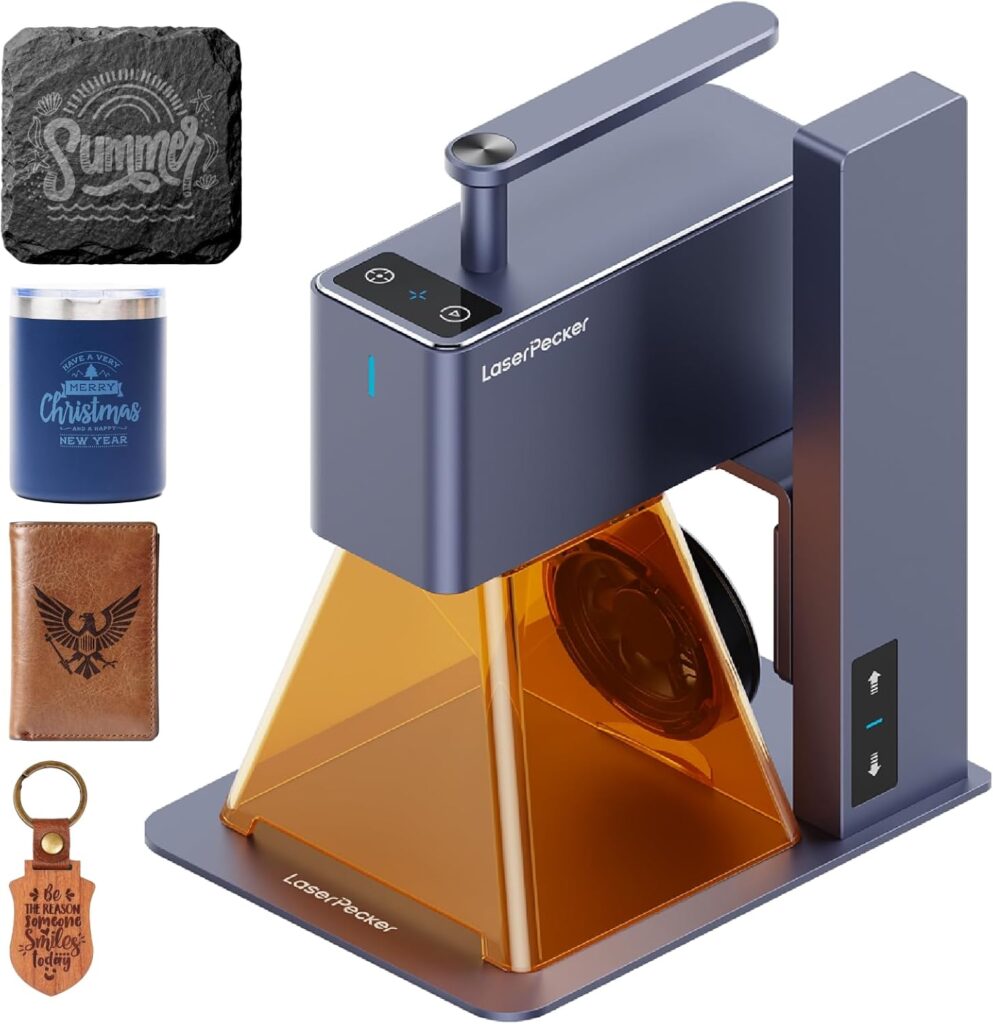
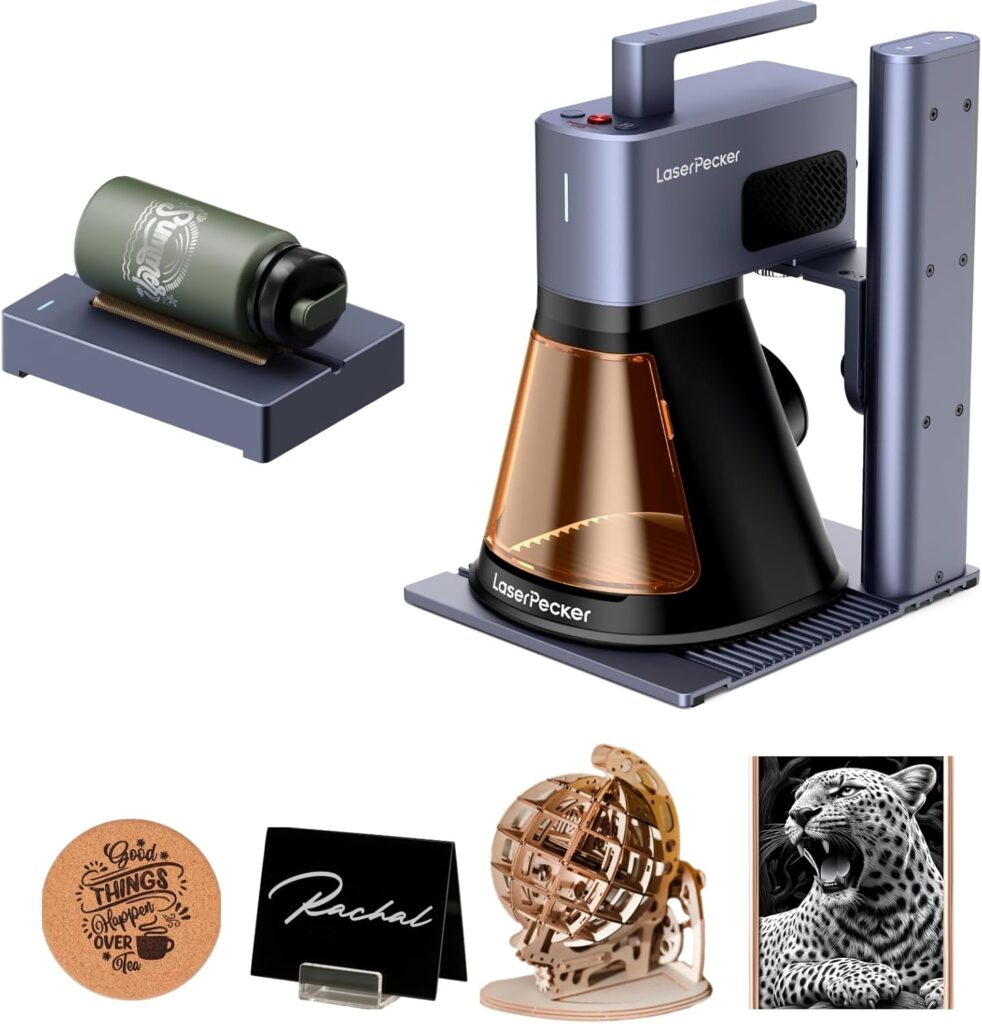
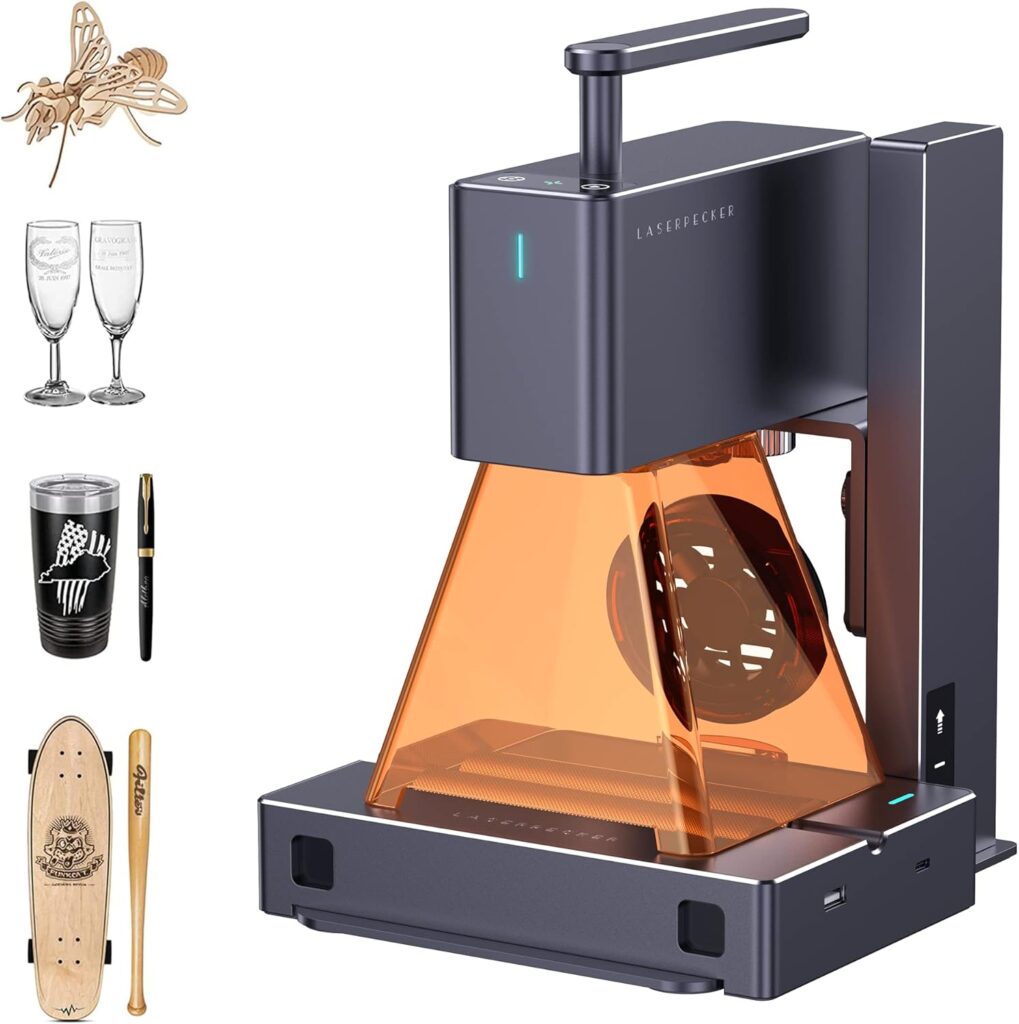
We’ve tried our share of desktop machines that look like they were designed to cut sheet metal as a hobby, and then there’s the LaserPecker LP2: a 1 kg handheld laser engraver we can literally pick up with two fingers and a hopeful grin. It’s compact, has a built-in handle, and doesn’t demand a cleared-off workshop or a special table to function. It simply asks, “Where do you want your mark today?” and then does it.
This model is a galvo-driven unit, which is a fancy way of saying the laser beam zips across the target at astonishing speed thanks to mirror-based steering. The result is quick projects, crisp detail, and a workflow that actually keeps up with our ideas. For anyone tired of waiting around while a slow cart-based laser shuffles from left to right like an indecisive librarian, this one’s a breath of fresh air.

LaserPecker LP2 Handheld Laser Engraver, 1kg Portable Engraving Machine for Wood/Leather/Coated Metal, 36000mm/min Speed & 0.05mm Precision, Multi-Angle Engraving, Basic Set
$599 In Stock
Who This Engraver Is For
We’ll be honest: the LP2 isn’t trying to be everything to everyone. If we’re looking to mark titanium rings like a jeweler with a microscope and a thousand-yard stare, we’ll want to look at LaserPecker’s LP3 or LP4. But if we love customizing wood gifts, doing leatherwork, adding logos to coated metals, or personalizing items on-site at events, the LP2 is kind of irresistible.
We’d recommend it for crafters, Etsy sellers, market vendors, teachers, workshop leaders, and brand reps who need to engrave quickly and reliably without setting up a campsite of equipment. It’s also a great first laser for beginners—no assembly, intuitive app control, and a safety-first mindset.
Key Specs, At a Glance
Let’s keep the essentials in one place. We put together a quick table so we’re not stuck reading our own notes scrawled on a napkin.
| Category | Details |
|---|---|
| Product | LaserPecker LP2 Handheld Laser Engraver, Basic Set |
| Weight | Approx. 1 kg (ultra-portable, built-in handle) |
| Engraving Speed | Up to 36,000 mm/min (galvo-driven); preview up to 225,000 mm/min |
| Precision | 0.05 mm micro-spot; selectable resolutions: 1K / 1.3K / 2K |
| Materials (Engrave) | Paper, cardboard, wood, leather, coated metals, brushed stainless steel (and more) |
| Materials (Cut) | Wood and paper up to 0.2″ thickness |
| Materials Not Supported | Pure metal, shiny metal; light/transparent materials require black paint before engraving |
| Control | Intuitive app; supports JPG/PNG/G-code; fast setup |
| Multi-Angle | Handheld use; includes electric stand; trolley mode for long projects up to ~78″ |
| Safety | Anti-overheat, motion sensors, password lock, included safety goggles |
| Certification & Warranty | CE-certified; 12-month warranty |
| In the Box | Laser unit, electric stand, conical protective cover, adapter, safety glasses, 2× Type-C cables, English manual |
We like that it states clearly what it can and can’t do. Many laser products pretend everything is possible. The LP2 admits its limitations and shines where it’s meant to.
Unboxing and First Impressions
The LP2 arrives like a compact promise—no giant foam monoliths or shockingly heavy modules. Inside, we found the essentials laid out in a way that made us feel like competent adults who knew what each piece was for. We appreciated the inclusion of safety goggles and the conical protective cover, which tells us someone at LaserPecker has met folks like us who sometimes forget lesson one: protect your eyes.
We also liked the electric stand. It gives us a stable base when we want repeatability and frees our hands when we need to keep the machine steady. The build feels solid without pretending to be indestructible. This thing is meant to move around and work in real spaces, not sit in a lab.
What’s in the Box (And Why It Matters)
It’s oddly comforting to have everything needed from the start. We didn’t have to hunt for random cables or shop for third-party eyewear. Here’s what’s included:
- Laser Unit
- Electric Stand
- Conical Protective Cover
- Adapter
- Laser Safety Glasses
- 2 × Type-C Cables
- English Manual
We like the respect for beginners in this package. Between the manual and the safety-first design, it’s nearly impossible to set this up wrong—unless we try to engrave something reflective without painting it first. And to be clear, we shouldn’t do that.
Setup: From Box to First Engraving in Minutes
“Zero assembly” sounds like marketing poetry until we see it happen. With the LP2, it’s real. We plugged in the adapter, connected the cables, and clipped on the conical shield. The app recognized the device quickly, and we were previewing images almost immediately.
- Power it up.
- Connect through the app.
- Drop in a JPG, PNG, or G-code file.
- Use the instant preview (seriously fast) to position.
- Adjust resolution (1K/1.3K/2K), power, and speed.
- Hit go and watch it trace our test image like a tiny, serious artist.
For oversized projects, we toggled into trolley mode, which lets us reposition the unit and continue a design across a long surface—up to about 78 inches. For banners, oversized cutting boards, or elongated leather straps, this feature is like a “go long” button for our creativity.
Software and Workflow: Smooth, Friendly, and Immediate
We appreciate software that doesn’t treat us like a suspicious party at a club entry. The app is straightforward: upload or create, preview, set parameters, and run. It accepts common image files (JPG/PNG) and G-code for more advanced users.
The preview speed—up to 225,000 mm/min—isn’t just a statistic. It means we can position the design rapidly, trace outline previews, and see how it frames on our material. That, combined with multi-angle positioning, gets us to the fun part faster: the actual engraving.
We also liked the easy tweaking of burn parameters per material. Once we found settings we loved for maple, bamboo, or vegetable-tanned leather, we saved them. It’s small quality-of-life touches like these that make the difference between hesitation and flow.
Performance and Precision: Where the LP2 Earns Its Keep
Speed and accuracy are the core of this machine’s personality. The 36,000 mm/min engraving speed is excellent, and the 0.05 mm micro-spot offers crisp lines even on intricate art. The selectable resolutions—1K, 1.3K, and 2K—let us choose between speed and detail on a per-project basis.
We found 1K a great default for text and logos on wood and leather. For fine art or detailed images, stepping up to 1.3K or 2K delivered more nuance, especially on hardwoods and high-quality leather. The galvo architecture lets it move quickly without introducing wobbles, which we’ve seen in belt-driven systems that picked up every table jiggle like a drama critic.
On Wood: Sharp Contrast and Warm Texture
Wood is where the LP2 practically sings. On maple, cherry, walnut, and bamboo, we got crisp lines and pleasing contrast. With clear-coated wood, we made sure to test on a scrap area to avoid bubbling finishes. Best results came from bare or lightly sealed surfaces, followed by sealing with a matte clear coat after engraving to lock in the art.
We found:
- Clean text at 2–4 mm height remained legible and neat.
- Photo-style engraving at 2K resolution showed fine shading, especially on light woods like maple and beech.
- Cutting through thin wood (within the 0.2″ limit) worked well with multiple passes, especially on softer woods.
On Leather: Chic, Deep, and Gift-Ready
Leather engravings have that elegant boutique feel when done right. The LP2 produced dark, even burns on vegetable-tanned leather and a subtler effect on chrome-tanned pieces. We got best results when we tested a corner for burn depth and contrast. Engraving wallets, belts, coasters, and key fobs became an assembly line we didn’t mind running.
Tips we liked:
- A light misting of water on veg-tan leather can reduce scorching.
- For crisp monograms, 1K resolution is plenty; for complex logos, go 1.3K or 2K.
- After engraving, a leather conditioner helps bring back luster.
On Coated Metals and Brushed Stainless Steel: Respect the Finish
This is where the LP2 asks us to read the fine print. It engraves coated metals and brushed stainless steel, and it can achieve attractive marks. What it doesn’t do is engrave pure or shiny metals. If metal is our main canvas, LaserPecker recommends the LP3 or LP4. We appreciate the honesty there.
On coated metal, our results were sharp and durable, especially on anodized aluminum tags and powder-coated mugs. We used steady positioning (either the stand or a firm hand) to keep edges crisp. The brushed stainless steel produced subtle, classy marks, ideal for branding or personalization on finished pieces.
On Paper and Cardboard: Instant Gratification
Paper and cardboard aren’t glamorous, but they’re beautiful in the LP2’s hands. We made custom invitations, ornate packaging, and craft labels that looked more expensive than they had any right to. Because the laser can burn through thinner stock, we were careful to use low power and test small sections to prevent unwanted cut-through.
Cutting: Within 0.2″ Thickness
The LP2 can cut wood and paper within 0.2″ thickness. That’s great for thin wood sheets, card stock, paper art, and some craft foam applications (with proper ventilation). Multiple passes are key for clean edges and minimizing char. We won’t be making furniture joints with it, but we can produce delicate ornaments, signage, and layered art pieces.
Multi-Angle Engraving and Handheld Freedom
This might be our favorite part. With the handheld design and built-in handle, we can approach the workpiece at the angle that makes sense—on a crate, a mounted sign, or a chair back—without contorting ourselves into a yoga pose we didn’t agree to. When we need repeatable precision, the electric stand stabilizes everything nicely.
The conical protective cover helps contain glare and provides a visual perimeter for safe working. For oddly shaped surfaces or quick on-site jobs, being able to bring the laser to the object—rather than the object to the laser—feels almost rebellious.
Safety and Responsibility: Thoughtful, Not Theatrical
We appreciate that the LP2 comes with multiple safety features built in, not just a stern note in the manual.
- Anti-overheat system keeps components within safe limits.
- Motion sensors help detect abnormal movement, pausing or stopping as needed.
- Password lock prevents unauthorized use (a blessing for shared spaces).
- Safety goggles are included and not optional. We wore them every time.
- Conical protective cover reduces exposure and helps contain stray reflections.
It’s CE-certified, which provides extra peace of mind and hints at quality control. Still, we used it in a well-ventilated area, kept flammables away, and stayed present during jobs. A laser engraver isn’t a toaster; it demands respect.
Material Compatibility and Limitations (Read Before We Point and Burn)
Let’s be crystal clear on materials so we’re not at odds with physics:
- Yes: Paper, cardboard, wood, leather, coated metals, brushed stainless steel, and other common surface-treated materials.
- Cutting: Wood and paper within 0.2″ thickness.
- No: Pure metal and shiny metal are outside the LP2’s engraving capabilities.
- Special Case: Light-colored or transparent materials reflect the laser. We paint or spray them black before engraving and wipe clean afterward.
We like that LaserPecker openly states the LP2’s metal limitations. If our business is marking bare metal—tools, knives, jewelry, industrial parts—we should move up to the LP3 or LP4. For everything else, the LP2 is a little champion.
Instant Preview: The Positioning Superpower
That preview speed—up to 225,000 mm/min—felt like a cheat code for accuracy. We traced design outlines directly onto surfaces to confirm placement without a single test cut or tape jig. It sped up our process and saved materials. On uneven or curved surfaces, a couple of quick previews helped us adapt our positioning for better results.
We also enjoyed using preview for on-site jobs: we could show a client exactly where their logo or name would sit before hitting go. It turned the whole thing into a neat little performance.
Trolley Mode: Going Long (Up to ~78″)
For large signs, banners, or oversized cutting boards, trolley mode is where we stretch our legs. By shifting the engraver along a straight path, we extended designs up to roughly 78 inches. It requires a bit of care—consistent alignment and predictable increments—but the results can be dramatic and professional. We found it best to mark alignment points on the material with low-tack tape, use light preview passes, and proceed segment by segment.
Real-World Projects We Loved
We tested a handful of projects that match what we’d actually sell or gift:
- Custom bamboo cutting boards: family names, recipes in handwriting, and map outlines. The LP2 did clean script at 2K resolution and block fonts at 1K with equal confidence.
- Leather keychains and wallets: initials, logos, and monograms had boutique quality with minimal setup time.
- Coated metal tags: sharp, legible marks for gear bags and toolboxes, perfect for small batch runs.
- Event personalization station: we set up at a craft event and personalized notebooks and wooden coasters. The handheld design made this a breeze, and people loved watching instant previews.
- Ornamental paper cutouts: using low power and high speed with multiple passes for precision, we made delicate patterns that would embarrass a die cutter.
Quality Over Time: Stability and Care
We put hours on the LP2 and didn’t see a drop in performance. The anti-overheat functions kept us in the safe zone even during longer sessions. We took time to keep the lens area clean, avoided dusty surfaces, and gave the machine breaks between larger jobs. With basic care, it feels built to last.
Lens cleanliness and material prep make a visible difference. A quick wipe, masked areas for clean edges, and a tidy workspace add up to professional looking results we can be proud of.
Tips, Tricks, and Settings We Kept Coming Back To
We built a small playbook that took our results from “nice” to “did we really do that?”
-
Wood
- For dark burns on maple: moderate power, slower speed, 1.3K resolution.
- For photo-style: 2K resolution, careful dithering (the app’s stock settings worked well).
- Masking tape can reduce smoke staining around edges; peel after engraving.
-
Leather
- Veg-tan: low-to-medium power, 1K or 1.3K resolution for clean lines.
- Try a test patch—different leathers vary widely.
- Consider conditioning after engraving.
-
Coated/Brushed Metals
- Use the stand or a secure jig to ensure stability.
- Preview multiple times for perfect placement.
- Keep a lint-free cloth handy; fingerprints can affect results.
-
Paper/Cardboard
- Go low power and high speed to avoid charring.
- For cut-out designs, use multiple light passes rather than one heavy pass.
-
Light/Transparent Materials
- Paint or spray black first; wipe clean after. It’s worth the extra minute.
-
General
- Save parameter presets as we go; future us will be grateful.
- Check the surface for dust or oils—clean surfaces engrave better.
- Keep the conical cover in place whenever possible.
Using the Electric Stand vs. Handheld: When Each Makes Sense
The stand is ideal for:
- Batch jobs where every piece needs to match.
- Fine-detail work at 2K resolution.
- Small items where every millimeter counts.
Handheld is best for:
- Large or fixed objects that can’t come to us.
- Curved or irregular surfaces where repositioning is easier than jigging.
- On-site personalization where speed and flexibility matter more than production-line uniformity.
We often start with the stand for tests, then switch to handheld for the real piece once we trust our settings.
Safety Reminders We Actually Followed
We’ve learned the hard way that lasers need grown-up rules. Here’s what stuck:
- We wore the safety glasses every time, even for quick previews.
- We kept the workspace ventilated—nothing fancy, just fresh air moving.
- We never left the engraver running unattended, even “just for a minute.”
- We kept flammable finishes and solvents at a distance.
- We used the conical protective cover as our default.
It’s not about being paranoid; it’s about not turning a craft day into a story with a sad ending.
Troubleshooting: The Few Hiccups We Met (and Fixed)
We didn’t encounter big issues, but here are the usual suspects and what helped:
-
Faint Engraving on Light/Transparent Materials
- Paint or spray the surface black first, then wipe after engraving.
-
Inconsistent Results on Curved Surfaces
- Slow the speed a bit, preview multiple times, tilt the machine for consistent focal distance.
-
Overburn or Off-Gassing Smells on Leather
- Reduce power and increase speed, try light moisture on veg-tan, ventilate better.
-
Slight Misalignment Across Long Projects (Trolley Mode)
- Use alignment marks and tape guides; preview each segment before committing.
-
Slippage on Smooth Metals
- Stabilize with the stand or a jig; a rubber mat under the workpiece can add grip.
Compared to Big Desktop Engravers
Bench-top CO2 machines are great for maximum cutting thickness and large bed sizes, but they require space, ventilation, and a certain commitment level we don’t always have. The LP2 trades raw cutting power for portability, speed, and ease of use. If our projects are mostly surface marking and light cutting on common materials, the LP2’s speed and precision feel like the better daily companion.
And when it comes to metal, we’ll repeat the essential point: if metal is the main course, we should consider LaserPecker LP3 or LP4.
Portability: The Reason We Took It Everywhere
At around 1 kg, with a built-in handle, the LP2 is easy to carry and set down anywhere flat. We brought it to a maker meetup, a school workshop, and even a backyard party where we customized coasters between snacks. Not once did we deal with the anxiety of moving a heavy gantry or aligning a giant bed. The LP2 lowers the friction so much that we kept thinking of new projects.
If creativity likes momentum, this machine becomes our friendly enabler.
Event and Business Use: Personalization Without the Drama
For small businesses, the LP2 can be a revenue booster. We set up a personalization station and offered initials or logos on wood and leather goods. The instant preview lets customers see placement and size ahead of time, which gives them confidence—and helps us avoid awkward redos.
We found the sweet spot in:
- Custom gifts (weddings, birthdays, graduations)
- Branding small-batch products
- Craft fairs and pop-up shops
- Real-time personalization of notebooks, coasters, keychains, bag tags
- Workshops where students design and take home a finished piece
Everything about the LP2 cues “approachable,” which is priceless when we’re working with people who have never seen a laser engraver in person.
The Learning Curve: Gentle, Not Boring
We’ve used lasers that made us feel like we were trying to talk to a cactus about tax law. The LP2 is not that. Its “zero assembly” approach, simple interface, and useful presets mean we’re productive on day one. If we want to get nerdy with G-code, we can. But we don’t have to.
Beginners can start with template projects and evolve into custom designs as they learn. Even seasoned users will appreciate how little fighting is required to get the output they want.
What We Wish the LP2 Did (And How We Worked Around It)
No product is perfect. Here’s what we noticed:
- Pure/Shiny Metal: It can’t engrave these. That’s physics and laser type. If that’s our main focus, we’ll plan for the LP3 or LP4.
- Cutting Thick Materials: Its cutting limit is within 0.2″. For deep cuts and thicker stock, we’d need a more powerful cutting setup.
- Curved Surfaces: Handheld precision on highly curved surfaces requires practice. We got better results with multiple previews and slower speeds.
These aren’t deal-breakers, just reality checks. And each one has a workaround—or a different machine—when needed.
Maintenance: A Little Care Goes a Long Way
We kept the lens clean with a microfiber cloth and avoided sticky residue or resin build-up by ensuring materials were dust-free. We stored the LP2 with the conical cover on and coiled cables neatly. Every so often, we checked for firmware or app updates.
We also found it helpful to keep a small material library—a binder or box with labeled wood, leather, and coated metal samples with favorite settings. It took the guesswork out of repeat jobs.
Support, Warranty, and Peace of Mind
We take comfort in the CE certification and the included 12-month warranty. It signals that someone has paid attention to safety and standards. The user community around LaserPecker is active, and we found that especially handy for discovering clever jigs and fresh setting suggestions.
If we’re gifting this or putting it into a classroom, the combination of safety features, warranty, and approachable software makes it feel like a responsible pick.
Pros and Cons (The Short List We Wish We’d Had)
We have to keep this honest. Here’s how it breaks down for us:
Pros:
- Ultra-portable at ~1 kg with built-in handle—engrave anywhere.
- Fast galvo system: up to 36,000 mm/min engraving and lightning previews.
- Sharp precision: 0.05 mm micro-spot; selectable resolutions up to 2K.
- Beginner-friendly: zero assembly, intuitive app, supports JPG/PNG/G-code.
- Trolley mode for long designs up to ~78″.
- Solid safety suite: anti-overheat, motion sensors, password lock, included goggles.
- Excellent results on wood and leather; very good on coated metals and brushed stainless.
- CE-certified; 12-month warranty.
Cons:
- Can’t engrave pure or shiny metal; limited metal capability compared to LP3/LP4.
- Cutting limited to materials within 0.2″ thick.
- Curved surfaces need practice and careful previewing.
- As with all lasers, requires eye protection and ventilation (not a con, but a fact of life).
A Few Project Recipes We Keep Repeating
Because nothing beats a ready-made plan when we’re in a creative mood:
-
Recipe Cutting Board
- Material: Bamboo board
- Settings: 1.3K or 2K resolution, moderate power, medium speed
- Tip: Use a scanned family recipe in the original handwriting; align with preview.
-
Leather Monogram Wallet
- Material: Veg-tan wallet
- Settings: 1K resolution, lower power, higher speed for crisp dark lettering
- Tip: Lightly condition leather after engraving.
-
Brushed Stainless Nameplate
- Material: Brushed stainless blank
- Settings: 1K resolution, moderate power, slow-to-medium speed
- Tip: Tape and preview twice for perfect placement; keep the surface clean.
-
Paper Cut Lace
- Material: Heavy card stock
- Settings: Low power, high speed, multiple passes
- Tip: Test on scraps to avoid scorching; use a supportive backing.
-
Oversized Wooden Sign (Trolley Mode)
- Material: Pine or cedar board up to ~78″ long
- Settings: 1K resolution, moderate power, medium speed
- Tip: Use guide marks and preview each section before engraving.
The LP2 vs. Friends in the Same Family
LaserPecker’s lineup makes sense if we think about use cases:
- LP2: Portability, speed, and detail for wood, leather, coated metals, and brushed stainless steel. Great general-purpose engraver with light cutting.
- LP3/LP4: If metal is our main canvas, these are the better picks.
We appreciate that the LP2 leans into mobility and ease. It’s a specialist at being general (yes, we know) and is tailored for people who value speed, precision, and grab-and-go convenience.
The Little Comforts That Won Us Over
We noticed so many thoughtful touches that we stopped noticing them—which is a compliment. The conical cover, the instant preview, the easy presets, the password lock, the friendly app—all those add up. Our favorite part is that it gets out of the way. We’re not coaxing it to work; it’s ready when we are.
And there’s a joy we can’t quantify: carrying a laser in one hand, walking over to a wooden box, and adding a clean custom design like it’s no big deal. When tools feel like extensions of our ideas, they’re doing it right.
Buying Advice: Who Should Hit “Add to Cart” Today
If our projects revolve around wood, leather, paper, and coated metals, and we value portability and speed, the LP2 is an excellent investment. For craft sellers, teachers, event vendors, and anyone who wants a capable engraver without dedicating a room to it, it’s hard to beat.
We wouldn’t buy it if:
- Our main workload is pure metal or shiny metal.
- We need to cut thick materials regularly.
- We’re planning industrial-scale runs that demand a rigid bed and automation.
We would buy it if:
- We want pro-level detail (0.05 mm spot) and fast turnarounds.
- We love the idea of handheld, multi-angle engraving anywhere.
- We want beginner-ready controls with room to grow.
- We appreciate a full safety suite and a clean setup out of the box.
Final Verdict: A Laser That Moves With Us, Not Against Us
We came in curious and left a little smitten. The LaserPecker LP2 Handheld Laser Engraver gives us the kind of speed, precision, and flexibility that turns “someday projects” into “finished today.” It’s compact, clever, and confident about what it can do. More importantly, it helps us be confident too.
It won’t replace a heavy-duty shop laser for thick cuts or pure metal work, and it doesn’t pretend to. Instead, it redefines what a portable engraver can be: fast, accurate, and actually fun to use. With 36,000 mm/min engraving speed, a 0.05 mm micro-spot, instant previews, trolley mode for long pieces, and an approachable app, it’s a creative partner we’ll keep reaching for.
And if anyone asks how we managed to engrave a beautiful cutting board at a picnic table, we’ll smile and say, “We brought the studio with us.”
Disclosure: As an Amazon Associate, I earn from qualifying purchases.