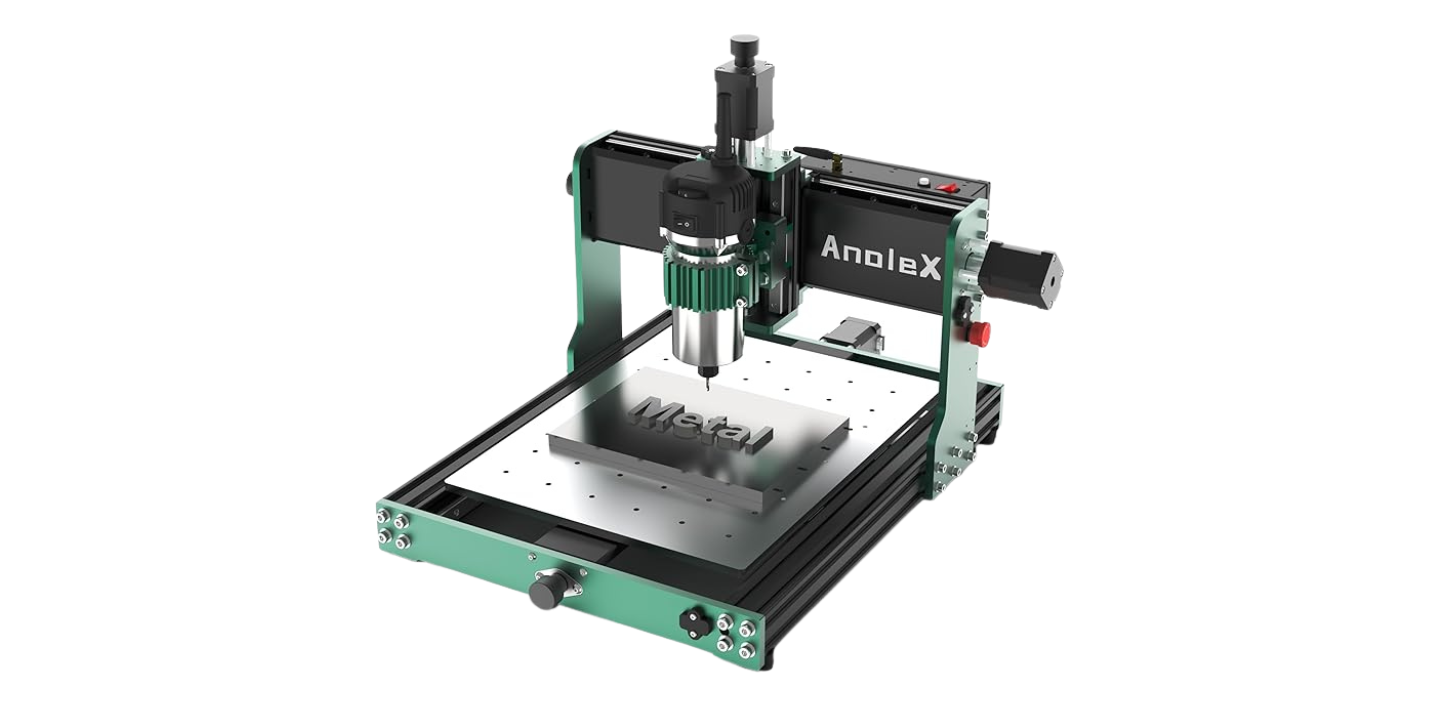
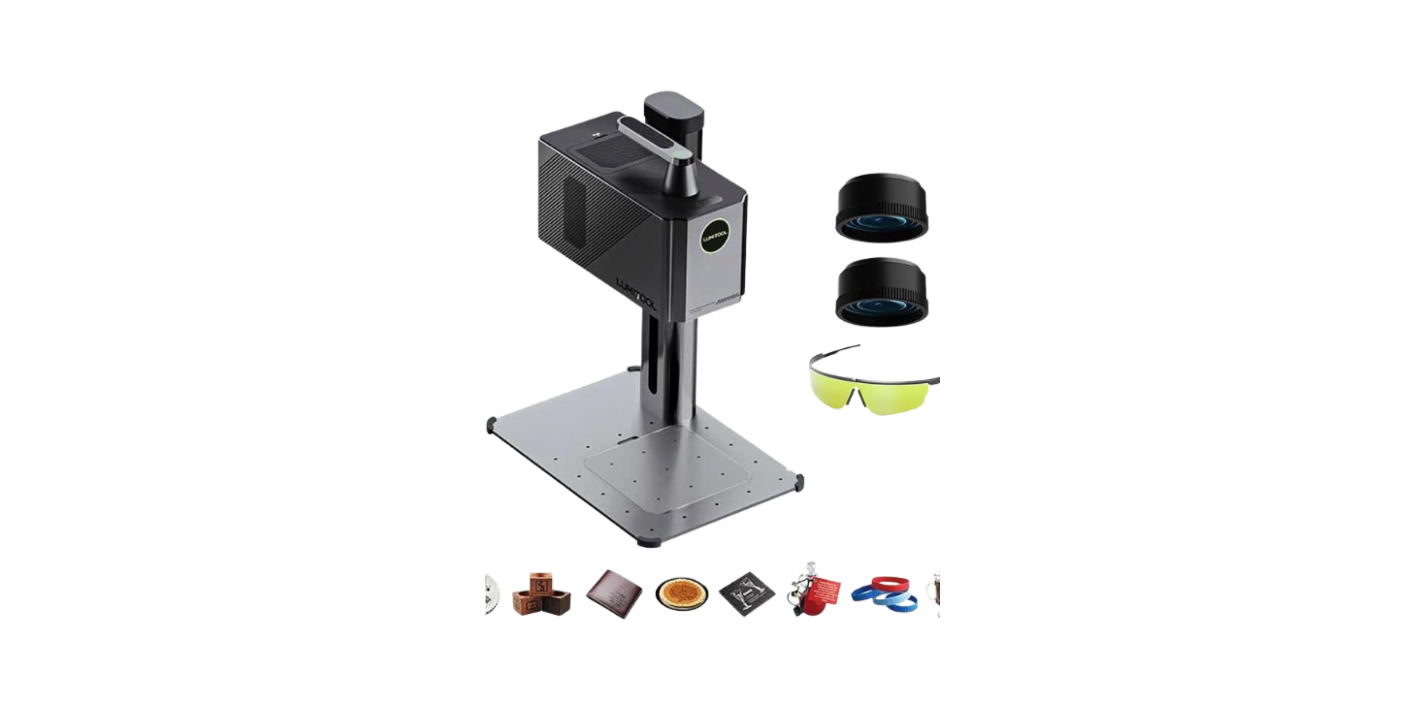
Have we ever met a desktop CNC that cuts aluminum without chewing it into glitter and hurt feelings?

CNCTOPBAOS 500W CNC Router 3020 Plus: What We Learned the Hard Way (and the Fun Way)
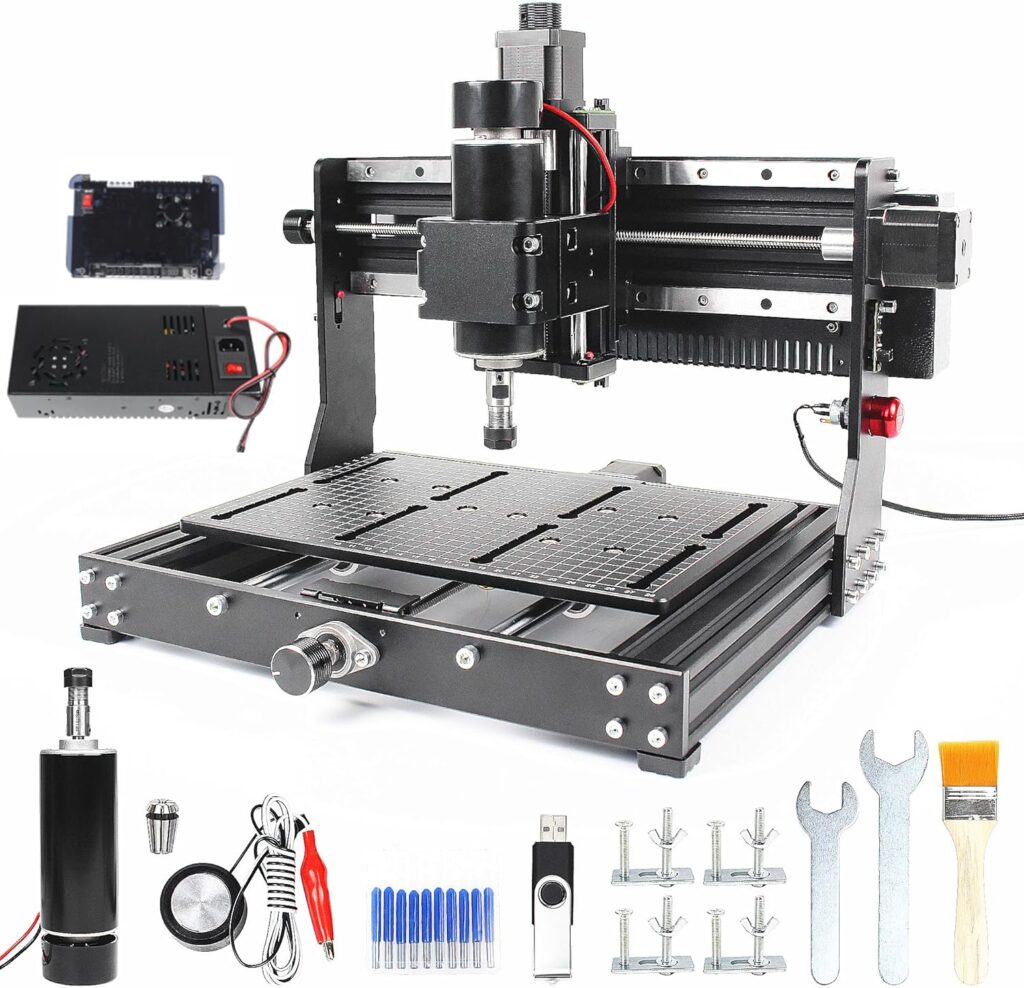
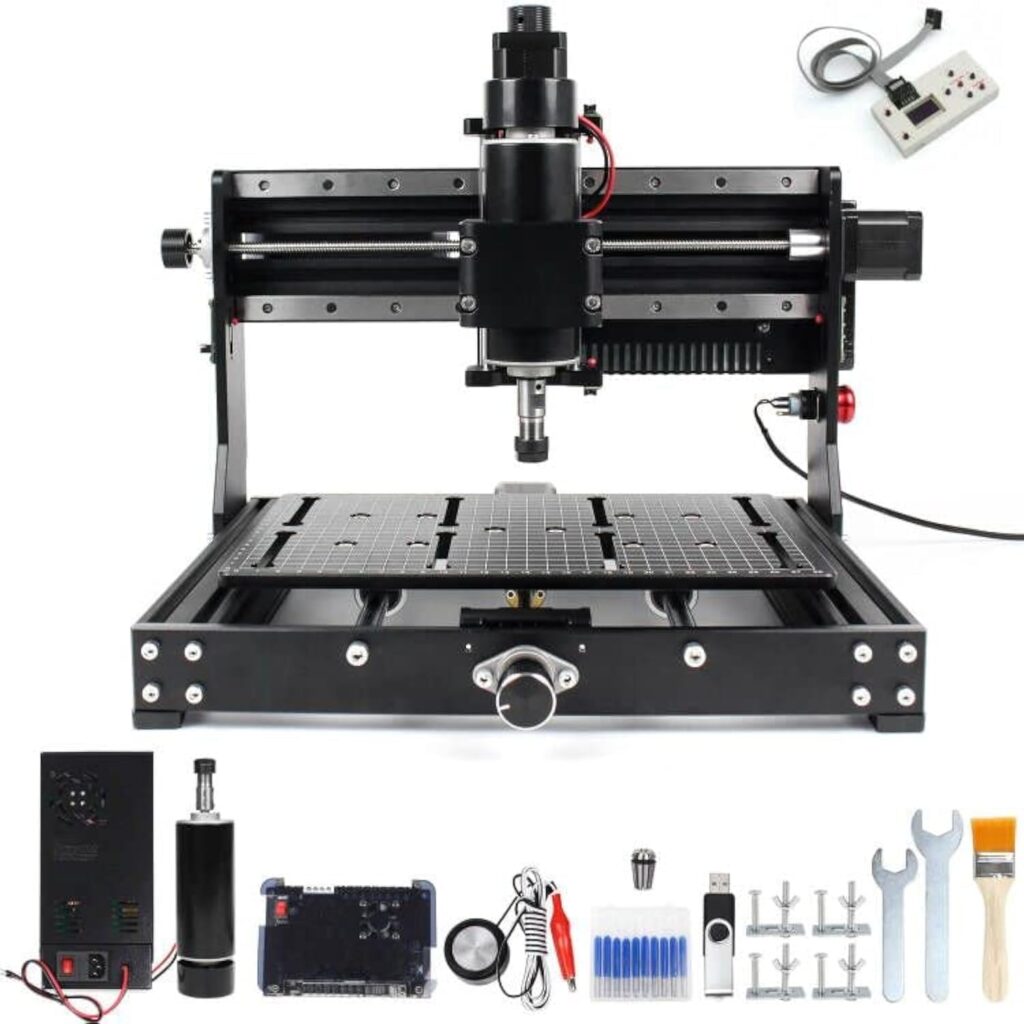
We went hands-on with the CNCTOPBAOS 500W CNC Router for Metal Carving, 3020 Plus DIY CNC Engraving Machine, 3 Axis Desktop GRBL CNC Milling Machine, Cutting Wood Acrylic MDF w/XYZ Limit Switches E-Stop 11.81×7.9×2.9inch. Yes, the name feels like someone pasted the manual into the product title. But once we got past the word salad, we found a compact, all-metal, 3-axis desktop machine that behaves less like a gadget and more like a tool.
We’ll tell you what worked, what squeaked, what surprised us, and where we slightly panicked and then pressed the big red button like a game show contestant.
Why this little bruiser stood out
We’ve tried our share of 3018-class machines that politely trace wood and then faint at the sight of metal. This 3020 Plus is different. With a 500W, 48V spindle (11,000 RPM) and an ER11 collet, it’s not delicate about materials. The working envelope of 300 x 200 x 73 mm (11.81 x 7.9 x 2.9 inches) gives us room to make honest projects, not just keychains. The all-metal body—no plastic structural parts—keeps things rigid. And the built-in emergency stop and six limit switches make it feel like a real machine tool, not a science fair exhibit.

CNCTOPBAOS 500W CNC Router for Metal Carving,3020 Plus DIY CNC Engraving Machine,3 Axis Desktop GRBL CNC Milling Machine,Cutting Wood Acrylic MDF w/XYZ Limit Switches E-Stop 11.81x7.9x2.9inch
Build Quality That Actually Matters
We’ve met plenty of machines that say “all-metal” and then show up with plastic bits where it counts. This one means it. The frame, gantry, and X-Z axis components are metal, and the linear motion uses 12 mm thick solid double-steel linear guide rails with bearing slide rails. That’s not just brochure poetry—it translates to less rattle and more accuracy.
The numbers that had us nodding
- Working area: 300 x 200 x 73 mm (11.81 x 7.9 x 2.9 inches)
- Overall size: 460 x 390 x 354 mm (18.1 x 15.4 x 13.9 inches)
- Claimed accuracy: 0.01 mm
- Spindle: 500 W, 48 V, ~11,000 RPM, ER11 collet
- Safety: Emergency stop button, six limit switches
- Software: GRBL-compatible, Candle supported
- Systems: Windows XP/7/8/10 and Linux
- Pre-assembly: Partially pre-assembled; final setup is straightforward
We were skeptical about the 0.01 mm accuracy claim, but the rigidity and rails go a long way. Are we making aerospace parts? No. Are we pocketing aluminum cleanly with crisp edges and repeatable dimensions within a few hundredths of a millimeter? Yes, with reasonable feeds and sane expectations.
Work Area and Footprint: Small Bench, Big Ambitions
The 3020 Plus offers that sweet spot: just big enough for signage, plates, brackets, and acrylic parts, but not so big that our bench collapses under the weight of our optimism. The worktable is marked with a useful scale, making quick alignment less of a scavenger hunt. We still use an edge finder and touch-off methods for precision, but the scale line helps us eyeball stock placement when we’re rushing to start a cut before we change our minds.
Vertical travel that isn’t pretend
With a vertical stroke up to 73 mm on the all-metal X-Z assembly, we cleared clamps, fixtures, and a modest spoilboard without drama. We don’t try to stuff enormous vises underneath; it’s a desktop router, not a knee mill. But for woodworking jigs, soft-metal brackets, and a V-block now and then, the Z travel feels generous.
Unboxing and Getting Over Our Fear of Cables
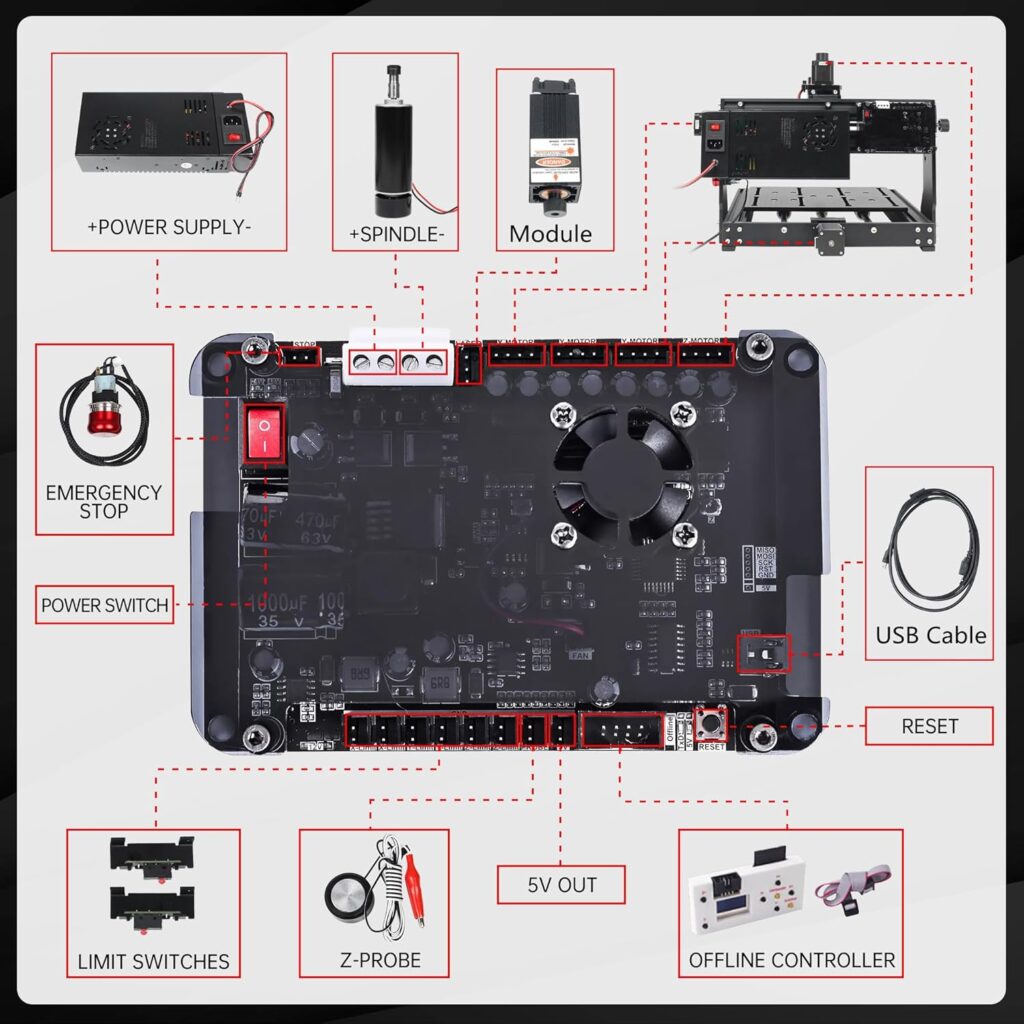
Unboxing was less eventful than assembling flat-pack furniture. The machine arrives pre-assembled to a satisfying degree. We had to attach a few components, connect cabling to the controller, and square things up. Our tool of choice was patience, followed by a tiny Allen key.
Setup time and first jog
We spent about an hour and a half at a calm, coffee-friendly pace. We squared the gantry, tightened factory-fastened bolts that were a hair shy of snug (as is tradition), and jogged the axes. The motors moved smoothly, without the “singing stepladder” sound that some lighter machines produce. With Candle and GRBL, homing worked on the first try thanks to those limit switches. We felt like competent adults for almost six minutes.
Software: GRBL, Candle, and Our Everyday Workflow
We appreciate that this machine doesn’t trap us in proprietary software. It speaks GRBL—the lingua franca of hobby CNC—and plays nicely with Candle for control. We ran it on Windows 10 and Linux without fuss. Candle gave us position readouts, homing control, jog control, and a clean way to stream G-code.
CAM choices we actually made
- For 2.5D signs, V-carving, and shallow pocketing: We used common CAM tools that output GRBL-compatible G-code.
- For aluminum plates and enclosures: We generated G-code with adaptive clearing strategies and kept stepdowns conservative.
- For PCB projects: We used standard PCB-to-G-code workflows with a sharp V-bit and measured Z carefully.
If you’re new, begin with Candle and a basic CAM that exports GRBL-friendly code. Stick to metric for your first projects. It hurts less to think in millimeters when you’re pocketing precise features.
The Spindle: 500W of “Yes, That’s Real Cutting”
That 500W spindle at 48V and around 11,000 RPM is the headline here. The ER11 collet is the unsung hero since it accepts a good range of tool shank sizes. We recommend getting a decent set of ER11 collets rather than relying on a single size with shims. Save your shims for a sad saxophone section.
Noise and runout
Noise is mechanical conversation, not a jet engine. We still recommend ear protection, especially when cutting metals. Runout was low enough to produce clean, chatter-free finishing passes with a 3 mm end mill in aluminum. We kept our tools sharp and our stepdowns polite, which helps any router look good.
Materials: What We Cut, What We Engraved, and What We Dreamed About
The manufacturer lists a wide range: Wood, MDF, carbon fiber, PCB, PVC, leather, paper, acrylic, ceramic products, food, bamboo, plastic, plywood, stainless steel, brass, plexiglass, aluminum, and more. We didn’t line up a buffet of pastries on the spoilboard, but yes, it can engrave food; we’d dedicate a food-only toolpath and hardware if we were serious about that, for obvious cleanliness reasons. Flour mixes poorly with aluminum chips.
Wood and MDF
This is where the machine feels happy and confident. We ran 6 mm and 3 mm end mills through hardwood, softwood, and MDF. The claim that it can cut 8 mm wood in a single pass is accurate, provided the bit is sharp and the clamping is secure. We still prefer two passes to keep edge quality pristine, but it’s nice to have the headroom.
Plastics and acrylic
Acrylic loves to weld itself to bits like a stage-five clinger. With this machine, we kept RPM steady and chip load high enough to evacuate chips. The result: clean edges, minimal melting, and faces that could be flame-polished if we had a flair for the dramatic. We recommend single-flute or O-flute cutters for acrylic, PETG, and polycarbonate.
PCBs and carbon fiber
For PCBs, the 0.01 mm claimed accuracy helps. We used V-bits for isolation routing and got consistent traces after careful Z probing. For carbon fiber, we used proper dust extraction and PPE. Carbon fiber dust is fine and not something we want to be breathing. The machine didn’t flinch; it’s more about safety and dust control than horsepower.
Metals: aluminum, copper, brass, stainless steel
- Aluminum: This is where the 500W spindle earns its keep. We used small end mills, shallow stepdowns, and adapted toolpaths. Repeat the passes, and you can achieve up to 10 mm depth, as the product states. It’s not one-pass heroics; it’s respectable machining at hobby scale.
- Copper and brass: Both cut cleanly with sensible feeds. Use sharp tools, keep them cool with air blast if possible, and expect pretty edges.
- Stainless steel: Think engraving, not hogging. We scored and engraved text and patterns on stainless with careful depth control and gentle feeds. Cutting through is not on the menu here, but marking and fine engraving looked good.
Precision and Repeatability: Not Just Wishful Thinking
The linear guide rails and all-metal X-Z components bring actual stability. Deflection is low for a desktop router of this size, which shows up in hole location accuracy and pocket squareness. When we measured parts, we saw consistent results across repeated runs, provided we zeroed correctly and kept our clamping consistent. It’s the kind of reliability that makes you start thinking in terms of batches instead of single pieces.
Tuning GRBL for happy motion
We set homing to use the built-in limit switches, enabled soft limits to prevent accidental overtravel, and verified steps-per-mm with a dial indicator. If that sounds like a lot, it’s really just an afternoon with a notebook and a cup of coffee. The payoff is worth it in cleaner corners and smoother arcs.
Safety: Limit Switches That Save Our Sanity
We love an emergency stop we can slap with the enthusiasm usually reserved for game shows. It cuts power fast. The six limit switches—covering XYZ—add confidence during both homing and accidental programming decisions.
Using the E-stop without dramatics
We triggered E-stop once when a clamp decided to audition for a bit part in a horror movie. The machine stopped cleanly, and we resumed after re-zeroing. No mysterious firmware purgatory, no re-cabling, no swearing (okay, some muttering). It’s a safety system we trusted on day one.
Usability: The Little Things Add Up
The engraved scale lines on the worktable are more useful than we expected. We still recommend a proper spoilboard and T-slot clamps or low-profile fixtures, but the markings make quick stock alignment less fussy. The working envelope supports small production runs, and we didn’t feel boxed in unless we tried to cut parts that belonged on a larger gantry router.
Workholding and fixtures
- Add a spoilboard right away. MDF is fine.
- Get a set of low-profile clamps or cam clamps.
- For thin stock or PCBs, double-sided tape with a perimeter clamp works wonders.
- For metals, a small vise or toe clamps help—just mind Z clearance and be gentle with your stepdowns.
Maintenance: The Ritual That Keeps Things Smooth
We treat CNC machines like bicycles. They need occasional love to stay sweet. This one’s no different.
- Keep the rails clean. Wipe with a lint-free cloth and a light lubrication compatible with linear rails.
- Check fasteners monthly. Vibration loosens things; Loctite sparingly where appropriate.
- Vacuum chips religiously. Chips are sneaky; they get into couplers and under switches.
- Check collet condition. ER11 collets wear; they’re not a family heirloom.
Dust, Chips, and Noise
Chips and dust go everywhere, like confetti at a party you didn’t know you were hosting. We use a vacuum shoe when possible and a shop vac with a HEPA filter. The spindle alone isn’t deafening, but cutting noise adds up. We wear ear and eye protection, and we don’t apologize for looking like cautious astronauts.
Managing heat and chip evacuation
Metal likes an air blast; plastics like steady evacuation to prevent melting. Wood and MDF just like a good cleanup afterward. Think of chip evacuation as door service for your cutter. If chips overstay their welcome, the party turns ugly.
Feature Breakdown at a Glance
We built a quick table so we don’t have to keep squinting at specs mid-project.
| Feature | What It Is | Why We Care |
|---|---|---|
| Working Area | 300 x 200 x 73 mm (11.81 x 7.9 x 2.9 in) | Big enough for signs, plates, and brackets |
| Overall Size | 460 x 390 x 354 mm (18.1 x 15.4 x 13.9 in) | Bench-friendly footprint |
| Frame | All-metal, no plastic structural parts | Rigidity and stability under load |
| Linear Motion | 12 mm solid double-steel guide rails with bearing slides | Smooth, accurate travel |
| Spindle | 500 W, 48 V, ~11,000 RPM, ER11 collet | Real metal-cutting potential |
| Accuracy | Claimed 0.01 mm | Good for PCBs, inlays, and precise pockets |
| Safety | Emergency stop, six limit switches | Homing, overtravel protection, quick stop |
| Software | GRBL/Candle compatible | Open ecosystem, easy control |
| OS Support | Windows XP/7/8/10, Linux | Flexible setups |
| Pre-Assembly | Device pre-assembled, simple finish | Faster to first cut |
| Materials | Wood, MDF, acrylic, plastics, PCB, carbon fiber, leather, paper, ceramic, bamboo, food, stainless steel (engraving), brass, aluminum, plexiglass | Versatile projects |
| Cutting Depth Claims | One-pass 8 mm wood; aluminum multiple passes to ~10 mm depth | Realistic expectations |
A Practical Settings Cheat Sheet
These are conservative starting points we used. Always start gently and adjust based on your cutter, rigidity, and chip evacuation. Use sharp tools and keep passes shallow for metals.
| Material | Tool | RPM | Feed | Stepdown | Notes |
|---|---|---|---|---|---|
| MDF | 3 mm 2-flute end mill | 10,000–11,000 | 500–900 mm/min | 1.0–1.5 mm | Easy on bits, vacuum often |
| Hardwood | 3 mm 2-flute | 9,000–11,000 | 400–800 mm/min | 0.8–1.2 mm | Climb finish pass for cleaner edge |
| Acrylic | 3 mm single-flute (O-flute) | 9,000–11,000 | 400–700 mm/min | 0.5–1.0 mm | Avoid melting; steady chip flow |
| Aluminum | 3 mm single- or 2-flute | 9,000–11,000 | 200–450 mm/min | 0.2–0.6 mm | Air blast helps; multiple passes |
| Brass | 3 mm 2-flute | 9,000–11,000 | 250–500 mm/min | 0.3–0.8 mm | Stable, clean chips |
| Copper | 2–3 mm 1–2 flute | 9,000–11,000 | 200–450 mm/min | 0.2–0.5 mm | Can get gummy; keep chips clear |
| PCB (FR-1/FR-4) | V-bit 10–30° | 10,000–11,000 | 200–400 mm/min | 0.05–0.15 mm | Precise Z; dust control for FR-4 |
We treated these as starting lines, not commandments. If chatter enters the chat, reduce stepdown, reduce feed, or increase RPM slightly. If the bit rubs or melts plastic, increase feed or reduce RPM.
The Stuff We Made (and Showed Off Shamelessly)
- Aluminum nameplate: 2 mm deep letters, crisp edges, brushed finish. We did a final spring pass and felt smug about it for an entire afternoon.
- MDF wall sign: V-carved letters and a pocketed border. The one-pass 8 mm claim is real, but we used two passes for a cleaner finish.
- Acrylic front panel: Holes and rectangular pockets cut clean with an O-flute bit. We wore cotton gloves to avoid fingerprints and pretended we were lab techs.
- PCB prototype: Traces down to a fraction of a millimeter with consistent isolation. We triple-checked Z because PCBs are sensitive like houseplants.
- Brass tag: Engraved logo and text—this machine handles brass with a poise we didn’t expect at this price.
Comparing It to the 3018 Crowd
We’ve used popular 3018-class routers with 200–300W spindles and lighter frames. They’re fine for soft woods and engraving, but aluminum can feel like punishment. The CNCTOPBAOS 3020 Plus—with 500W power, ER11 collet, and sturdy rails—sits a step above. It’s still a desktop footprint, but the rigidity makes real cutting possible, not just marking.
Where the extra money goes
- Power: The 500W spindle isn’t marketing fluff; it’s usable torque.
- Rigidity: All-metal structure and proper rails reduce flex.
- Safety: E-stop and six limit switches make it less stressful to learn on.
- Accuracy: The 0.01 mm claim is backed by smooth motion and solid mechanics.
Pros and Cons We Actually Noticed
We like lists. They make us feel decisive, even when we are not.
Pros:
- Real cutting capability in aluminum, copper, and brass with proper settings
- All-metal frame and 12 mm guide rails for rigidity and smooth motion
- ER11 collet for proper tool holding and flexibility
- Emergency stop and six limit switches included
- Pre-assembled enough to get started quickly
- Works with open-source GRBL and Candle on both Windows and Linux
- Scale-marked worktable for quick alignment
- Can cut 8 mm wood in one pass and reach ~10 mm depth in aluminum with multiple passes (as claimed)
Cons:
- Spindle RPM tops around 11,000; still good, but plastic finishing can be picky without the right bit
- Aluminum cutting requires patience and multiple light passes—this is a router, not a milling center
- Dust management is DIY; plan for a shoe or vacuum setup
- Z clearance is generous for a desktop machine but still requires careful fixture planning
- No enclosure by default; chips will travel like tourists on a long weekend
Tips We Wish We’d Known Before We Started
- Add a spoilboard right away. Drill a grid of threaded inserts for flexible workholding.
- Square the gantry after unboxing. Even a tiny tweak helps accuracy.
- Enable soft limits in GRBL once homing works. It’s cheap insurance.
- Measure tool length offsets carefully. Z is where most mistakes hide.
- Use an air blast for metals if you can. Even a small compressor makes a difference.
- Replace the default collet with a quality ER11 set to reduce runout.
- Keep a dedicated notebook. Feeds, speeds, and bit wear notes make you smarter over time.
- For acrylic, single-flute cutters are worth their weight in smooth edges.
- For PCB, use a feeler gauge or probe for consistent Z. Tiny mistakes get loud on copper.
FAQs We Asked Ourselves Out Loud
Q: Can it cut aluminum for real, or just scratch it?
- A: It can cut aluminum for real. Use small tools, multiple passes, and keep chips moving. We pocketed and profiled 2–6 mm aluminum plate with respectable results.
Q: Will it cut stainless steel?
- A: Think engraving and marking, not through-cuts. We engraved text and patterns; full-depth cutting in stainless isn’t the goal here.
Q: Is it beginner-friendly?
- A: Yes, provided you respect the safety and take time to learn CAM basics. The E-stop and limit switches make the early mistakes less scary.
Q: What software do we need?
- A: Use a CAM that outputs GRBL-compatible G-code and Candle for control. Windows or Linux both work.
Q: How accurate is it?
- A: The claim is 0.01 mm, and our real-world parts showed tight repeatability within hobby expectations. Fixture well, zero carefully, and it delivers.
Q: How messy is it?
- A: Chips everywhere without a plan. Use a dust shoe, vacuum often, and consider a simple enclosure if your shop shares space with polite company.
Q: What collets does it use?
- A: ER11. Invest in a quality set; it’s worth it.
Q: Can it really cut 8 mm wood in a single pass?
- A: Yes. We did it. But we often choose two passes for cleaner edges.
Q: Do we need to assemble everything?
- A: It’s pre-assembled to a helpful degree. Expect a straightforward setup, not a day-long wrenching session.
Who Should Buy This and Who Should Pass
Buy it if:
- We want a desktop CNC that actually machines aluminum with care and reasonable speed.
- We value rigidity and safety features over flashy screens.
- We plan to work in wood, plastics, and soft metals with precision.
- We like open software like GRBL and Candle.
Skip it if:
- We want to cut thick steel or hog out aluminum like an industrial VMC.
- We need a giant working area for furniture-scale projects.
- We don’t want to manage dust, maintenance, or feeds-and-speeds learning.
A Few Project Workflows That Worked for Us
Aluminum label plate with engraving
- Stock: 2 mm 6061 plate, taped and perimeter clamped
- Tools: 2 mm end mill for profile and pockets; 30° V-bit for engraving
- Strategy: Adaptive clearing for pockets, spring pass for finish, engraving last
- Result: Sharp edges, legible engraving, consistent depth
MDF sign with inlay accent
- Stock: 12 mm MDF base, 3 mm contrasting wood inlay
- Tools: 6 mm end mill for clearing, 60° V-bit for lettering
- Strategy: Pocket base, cut inlay separately, glue and sand flush
- Result: Clean V-carve letters, satisfying fit, only minimal sanding required
Acrylic front panel for a small project box
- Stock: 4 mm clear acrylic
- Tools: 3 mm O-flute, 1.5 mm drill
- Strategy: Profile with climb finish, drill holes at slower feed
- Result: No melting, neat edges, happy fit onto standoffs
PCB prototype for a sensor breakout
- Stock: FR-1 board
- Tools: 20° V-bit for traces, 0.8 mm drill
- Strategy: Isolation routing with careful Z, drill holes afterward
- Result: Reliable traces, no lifted copper when we respected Z
Homing, Limits, and Getting Back to Zero Without Tears
Homing with limit switches means our work coordinate system is actually coherent. We set a repeatable work origin using a corner finder or the good old “paper feel” method for Z. Soft limits kept us from plowing the gantry into the end of the universe. The controller didn’t throw tantrums when we stopped and restarted jobs, which gave us courage.
E-stop etiquette
Use it if things go sideways. After hitting it, we reset, re-home, re-zero, and restart from a known point. We saved our woodworking clamping kit from a tragic end this way. We might have named the E-stop “Stanley.” It seemed right.
The Ergonomics of Living With It
On the bench, the machine’s footprint leaves room for a laptop, a tray of tools, and a vacuum hose that always tries to become a sculpture. The cable routing didn’t snag during our tests, and the moving mass felt controlled. The Z-axis didn’t droop when we powered down, which we appreciated when swapping bits mid-project.
Lighting and visibility
We added a small LED strip for better visibility. Watching chips stay clear and edges form cleanly is both practical and strangely calming. It’s like watching a tiny, well-behaved storm.
Upgrades and Accessories We’d Consider
- Better ER11 collet set: Lower runout, more sizes, happier cutters.
- Dust shoe and a HEPA-capable vacuum: Your lungs will thank you.
- Air-assist nozzle: For aluminum and plastics, chip clearing matters.
- Spoilboard with threaded grid: Faster setups, fewer clamp gymnastics.
- Enclosure: Keeps noise down and chips contained.
None of these are mandatory, but each makes the machine feel more like a dependable shop partner.
Reliability Over Time
After multiple projects spanning wood, acrylic, and soft metals, we saw consistent performance. The rails stayed smooth with light maintenance. Stepper motors didn’t miss steps when we kept our feeds sensible. We didn’t baby it, but we also didn’t treat it like a carnival ride. It rewarded that attitude.
Things we checked periodically
- Gantry squareness
- Belt tension—if present on your specific motion stage; otherwise, coupler integrity
- Collet condition and tool shank cleanliness
- Electrical connectors seated and snug
- Limit switch actuation and homing repeatability
If homing points drift, we look for loose hardware before blaming the machine like it’s the dog’s fault.
When Aluminum Meets Ambition
Let’s talk aluminum without bravado. With the 500W spindle, the machine can pocket, contour, and chamfer aluminum parts that fit its work envelope. We chose conservative feeds, small stepdowns, and good chip evacuation. The result: parts that fit together, edges that deburr easily, and holes that actually line up. The 10 mm depth claim for aluminum with repeated passes is achievable if we keep the tool sharp, the chips clear, and our expectations reasonable.
We also learned that a short stick-out on the cutter makes a huge difference. Keep that end mill tucked in—just enough to clear the stock—and chatter will fade like a bad memory.
The Table Markings: More Useful Than We Expected
We rolled our eyes at the scale marks on the worktable before we used them, and then we found ourselves relying on them for quick setups. For one-off jobs, they were enough to eyeball stock position and get to cutting. For serious work we still used precise zeroing, but the marks saved time that would otherwise vanish into measuring tape theater.
Software Notes That Saved Our Sanity
- We set $20=1 and $22=1 in GRBL to enable soft limits and homing.
- We kept acceleration modest to avoid exciting harmonics on abrupt corners.
- We standardized post-processors to output arcs as small segments when needed to stay GRBL-friendly.
- We kept G-code tidy—no fancy commands outside GRBL’s comfort zone.
The benefit was boring reliability, which we cherish in machines and in friendships.
Price-to-Possibility Ratio
Given the stiff frame, 500W ER11 spindle, safety features, and genuine cutting ability in aluminum and brass, the CNCTOPBAOS 3020 Plus offers strong value. It’s a clear upgrade over entry-level kits without leaping into pro-sumer prices that require a second mortgage and a pep talk.
We could outfit it with a spoilboard, collets, clamps, and a dust shoe and still feel like we got a deal. The time saved by not repairing missed steps and bad cuts is value, too—our future selves are grateful.
Where It Fits in a Small Shop
- Prototyping: Panels, brackets, engravings, and fixtures in-house.
- Hobby fabrication: Signs, inlays, badges, and custom pieces to gift or sell.
- Light metalwork: Aluminum enclosures, faceplates, and plates with recessed features.
- Electronics: PCB prototypes and labeled control panels.
If your projects need half-sheet plywood or steel brackets thicker than a finger sandwich, you’ll want a larger or different machine. But for the kind of work we described, this router feels purpose-built.
Our Wish List for a Future Revision
- A slightly higher top RPM would help with plastic finishing, though it’s workable now with the right bits.
- A bundled dust shoe would make setup kinder to beginners.
- A simple enclosure option would sweeten the package and reduce cleanup.
- A printed quick-start guide tuned to GRBL newcomers would lower the learning curve further.
None of these are deal-breakers, but we are a species of wishful thinkers.
Final Thoughts Before We Pretend We’re Not Still Buzzing
The CNCTOPBAOS 500W CNC Router for Metal Carving, 3020 Plus DIY CNC Engraving Machine, 3 Axis Desktop GRBL CNC Milling Machine, Cutting Wood Acrylic MDF w/XYZ Limit Switches E-Stop 11.81×7.9×2.9inch is a mouthful that turns into a handful of capability. It’s rigid, reasonably powerful, and thoughtfully appointed with safety features that make learning less perilous. The ER11 spindle unlocks real tool options, and the all-metal construction gives us the confidence to tackle aluminum and brass without a pit in our stomach.
We won’t pretend it’s a bridge mill in disguise. It’s a desktop CNC that punches above its weight when treated with respect. Keep your passes light, your bits sharp, your rails clean, and your panic finger near the E-stop. In return, it delivers crisp pockets, tidy engravings, and the simple joy of watching a design turn into a thing we can hold.
We showed it wood, acrylic, PCBs, and aluminum. It answered with clean cuts and a quiet, competent hum. If that’s what we want from a desktop CNC—reliability, flexibility, and just enough power to make metal behave—this 3020 Plus makes a persuasive case.
Disclosure: As an Amazon Associate, I earn from qualifying purchases.