
Mecpow M1 Mini Laser Engraver Review: Is This Class 1 Enclosed 5W Laser Worth $180 in 2026?
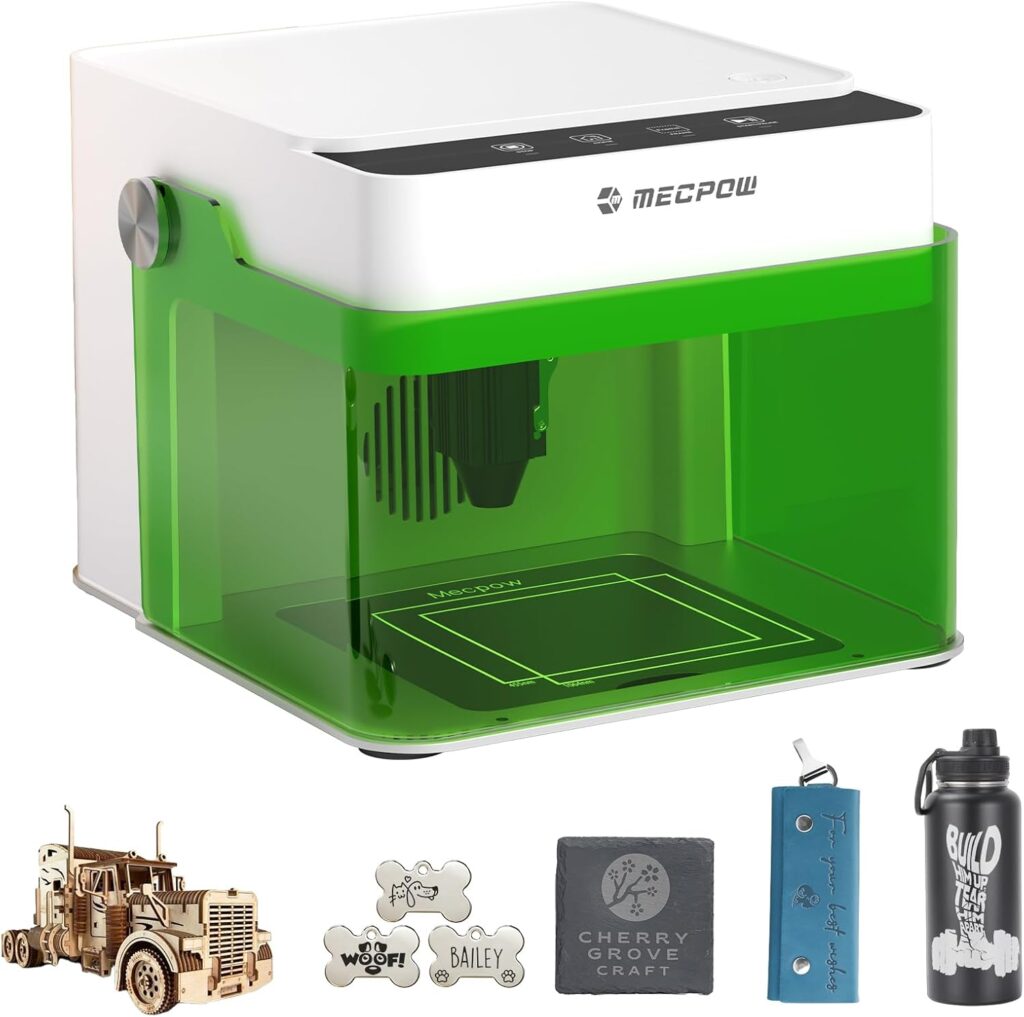
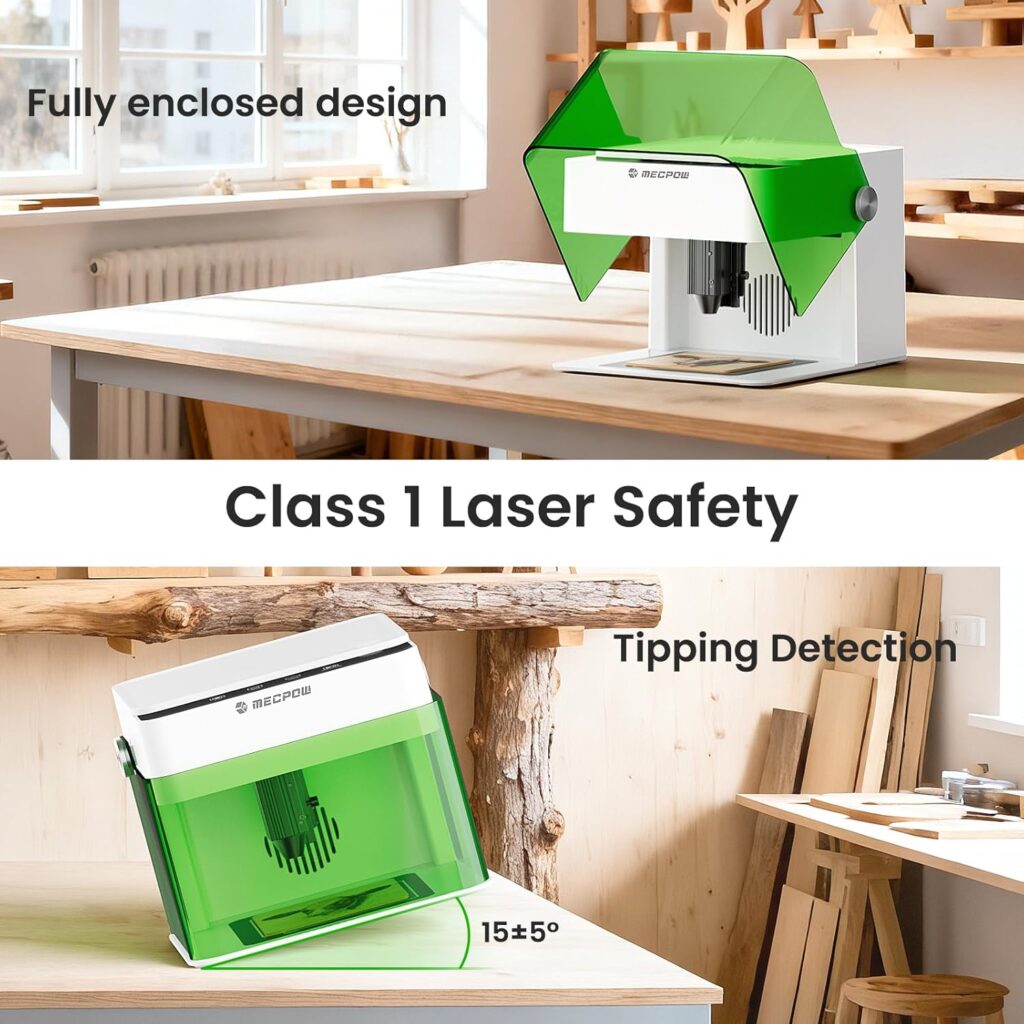
The single biggest frustration with budget desktop laser engravers is choosing between cheap open-frame Class 4 modules that require mandatory laser safety glasses and proper room ventilation, or paying premium prices for fully enclosed Class 1 systems with proper safety certifications. Most sub-$300 lasers ship as Class 4 open-frame designs that simply aren’t suitable for apartments, classrooms, or shared workspaces with pets and children. The Mecpow M1 Mini Laser Engraver solves this with a genuine Class 1 laser certification featuring a fully enclosed cover that filters 99% of laser light, plus auto-stop functionality when the lid opens.
The package pairs that safety-first design with a 5W (5,000mW) diode laser capable of cutting 3mm plywood and 5mm pine, engraving speeds up to 10,000 mm/min, 0.1mm precision, a compact 100 x 100mm working area, and a portable 2.4 kg (5.29 pound) footprint. Connectivity covers USB, WiFi, and offline operation, with control via phone, PC, or tablet. Software compatibility includes CutLabX, LightBurn, and LaserGRBL, and the machine ships pre-assembled with built-in material presets and four intuitive buttons for first-day operation.
This review contains affiliate links. If you buy through them, we may earn a commission, at no extra cost to you.
Why Class 1 certification matters: The Mecpow M1’s Class 1 laser certification means user-accessible emission stays at or below 0.5mW during normal operation with the cover closed. The fully enclosed design filters 99% of laser light, eliminating the need for OD-rated laser safety glasses during normal closed-lid operation. The auto-stop lid feature shuts down the laser instantly if the cover opens during a job. This is a genuinely apartment-friendly, classroom-appropriate design that Class 4 alternatives simply cannot match.
Who should buy: Apartment dwellers and shared-space makers who need contained operation, beginners wanting Class 1 safety certification out of the box, classrooms and makerspaces requiring institutional-grade safety documentation, Etsy sellers producing personalized small gifts (coasters, leather wallets, dog tags), and parents wanting a laser that’s safe to operate with children or pets in the room.
Who should skip: Buyers needing larger work envelopes (look at the Carverall K15 Pro 5W or Creality Falcon 5W instead), shops cutting thick hardwoods (need 10W+ machines), production-focused users requiring throughput speed, makers wanting open-frame modding flexibility, or anyone whose primary work involves bare metal engraving without the optional IR module.

M1 Mini Laser Engraver, 5W Laser Cutter Portable Desktop Laser Engraving, 100x100mm Engraving Area, mm/min Engraving Speed,Accuracy up to 0.01 mm, Eye Protection Design
Quick Verdict: Mecpow M1 Mini Laser Engraver
The Mecpow M1 delivers what apartment-friendly, classroom-appropriate laser buyers actually need: genuine Class 1 laser certification with a fully enclosed cover filtering 99% of laser light, auto-stop functionality when the lid opens, a 5W diode laser capable of cutting 3mm plywood and 5mm pine, engraving speeds up to 10,000 mm/min, USB plus WiFi plus offline operation flexibility, cross-platform control via phone/PC/tablet, and a portable 2.4 kg footprint. The pre-assembled design with built-in material presets enables genuine first-day operation.
The trade-offs are honest: the 100 x 100mm working area is the smallest in this comparison group and limits single-piece projects to coasters, dog tags, and small craft items, the 5W power restricts cutting to thin softwoods with multiple passes, bare metal engraving requires the optional Mecpow R1 1.2W IR module purchase, and fume extraction (Mecpow P50 or DIY ventilation) needs to be added for indoor work despite the enclosure. Match expectations to the safety-first compact positioning and the value math works clearly.
- Best for: Apartment crafters, classrooms, beginners wanting Class 1 safety, parents with children at home
- Skip it if: Need larger work area, production throughput, thick hardwood cutting, or open-frame flexibility
- Standout features: Class 1 certification, 99% laser light filtering, auto-stop lid, WiFi + USB + offline operation
- Main compromises: 100 x 100mm area, 5W power ceiling, no included rotary or IR, fume extractor sold separately
Mecpow M1 Specifications
| Brand | Mecpow |
| Model | M1 |
| Optical power output | 5W (5,000mW) diode laser |
| Accessible emission | 0.5mW (Class 1 certified) |
| Safety classification | Class 1 laser certified |
| Enclosure | Fully enclosed cover, filters 99% of laser light |
| Auto-safety | Auto-stop when lid is opened |
| Working area | 100 x 100mm (3.94 x 3.94 inch) |
| Maximum engraving speed | 10,000 mm/min |
| Precision | 0.1mm |
| Item weight | 2.4 kg (5.29 pounds) |
| Connectivity | USB cable, WiFi, offline operation |
| Control devices | Phone, PC, tablet |
| Onboard controls | 4 intuitive buttons, built-in material presets |
| Software compatibility | CutLabX, LightBurn, LaserGRBL |
| Compatible materials | 300+ materials including wood, leather, paper, acrylic, coated metals, glass (with masking) |
| Cut capacity | 3mm plywood, 5mm pine wood |
| Optional IR module | Mecpow R1 1.2W infrared (for bare metal engraving) |
| Optional rotary modules | Mecpow G3 Pro and G5 rotary rollers (for cylindrical objects) |
| Optional fume extractor | Mecpow P50 (99.97% fume removal, sold separately) |
| Setup | Pre-assembled, ready to use |
Key Features Tested: Where the Mecpow M1 Earns Its Price
Class 1 Laser Certification
The Class 1 laser certification is the Mecpow M1’s defining feature and the strongest argument for choosing it over Class 4 alternatives at similar price points. Class 1 is the safest laser classification, meaning user-accessible emission stays at or below 0.5mW during normal operation. The fully enclosed cover filters 99% of laser light, eliminating the mandatory OD-rated laser safety glasses requirement that Class 4 machines impose during every job.
For apartments, classrooms, makerspaces, and homes with children or pets, this certification transforms what’s practical. Class 4 lasers like the ACMER S1 require operators and bystanders to wear laser-rated glasses for the entire job duration; the Mecpow M1’s Class 1 design enables normal closed-lid operation without protective eyewear. The institutional purchasing implications matter for schools and educational programs that require documented safety standards.
Auto-Stop Lid Safety Feature
The auto-stop functionality shuts down the laser instantly if the cover opens during a job. This eliminates the most dangerous failure mode for Class 4 lasers: stray exposure when an operator opens the enclosure mid-cut to check progress. The interlock means even unexpected lid opens (curious cats, accidental bumps, children investigating) trigger immediate laser shutdown without operator intervention.
5W Diode Laser with Genuine Cutting Capability
The 5W rating refers to actual optical output (5,000mW) hitting the material, not total electrical machine consumption. This honest specification means realistic capability for engraving on wood, leather, acrylic, anodized aluminum, ceramic-coated items, and the 300+ materials listed by Mecpow. Cut capacity covers 3mm plywood (typically 2-4 passes) and 5mm pine (typically 4-6 passes) with appropriate settings.
USB Plus WiFi Plus Offline Operation
The connectivity options cover every workflow scenario:
- USB cable: Traditional tethered control with no network requirement
- WiFi: Wireless control from phone, tablet, or PC across the room or workspace
- Offline operation: Upload designs and run jobs without an active computer connection
The cross-platform device support across phones, PCs, and tablets removes operating-system lock-in. Combined with onboard controls (4 intuitive buttons and built-in material presets), the Mecpow M1 can run jobs without any computer at all once designs are loaded.
Pre-Assembled Design with Built-In Presets
The pre-assembled design enables genuine first-day operation. Built-in material presets cover common substrates (wood, leather, acrylic, coated metals) without requiring extensive software setup. The four intuitive buttons handle basic operations (start, pause, focus, settings) for users who don’t want to learn LightBurn before producing their first project.
Modular Accessory Ecosystem
The Mecpow accessory ecosystem provides clear expansion paths without requiring machine replacement:
- R1 1.2W IR module (sold separately): Bare metal engraving on stainless steel, raw aluminum, brass, and titanium where the standard 5W diode cannot mark
- G3 Pro rotary roller (sold separately): Cylindrical engraving on tumblers, glasses, vases, and bottles
- G5 rotary roller (sold separately): Larger cylindrical work capability
- P50 Fume Extractor (sold separately): 99.97% fume removal for cleaner indoor operation
Branded ecosystem accessories ensure compatibility and proper firmware integration that third-party alternatives cannot guarantee.
Performance by Material
| Material | Performance | Settings |
| 3mm birch plywood cutting | Good with patience | Moderate speed, 65-100% power, 2-4 passes |
| 5mm pine cutting | Possible | Slow speed, high power, 4-6 passes |
| Wood engraving (general) | Excellent | 3000-6000 mm/min, 65-85% power, single pass |
| Leather engraving | Excellent | 6000-10,000 mm/min, 15-30% power, vegetable-tanned preferred |
| Anodized aluminum marking | Excellent | 4000-8000 mm/min, 25-40% power, single pass |
| Cast acrylic engraving | Very good | Moderate speed, lower power, frosted finish |
| Glass surface marking | Possible with masking | Mask with painter’s tape or wet paper, slightly defocus |
| Paper and cardstock | Excellent | High speed, low power, single pass for cuts |
| Bare metals (stainless, raw aluminum) | Requires R1 IR module | 5W diode cannot mark bare metals; needs 1064nm IR |
| Hardwood thick cuts | Wrong machine class | Look at 10W+ alternatives |
| PVC or unknown plastics | Never cut | Releases toxic chlorine gas |
Wood and Leather: The Strong Zone
Wood and leather engraving represent where the Mecpow M1 performs above its tier when matched to its small work envelope. The 5W diode handles 3mm plywood cuts in 2-4 passes and 5mm pine in 4-6 passes with proper settings. Vegetable-tanned leather develops the satisfying darkening that looks intentional and upscale at high speeds with low power. The enclosed design contains the smoke and char that open-frame alternatives scatter throughout the workspace.
Coated Metals and Anodized Aluminum: Strong Capability
Anodized aluminum, powder-coated steel, and ceramic-coated items mark with excellent permanence and high contrast at appropriate settings. Pet tags, dog tags, aluminum keychains, and ceramic mug personalization become viable product lines without additional accessory purchases. The 455nm wavelength works particularly well on anodized aluminum’s coating, producing bright marks against the underlying metal.
Bare Metals: Optional R1 IR Module Required
The standard 5W blue diode cannot mark or engrave bare stainless steel, raw aluminum, brass, or titanium. The 455nm wavelength simply doesn’t absorb into reflective bare metals. The optional Mecpow R1 1.2W infrared module operates at 1064nm wavelength, which produces consistent marks on bare metals. Plan for the additional purchase if bare metal engraving is part of the workflow.
Class 1 Safety Requirements vs Class 4 Alternatives
The Class 1 certification fundamentally changes the laser safety equation compared to Class 4 machines:
- No mandatory laser glasses during normal operation: The fully enclosed Class 1 design filters 99% of laser light, eliminating the OD 4+ glasses requirement that Class 4 machines impose
- Apartment-appropriate operation: Children, pets, and bystanders can be in the same room without protective eyewear during normal closed-lid jobs
- Auto-stop lid interlock: Instant laser shutdown if the cover opens during operation prevents the most dangerous Class 4 failure mode
- Classroom-appropriate certification: Class 1 documentation supports institutional purchasing, insurance requirements, and educational program approval
- Reduced safety equipment budget: No need for $20-$60 OD 4+ laser glasses purchases for every workspace user
Ventilation remains necessary for cutting and engraving fumes regardless of laser classification. The optional Mecpow P50 Fume Extractor (99.97% fume removal) handles indoor operation; basic window venting also works for occasional projects.
Setup and First Cuts
The Mecpow M1 ships pre-assembled. Realistic time from unboxing to first engrave: 10-30 minutes for first-time users.
Setup Sequence
- Unbox and inspect the frame, cables, and shield
- Place the machine on a stable, fire-safe surface
- Connect power and USB (or configure WiFi)
- Install CutLabX (Mecpow’s native software), LightBurn ($60 paid), or LaserGRBL (free)
- Update firmware if prompted via the manufacturer page
- Test the auto-stop lid interlock by opening the cover with the laser idle
- Run a low-power frame pass to verify positioning
- Use a built-in material preset for your first project
- Engrave a test pattern on scrap material from the workspace
- Save settings to a Material Library for future jobs
- Set up ventilation or the optional P50 Fume Extractor before production work
Recommended First Project
Wooden gift coaster with engraved monogram. Use 3mm birch plywood, the built-in wood preset, and conservative settings (medium speed, low-to-medium power) for the engrave. The project exercises the enclosed design’s containment, validates the auto-stop lid functionality (test it by opening the lid mid-engrave to confirm the interlock works), and produces a usable result. A second project might add a 3mm plywood cutout in 2-4 passes to test the cutting capability.
Mecpow M1 vs Alternatives
| Machine | Safety Class | Power | Work Area | Best For |
|---|---|---|---|---|
| Mecpow M1 | Class 1 (enclosed) | 5W | 100 x 100mm | Apartment/classroom safety priority |
| ACMER S1 3500mW | Class 4 (open) | 3.5W | 130 x 130mm | Detail precision, NRTL certified |
| Carverall K15 Pro 5W | Class 4 (open) | 5W | 200 x 300mm | Larger work area, WiFi |
| Creality Falcon 5W | Class 4 (open) | 5W | 400 x 415mm | Largest work area |
| Woxcker L2 Flex 5W | Enclosed (variable class) | 5W | 150 x 200mm | Enclosed alternative |
Mecpow M1 vs ACMER S1 3500mW
The ACMER S1 offers a finer 0.04mm laser spot for sharper detail engraving, NRTL certification documentation, and a larger 130 x 130mm work area at a lower price point. The Mecpow M1 provides the critical Class 1 enclosed safety design with auto-stop lid functionality, plus higher 5W power and WiFi connectivity. Pick the ACMER S1 for finest detail and lower price; pick the Mecpow M1 for Class 1 enclosed safety and apartment-friendly operation. For a deeper comparison, our ACMER S1 3500mW review covers the open-frame precision alternative.
Mecpow M1 vs Carverall K15 Pro 5W
The Carverall K15 Pro 5W offers a much larger 200 x 300mm (near-A4) work area with 5W power and WiFi connectivity at a higher price point. The Mecpow M1 delivers the same 5W power in a much smaller 100 x 100mm work area but with Class 1 enclosed safety and auto-stop lid features the Carverall lacks. Pick the Carverall K15 Pro for larger work envelope; pick the Mecpow M1 for safety-first apartment-appropriate operation. Our Carverall K15 Pro 5W review covers the larger-area alternative.
Mecpow M1 vs Creality Falcon 5W
The Creality Falcon 5W delivers a much larger 400 x 415mm work area with established Creality brand backing at a higher price point. The Mecpow M1 provides Class 1 enclosed safety with auto-stop functionality and WiFi plus offline operation flexibility that the open-frame Falcon cannot match. Pick the Creality Falcon for largest work area and brand support; pick the Mecpow M1 for enclosed safety priority. Our Creality Falcon 5W review details the larger-area alternative.
Mecpow M1 vs Woxcker L2 Flex 5W
The Woxcker L2 Flex 5W offers a 360-degree full enclosure design with a larger 150 x 200mm work area but with a less established review history. The Mecpow M1 provides documented Class 1 certification with the auto-stop lid feature and a smaller 100 x 100mm work area. Pick the Woxcker L2 Flex for larger enclosed work area; pick the Mecpow M1 for documented Class 1 certification and the auto-stop interlock. Our Woxcker L2 Flex 5W review covers the alternative enclosed design.
Drawbacks and Considerations
| Consideration | Detail |
|---|---|
| 100 x 100mm work area | Smallest in this comparison group. Limits single-piece projects to coasters, dog tags, and small craft items. Tile larger projects in segments. |
| 5W power ceiling | Light cutting only. 3mm plywood requires 2-4 passes, 5mm pine requires 4-6 passes. Thicker hardwoods need 10W+ machines. |
| Bare metal requires R1 IR module | Standard 5W blue diode cannot mark bare metals. Plan for the optional R1 1.2W IR module purchase if metals are part of the workflow. |
| No rotary in box | Cylindrical engraving (tumblers, glasses, vases, bottles) requires the optional G3 Pro or G5 rotary roller purchase. |
| Fume extractor sold separately | The optional Mecpow P50 Fume Extractor (99.97% removal) handles indoor air quality. DIY ventilation works for occasional use. |
| 0.1mm precision | Less fine than ACMER S1’s 0.04mm laser spot. Sufficient for typical engraving, but detail work benefits from finer-spot competitors. |
| Smaller community resources | Brand-specific tutorials and community help are less available compared to established alternatives like Creality or Carverall. |
| No tooling beyond basics | Plan to budget for honeycomb panel, project blanks, and optional accessories beyond the included starter materials. |
Maintenance for Long-Term Reliability
- After every session: Wipe the lens with a proper lens wipe; vacuum the enclosed work area; inspect the lid interlock for proper closure
- Weekly: Clean the laser head focal lens (a clean lens is the single biggest quality factor for engraving)
- Monthly: Verify the auto-stop lid interlock by opening the cover during a low-power test; check belt tension; inspect cables for wear
- Per project: Confirm focus calibration before each new material type
- Material safety: Never cut PVC or unknown plastics regardless of enclosure design
- Long-term: Plan for eventual diode module replacement after thousands of operating hours
Who This Laser Is For
Apartment crafters and shared-space makers: The Class 1 enclosed design with 99% laser light filtering and auto-stop lid functionality is the Mecpow M1’s strongest argument. If you’re working in an apartment, shared kitchen, home office, or any environment where contained operation matters more than work envelope size, the Mecpow M1 addresses real safety concerns that Class 4 alternatives cannot.
Classroom and STEM education programs: The Class 1 certification matters for institutional purchasing approval, classroom liability requirements, and STEM curriculum integration. The auto-stop lid feature reduces supervisory burden during student projects. The cross-platform control via phone, PC, or tablet supports student devices regardless of operating system.
Beginners wanting safety without the learning curve: The pre-assembled design, built-in material presets, four onboard buttons, and Class 1 certification create the lowest-friction laser engraver entry point for buyers who don’t want to learn safety protocols, focus calibration, and material profiling all at once.
Parents with children or pets at home: The Class 1 design eliminates the mandatory laser glasses requirement that makes Class 4 lasers impractical in family environments. The auto-stop lid provides the additional reassurance that curious children or pets cannot accidentally encounter operating laser exposure.
Etsy sellers and personalized gift makers focused on small items: The 100 x 100mm work area suits coasters, dog tags, jewelry blanks, leather wallets, key fobs, and small branding plates. Match expectations to the size class and the precision-focused positioning works clearly for personalized small-batch production.
Final Verdict: Should You Buy the Mecpow M1?
Not the largest work area in its category. Not the highest-power diode laser available. Not the most established laser brand. But the most apartment-appropriate, classroom-ready Class 1 certified laser at this price point.
The Mecpow M1 Mini Laser Engraver delivers what safety-first laser buyers actually need: genuine Class 1 laser certification with a fully enclosed cover filtering 99% of laser light, auto-stop functionality when the lid opens during operation, a 5W diode laser capable of cutting 3mm plywood and 5mm pine, engraving speeds up to 10,000 mm/min, USB plus WiFi plus offline operation flexibility, cross-platform control via phone/PC/tablet, pre-assembled design with built-in material presets, and a portable 2.4 kg footprint. The Mecpow accessory ecosystem (R1 IR module, G3 Pro/G5 rotaries, P50 Fume Extractor) provides clear expansion paths for skill growth.
Buy the Mecpow M1 if: You work in an apartment or shared space where Class 1 safety matters more than work envelope size, you teach in a classroom or makerspace requiring documented institutional safety standards, you’re a beginner wanting safety-first operation without the learning curve of Class 4 protocols, you’re a parent with children or pets at home, or you produce personalized small items where the 100 x 100mm work area matches your typical project size.
Skip the Mecpow M1 if: You need larger work envelopes (look at the Carverall K15 Pro 5W or Creality Falcon 5W instead), you require fast cutting on thick hardwoods (need 10W+ machines), you focus on detailed precision work where finer laser spots matter (the ACMER S1’s 0.04mm spot is finer), you need open-frame modding flexibility, or your primary work involves bare metal engraving without the optional R1 IR module purchase.
This review contains affiliate links. If you buy through them, we may earn a commission, at no extra cost to you.
For broader context on choosing the right laser engraver, browse our Portable Laser Engravers review library covering options across every price tier, or explore the Fabrication Intelligence resource library for laser safety and workflow fundamentals.
Frequently Asked Questions
Is the Mecpow M1 actually safer than other laser engravers?
Yes. The Class 1 laser certification means user-accessible emission stays at or below 0.5mW during normal operation with the cover closed, while the fully enclosed design filters 99% of laser light. The auto-stop lid feature shuts down the laser instantly if the cover opens during a job. Compared to Class 4 alternatives that require mandatory OD 4+ laser glasses for the entire job duration, the Mecpow M1 enables normal closed-lid operation without protective eyewear.
Can a 5W laser cut thick wood?
The Mecpow M1’s 5W diode handles 3mm plywood (typically 2-4 passes) and 5mm pine wood (typically 4-6 passes). Thicker hardwoods or production cutting require 10W+ machines. For deep engraving on thicker wood without through-cutting, the machine performs well at conservative settings with multiple passes.
Does it work with WiFi?
Yes. The Mecpow M1 supports USB cable, WiFi, and offline operation. Designs can be uploaded via WiFi or USB, then controlled from phone, PC, or tablet. The cross-platform support eliminates operating-system lock-in and removes the proprietary tether requirement common on budget laser engravers.
Can it engrave bare metal?
Not with the standard 5W diode. The 455nm wavelength does not absorb into reflective bare metals like stainless steel, raw aluminum, brass, or titanium. The optional Mecpow R1 1.2W IR module operates at 1064nm wavelength, which produces consistent marks on bare metals. The standard 5W diode handles anodized aluminum, powder-coated steel, and other coated metals well without the IR module.
What software does it use?
The Mecpow M1 supports CutLabX (Mecpow’s native software), LightBurn (paid, $60), and LaserGRBL (free, open-source). The cross-platform support across Windows, macOS, iOS, and Android removes operating-system lock-in. Built-in material presets reduce the software learning curve for first-time users.
Is the 100 x 100mm work area too small?
For coasters, dog tags, key fobs, leather wallet fronts, jewelry blanks, and small branding plates, the size works fine. For placemats, larger signs, or 8 x 10 inch wall art, the area is too small unless you tile designs across multiple positions, which adds alignment complexity. Buyers should measure typical project sizes before purchase.
How does the auto-stop lid work?
The auto-stop interlock detects when the enclosed cover opens during operation and shuts down the laser instantly. This eliminates the most dangerous Class 4 failure mode: stray laser exposure when an operator opens the enclosure mid-cut to check progress. Test the interlock during initial setup by opening the lid during a low-power frame pass to confirm proper function.
Do I still need ventilation with the enclosure?
Yes, for cutting and engraving fumes. The Class 1 enclosure contains laser light but doesn’t fully eliminate fumes from materials like leather and acrylic. The optional Mecpow P50 Fume Extractor provides 99.97% fume removal for indoor operation. DIY ventilation (window venting or basic air purifier) handles occasional use cases.
What’s included in the box?
The Mecpow M1 ships pre-assembled with the engraver, 5W diode module, power supply, USB cable, basic tools, and a quick-start guide. Optional accessories sold separately include the R1 1.2W IR module for bare metal engraving, G3 Pro and G5 rotary rollers for cylindrical objects, and the P50 Fume Extractor for indoor air quality.
Is the Mecpow M1 worth buying?
For the right buyer, absolutely. The combination of Class 1 laser certification with auto-stop lid safety, 5W diode power capable of cutting 3mm plywood and 5mm pine, USB plus WiFi plus offline operation flexibility, pre-assembled design with built-in material presets, and the modular Mecpow accessory ecosystem delivers genuine value at $179.99. If you work in an apartment or classroom environment where Class 1 safety matters most, this machine earns its place. If you need larger work areas or open-frame modding flexibility, alternatives like the Carverall K15 Pro 5W or Creality Falcon 5W deliver those capabilities at higher price points.
Key Takeaways
- Genuine Class 1 laser certification with fully enclosed cover filtering 99% of laser light eliminates the mandatory laser glasses requirement Class 4 machines impose
- Auto-stop lid functionality shuts down the laser instantly if the cover opens during operation, addressing the most dangerous Class 4 failure mode
- 5W (5,000mW) diode laser handles 3mm plywood cutting (2-4 passes), 5mm pine cutting (4-6 passes), and engraving across 300+ materials
- USB cable, WiFi, and offline operation provide complete connectivity flexibility with cross-platform support across phone, PC, and tablet
- Pre-assembled design with built-in material presets and four intuitive onboard buttons enables genuine first-day operation without software learning curves
- 100 x 100mm work area is the smallest in this comparison group; suits coasters, dog tags, leather wallets, and small craft items
- Modular Mecpow accessory ecosystem (R1 IR module, G3 Pro/G5 rotaries, P50 Fume Extractor) provides clear expansion paths without machine replacement
- Class 1 certification matters for apartment dwellers, classrooms, makerspaces, and homes with children or pets where Class 4 alternatives are impractical
- Bare metal engraving requires the optional Mecpow R1 1.2W IR module purchase; standard 5W diode handles anodized and coated metals well
- Plan to budget for the optional P50 Fume Extractor (or DIY ventilation) for serious indoor laser work despite the Class 1 enclosure
Disclosure: As an Amazon Associate, I earn from qualifying purchases.