Carverall K15 Pro 5W Laser Engraver Review: Is This Beginner Laser Worth It in 2026?
The single biggest frustration for first-time laser engraver buyers is finding a beginner machine that’s actually capable without locking you into a single device or paywalled software. Most sub-$200 lasers ship with proprietary apps that work on one operating system, charge for advanced features, or require expensive third-party software just to handle basic vector files. The Carverall K15 Pro 5W Laser Engraver solves this with the free CutLabX app that runs on Windows, Mac, Android, and iOS, plus full compatibility with LightBurn and LaserGRBL for advanced workflows.
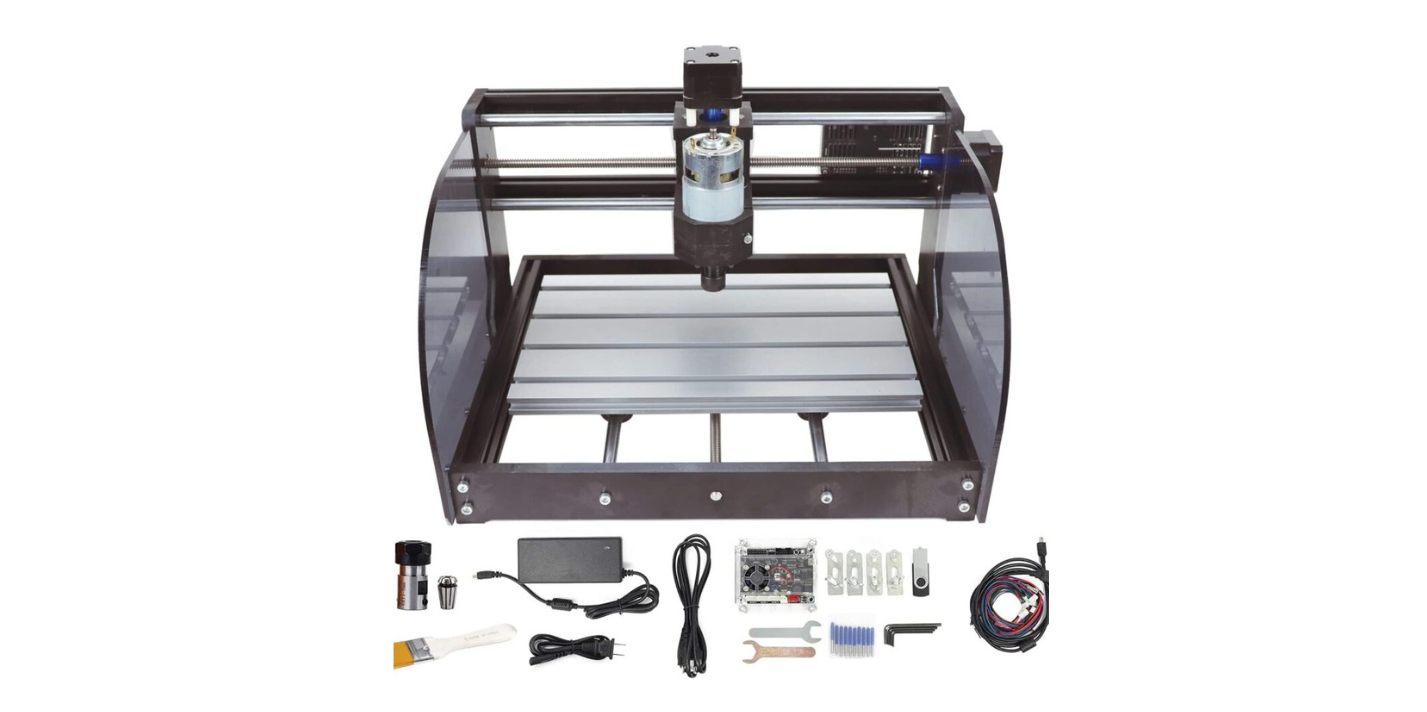
The package pairs that cross-platform software ecosystem with a genuine 5W+ optical output diode laser, a 200 x 300mm (near-A4) working area, 15,000 mm/min (9.8 inch/sec) maximum engraving speed, 0.0004 inch (0.01mm) precision, WiFi connectivity for wireless operation, and a Class 1 safety rating. Setup takes 6 screws and 90 seconds, with no belts to thread or tension.
This review contains affiliate links. If you buy through them, we may earn a commission, at no extra cost to you.
Who should buy: Beginners learning laser engraving fundamentals, Etsy sellers producing personalized gifts and small craft items, side hustlers running pop-up shops at fairs and markets, classrooms and makerspaces teaching laser basics, and tinkerers who want a clear upgrade path through the optional 1064nm IR module.
Who should skip: Anyone needing to cut thick hardwood quickly (look at 10W or 20W diode lasers), shops requiring large-bed engraving without tiling, buyers who need to engrave bare stainless steel or brass without the IR upgrade, and users requiring fully enclosed turnkey systems.
Laser Engraver, Carverall K15 Pro 5W Laser Engraving Machine for Beginners DIY High Accuracy 200x300mm (Near A4) Portable CNC Laser Cutter for Wood Coated Metal Acrylic Leather, 5000mW, Class 1
$159.99 In Stock
Quick Verdict: Carverall K15 Pro 5W Laser Engraver
The Carverall K15 Pro delivers what beginner laser buyers actually need: cross-platform free software, WiFi connectivity, fast 90-second setup with no belts, true 5W+ optical output, near-A4 working area, and a clear IR module upgrade path for bare metals. The 200 x 300mm work envelope handles personalized gifts, leather wallets, acrylic signs, wooden plaques, and Etsy-style craft items confidently. The Class 1 safety rating and included safety glasses make this suitable for home workshops and classrooms.
The trade-offs are honest: cutting thick hardwood is slow at 5W, bare metal engraving requires the optional 1064nm IR module purchase, ventilation is mandatory not optional, and the near-A4 bed limits large signs without tiling. Match the machine to its scope and the value math works clearly.
- Best for: Beginners, Etsy sellers, classrooms, side hustles, personalized gift makers
- Skip it if: Need fast thick-wood cutting, larger work areas, bare metal engraving, or enclosed turnkey systems
- Standout features: Cross-platform CutLabX app, WiFi connectivity, 6-screw 90-second setup, IR module upgrade path
- Main compromises: Slow on thick hardwood, IR module sold separately for bare metals, ventilation required
Carverall K15 Pro 5W Laser Engraver Specifications
| Brand | Carverall |
| Model | K15 PRO |
| Laser type | Diode laser (blue), genuine 5W+ optical output (5000mW) |
| Safety class | Class 1 (rated for safe home use) |
| Working area | 200 x 300mm (near A4 paper size) |
| Engraving speed | Up to 15,000 mm/min (9.8 inch/sec) |
| Precision | 0.0004 inch (0.01mm) |
| Cut capacity (wood) | Up to 0.24 inch (6mm) |
| Cut capacity (acrylic) | Up to 0.12 inch (3mm) |
| Compatible materials | 100+ surface types: wood, acrylic, coated metals, leather, paper, bamboo, fabric |
| Connectivity | WiFi, Bluetooth, USB cable |
| Software | CutLabX (Windows/Mac/Android/iOS), LightBurn, LaserGRBL |
| Setup | 6 screws, ~90 seconds, no belts to thread |
| Upgrade modules | 10W diode (sold separately), 1064nm IR for bare metals (sold separately) |
| Risers | 4 detachable risers for taller items |
| Reliability target | 10,000+ engineered operating hours |
| Color | 5W-Gray |
| Warranty | 1 Year Manufacturer |
| Power source | AC corded |
| Included accessories | Safety glasses, test materials, assembly tools |
Key Features Tested: Where the K15 Pro Earns Its Price
Cross-Platform CutLabX App with WiFi Connectivity
The free CutLabX app is the K15 Pro’s standout feature. It runs on Windows, Mac, Android, and iOS, which means design happens on whatever device is convenient: an iPad on the couch, a laptop at the desk, or a phone on the way to a craft fair. The app handles photo uploads, prompt-based design generation, SVG/PNG/JPG imports, scale adjustments, power and speed configuration, and live framing to verify position before cutting.
WiFi connectivity matters more than it sounds. Tethered USB connections fail when the cable strains or the laptop sleeps mid-job. Wireless operation removes those friction points and lets the laser sit in a ventilated area while design work happens elsewhere in the room. Bluetooth and USB cable connectivity remain available as backup options.
For advanced users, full LightBurn compatibility unlocks layers, offsets, vector tricks, photo dithering, and the professional workflow features that serious projects benefit from. LaserGRBL compatibility provides a free open-source alternative for users who don’t want LightBurn’s $60 license fee.
Genuine 5W+ Optical Output
The 5W rating refers to actual laser optical output (5000mW) hitting the material, not total electrical machine draw. This distinction matters because some competitors advertise machines as “20W” or “40W” when those numbers refer to wall power consumption rather than usable laser energy. The K15 Pro’s honest 5W+ specification means realistic capability for engraving on wood, leather, acrylic, coated metals, and 100+ surface types, plus clean cuts through 6mm wood and 3mm acrylic.
Designed to stay cool during longer sessions, the K15 Pro handles batch jobs that would force lower-cost lasers to thermal throttle. The 10,000+ hour engineered reliability target backs up the consistent-output design philosophy.
200 x 300mm Near-A4 Working Area
The 200 x 300mm working envelope hits a practical sweet spot. Smaller 6 inch x 6 inch lasers force tile-and-shift workflows for anything beyond coasters and small jewelry. Larger 16 inch x 16 inch machines dominate desk space and add cost without proportional benefit for most hobby and small-shop use cases. The near-A4 size accommodates the products that matter most for personalized gifts and Etsy sales:
- Notebook covers and journal panels
- Phone cases up to large-format models
- Leather wallet panels and minimalist cardholders
- Acrylic signs and LED edge-lit displays
- Wooden plaques and award pieces
- Pet tags, jewelry blanks, ornament sets
- Small business signage and packaging tags
Four detachable risers enable engraving on taller items like gift boxes and accessories without buying separate adapters. This thoughtful inclusion solves a common limitation of fixed-bed entry-level lasers.
6-Screw, 90-Second Setup
Setup speed is where many budget lasers fail. Competing machines often require belt threading, tensioning, axis squaring, and multi-page assembly procedures. The K15 Pro’s 6-screw assembly with no belts removes the friction that derails first-time users. The included safety glasses, test materials, and assembly tools mean buyers can move from unboxing to first engraving in under 30 minutes including software setup.
Class 1 Safety Rating
Class 1 is the safest laser classification under standard usage conditions. This rating doesn’t replace the included safety glasses or proper ventilation requirements, but it does mean the machine’s enclosure design and operation profile minimize laser exposure risk during normal use. For homes with pets, classrooms with students, and shared workshop spaces, Class 1 provides meaningful peace of mind.
Upgrade Path Through IR Module
The K15 Pro’s clearest long-term advantage is the upgrade path. Instead of replacing the entire machine when capability needs grow, buyers can install the optional 1064nm IR laser module (sold separately) to engrave bare stainless steel, aluminum keychains, brass, and other unmodified metals. This is the smarter halfway house between a 5W diode laser and a dedicated fiber laser machine.
Buyers who plan to grow into more aggressive metalwork or wood-cutting throughput can also opt for the 10W diode module upgrade, which shortens cut times and extends material capability within the same compact frame.
Performance by Material
| Material | Operation | Settings |
| 3mm basswood | Cut | 100% power, 300-500 mm/min, 2-3 passes |
| 6mm poplar | Cut | 100% power, 150-250 mm/min, 3-5 passes |
| 3mm cast acrylic | Cut | 95-100% power, 300-400 mm/min, 2-3 passes |
| Maple (engrave) | Engrave | 35-55% power, 3,000-5,000 mm/min, single pass |
| Vegetable-tanned leather | Engrave | 25-45% power, 3,500-6,000 mm/min, single pass |
| Anodized aluminum | Mark | 45-65% power, 3,000-7,000 mm/min, single pass |
| Photo on birch | Engrave | 18-35% power, 3,000-8,000 mm/min, dithering required |
| Bare stainless steel | Not supported (without IR upgrade) | Requires 1064nm IR module |
| PVC / unknown plastics | Never cut | Releases toxic chlorine gas |
Wood Engraving: Crisp and Consistent
Wood is where the K15 Pro performs above its price tier. Hardwoods like maple and cherry produce clean, dark marks with sharp edges and consistent fill. Small text stays legible down to 6-8pt, and detailed logos carry their finer lines without breaking up. Plywood quality varies by manufacturer, but masking with blue painter’s tape combined with calibrated settings delivers professional results.
Acrylic: Glossy Engraves and Clean Cuts
Cast acrylic produces frosty, sharp engravings that look like etched glass. For 3mm acrylic, the K15 Pro slices with smooth edges at sensible speeds, and the finish takes on a professional appearance suitable for retail products. Always use cast acrylic rather than extruded for engraving (the chemistry differs significantly), and never cut PVC or unknown plastics.
Leather: Deep Contrast Without Slop
Vegetable-tanned leather engraves beautifully, with a satisfying darkening that looks intentional and upscale. Power levels matter to avoid overburn, and a light leather conditioner applied after engraving keeps the material soft and prevents soot transfer. Wallets, belts, minimalist cardholders, and journal covers showcase the K15 Pro’s leather capability well.
Coated Metals: Excellent Permanence
Anodized aluminum, powder-coated steel, and similar coated metals mark with excellent permanence. Pet tags, dog tags, and aluminum keychains become viable product lines with the standard 5W diode module. For bare metals, the 1064nm IR upgrade unlocks stainless steel tumblers, raw aluminum, and brass.
Photo Engraving: Detail With Dithering
The 0.0004 inch (0.01mm) precision spec enables genuinely detailed photo engraving. Convert images to grayscale, apply dithering patterns to smooth gradients, and run a quick test strip on the actual material batch before committing to large pieces. Faces stay friendly, shadows stay rich, and the result looks intentional rather than blurry.
Setup and First Cuts
Realistic time from unboxing to first engraving: 30 minutes including software installation, faster for users with prior laser experience. The 6-screw, no-belt assembly is genuinely the easiest setup in the entry-level laser category.
Setup Sequence
- Unbox and inventory components against the included parts list
- Assemble the frame using 6 screws (90 seconds with the included tools)
- Install the laser module on the gantry
- Connect power and choose connectivity method: WiFi, Bluetooth, or USB
- Download the free CutLabX app on your preferred device
- Pair the machine via WiFi or Bluetooth, or connect USB
- Put on the included safety glasses
- Run a small test pattern on the included test materials
- Confirm focus using the module’s built-in tool or focus gauge
- Verify ventilation: a fan or fume extractor pointed at the cut area
- Run your first real project on a small piece of basswood
Recommended First Project
Engraved wooden coaster set with personalized monograms. Use 3mm basswood, a 60 degree V-bit, 35-45% power, 4,000 mm/min engraving speed. The combination exercises the laser, validates motion quality, produces a usable gift on day one, and teaches material settings before committing to higher-stakes projects.
Mandatory Safety Setup
- Wear the included safety glasses (or OD-rated 455nm laser glasses for additional users)
- Run ventilation: a small fan, fume extractor, or open window with airflow
- Never cut PVC or unknown plastics (releases toxic chlorine gas)
- Keep flammable materials clear of the work area
- Never leave the machine unattended during operation
- Have a fire extinguisher within arm’s reach
Software and Workflow
The K15 Pro’s software ecosystem covers every workflow tier:
- CutLabX (free): Cross-platform on Windows, Mac, Android, iOS. Handles photo upload, prompt-based design, SVG/PNG/JPG import, layer settings, live framing.
- LightBurn (paid, $60): Industry-standard professional laser software. Worth the investment for serious projects, batch operations, and photo dithering.
- LaserGRBL (free, open source): Solid free alternative to LightBurn for users who prefer open-source tools.
For most beginners and Etsy sellers, CutLabX covers the workflow without requiring additional software purchases. As skills grow, LightBurn becomes worth the upgrade for batch production and complex multi-layer projects.
Carverall K15 Pro 5W vs Alternatives
| Machine | Power | Work Area | Software | Best For |
|---|---|---|---|---|
| Carverall K15 Pro 5W | 5W (5,000mW) | 200 x 300mm | Free CutLabX + LightBurn + LaserGRBL | Beginners, Etsy sellers |
| Creality Falcon 5W | 5W (5,000mW) | 400 x 415mm | LightBurn, LaserGRBL | Larger work area priority |
| xTool F1 Lite | 2W diode + 1064nm IR | 115 x 115mm | XCS proprietary | Portable bare-metal engraving |
| WIZMAKER Wand MINI 2.5W | 2.5W | Handheld portable | Brand-specific app | Maximum portability |
| ACMER S1 3500mW | 3.5W | ~400 x 400mm | LightBurn, LaserGRBL | Lower-budget larger area |
Carverall K15 Pro vs Creality Falcon 5W
The Creality Falcon 5W offers a much larger 400 x 415mm work area at a similar 5W power level. The Carverall K15 Pro delivers a smaller bed but adds WiFi connectivity, the cross-platform CutLabX app, faster 90-second setup, and the IR module upgrade path. Pick the Creality Falcon if work area size matters most; pick the Carverall K15 Pro if WiFi, beginner-friendly software, and the bare-metal upgrade path matter more. For a deeper comparison, our Creality Falcon 5W review covers the full picture.
Carverall K15 Pro vs xTool F1 Lite
The xTool F1 Lite combines a 2W diode laser with a 1064nm IR laser in one machine, delivering bare-metal engraving without separate module purchases. The trade-off is a much smaller 115 x 115mm work area. The Carverall K15 Pro’s 5W diode handles larger projects with stronger cutting capability, with bare-metal engraving available through the optional IR module. Our xTool F1 Lite review details where each machine wins.
Carverall K15 Pro vs ACMER S1
The ACMER S1 offers a similar work area at a lower price point with 3.5W power. The Carverall K15 Pro delivers a meaningful power upgrade plus WiFi connectivity, cross-platform free software, and the IR module upgrade path. For buyers who plan to grow into bare-metal engraving or want device flexibility, the K15 Pro’s premium is justified.
Drawbacks and Considerations
| Consideration | Detail |
|---|---|
| Slow on thick hardwood cutting | 5W power means 6mm hardwood requires 3-5 passes. Higher-power 10W or 20W lasers cut faster but cost more. |
| Bare metal requires IR module | Stainless steel, brass, raw aluminum need the 1064nm IR upgrade (sold separately). Coated metals work with the standard 5W diode. |
| Ventilation mandatory | Engraving and cutting produce smoke and fumes. A fan, fume extractor, or open window is non-negotiable, not optional. |
| Bed size limits large projects | 200 x 300mm is sufficient for most products but requires tiling for large signs. The Creality Falcon 5W offers 400 x 415mm for similar cost. |
| Mobile app editing is basic | Advanced layer work and complex vector edits perform better on desktop CutLabX or LightBurn rather than phone or tablet. |
| Lens cleaning required | A dirty lens turns crisp engravings fuzzy and shortens diode life. Plan regular maintenance with proper lens wipes. |
| No tooling beyond test materials | Plan to budget for production-quantity blanks: leather, basswood, acrylic, anodized tags. |
The Accessory Kit
| Item | Quantity |
|---|---|
| Carverall K15 Pro 5W laser engraver | 1 |
| 5W diode laser module | 1 |
| Detachable risers (for taller items) | 4 |
| Safety glasses | 1 |
| Test materials sample pack | 1 |
| Assembly tools | 1 set |
| Power cable | 1 |
| USB cable | 1 |
| Quick start guide | 1 |
Maintenance for Long-Term Reliability
- After each session: Wipe the lens with a proper lens wipe, brush dust from rails and gantry
- Weekly: Verify focus calibration, check for accumulated soot on the laser module
- Monthly: Inspect cable routing for wear, verify all 6 frame screws remain tight
- Per project: Confirm focus before each new material type
- Material safety: Never cut PVC or unknown plastics, always test new materials in small areas first
- Long-term: Plan for eventual diode module replacement after thousands of operating hours
Who This Laser Is For
Beginners learning laser engraving fundamentals: The 6-screw 90-second setup, included safety glasses and test materials, free cross-platform CutLabX app, and Class 1 safety rating remove the friction that derails most first-time laser purchases. The learning curve is progressive rather than overwhelming.
Etsy sellers and side hustle makers: The 200 x 300mm work area accommodates the personalized gift size range that dominates handmade marketplaces. The 5W power produces clean engraving on wood, leather, acrylic, and coated metals, the materials that drive the highest-margin products on Etsy.
Pop-up shop and craft fair vendors: The compact frame, fast WiFi-enabled setup, and live personalization capability turn the K15 Pro into a customer magnet at fairs and markets. Personalized engraving in real-time creates an experiential element that justifies premium pricing.
Educators and makerspaces: Class 1 safety, near-A4 work area, cross-platform student device support, and beginner-friendly software make this suitable for classroom deployment. Students bring their own designs on phones, tablets, or laptops without device compatibility friction.
Tinkerers planning gradual upgrades: The 10W diode module and 1064nm IR module upgrade paths provide a clear expansion route. Skills and product lines can grow without machine replacement.
Final Verdict: Should You Buy the Carverall K15 Pro 5W Laser Engraver?
Not the largest work area in its price class. Not the highest power output. Not the brand name competitors recognize first. But the most beginner-friendly laser engraver with the smartest upgrade path at this price point.
The Carverall K15 Pro delivers what beginner laser buyers actually need: free CutLabX software running on Windows, Mac, Android, and iOS, WiFi connectivity for wireless operation, full LightBurn and LaserGRBL compatibility for advanced users, true 5W+ optical output with 0.0004 inch precision, near-A4 work area covering most personalized gift products, 6-screw 90-second setup with no belts, Class 1 safety rating, and the 1064nm IR module upgrade path for bare-metal engraving when capability needs grow.
Buy the Carverall K15 Pro 5W if: You’re new to laser engraving and want a beginner-friendly platform, you sell personalized gifts on Etsy or at fairs, you teach in a classroom or makerspace setting, you value WiFi connectivity and cross-platform device flexibility, or you want a clear upgrade path through IR or 10W diode modules.
Skip the Carverall K15 Pro 5W if: You need to cut thick hardwood quickly (look at 10W or 20W diode lasers), you require a larger work envelope without tiling (the Creality Falcon 5W offers 400 x 415mm), you need bare-metal engraving immediately without buying additional modules (the xTool F1 Lite includes both diode and IR lasers), or you want a fully enclosed turnkey system.
This review contains affiliate links. If you buy through them, we may earn a commission, at no extra cost to you.
For broader context on choosing the right laser engraver, browse our Portable Laser Engravers review library covering options across every price tier, or explore the Fabrication Intelligence resource library for laser safety and workflow fundamentals.
Frequently Asked Questions
Can the Carverall K15 Pro engrave bare stainless steel?
Not with the standard 5W diode module. The K15 Pro engraves coated and anodized metals (powder-coated steel, anodized aluminum) excellently with the included module. For bare stainless steel, raw aluminum, brass, and titanium, install the optional 1064nm IR laser module (sold separately). This upgrade path costs significantly less than buying a separate fiber laser machine.
What software works with the K15 Pro?
The free CutLabX app runs on Windows, Mac, Android, and iOS, providing photo upload, prompt-based design, SVG/PNG/JPG import, and live framing. For advanced workflows, LightBurn ($60 license) is the industry standard with layer support, photo dithering, and batch production features. LaserGRBL is a free open-source alternative. The machine connects via WiFi, Bluetooth, or USB cable.
Is 5W enough power for cutting wood?
Yes, for the materials this laser targets. The K15 Pro cuts up to 6mm wood (basswood, poplar, plywood) and 3mm acrylic in multiple passes. Hardwoods cut more slowly than softwoods and require additional passes. For frequent thick-hardwood cutting, the optional 10W diode module shortens cut times significantly. For production-rate hardwood cutting, 20W diode lasers or CO2 machines are better suited.
How long does setup take?
Realistic time from unboxing to first engraving: 30 minutes including software installation and safety setup. The 6-screw, no-belt assembly takes 90 seconds. The remaining time covers software download, WiFi pairing, focus calibration, and a test cut on the included sample materials. The included safety glasses, test materials, and assembly tools eliminate trips to the hardware store.
Is it safe to use indoors?
Yes, with proper safety setup. The Class 1 rating means the machine’s enclosure design and operation profile minimize laser exposure risk during normal use. The included safety glasses and assembly tools provide what’s needed for safe operation. Ventilation is mandatory: a fan, fume extractor, or open window with airflow handles the smoke and fumes from engraving and cutting. Never cut PVC or unknown plastics. Never leave the machine unattended.
What materials should I avoid cutting?
Never cut PVC, vinyl, ABS plastics, unknown plastics, fiberglass, or chlorinated materials. PVC releases toxic chlorine gas when cut, which damages your lungs and the laser machine. Always verify material safety before cutting. Bamboo, leather, basswood, plywood, MDF, cast acrylic, paper, cardstock, and coated metals are all safe with proper ventilation.
Can I upgrade the laser later?
Yes. Two upgrade paths exist: the 10W diode module shortens cut times and extends material capability for users who want more cutting throughput. The 1064nm IR laser module unlocks bare-metal engraving (stainless steel, brass, raw aluminum) without buying a separate fiber laser machine. Both modules install in the same chassis, preserving your investment in the base machine.
Does the WiFi feature work reliably?
WiFi connectivity enables wireless file transfer and operation from any device on the network. Bluetooth provides shorter-range wireless backup. USB cable connection remains available for users who prefer tethered operation. The cross-platform CutLabX app maintains the connection method that works best for each user’s setup.
Is the Carverall K15 Pro worth buying for beginners?
For the right buyer, absolutely. The combination of free cross-platform software, WiFi connectivity, fast 90-second setup, true 5W+ optical output, near-A4 work area, Class 1 safety rating, included safety accessories, IR module upgrade path, and 10,000+ hour reliability target delivers genuine value above no-name beginner lasers. If you’re new to laser engraving and want a platform that won’t dead-end your skills as you grow, the K15 Pro earns its place.
Key Takeaways
- Free CutLabX app runs on Windows, Mac, Android, and iOS, with full LightBurn and LaserGRBL compatibility for advanced users
- WiFi connectivity, Bluetooth, and USB cable connection options provide flexibility across home and shared workshop setups
- Genuine 5W+ optical output (5000mW) with 0.0004 inch (0.01mm) precision and 15,000 mm/min engraving speed
- 200 x 300mm near-A4 work area handles personalized gifts, leather wallets, acrylic signs, and Etsy-style products
- Cuts up to 6mm wood and 3mm acrylic, engraves 100+ surface types including wood, leather, coated metals
- 6-screw 90-second setup with no belts, includes safety glasses, test materials, and assembly tools
- Class 1 safety rating suitable for home workshops, classrooms, and makerspaces
- Clear upgrade path: 10W diode module for faster cutting, 1064nm IR module for bare-metal engraving
- Engineered for 10,000+ operating hours with 1-year manufacturer warranty
- Plan to budget for ventilation (fume extractor or fan), production blanks, and optional LightBurn license
Disclosure: As an Amazon Associate, I earn from qualifying purchases.