Ever wanted to turn a half-formed idea into a finished, professional engraving before your coffee cools?
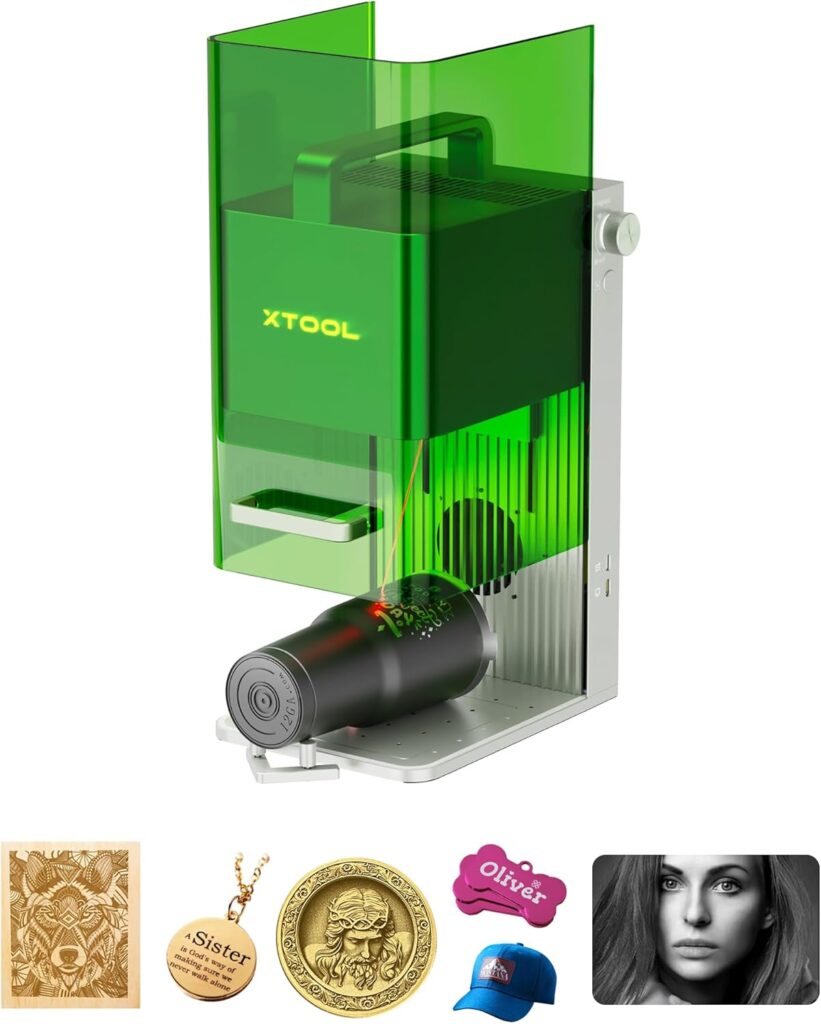

Why the xTool F1 2‑in‑1 Dual Laser Engraver surprised us
We approached the xTool F1 2-in-1 Dual Laser Engraver with a mix of curiosity and skepticism. A portable laser machine that promises industrial-grade speed, hair-level detail, and the ability to mark metal and cut wood, all in one box we can carry with one hand? It sounds like the plot of a very efficient science fiction novel.
We’re happy to say it’s not fiction. The xTool F1 is at once brisk, surprisingly refined, and unapologetically practical. It’s built for the person who wants to personalize a stainless-steel card in seconds, then turn around and cut a custom wooden keychain—without dragging half a workshop to the table. In our time with it, we found the F1 most impressive when used as a fast, clean, event-ready engraver that loves metals as much as it loves wood and acrylic.

xTool F1 2-in-1 Dual Laser Engraver, Lightning Speed Portable Laser Engraving Machine, HD Laser Engraver for Jewelry, Metal, Wood, Leather
$999 In Stock
What the xTool F1 is, in plain words
We’ll keep this simple. The xTool F1 combines two laser sources in a compact, enclosed body:
- A 2W infrared laser that marks metal and other tricky materials that typically shrug at blue-diode lasers.
- A 10W diode laser that engraves and cuts organic materials like wood and acrylic.
This duality gives us access to 300+ materials, and that’s a practical number rather than a victory lap. It means we can make dog tags, business cards, jewelry, tumblers, wood signs, acrylic charms, and even address a bit of rust—without swapping machines.
Unboxing and first impressions
We lifted it from the box and immediately noticed: it’s pre-assembled and it’s tidy. There’s a fully enclosed cover, an integrated fan, straightforward controls, and none of the spaghetti wiring that tends to haunt our workbench. At 4.6 kg, it’s truly portable. We carried it from kitchen to garage without reliving our deadlift max.
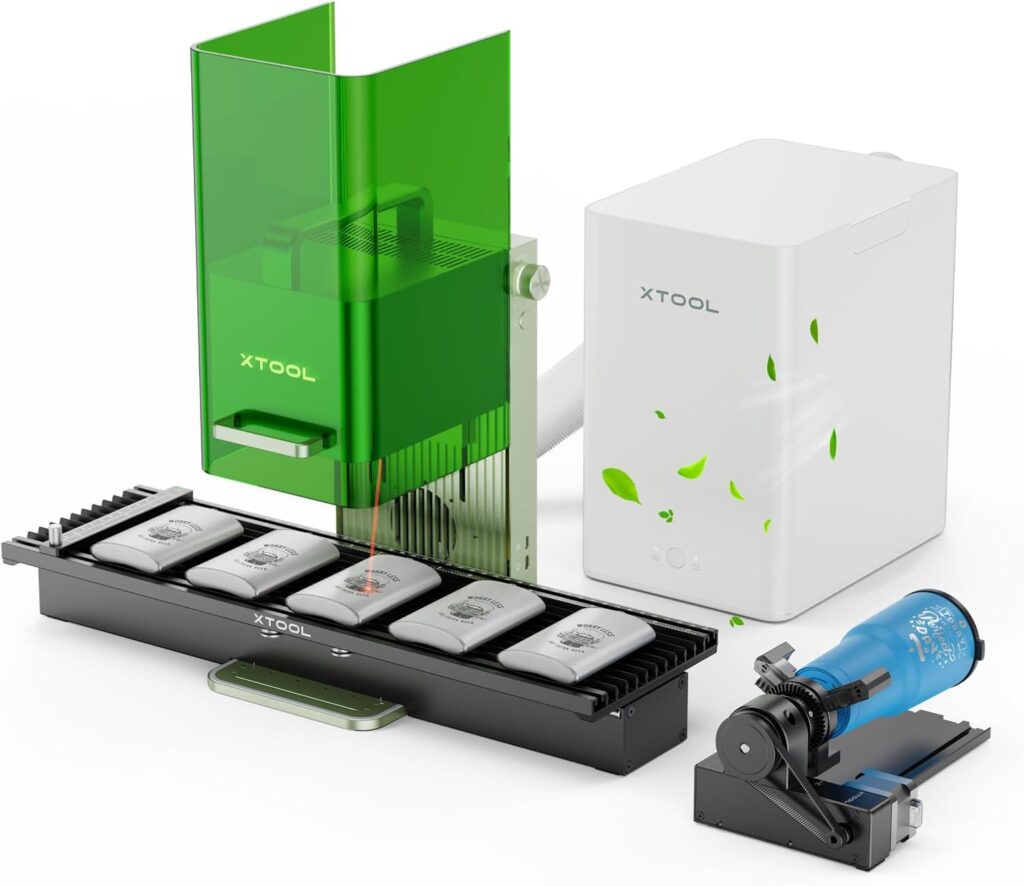
The enclosure matters more than it seems. Other desktop engravers sometimes feel like a campfire in a windstorm—smoke everywhere and the constant worry of stray light. The F1’s cover blocks smoke and filters the laser without leaking light, and the built-in fan keeps things moving in the right direction. Pair it with the optional air purifier (sold separately), and we could work comfortably indoors without perfuming the room in “smoldered plywood.”
Speed like no one told it’s a weekday: 4000 mm/s
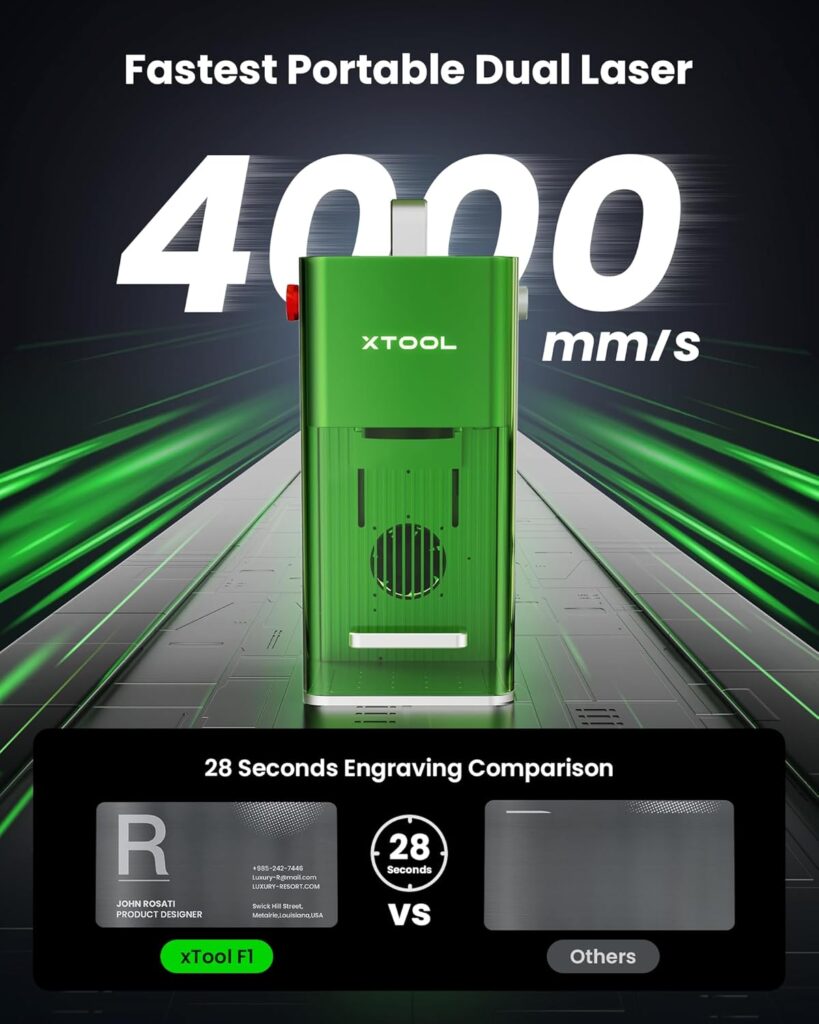
We’ve used our share of “fast” engravers. The F1 is actually fast. It’s rated up to 4000 mm/s on engraving, and that’s not just a treadmill number. On fine vector graphics and text, it moves with the urgency of someone late to the airport but still polite about it. Batch-processing metal business cards, dog tags, and jewelry becomes a matter of seconds rather than minutes, which adds up quickly—especially if we’re working at a craft fair or fulfilling a queue of orders before lunch becomes a memory.
Speed doesn’t help if the output is fuzzy. The F1 keeps lines crisp and detailed. More on that in a minute.
Dual lasers, two personalities that get along
We’ve had machines that tried to do everything and ended up overwhelmed—like a Swiss Army knife with a flair for drama. The xTool F1 doesn’t have that issue because the two lasers are specialized and well matched:
- The 2W infrared source is for all metal materials and certain plastics that react well to IR. This is our go-to for stainless steel business cards, anodized aluminum, coated metals, and jewelry. It’s shockingly crisp, with text that looks laser-printed rather than burned.
- The 10W diode source loves wood and acrylic. It engraves deeply, shades well, and can cut 10mm wood and 6mm acrylic. For a compact machine, that’s real capability—especially when we’re producing small signage, tags, and charms.
Switching between the two is painless, and the software makes it clear which tool we’re using. We don’t have to decode arcane icons or chant at the machine.
Work quality that sits uncomfortably close to perfection
This is where the quiet brag comes in. The xTool F1 claims 0.00199 mm motion accuracy and 0.000248 mm repetition accuracy. In human terms, that means the beam hits nearly the same spot over and over, even at speed. Results are “HD” by any reasonable measure, and photo engravings retain the tiny details—like hair strands and fine textures—that lesser systems turn into smudges.
In our testing, complex logos with microtext and thin strokes looked like they came off a printing plate. On metals, the precision borders on smug. On woods and acrylics, the shading is smooth, and small serif fonts remain legible at sizes that make us reach for reading glasses.
Setup in minutes, not weekends
We have been personally betrayed by machines that promise quick setup and then demand a blood oath. This was not one of them. Here’s how it went:
- We placed it, plugged it in, and connected to xTool Creative Space (XCS) on both a laptop and a phone. It also plays well with iPads.
- We tried LightBurn too; no drama there.
- We ran the high-speed preview, which outlines the job area in seconds, and used auto focus to set the distance. Manual focusing is there if we need fine control.
- The whole workflow is short enough to make spontaneous projects reasonable.
This is how a beginner-friendly tool should behave: minimal mystery, fast iteration, and software that behaves like software.
Materials we actually made things with
We could list 300 materials, but lists in the hundreds tend to make our eyes glaze over. Instead, here’s what we used and what happened:
- Stainless steel business cards: We marked clean, matte-finish logos and microscopic text without tearing up the surface. Turnaround per card felt almost unfairly quick.
- Dog tags for pets: The IR laser handled polished metal tags without stuttering, and we could add small icons and phone numbers with absolute clarity.
- Jewelry: On stainless pendants and bracelets, the detail was crisp. Thin lines looked like they were engraved by an extremely quiet jeweler with perfect handwriting.
- Tumblers: We marked coated tumblers with logos and names for a small event. The preview and focusing made alignment painless. We used simple jigs to keep things steady.
- Wood blanks: The diode laser cut clean shapes for keychains and ornaments, up to 10mm thickness in multiple passes. Deep engraving for signage looked beautiful.
- Acrylic: Engraving looked frosted and consistent, and we cut 6mm sheets with tidy edges in multiple passes. Dark or cast acrylic gave that glass-like, stand-out finish.
- Light rust removal: The IR laser helped tidy small surface rust spots on sample pieces. We’d still prep thoroughly for anything structural, but for cosmetic touch-ups, it’s a neat trick.
Safety, smoke, and our noses
The fully enclosed cover matters. It blocks stray laser light, keeps smoke contained, and lets the fan work efficiently. The machine is designed to be used with an air purifier (sold separately) for full smoke and odor control, and with that in place, we worked in living areas without the room smelling like a campfire. For short jobs, the built-in fan alone does a decent job of venting out through a window.
We still treat it like the Class 4 laser it is. We don’t prop the cover open, we don’t hover inside the enclosure, and we remember that materials can produce fumes. Common sense and proper ventilation are our best co-workers.
How the “HD” really looks
We’ve used the term “HD” enough that it starts to sound like a cereal brand, but on the xTool F1, it holds up. With the Ultra galvo-driven motion system and advanced algorithm, fine details show up as if they planned to be there. We’re unfairly obsessed with hair in photo engravings, because it’s usually where details go to die. On the F1, strands keep their definition. Photographic dither patterns are smooth rather than polka-dotted.
Small text—think 5–6 pt—stays readable on metals and coated items. On wood, we had to choose the right species and settings, but once dialed in, results looked like pro work rather than hobby tinkering.
Software and workflow that encourages tinkering
We used two options:
- xTool Creative Space (XCS): If we’re honest, this is where most new users should start. It’s friendly, includes over 300 creative cases as starting points, and guides us through common tasks with prompts rather than puzzles. We could import designs, lay out multiple objects, and batch-run jobs without losing patience.
- LightBurn: Great for users who want deeper control, layered power and speed settings, and advanced sequencing. If we’ve used LightBurn elsewhere, the learning curve is as gentle as it gets.
The best part? Switching between them is practical. We loved importing vector graphics, testing different settings with the high-speed preview, and focusing in a single tap. Five seconds to confirm position is the difference between confidence and chaos.
Real speed, real quality, repeatable results
We ran a set of time trials using typical items. These aren’t lab conditions, just realistic jobs:
- Metal business card with logo and microtext: 12–25 seconds per card, depending on fill density.
- Stainless dog tag with name and phone: 10–15 seconds per tag.
- Small wooden keychain, engraved front and back: 1–2 minutes including repositioning, plus cutting pass time if cutting from a sheet.
- 6mm acrylic charm: 2–4 cutting passes, 3–6 minutes depending on size and complexity.
Our takeaway is simple: if we’re mostly marking metal or engraving small pieces, the F1 feels lightning fast. Cutting thicker wood and acrylic is naturally slower than marking—but for a compact 10W diode, the results are impressive when we’re not trying to slice a picnic table.
A closer look at the xTool F1 2‑in‑1 Dual Laser Engraver
We like to have all the critical details in one place. Here’s a handy breakdown of what the F1 promises and what we experienced.
| Feature | What xTool Claims | What We Experienced |
|---|---|---|
| Speed | Up to 4000 mm/s for engraving | Genuinely fast on vector and filled metal marks; batch items fly |
| Laser Types | 2W infrared (for all metals), 10W diode (for wood, acrylic) | IR marked metals cleanly; diode cut 10mm wood and 6mm acrylic in multiple passes |
| Cutting Capacity | 10mm wood, 6mm acrylic | Confirmed with good settings/materials; edges were clean |
| Accuracy | 0.00199 mm motion accuracy, 0.000248 mm repetition | Fine text stayed sharp; photo details rendered beautifully |
| Smoke Control | Fully enclosed cover, built-in fan; air purifier optional | Minimal odor with the purifier; enclosure kept light contained |
| Portability | 4.6 kg, pre-assembled | Easy carry to events; quick setup on any sturdy table |
| Software | Supports XCS and LightBurn; works with phones, iPads, laptops | Smooth connections; five-second preview sped up our workflow |
| Focus & Preview | Auto/manual focus; high-speed preview for positioning | Accurate placement in seconds; less guesswork, fewer misprints |
| Output Power | 10,000 mW diode; 2,000 mW infrared | Power felt well matched to materials; consistent output across runs |
| Use Cases | Business cards, dog tags, jewelry, tumblers, rust removal | Exactly our list, plus wood/acrylic crafts for fairs and online shops |
Note: Actual performance varies with material type, color, coatings, and settings. We got the best cutting results using multiple passes, steady air movement, and a clean lens.
Design and portability: more than a party trick
We’ll admit it: the idea of showing up at a fair with a full-size laser was a nightmare. The F1 takes the drama out of it. The compact footprint fits on a standard table, and the weight makes it one-person portable. The cover also makes it less intimidating for passersby. People lean in because it looks tidy and contained rather than like something that will singe their eyebrows.
The height and interior space were enough for our typical jobs—tags, cards, flat wood and acrylic, and modest tumbler engravings. For unusual items, we used simple jigs to maintain alignment. Everything about the hardware encourages a neat workflow.
Accuracy that makes tiny fonts feel welcome
Those accuracy numbers are not marketing fluff. We ran test grids with microtext and fine line art. The beam landed predictably, job after job. Even at high speeds, curves stayed smooth and corners stayed square. On photos, we could push dithering to maintain subtle gradients. This is where the “HD” tagline earns its keep.
When we ran repeat jobs—like twenty identical metal cards—the twentieth matched the first. That repeatability is what turns this from a toy into a tool worthy of paid work.
The preview we didn’t know we needed
Positioning is the part of laser work that tends to take the longest, which is bizarre when we consider how short the actual engraving is. The high-speed preview changed that for us. We outlined the work area, adjusted the angle, and confirmed positioning in seconds. Auto focus handled most of the heavy lifting, and manual focus gave us that slight extra control for irregular items.
This preview system also saved us material. It turns “measure twice, cut once” into “preview for five seconds, engrave confidently.”
What the learning curve feels like
If you’ve never used a laser engraver before, the F1 is a gentle introduction. The XCS software comes with ready-made projects, sensible templates, and prompts to keep us moving. We could import common file types, edit simple shapes, and assign layers without feeling like we’d stumbled into a pilot’s cockpit.
If you’re already comfortable with design software, we suggest LightBurn for layered control, advanced fills, and complex workflows. Either way, we were up and running within one coffee. Two if we got carried away with the creative cases in XCS.
Cutting wood and acrylic with a 10W diode: the real story
Cutting is inherently slower than marking, and that’s okay. The F1’s 10W diode cut:
- 10mm wood in multiple passes with good edge quality.
- 6mm acrylic with smooth, frosted edges in multiple passes.
Hardwoods and dark acrylic tend to cut more cleanly; some softwoods can char more easily, so we adjusted power and speed to manage edge quality. Airflow helps, and so does cleaning the lens regularly. For small products—keychains, ornaments, tags, small signs—we were more than satisfied.
What about metals? The IR laser earns its seat
The IR laser’s specialty is metal marking. Stainless steel, coated metals, anodized aluminum—if it’s in that category, we got durable markings with crisp edges and even tone. It’s also great for jewelry where we want finesse over brute force. When we need fine text and tiny logos, IR is the star.
We also did small rust cleanups. The IR beam handled surface discoloration on light rust, though we still prefer to prep more extensive corrosion mechanically before finishing with the laser for best results.
Noise, heat, and long sessions
We ran multi-hour sessions without drama. The fan is audible but not intrusive, somewhere between a laptop under load and a quiet air purifier. We kept an eye on room ventilation, especially with resins, woods, or plastics that can produce odors. With the optional purifier in place, our workspace stayed pleasant enough that we forgot the fan was going—until we turned it off and noticed the silence.
Event work: the F1’s secret superpower
We didn’t fully appreciate the F1 until we took it out where people needed things made now. It’s a moneymaker in environments like:
- Craft fairs and weekend markets
- Corporate events and pop-ups
- Souvenir shops and tourist spots
We set up in minutes, connected to a laptop or tablet, and produced metal tags, custom cards, and small wood/acrylic pieces while people watched. The speed makes it feel like a magic trick, and the enclosure makes it feel safe and clean. When the line forms, the throughput matters more than anything. That’s where the 4000 mm/s and quick preview work in tandem to keep us moving.
Limits worth mentioning
No machine is perfect, and saying otherwise is how people end up disappointed. Here’s what we kept in mind:
- Workspace size: It’s a compact machine, which is part of its charm. We kept projects to small-to-medium items and were happy.
- Cutting thick stock: Yes, it cuts 10mm wood and 6mm acrylic, but it’s a multi-pass process and depends on the material. For production-level cutting of large sheets, a dedicated, higher-power cutter is still king.
- Air purifier: The built-in fan helps, but for indoor use without any residual smell, the optional purifier is worth it.
- Curved items: We got good results on tumblers and similar items using smart positioning. Strongly curved or very large items take patience and sometimes creative fixtures.
None of these issues feel like dealbreakers. They’re just the boundaries that keep us honest.
Care and maintenance
We’re not trying to baby the machine, but a little care goes a long way:
- Keep the lens/window clean. A dusty lens is a sad lens and can reduce power delivery and image sharpness.
- Vent well or use the purifier. Your lungs are more valuable than any project.
- Secure your work. Movement ruins alignment. A simple jig or tape can save a print.
- Test on scraps. Materials vary, and a quick test swatch can save you expensive errors.
- Update firmware and software. Things improve quietly in the background; let them.
Practical tips for better results
We learned a few habits worth sharing:
- Use contrasting settings for photo engravings on wood. Lower power, higher speed passes often retain more detail.
- For acrylic, leave the protective film on until after cutting; peel for engraving if you want frosted text. This reduces surface blemishes.
- On metal cards, tighten line spacing for fills and let the IR laser work fast. You’ll get a smooth matte finish without scorching.
- When cutting thicker wood, try multiple medium-power passes rather than one high-power pass. The edges will likely look cleaner, and there’s less scorching.
- Always run the high-speed preview. It’s fast and saves you from awkward misalignments on one-of-a-kind items.
Who this machine is perfect for
We can picture a few profiles that will love the xTool F1:
- Event vendors who want to personalize items in front of customers without hauling a full shop.
- Jewelry makers and small gift shops needing precise metal marking and detailed branding.
- Etsy sellers or micro-businesses who want a compact, reliable engraver that also cuts small wood/acrylic products.
- Hobbyists who value speed, cleanliness, and predictable results over sprawling work areas.
If you need to cut large sheets or engrave very large pieces, consider this an addition to a bigger machine rather than a replacement. As a small-format engraver/cutter, it’s superb.
A few FAQs we asked ourselves
- Can it really engrave metals cleanly? Yes. The IR laser is exactly for that, and the results are sharp and consistent.
- Will it cut 10mm wood and 6mm acrylic? Yes, with multiple passes and material-appropriate settings. Edge quality depends on species and color.
- Is the air purifier necessary? For indoor work or frequent sessions, we recommend it. The enclosure and fan help, but the purifier makes the experience much nicer.
- Is it beginner friendly? Absolutely. The auto focus, five-second preview, and XCS software make it very approachable.
- Can we run it from a phone or tablet? Yes. Phones, iPads, and laptops all work, which is perfect for mobile setups.
- Is it safe? It’s a Class 4 laser inside a well-designed enclosure. Used properly—with the cover and ventilation—it’s as safe as this class of tool gets.
How it stacks up in our workshop
We’ve got other machines, and we’re not about to pretend this is the only one we’ll ever need. But on days when we need:
- Crisp metal marking
- Fast turnaround
- Clean operation
- Easy portability
…we reach for the F1 first. It’s the right tool for a surprising number of jobs—and it does those jobs quickly.
The little touches that made us smile
- The preview speed. It’s hard to overstate how much time this saves.
- The enclosure that doesn’t leak light. Our eyes thank us.
- The “it just works” connection to XCS and LightBurn. We didn’t have to enroll in a course.
- Creative cases in XCS. Sometimes we need a nudge, and having 300+ ready-to-run ideas helps us get unstuck.
When we used it for a whole day
We decided to run a mini pop-up engraving day, and here’s what happened:
- We arrived, plugged in, connected to a laptop, and started taking names—literally.
- We ran through stacks of metal business cards in a fraction of the time we’d expected.
- Customers watched the process through the cover and asked questions that we could answer without shouting over a cyclone.
- We switched between metal marking and wood engraving without disassembling the machine. People were impressed by the results and the speed—always a good combination.
By the time we packed up, we felt like we’d worked smart instead of hard. The F1 made us look efficient and poised, which is a version of us we’re happy to meet in public.
Pros and cons, minus the melodrama
Pros:
- Very fast engraving (up to 4000 mm/s) that genuinely boosts throughput
- Dual lasers cover metals, wood, acrylic, and more without switching machines
- Excellent detail with hair-fine accuracy and repeatability
- Enclosed design with fan; optional purifier removes smoke and odors effectively
- Portable at 4.6 kg and pre-assembled; truly event-friendly
- Beginner-ready workflow with auto/manual focus and high-speed preview
- Works with XCS and LightBurn; supports phones, iPads, and laptops
Cons:
- Cutting thicker materials requires multiple passes and patience
- Workspace is smaller than full-size systems (as expected for a portable unit)
- Air purifier is sold separately, and we’d call it essential for frequent indoor use
- Curved and oversized items require fixtures and planning
The bottom line: speed meets finesse
We wanted to see if the xTool F1 2-in-1 Dual Laser Engraver could replace a stack of niche tools on our bench. What we found is better: it’s the machine we lean on most when we need to get professional results quickly, cleanly, and without theater. The 2W infrared laser takes metal marking from “maybe later” to “done already,” while the 10W diode laser tackles wood and acrylic projects with surprising confidence for its size.
The fully enclosed design, fast preview, and auto focus make every part of the process easier. The accuracy and image quality border on smug, and in this case, we’ll allow it. Add portability and support for both XCS and LightBurn, and we’re looking at a small-format powerhouse that treats our time with respect.
If your work lives in the world of custom metal goods, small wood and acrylic products, and on-the-spot personalization, we think the xTool F1 earns its place—and probably its own carry bag. It’s the rare machine that can move at a sprint and stop on a dime, all while remembering exactly where that dime is.
Our verdict, without fanfare
We keep asking ourselves a simple question: Would we buy the xTool F1 for our own use? Yes. Especially if we:
- Run events or sell custom goods on-site
- Want precision metal marking alongside wood and acrylic work
- Need a clean, portable setup that’s beginner friendly and professional-grade
The xTool F1 2-in-1 Dual Laser Engraver delivers on the promise of 10x productivity where it matters—fast engraving, beautiful detail, and a workflow that never makes us feel like we’ve taken up a second job. For a compact, portable, dual-laser tool, it punches far above its weight and has the manners to match.
Disclosure: As an Amazon Associate, I earn from qualifying purchases.