Have you ever wanted to put our mark on something—keys, wallets, coasters, maybe the occasional ceramic mug—without turning our living room into a scene from a science fiction cautionary tale?
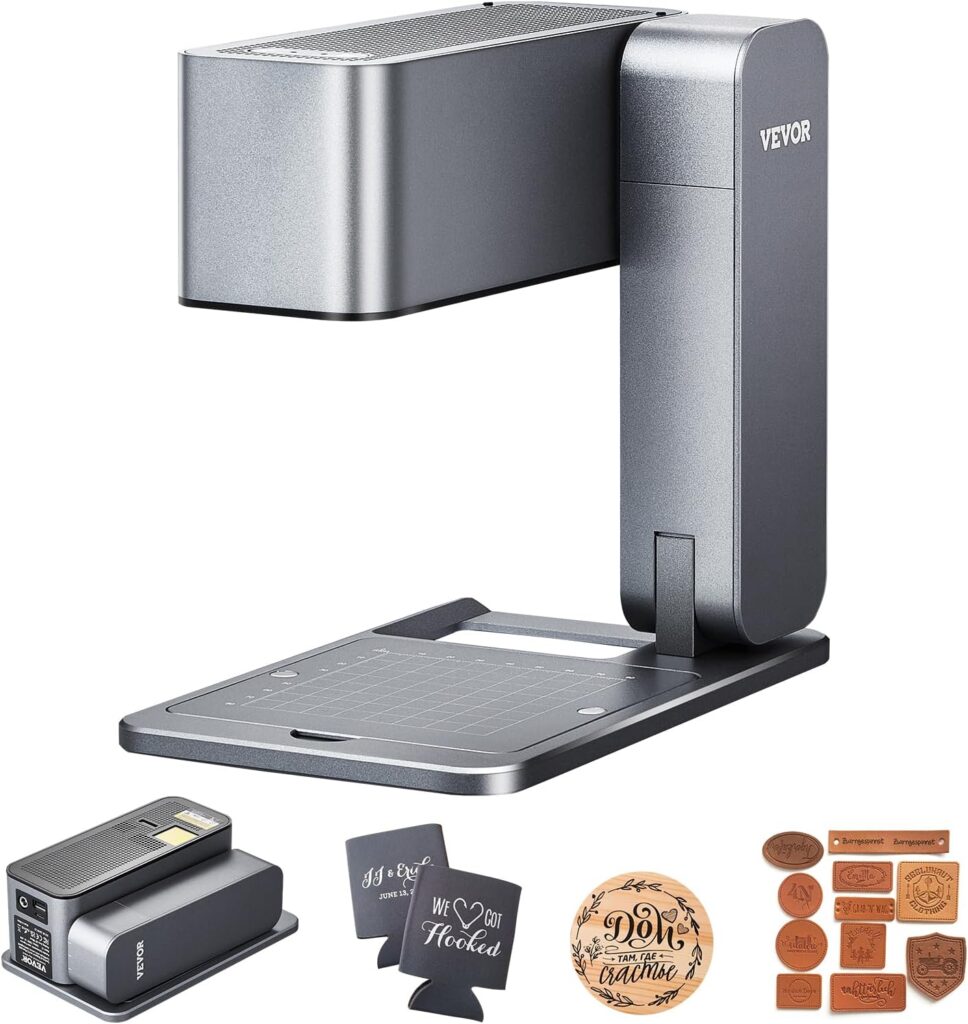

Why We Picked Up the VEVOR Portable Laser Engraver
We reached for the VEVOR Portable Laser Engraver because we like small machines that punch above their weight. It promises 36,000 mm/min movement speed, a compact folding design, and a one-click autofocus that sounds like a magic trick we can repeat without reading a manual each time. The engraving area is 3.14 x 3.14 in (80 x 80 mm), which won’t cover a dining table but easily claims coasters, phone cases, and that wooden spoon we should never have tried to personalize with a Sharpie.
We’re also fond of tools that don’t force us into one ecosystem. This one plays with Android, iOS, Windows, and Mac, and eats a buffet of file formats—JPEG, BMP, GIF, PNG, JPG, PLT, DXF, HPGL—without complaining. That alone earns it a spot in our workshop beside the coffee mugs and the deeply suspicious scrap of leather we insist we’ll use someday.
The Quick Version
If you want the gist before the anecdotes, here it is: it’s a 5W blue diode class 4 laser engraver with a tiny spot size (<0.5 mm), decent speed, simple autofocus, and a fold-up footprint that lets us stash it in drawer. it’s great for wood, leather, cardboard, coated metals, certain stones ceramics. can mark on some glasses metals (especially or with pretreatment), but this isn’t deep-cutting metal beast full-bed co2 machine. confident, portable engraver personalization craft-level work.< />>

VEVOR Portable Laser Engraver, Handheld Engraving Machine 36000mm/min High Speed DIY Laser Engraver and Cutter Basic Set for Metal, Wood, Leather, Arylic, Fiber, Jewelry, Glass
What This Machine Is (and Isn’t)
We’ll put this plainly because product listings sometimes mix vocabulary like a toddler with a label maker. The VEVOR Portable Laser Engraver uses a single blue diode laser at 455 nm wavelength with around 4,856 mW power output (about 5 watts). It’s a class 4 laser—powerful enough to demand eye protection and respect. It is not a CO2 laser and not a fiber laser, despite what some marketing blurbs might imply. As a diode engraver, it excels on organic materials (wood, leather, paper, fabric) and can mark or etch some coated metals and certain ceramics and stones. For most bare metals and thick acrylic cutting, 5W power is more about finesse than brute force.
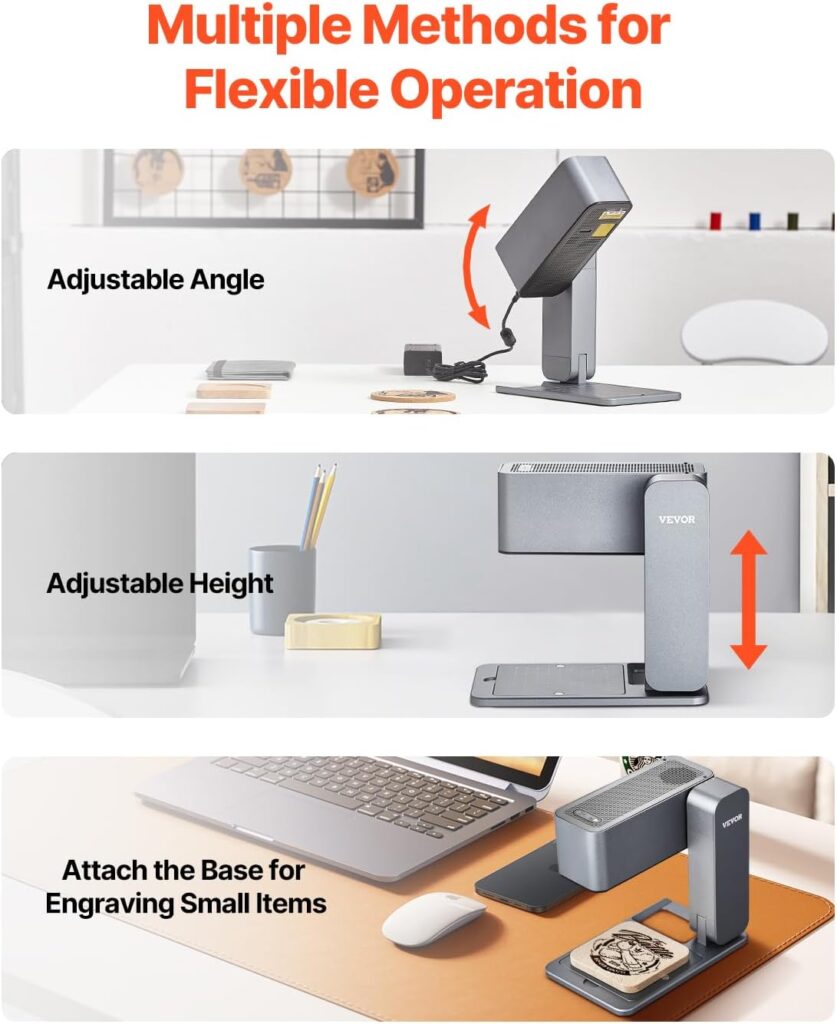
The highlight is portability. Folded up, it’s roughly 8.15 x 5.12 x 3.27 inches (207 x 130 x 83 mm). That means we can toss it in a backpack, carry it to a market, or tuck it onto a shelf. The base comes off when we want to work directly over a large object—like a cutting board or a guitar body—so long as we keep our hands and eyes safe and the cat thoroughly uninterested.
Specs at a Glance
We find it useful to see the essentials in one place. It’s like reading the menu before deciding how adventurous we feel.
| Feature | What We Got | Why It Matters |
|---|---|---|
| Laser Type | Blue diode (455 nm) | Excellent for organic materials; visible blue beam requires strict eye protection |
| Laser Class | Class 4 | Treat with care; protective eyewear is a must |
| Power Output | ~4,856 mW (approx. 5W) | Good for engraving and light cutting of thin materials |
| Spot Size | <0.5 mm< />d> | Finer detail, crisper text and graphics |
| Movement Speed | Up to 36,000 mm/min | Fast travel; engraving speed depends on material and settings |
| Engraving Area | 3.14 x 3.14 in (80 x 80 mm) | Compact workspace; great for small items |
| Autofocus | One-click | Faster setup, better consistency |
| OS Support | Android, iOS, Windows, Mac | Use phones, tablets, or computers |
| File Formats | JPEG, BMP, GIF, PNG, JPG, PLT, DXF, HPGL | Supports raster and vector workflows |
| Lifespan | Up to 10,000 hours (laser module) | Plenty of use with reasonable maintenance |
| Design | Folding, compact, detachable base | Portable, adaptable for different object sizes |
| Adjustment | Angle and height adjustable | Easier alignment on odd-shaped items |
Setup and First Impressions
We like machines that don’t make us feel like we’re assembling a bicycle with leftover parts. The VEVOR unit unfolds neatly, the head moves with reassuring smoothness, and the detachable base slots on and off without drama. That base is handy for small items—we can lock it down and keep everything square. For larger pieces, we lift the engraver off the base and hug the machine’s head right up to the surface of our workpiece.
There’s an immediate sense of “I can actually carry this,” which is not something we often say about laser tools. The build feels solid enough to inspire confidence but not so overbuilt that we fear dropping it on our foot. The controls are straightforward, and the autofocus means we’re not squinting with a plastic gauge, trying to make sense of millimeters while the dog sighs audibly.
One-Click Autofocus and Alignment
The autofocus button is the tiny hero here. Press it, and the machine does the distance dance on its own, positioning the laser at the optimal firing range. This cuts down on mistakes and dramatically reduces the ritual of nudging, adjusting, and re-focusing for each object. The spot size is small, under 0.5 mm, so the level of detail we can achieve is surprisingly sharp. We notice it most in fine text, thin line art, and halftone images on wood.
Alignment is always the part that tests our patience. With the base installed, we use the edges and a simple jig to align our items. Without the base, we rely on temporary marks (a bit of tape with a reference cross) and the preview positioning the software can provide. The machine doesn’t have an onboard camera, so this is more “craftsperson’s dance” than “click-and-place,” but it’s manageable.
Material Performance: What It Engraves Well (and What It Pretends To)
We tried a stack of materials and took notes like responsible adults who once branded a cutting board upside down. Here’s how it fared.
Wood
Wood is the happiest playground for a 5W blue diode. Birch plywood, maple, and walnut give us high-contrast markings that look like we’ve been doing this for years. Softwoods engrave darker at lower power and higher speed; hardwoods like maple and oak reward a slower pass or increased power. We found the 0.5 mm spot size produces crisp line work—small text stays legible at around 6–8 pt if the grain isn’t too bossy.
Cutting thin veneers and 1–2 mm balsa or basswood is possible with multiple passes, though we consider this machine primarily an engraver. For inlays or ornaments, we’d reserve cutting for very thin stock or use a more powerful machine.
Leather and Fabric
Vegetable-tanned leather accepts a beautiful, rich mark. We avoid chrome-tanned leather because of potential chemical nastiness when heated. For synthetic leathers, we test cautiously—some contain PVC (bad news for fumes). Power and speed are easy to tune for a deep, dark mark without crisping the edges.
Fabric is a mixed bag. Natural fibers like cotton and linen engrave patterns nicely without burning holes if we keep the power low and the speed brisk. Polyester behaves, but we keep a fan running and proceed with caution—synthetics can melt or leave a glossy trail if we overdo it.
Acrylic
Blue diode lasers don’t couple with clear acrylic well. We get better results with black or opaque acrylic, and even then, it’s more etching than deep, smooth cuts. If acrylic is our main material, a CO2 machine would be our go-to. For decorative surface marks on dark acrylic, this machine is serviceable and can look great with the right settings.
Paper and Cardboard
Cardboard and cardstock make us feel like professional gift-wrappers with power tools. Low power, high speed, and we can mark logos, labels, or the sort of witty notes we’ll regret later. It can cut thin paper and cardstock with clean edges, provided we have a solid flat base and minimal airflow disturbing the material. That said, watch for flare-ups—paper and lasers have a combustible friendship.
Stone and Ceramic
Some stones, like slate, engrave beautifully with a crisp, pale mark. Ceramic tiles, especially with a matte or coated surface, also produce sharp results. We don’t expect deep etching—it’s more of a surface mark—but the contrast is respectable, especially for coasters and small plaques.
Metals
Here’s where expectations need tuning. A 5W blue diode can mark anodized aluminum and coated or painted metals. For bare stainless steel, it can sometimes produce a faint mark, but consistent permanent results usually require a marking spray or paste. Deep engraving in metal? That’s the territory of fiber lasers or much higher-power machines. We managed good-looking monograms on anodized aluminum business cards and bottle openers. Bare brass and copper are reflective and less cooperative—coating them first makes a world of difference.
Glass
The machine can mark glass with the help of a surface treatment (like a light layer of tempera paint). Direct engraving on bare glass can lead to micro-fracturing and a frosted look, but it may be inconsistent. We get better control by painting a removable coating, engraving through it, and cleaning afterward. Coated glasses or certain opaque glasses respond more predictably.
Speed vs. Quality: About That 36,000 mm/min
The 36,000 mm/min figure describes maximum travel speed, not necessarily the speed we’ll use while burning details into oak. Actual engraving speed depends on material, desired depth, and quality. For photos or dithering on wood, we slow things down and lower power to avoid overburning. For simple line art on cardboard, we can zip along. We think of that speed spec as the chassis capability; it’s good to have headroom, even if prudence keeps us below the limit most of the time.
When we push too fast, edges lose definition, and images can look washed out. When we slow down too far with too much power, we char and lose detail. Our sweet spot on hardwoods tends to be moderate speed with moderate power and a single pass, then subtle tweaks based on the grain and tone.
Software and Connectivity
We used it with both a laptop and a phone. It supports Android, iOS, Windows, and Mac, so we can work from the couch or the workbench depending on the state of our life choices. The file format flexibility is great—we rely heavily on PNGs for raster work and DXF or PLT files for vector lines. For photo-style engravings, we prep images in our favorite editor, convert to high-contrast monochrome, and let the software handle dithering.
Connection is straightforward, and once our workflow is dialed in, switching between vector engraving and raster fill is painless. We returned to the same files repeatedly for small-batch projects (coasters, tags, and the occasional token), and the machine re-ran them consistently.
Portability and Ergonomics
Folding it up and tucking it away feels satisfying. If we’re working in a shared space—or a kitchen we’ve pretended is a studio—the compact size is a blessing. The adjustable angle and height let us line up to awkward surfaces. When the base is attached, the footing is stable and precise for small items; detaching it gives us access to things we’d otherwise never fit under a gantry.
The unit has a reassuring heft. We’re not juggling it nervously over a priceless family heirloom. Still, we like to secure workpieces with simple clips, a jig, or even double-sided tape to prevent shifts mid-burn.
Safety Considerations We Actually Follow
We promised ourselves we’d be the kind of people who wear safety glasses, and this machine enforced that promise. It’s a class 4 laser, and the blue beam is visible but still dangerous to eyes and skin. We use proper laser safety eyewear rated for 455 nm. We also:
- Keep the area free of clutter and flammables.
- Ventilate the space or use an external fan near an open window.
- Never engrave PVC or unknown plastics (chlorine gas is not a good room fragrance).
- Keep pets and bored relatives out of the beam path.
- Stay present; unattended engraving is the kind of experiment that ends in cautionary tales.
Working Within the 80 x 80 mm Engraving Area
The compact area isn’t a dealbreaker; it’s a design constraint we learned to dance around. For small items, it’s perfect. For larger objects, we detach the base and place the head directly over our target. We align using a pair of marks—X and Y reference points with painter’s tape—then position the artwork by previewing the outline. Some users tile larger designs in sections; this takes patience and careful alignment, and we don’t pretend it’s effortless. Still, for simple large surfaces (like putting a logo on a cutting board), it’s very doable.
Autofocus, Repeatability, and Calibration
The autofocus is quick and consistent, which means we spend more time choosing designs and less time wrestling with focus blocks. Repeatability across sessions has been reliable; when we engrave the same logo on ten leather key fobs, they look like siblings, not distant cousins. For unusually shaped or uneven surfaces, we sometimes adjust the angle to keep the focal plane as consistent as possible. Tiny height differences across a live-edge board will show up as slight shifts in darkness; not a fault of the machine so much as a reminder that wood has opinions.
Maintenance, Smoke, and the Unsung Hero: A Soft Brush
Dust and smoke residue happen. We keep a soft brush handy and gently clean the lens area while the machine is off and cool. For stubborn haze, a cotton swab and lens-safe cleaner helps. We try not to blow dust into the machine with compressed air; a small handheld blower at low output is kinder. The laser module’s rated life is up to 10,000 hours, which is generous for hobby use. Keeping the optics clean and not running at max power for every job helps longevity.
Noise, Odor, and Ventilation
The motion system isn’t loud, but the engraving process can produce smells depending on the material. Wood smells like a campfire; leather smells like a campfire with opinions; cardboard smells like a campfire someone forgot to supervise. We run a fan and crack a window. A small desktop purifier nearby helps, though it won’t replace proper ventilation for heavy use. We don’t engrave anything suspiciously plastic without checking material safety. When in doubt, we test a sliver outside—or skip it.
Who This Machine Fits Best
We think this unit fits in a few sweet spots:
- Hobbyists who want to personalize gifts, wallets, coasters, wooden spoons, and the occasional stone tile without dedicating half a room to machinery.
- Craft sellers who need small-batch customization at markets or pop-ups and appreciate a device they can carry in a bag.
- DIYers who enjoy learning curve projects and don’t mind making a jig from scrap wood.
- Pros who already have a big CO2 or fiber setup and want a portable sidekick for on-site marking and quick jobs.
If our work is production-level cutting or we need to engrave large panels in one pass, this is not that. If we dream of deep metal engraving on bare steel, that’s a job for a fiber laser. But for everyday personalization and small creative projects, it hits a very happy balance.
What We Wish Were Different
We keep a short wishlist because it keeps us honest:
- A larger engraving area would be nice, even at the cost of an extra inch in the folded footprint.
- An integrated safety shield or enclosure would help with stray reflections and add comfort for beginners.
- Built-in air assist would improve edge cleanliness on wood and reduce scorching.
- An onboard alignment camera would transform workflows on irregular objects—but we also understand that would nudge the price north.
None of these are dealbreakers; they’re just the sort of improvements we daydream about while watching the machine draw perfect little logos on leather.
How It Compares (In Our Heads and On Our Bench)
- Versus traditional handheld rotary engravers: The VEVOR produces cleaner, repeatable results without the wrist gymnastics. It’s also quieter and won’t chatter across a slick surface like a caffeinated ferret.
- Versus desktop diode engravers (10W or higher): Desktop units with larger beds and higher wattage can cut thicker materials and handle bigger jobs, but they won’t fit in our backpack or hover over a cutting board without a lot of choreography.
- Versus CO2 lasers: CO2 machines cut and engrave acrylic beautifully and work faster on many materials. They’re larger, pricier, and not something we casually carry to a friend’s house to monogram place mats.
- Versus fiber lasers: Fiber is the king of metal engraving, but they’re in a different price and size universe. If metal is our main material, we’d look there. For organic materials and coated metals, the VEVOR diode is more approachable and portable.
Tips We Learned The Pleasant Way (and a Few We Learned Otherwise)
- Start with test grids. On a scrap piece of the same material, run a small matrix of power and speed combinations. It saves time and heartache.
- Masking tape can help reduce soot on wood. We engrave through it and peel afterward.
- For glass, a thin coat of washable paint or a specialized marking spray improves consistency.
- For stainless steel and bare metals, a marking compound can produce a darker, more permanent mark.
- Keep the lens clean. The difference between “crisp” and “why is this fuzzy?” is often one smudge.
- Secure the work. A jig or even a simple frame of scrap wood helps keep items aligned.
- Don’t be shy about multiple passes at lower power. It can reduce burning and improve detail on wood.
- Use safe materials. We avoid PVC and mystery plastics. When engraving leather, we stick to vegetable-tanned.
- Preview boundaries. A dry run (outline preview) prevents surprises like off-center etches and moral crises.
Real-World Projects We Actually Finished
- Pocket notebooks: A logo on kraft covers looks lovely at low power. We pretend the owners will fill them with poems instead of grocery lists.
- Leather key fobs: Crisp initials at small sizes held up well, and we didn’t scorch the edges once we dialed in settings.
- Slate coasters: A classic. The contrast is excellent, and the machine’s compact head makes placement easy when the base is off.
- Anodized aluminum cards: Sharp text and logos that look professionally printed, but with that satisfying engraved texture.
- Wooden utensils: Light passes for names or small graphics; we keep power down so nobody wonders what that smell is while making soup.
Quality, Reliability, and the “We’d Use This Again” Factor
We’ve run it for short sessions across a couple of weeks without hiccups. The autofocus continues to hit the mark, and we haven’t seen drift or wobble in the mechanics. The chassis feels sturdy. The consistency of results on repeat jobs is what wins us over; if we engrave a batch of tags, the last looks like the first. That’s not always a given at this size and price tier.
What About Cutting?
We treat it primarily as an engraver. It can cut thin materials—paper, cardstock, very thin wood—with multiple passes and care. If our main goal is cutting thicker woods or acrylic, a higher-power machine (or a CO2 laser) would be a better fit. For small decorative cuts, embellishments, and prototypes on thin stock, it’s perfectly capable.
File Prep: Our Lightweight Workflow
- Vector logos: We import vector files (DXF/PLT) for crisp outlines. We simplify paths when we can; too many nodes slow things down and make small text jittery.
- Photos: We convert to grayscale, bump contrast, reduce noise, and resize to the final engraved size. Then we export a high-resolution PNG and let the software handle dithering.
- Text: We stick to clean, readable fonts for small sizes. Thin scripts at 6 pt look elegant on screen and tragic on wood.
Operating Costs and Consumables
There’s no tube to replace like with a CO2, and the diode’s lifespan is generous. Consumables are mostly materials and the occasional marking spray for metals or glass-paint for tricky surfaces. Protective eyewear is a one-time must-buy if it’s not included. Tape, jigs, and a brush are small costs that pay for themselves in cleaner results.
Support, Updates, and Community
A portable engraver like this benefits from a curious user base. We learned as much from communities as from manuals. While we won’t pretend every support channel is a bedtime story, the device’s simplicity means most questions have been asked and solved by someone kind enough to post pictures. Firmware and software improvements over time can refine workflows, and the cross-platform support helps future-proof our files.
Pros and Cons
Pros:
- Portable, folding design that fits small spaces and travel setups
- One-click autofocus that actually works and speeds setup
- Sharp detail thanks to the small spot size
- Broad OS and file format support for flexible workflows
- Detachable base and adjustable angle/height for awkward objects
- Excellent on wood, leather, cardboard, slate, and coated metals
Cons:
- Small engraving area (80 x 80 mm) limits single-pass scale
- 5W power restricts cutting capabilities and deep marks on bare metals
- No built-in enclosure or shielding; safety eyewear is mandatory
- Glass and bare metal marking often require coatings or sprays
- Alignment on large objects takes patience without a camera system
Who Should Skip It
If we need to cut 6 mm plywood cleanly every day, this will be an exercise in frustration. If our heart is set on deep metal engraving without sprays or pretreatments, we’ll want a fiber laser. If we require a large working area and hands-free alignment, a desktop machine with a bigger bed (and possibly a camera) makes more sense.
Value: What We Get for the Money
We weigh value by answering, “Would we buy it again after a month of use?” For on-the-go personalization, small business pop-ups, and home crafting, the answer is yes. The combination of portability, autofocus, and genuinely good results on the right materials makes it a compelling package. It won’t replace a shop’s flagship CO2 or fiber unit; it complements them. As a first engraver, it’s approachable without feeling like a toy.
A Few Frequently Asked Questions We Asked Ourselves
- Can we engrave stainless steel? We can mark it lightly, but for consistent, darker, permanent marks, we use a metal marking compound. Deep engraving requires a different class of machine.
- Can we cut acrylic? It can etch opaque acrylics and lightly cut thin, dark acrylics with multiple passes, but it’s not ideal. Clear acrylic is difficult with blue diode lasers.
- What about glass? We get better results with a removable coating like paint; direct marking is hit or miss and can frost unpredictably.
- Is the 36,000 mm/min speed real? It’s a maximum travel rating; effective engraving speeds are lower and vary by material and desired quality.
- Do we need special glasses? Yes—laser safety eyewear rated for 455 nm. A must.
- Does the autofocus replace test runs? It speeds setup, but we still run boundary previews and occasional test squares on new materials.
The Moments We Knew It Was a Keeper
We engraved a set of slate coasters for a friend who claims to like practical gifts. The lines were crisp, the text pulled tight against the slate’s texture, and we didn’t burn a single fingertip. Later, we added initials to leather tags in a neat row, each one positioned and focused without fuss. That kind of repeatable, tidy work from a machine we can slip into a backpack is the practical magic we hoped for. It doesn’t pretend to be a giant; it’s a clever small thing that does small things well.
Practical Expectations: The Success Formula
With this engraver, success looks like:
- Picking materials it loves (wood, leather, cardboard, slate, coated metals)
- Using autofocus and sensible alignment habits
- Accepting its size and leaning into projects that fit
- Keeping our lens clean and our settings modest
- Ventilating like we’re responsible adults who like our lungs
If we operate within those lines, we get consistently pleasing results.
Final Verdict
We like this machine. We like it for its compact footprint, its one-click autofocus, and the way it approaches small projects with a work ethic we aspire to. On wood and leather, it shines; on slate, it impresses; on coated metals, it holds its own. It is not a metal monster or a large-format cutter—and it doesn’t need to be. It’s a portable engraver that lets us bring personalization anywhere a level surface and a power outlet exist.
So yes, the VEVOR Portable Laser Engraver earns a spot on our shelf and in our bag. When we want a quick, precise mark without rearranging the room, it’s the tool we reach for. We’ve made better gifts since we got it. We’ve also made a few mistakes, which is how we remember we’re human and why we keep scrap wood close at hand. In the end, it’s the kind of friendly, focused machine that nudges us to make more things—not bigger, not louder, but ours. And that, for us, is reason enough to keep engraving.
Disclosure: As an Amazon Associate, I earn from qualifying purchases.