Isn’t it odd how a machine can make us feel both wildly capable and faintly underqualified at the same time?

What the Twotrees TTC450 Ultra Promises
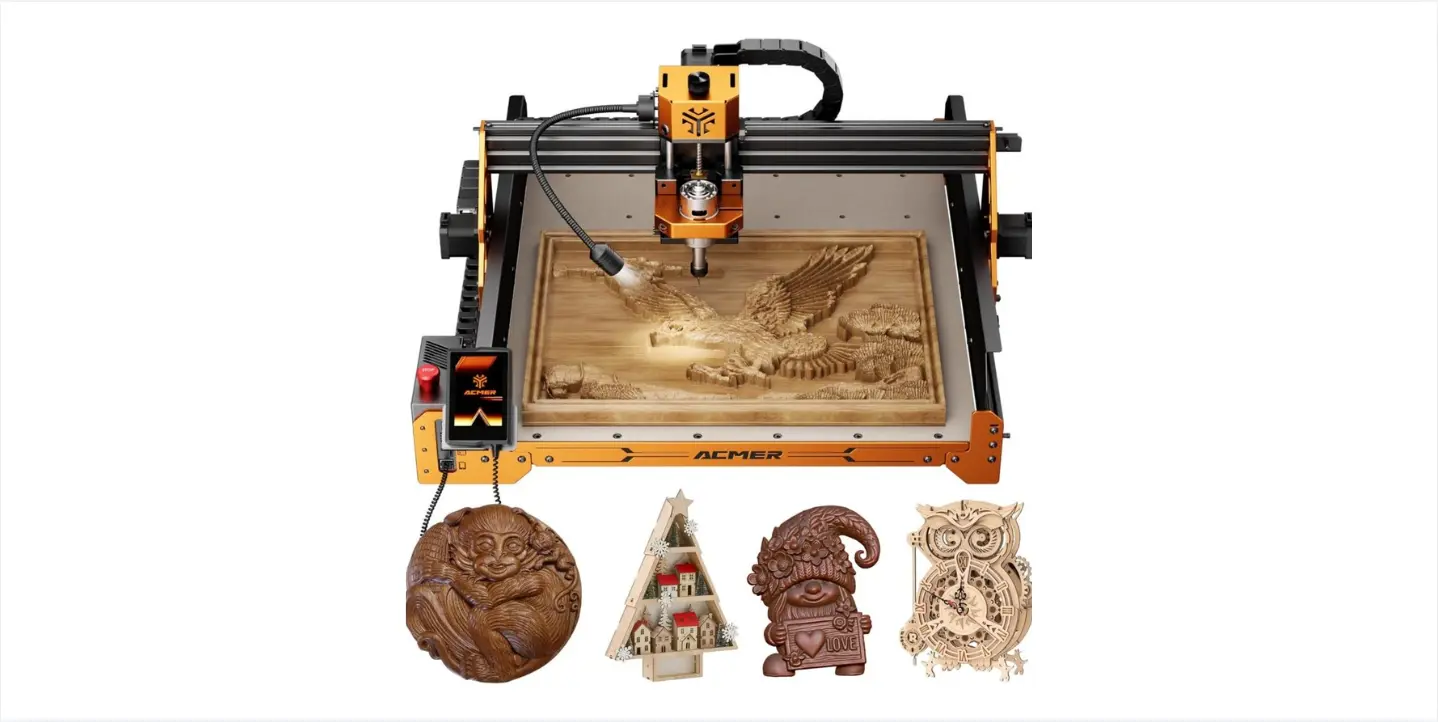
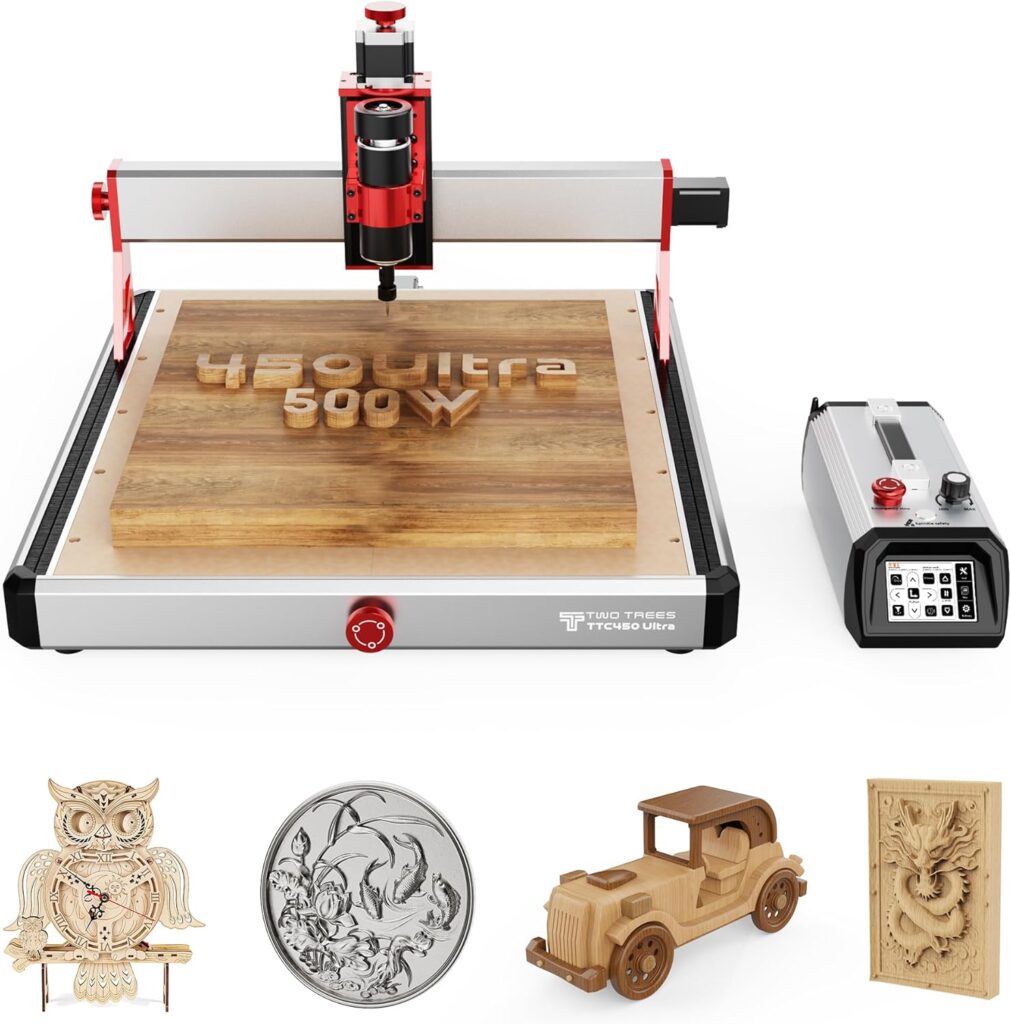
We’re looking at the Twotrees TTC450 Ultra CNC Router, a desktop machine with a generous 465x465mm work area and a 500W spindle—upgradable to a brawnier 3000W. It’s all-metal, runs on GRBL, and brings an honest-to-goodness 3.5-inch touch screen to the party. If we’ve ever thought, “We’d love to carve a chessboard from walnut, mill pockets in aluminum, or etch a logo into acrylic,” this machine is purpose-built to convince us we can.
The TTC450 Ultra aims to slide into that sweet spot between hobby gear and proper workshop tool: rigid where it matters, smart in just enough places, and approachable so we don’t need to apprentice ourselves to a machinist with a stern expression and a clipboard.

Twotrees TTC450 Ultra CNC Router Desktop CNC Router 465x465mm Large Work Area, 500W Spindle 3.5-inch Touch Screen, All-Metal 3-Axis Engraving Machine for Wood, Acrylic, MDF, Aluminum, Plastic
Unboxing and First Impressions
There’s something heartening about a box that arrives 90% pre-assembled. We’ll still need to set aside time for squaring and tightening because any machine worth using is worth aligning. But with a net weight of about 19 kg, it doesn’t feel flimsy. The rails look serious, the frame refuses to wobble for our amusement, and the cabling resembles thought-out engineering rather than a bowl of noodles.
Twotrees includes the bits that keep us from immediately rummaging through drawers: engraving tools, fixtures, wrenches, a piece of PP (polypropylene) for test cuts, and the necessary cables. We love when the first project is within reach of the very same afternoon we clear space on the workbench.
Build and Mechanics: Why the Chassis Matters
The TTC450 Ultra is an all-metal design—aluminum plus stainless steel—with MGN12H dual linear rails and T8 precision lead screws. Those names sound like things we should whisper while wearing white lab coats, but here’s what they mean: the rails give us smooth guidance with minimal slop; the lead screws turn rotational motion into linear movement consistently. Together, they boost the repeatability that separates “good enough” from “that fits on the first try.”
The positioning accuracy is rated at 0.01 mm on X and Y, and Z is even finer at 0.0025 mm. Engraving accuracy is ±0.05 mm per 100 mm. Numbers like these may sound like a dare, but they translate into joinery that fits without shims, inlays that sit flush, and aluminum parts that don’t need a shameful amount of filing.
Motion System Confidence
Lead screws, particularly in a compact machine, have a sturdier feel than belts. We trade some top-end speed for precision, but the TTC450 Ultra doesn’t limp along: it supports up to 3000 mm/min engraving speed. That’s brisk enough for wood and plastics and reasonable for careful passes in aluminum. For tiny text or intricate patterns, this steady motion makes a tangible difference, especially when the design calls for clean curves instead of hesitant approximations.
The Work Area That Feels Like a Real Tabletop
A 465×465 mm area makes us stop thinking small. We can fit cutting boards, instrument panels, larger plaques, and multi-piece jigs without patching together separate sections. It’s the kind of capacity that nudges us to dream a bit bigger, while still fitting on a standard bench.
Clamping a workpiece this size is always a little choreography. We’d recommend a spoilboard with threaded inserts or T-tracks. The machine’s rigidity deserves good workholding; it will repay us with smoother finishes and fewer moments of heart-in-throat as we watch a board shimmy mid-pass.
The Spindle: 500W Today, Headroom for Tomorrow
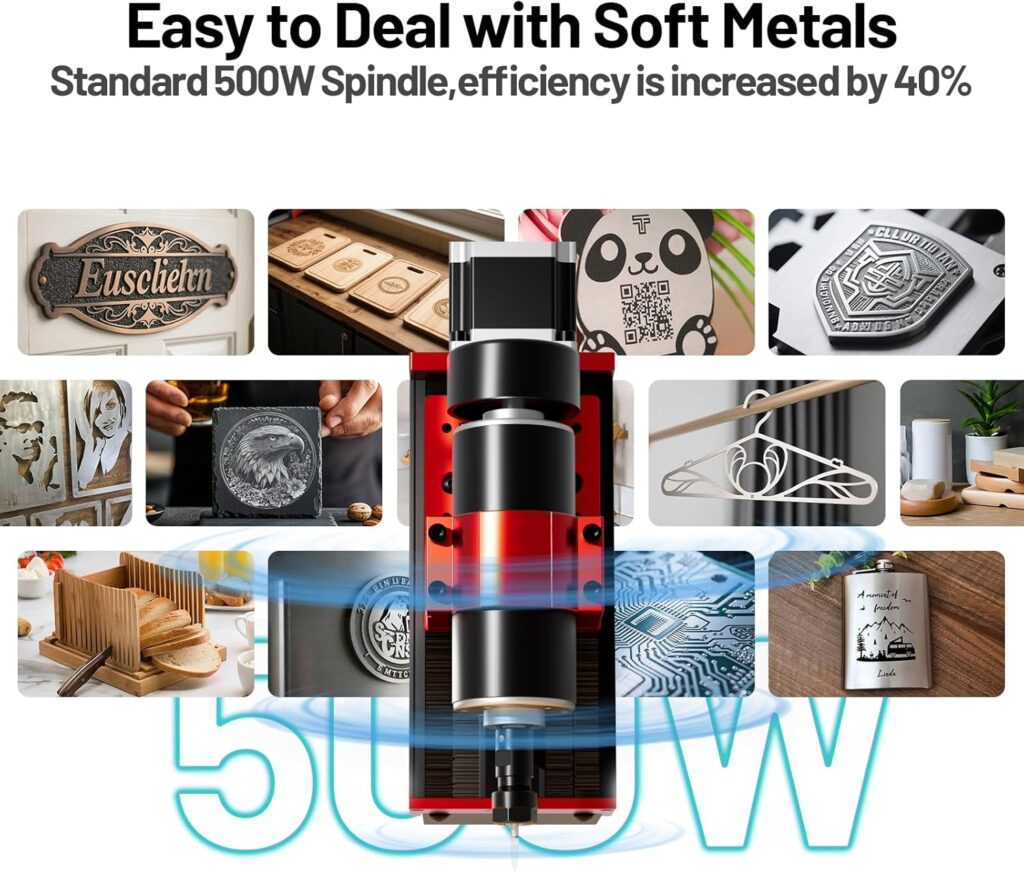
The stock 500W spindle runs from 8000 to 30000 RPM, coupled with an ER11 collet that supports 0.5–7 mm tools. That means our usual 1/8″ and 1/4″ cutters are at home here, as are tiny engraving bits that make delicate lettering feel possible instead of foolhardy. Twotrees claims compatibility across woods, MDF, acrylic, nylon, aluminum, carbon fiber, and even stainless steel. Stainless is no joke; it demands patient feeds, cautious depths, and cooling. But it’s reassuring that this isn’t a “wood only” machine.
We appreciate that this spindle is versatile. In hardwood, it sings; in acrylic, it carves with the right flute geometry; in aluminum, it needs a steady hand and sound strategy—single-flute cutters, chip evacuation, and respect for heat. The upgrade path to 3000W is tempting, but power is only one side of that equation; the structure needs to handle the load. Fortunately, the all-metal frame and linear rails create a solid foundation for growing into more aggressive work.
Touching on Noise
A 500W spindle running at 20,000 RPM is not whisper-quiet. It’s more “confident vacuum cleaner” with higher pitch. We’ll want ear protection, and the neighbors might be on a first-name basis with our project schedule. A dust shoe and good shop vac add their own soundtrack, but they also keep chips under control and save us hours sweeping.
Control System and Touchscreen: Actual Convenience
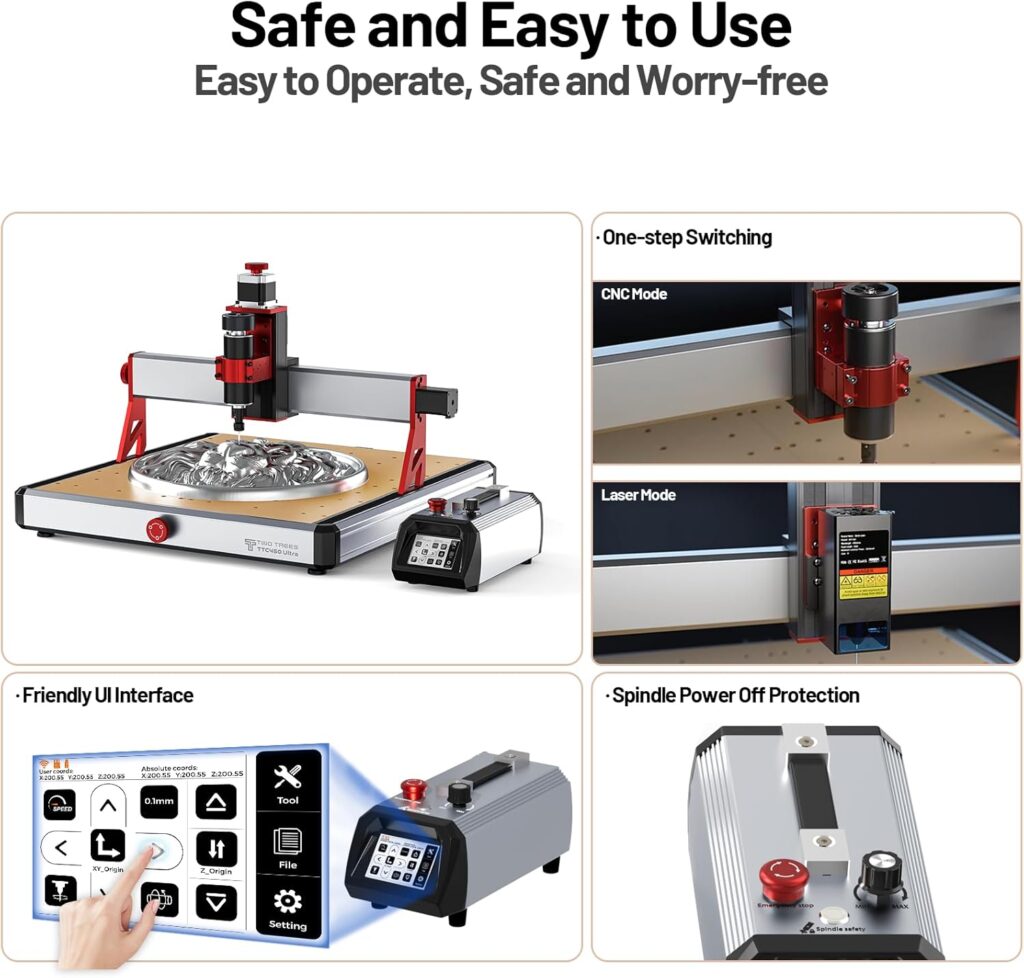
The integrated LKS CNC V1.0 motherboard supports GRBL without flashing firmware. This is a relief. We get a 3.5-inch IPS capacitive touchscreen that genuinely makes day-to-day operation easier. We can run jobs offline with a TF card or through USB, and swapping between CNC and laser modes happens in software—like a mood change without the cost of therapy.
Compatibility with mainstream packages like ArtCam and Fusion 360 means we’re not learning an alien language. We can draw in the tools we know (or at least tolerate), post-process to GRBL, and run the code without a four-hour ceremony involving candles.
Inside the Workflow
Our favorite pipeline goes like this: design in Fusion 360, set up the CAM, pick the right tool library, post to GRBL, then feed it to the machine via TF card. The touchscreen gives simple jogging, homing, and job control. It doesn’t try to be a smartphone, which is a blessing. Function first, with enough niceties to avoid constant laptop babysitting.
There are reserved interfaces for WiFi/Bluetooth modules, plus support for a fourth axis, external handwheels, and a tool setter. If we’re the tinkering type, it’s an invitation; if we’re not, it’s comfort that the machine won’t be obsolete just because we learned how to engrave more than our initials.
Specifications at a Glance
Sometimes it’s easier to size up a machine at a glance. Here’s the quick breakdown with what it means for our daily use.
| Feature | Details | What It Means for Us |
|---|---|---|
| Work Area | 465 x 465 mm | Room for cutting boards, plaques, signs, instrument panels, and multi-part jigs. |
| Spindle Power | 500W (upgradeable to 3000W) | Strong for wood/plastic; capable for aluminum with technique; headroom if we outgrow it. |
| Spindle Speed | 8000–30000 RPM | Matches a wide range of materials and tool sizes; keeps finishes clean. |
| Collet | ER11 (0.5–7 mm tools) | Supports common 1/8″ and 1/4″ cutters; easy to find quality bits. |
| Structure | Aluminum + stainless, MGN12H rails, T8 lead screws | Stable and precise; less flex, smoother motion. |
| Accuracy | X/Y: 0.01 mm; Z: 0.0025 mm | Tight tolerances for joinery, inlays, and detailed parts. |
| Engraving Accuracy | ±0.05 mm/100 mm | Predictable results; parts match the drawing. |
| Max Engraving Speed | 3000 mm/min | Productive without pushing the machine into sloppiness. |
| Control Board | LKS CNC V1.0 | GRBL without hassle; reliable and familiar. |
| Interface | 3.5-inch IPS touchscreen, TF card, USB | Offline convenience; no laptop tether required. |
| Firmware | GRBL (CNC/laser modes) | Flexible projects; no flashing required to switch. |
| Safety | Dual limit switches on XYZ, spindle safety switch, E-stop | Fewer “oops” moments, quicker recoveries when they happen. |
| Certifications | CE/ROHS/FCC | Reassurance for home and studio environments. |
| Expandability | WiFi/Bluetooth reserved interfaces, 4th axis, handwheel, tool setter | A path to grow our capabilities. |
| Pre-assembly | 90% built, ~19 kg net weight | Faster setup; solid but manageable to move. |
| Included Items | Tools, fixtures, wrenches, PP test material, cables | We can start same day with something real. |
Real-World Cutting: What We’ve Seen and Learned
We started where many of us do: a simple hardwood sign. In walnut, with a 60-degree V-bit, the machine sculpted crisp serifs without stair-stepping, even on tiny curves. The surface finish straight off the tool looked like it knew what sandpaper was but didn’t feel beholden to it.
Switching to acrylic, we grabbed a single-flute O cutter and kept the chips flying. With plastics, heat is the villain, and clearing chips is the hero. The TTC450 Ultra kept the cut steady; we just had to resist the temptation to slow too much, which can smudge the edges like a toddler’s fingerprint on glass.
Aluminum was where the machine gently reminded us of physics. We used a 3 mm single-flute end mill, shallow stepdowns (0.2–0.4 mm), and a reasonable feed with high RPM. With light pecking, the results were clean; we could hold tolerances good enough for small brackets and enclosures. The key was being patient and using a fog or mist if possible, or at least a consistent air blast.
Stainless steel is possible as a careful engraving or micro-milling project. We kept the cut extremely conservative: tiny widths of cut, minuscule depths, toolpaths that look like we’re tiptoeing across the metal. For anything more ambitious, the 3000W upgrade starts to look necessary—not to bulldoze, but to hold speed under load without burning.
Starting Parameters We Actually Use
We’re not promising universal recipes, but here are starting points that keep us out of trouble while we tune. Always adjust based on tool manufacturer data, rigidity, and finish.
| Material | Tool | RPM | Feed (mm/min) | Stepdown (mm) | Notes |
|---|---|---|---|---|---|
| Walnut/Maple | 1/4″ upcut, 2-flute | 18,000 | 1200–1800 | 1.5–2.0 | Leave 0.2 mm for a finishing pass. |
| MDF | 1/4″ upcut, 2-flute | 18,000–20,000 | 1500–2200 | 2.0–2.5 | Dust shoe is essential; seal edges if painting. |
| Acrylic | 1/8″ single-flute O | 20,000–24,000 | 800–1200 | 0.5–1.0 | Keep chips clearing; avoid melting. |
| Aluminum 6061 | 3 mm single-flute | 22,000–28,000 | 300–700 | 0.2–0.4 | Use air blast; finish pass for accuracy. |
| Nylon/Delrin | 1/8″ single-flute | 16,000–20,000 | 900–1500 | 0.5–1.0 | Excellent for fixtures; watch burrs. |
| Carbon Fiber | 1/8″ burr-style | 20,000–25,000 | 800–1200 | 0.3–0.6 | Use full PPE; dust is hazardous. |
| Stainless (Engraving) | 1 mm carbide engraver | 25,000–30,000 | 100–250 | 0.05–0.1 | Very light passes, consider lubricant. |
Software and Firmware: Working Without Tears
GRBL is the comfortable pair of shoes of hobby CNC. We can jog, home, set zero, run jobs, and recover. The machine’s dual limit switches mean homing is reliable; soft limits protect against “we forgot to set Z and now it’s trying to tunnel.” Switching between CNC and laser mode is also practical: one day we’re pocketing an inlay, the next we’re etching a photograph on birch plywood.
If we’re used to Fusion 360, we’ll find the post-processor straightforward. For engraving, V-carve toolpaths are our friend. For aluminum pockets, adaptive clearing with small stepovers gives that lovely scalloped efficiency that makes us feel like we know what we’re doing even before we actually do. ArtCam and other design suites slot in without drama, which is all we ask from software.
Touchscreen: Little Screen, Big Relief
The 3.5-inch screen does just enough. We can browse files, check the job, and start or pause without a computer. Jogging is responsive; setting work zero is less of a ritual and more of a routine. There’s something delightfully liberating about not tethering the machine to a laptop whose battery would otherwise die mid-pocket.
Expandability: Room to Grow, Not Just to Brag
We like that Twotrees leaves the door open for more. Reserved interfaces for WiFi/Bluetooth modules help if we want to send jobs wirelessly. Fourth-axis support converts us from “flat universe” people to “yes, we can engrave that cylindrical lamp base.” An external handwheel gives us tactile jogging—less poking at screens, more feeling where we are.
A tool-setting probe, when we add it, turns zeroing into a press-and-sip-coffee move. It also cuts down on Z-axis mishaps, which are the CNC equivalent of dropping a stack of plates and pretending we meant to do that.
Safety: Sanity in a Small Box
Dual limit switches on X, Y, and Z mean we have actual hardware boundaries. The emergency stop is a button we should get to know like a neighbor’s dog—friendly, instantly available, and not shy. A spindle safety switch is one more layer of “we saw this coming,” and certifications like CE/ROHS/FCC offer peace of mind for home studios and classrooms.
We won’t lecture—but we will say: eye protection, ear protection, and dust control. Especially with MDF and carbon fiber. Make a habit of vacuuming the enclosure, not the filter. We can be the kind of people who live long enough to get really good at this.
Maintenance: The Boring Tasks That Save Projects
Machinery rewards attention. Once a month (or every intensive week), we check the linear blocks for smooth motion, wipe the rails, and apply a light lubricant suited for linear guides. Lead screws appreciate a clean and re-lube; chips have a way of worming into places they shouldn’t.
Collets wear; they’re consumables. If we start hearing chatter or see runout in our cuts, we swap collets and inspect the tool. Keep the ER11 taper clean. A speck of dust can tilt a cutter enough to make a finish look like corduroy.
Tramming the spindle—ensuring it’s perfectly perpendicular to the work surface—pays dividends in surfacing and pocket bottoms. With an all-metal frame, this holds longer, but it’s worth revisiting after the first few projects and any time we’ve had an “incident.”
Calibration That Keeps Us Honest
- Steps/mm: Verify by jogging a known distance and measuring with calipers.
- Backlash tests: Cut a square and measure both axes; adjust as needed.
- Squareness: Cut a large right angle; measure diagonals to confirm the gantry isn’t yawed.
This is not busywork. It’s the reason we can design parts and trust they’ll match in the real world.
Workholding and Spoilboards: We Cannot Overstate This
A rigid machine with a slippery workpiece is a well-lit disaster. We like a replaceable spoilboard with threaded inserts on a simple grid: 100 mm spacing works well, tighter if we do small parts. Cam clamps, low-profile clamps, and a few sacrificial fences make setups faster. If we’re doing thin acrylic or metal plates, painters’ tape and CA glue can be a revelation—stick it once, cut cleanly, pry it up with a putty knife.
For longer jobs, double-check clamp clearance in our CAM. Nothing tests our reflexes like an end mill making flirtatious passes near a clamp foot.
Dust, Chips, and Reality
A dust shoe on a small CNC router isn’t optional; it’s adulthood. MDF creates a fine powder that will colonize our lungs if we let it. A shop vac with a decent filter helps; a small cyclone separator keeps the filter from clogging every ten minutes. Aluminum chips are little knives; we sweep and vacuum them like our future shoe soles depend on it.
For acrylic and plastics, we aim for shaving-like chips. Dust means we’re melting, not cutting. Sometimes we add a little dish soap in water as a lubricant on plastics; sparingly, and mindful of the electronics.
The 3000W Temptation: Should We?
More power gives us confidence in hard materials, but power without rigidity is how we end up bending bits and inventing new swears. The TTC450 Ultra’s metal frame and linear rails provide real structure, so the upgrade isn’t senseless bravado. But we ask what we actually cut. If we’re mostly doing wood, acrylic, and occasional aluminum, the 500W spindle is efficient and civilized. If stainless or faster metal removal is our ambition, moving to 3000W can make sense—with the understanding that tool selection, coolant, and revised feeds and speeds are part of that life.
Project Ideas That Fit This Machine
- Fancy cutting boards with inlaid initials (we become the household hero).
- Aluminum control panels for synths, 3D printer mods, or bike accessories.
- Acrylic signage with polished edges (let the single-flute shine).
- Carbon fiber drone plates (using strict dust protocols).
- Wooden puzzles, trays, and layered art that the people we gift to will Instagram immediately.
- Small run production of plaques or tags: identical quality with every run.
Classroom and Workshop Use
With certifications in place and a reasonably contained footprint, the TTC450 Ultra makes sense for maker spaces and classroom labs. The touchscreen is friendly for new users; the offline mode means one less laptop to babysit. We can teach CAD and CAM, watch students’ designs come to life, and avoid the recurring tragedy of unplugging the wrong cable.
Strengths We Keep Coming Back To
- Structure: The dual MGN12H rails and lead screws make motion feel deliberate and precise.
- Spindle flexibility: From tiny engraving bits to 1/4″ cutters, it just works.
- Touchscreen and offline control: Actually useful, not a gimmick.
- Expandability: Fourth axis and probing are more than marketing bullet points.
- Pre-assembly: We’re making chips sooner, not assembling a thesis project.
Limitations and Honest Caveats
- Noise: Busy, high-pitched; no one mistakes it for a white-noise machine. Headphones help.
- Aluminum: Very capable, but patient paths and air assist are vital; this isn’t a milling center.
- Stainless: Possible with engraving and micro-milling; don’t expect bulk material removal with the 500W setup.
- Dust Management: Not all shoes or enclosures are included; we’ll likely add our own.
- Learning Curve: GRBL is friendly, but CAM is still a craft. We’ll earn our speed over time.
- Footprint vs. Enclosure: Once we add dust control and a box, we need more space than the base machine suggests.
Troubleshooting Notes From Our Bench
- Chatter in aluminum: Reduce stepdown, increase RPM, use a sharper single-flute, and ensure rigid clamping.
- Melting acrylic: Increase feed or reduce RPM; switch to single-flute; verify chip evacuation.
- Lost steps or missed homing: Check limit switch wiring and tension; watch for chips in the rails; reduce acceleration in GRBL settings if needed.
- Poor surface finish: Tram the spindle, sharpen/replace the tool, stabilize the workpiece, and add a finishing pass with smaller step-over.
- Inconsistent Z zero: Clean the collet and tool shank; consider a touch probe; re-tighten the collet nut with proper torque.
Setting Up for Success: Our Repeatable Routine
- Surface the spoilboard with a fly cutter after initial assembly. It aligns the work surface to the actual spindle plane.
- Create a dedicated “proving” job: pocket, contour, V-carve, and drilling on a scrap panel to test every motion type.
- Keep separate tool libraries for wood, plastics, and metals. We’re less likely to cut acrylic like oak by accident.
- Log successful parameters. Our future selves will send thank-you notes.
- Label clamps and wrenches with their sizes. We save 20% of our day not playing the guessing game.
How It Stacks Up Against Other Options
Compared to small hobby routers with belt-driven motion and smaller work areas, the TTC450 Ultra feels more serious. Lead screws and linear rails bring measurable precision. The 465×465 mm space puts it in a different category than entry-level 3018-style machines. Against larger prosumer platforms with more massive frames, we trade some brute power for a more manageable footprint and a cost that doesn’t require a solemn family meeting.
We’d say it lives in the “confident desktop” tier. It’s not an industrial mill, but it’s not a toy. The all-metal build and thoughtful control system tie it together. For wood, plastics, and careful aluminum work, it’s a very capable companion.
Everyday Quality of Life
The touchscreen reduces the hard stare we give to a laptop; the TF card slot keeps jobs simple. The emergency stop is right where we want it to be. The limit switches mean homing is reliable. These are creature comforts, but they add up to a machine we don’t dread using. That matters more than we admit, especially when a project spans multiple evenings.
Teaching Ourselves to Be Better Machinists
A machine like this doesn’t just cut; it teaches. We start seeing grain direction as a co-conspirator, understanding why climb milling affects edges, and hearing the difference between a happy cut and a future apology. The TTC450 Ultra gives consistent feedback. When the setup is right, it delivers. When we err, the results are instructive rather than catastrophic.
Cost of Ownership Beyond the Box
- End mills: Keep a small stable of sharp tools. We replace them more often than we expect at first.
- Dust collection: A decent shop vac and separator pay off immediately.
- Workholding: Clamps, inserts, and tape/CA glue aren’t glamorous, but they are the unsung heroes.
- Lubricants: A little goes a long way—especially for aluminum and plastics.
- Upgrades: A probe, possibly a handwheel, and, down the line, we might consider that higher-powered spindle.
These extras feel like a second shopping trip, but they are the difference between “the machine works” and “we work well with the machine.”
When to Consider the 4th Axis
If we’ve ever wanted to engrave on dowels, shape chess pieces, or texture rolling pins, a fourth axis opens that door. It turns the machine from a sheet whisperer into something comfortably multi-dimensional. It’s not essential on day one, but it’s a delightful capability to grow into.
Who Will Love This Machine Most
- DIYers who want real precision without graduating to a full-sized mill.
- Small makers selling custom goods—signs, plates, panels, inlays—who need repeatability.
- Educators and labs who want a robust, approachable tool with offline operation.
- Tinkerers who appreciate a mod-friendly platform that doesn’t require soldering to start.
A Few Finishing Touches to Consider
- Enclosure: Reduces noise, controls dust, and keeps chips from migrating into our socks.
- LED lighting inside the enclosure: Seeing the cut clearly improves results and our mood.
- Air assist: Even a small compressor makes aluminum happier and acrylic cleaner.
- Tool length gauge: Either a probe or a simple, repeatable manual method.
- Cable management: It arrives tidy; we keep it that way through thoughtful routing.
The Bottom Line We Keep Returning To
The Twotrees TTC450 Ultra gives us a desktop CNC experience that feels like an honest tool rather than a toy. It’s rigid, precise, thoughtfully controlled, and expandable. With a 500W spindle and ER11 collet, we can work across an impressive range of materials, and the workflow—from design to TF card to cut—is smooth enough to keep our focus on the project rather than the process.
It is not a machine for impatient stainless steel excavations. It is not silent. It requires care and attention. But in exchange, it gives us parts that fit, surfaces that flatter, and a sense that we can make the thing we imagined when we woke up that morning. And frankly, that feeling is rare.
Our Verdict
We think the Twotrees TTC450 Ultra strikes a sweet balance: sturdy mechanics, a sensible control system, a generous work area, real safety features, and a path to grow. It rewards careful setups and good habits. In wood and plastics, it’s confident and fast. In aluminum, it’s capable with proper tools and restraint. In stainless, it’s possible for engraving and fine detail with patience.
If we’re looking for a desktop CNC router that can carry us from first projects to serious work without turning the garage into a factory, the TTC450 Ultra is a strong choice. It’s the sort of machine that sits on the bench, looks back at us, and says, “We can do this.” Then, gratifyingly, it does.
Disclosure: As an Amazon Associate, I earn from qualifying purchases.