Have you ever wanted to keep a child’s stick-figure family forever, but on something sturdier than the side of the fridge?

What We’re Reviewing and Why It Surprised Us
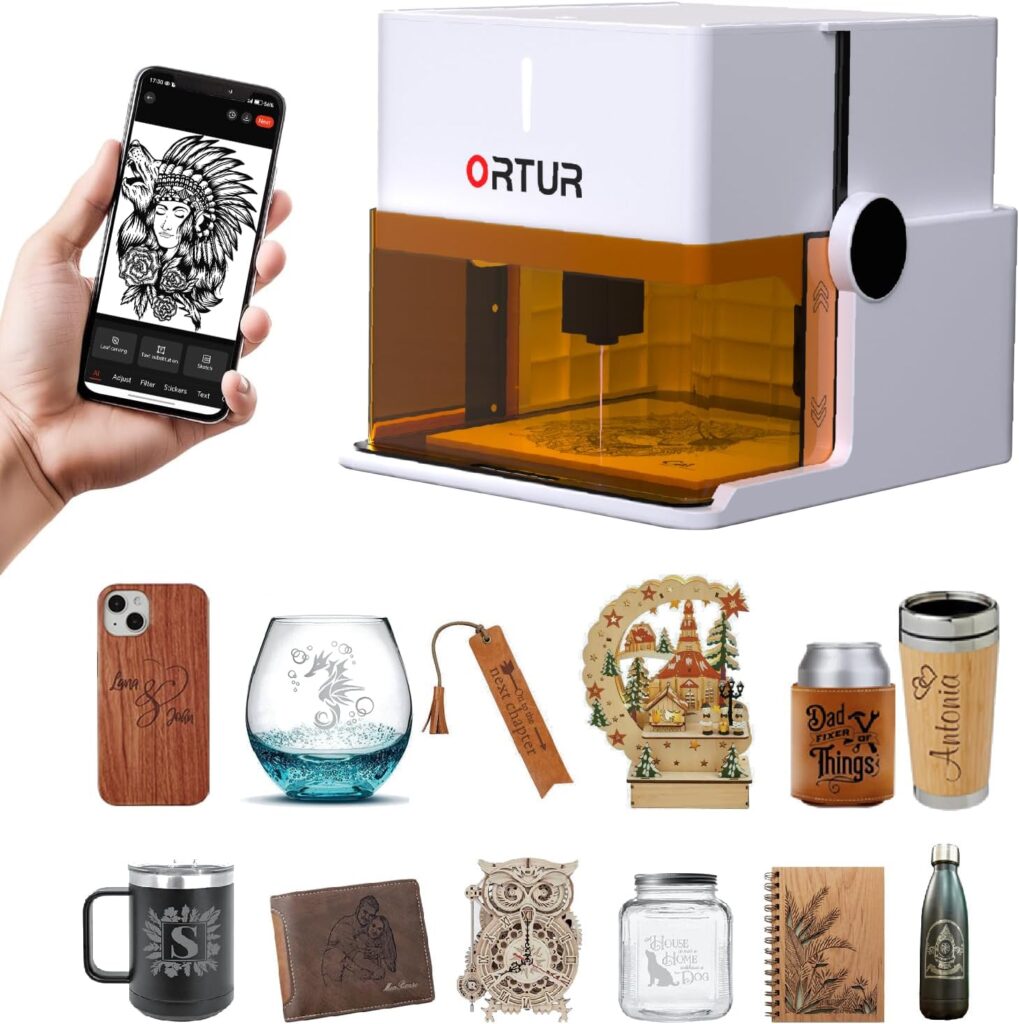
We’ve been putting the Ortur R1 5000mW Portable Laser Engraver and Cutter (white) through its paces, and we’re oddly charmed. It’s compact, foldable, and shows up in gift-ready packaging that makes us feel like we’ve done something right with our lives. There’s no assembly, no scavenger hunt for tools, and no dramatic sighing while we search for a tiny hex key. We click, it opens, and—somehow—it’s already ready.
We expected a cute novelty. We found an actual tool. The Ortur R1 is a Class 1 foldable laser engraver with a transparent high-definition cover, a 5W diode laser module, an aluminum base plate with a simple tutorial printed on it, and an app that cheerfully nudges us to make something with our hands that doesn’t require glitter. It supports online and offline operation, engraves an area of 100 x 100 mm with an accuracy up to 0.05 mm, and can cleanly cut 3 mm basswood in a single pass. We kept waiting for the catch. It hasn’t arrived.
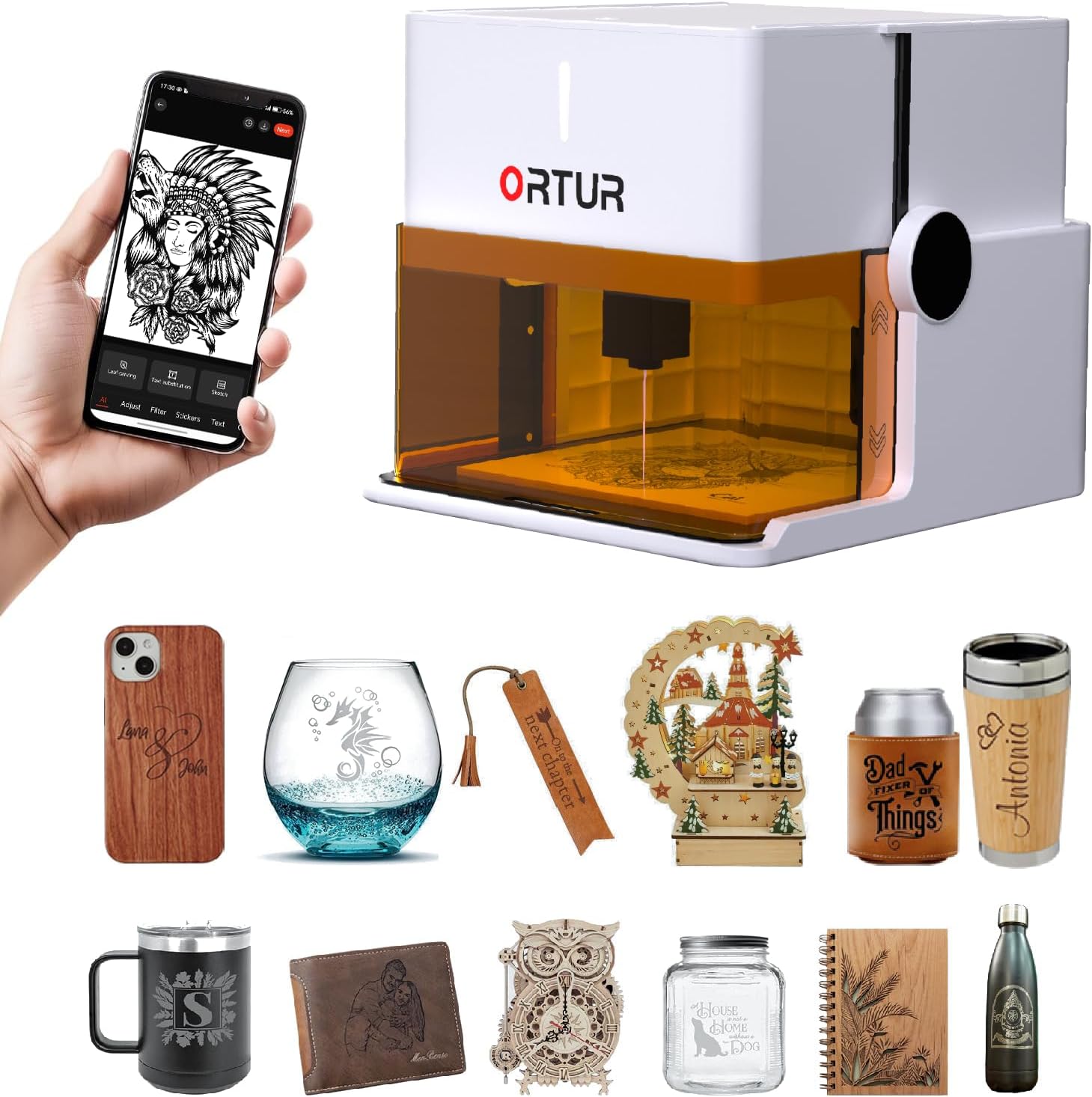
Ortur R1 5000mW Portable Laser Engraver and Cutter, Class 1 Foldable Laser Engraver, Exquisite Gift Box Packaging, APP Control Laser Engraver for Wood, Leather, Glass, Cloth (White)
Design and Build: Foldable, Functional, and Not Embarrassed to Be Seen
The Ortur R1 folds into a compact, handled box shape that looks more “weekend art class” than “shop-class detention.” The white finish feels modern, and the enclosed design with the transparent cover lets us watch the magic happen without crouching over the machine in safety goggles. The aluminum alloy base plate isn’t just there to look purposeful; it protects the desk underneath when we forget that wood burns and that we own furniture.
We appreciate the thoughtful touches, like the quick tutorial etched onto the back of the base plate—like leaving a sticky note to our future selves, except this one is legible. When we’re done, the R1 folds back into itself, and the cables stow easily. If you’re already imagining handing it to a friend as an extravagant “no reason” gift, we understand.
Build Quality That Feels Reassuring
We’ve handled enough DIY tools to know when corners have been cut (and not by a laser). The mechanics here feel precise. Hinges don’t wobble. The lid opens and closes with intention, and the base plate doesn’t skid around. We still treat it like a small machine with a laser inside because that’s exactly what it is, but we’re not nervous to touch it, which is progress.
Setup and “Click and Go”: The Rare Promise That Actually Delivers
We unfolded the Ortur R1, plugged it in, connected through the app, and were engraving in minutes. It doesn’t demand a weekend and a podcast marathon to get started. This, for us, lowers the threshold for spontaneous projects—keychains before coffee, coasters before dinner, that sort of thing. The offline mode means we can pop in a USB, select a job, and set it running without tethering ourselves to a laptop.
We like that the device allows us to send jobs remotely via the app, then repeat them offline. It means once we’ve dialed in the settings, producing multiples is easy, and our living room doesn’t have to be a command center every single time.
App Control That Encourages Play
The Ortur app includes features that sound like they were created by people who actually use laser engravers:
- AI image tuning to make photos and drawings more engraving-friendly.
- Hand-drawn engraving—sketch right on our phone, send it to the machine, and instantly regret or cherish our artistic choices.
- Puzzle Mode, which lets us generate grid-based designs that feel like Lego for adults who like straight edges.
- QR Code stories: upload text, a photo, or even a video to generate a code, engrave it onto wood or leather, and then scan it later to reveal the hidden content.
We’re used to software making us feel like we need a diploma to center text. Here, it’s straightforward. And for quick jobs, there are 19+ fonts and multi-language text support, which matters when a last-minute gift needs to say “Happy Birthday” in more than one tongue.
Laser Specs and Real-World Performance
On paper, the 5W optical output with a 0.025 x 0.11 mm spot size and speeds up to 5000 mm/min promised precision and fine detail. In practice, we’re impressed. The Ortur R1 handled intricate line work and text at small sizes that would make our handwriting weep with envy. The 100 x 100 mm workspace sounds modest until we realize how many things we actually personalize are within that size—wallets, phone cases, bookmarks, tags, badges, jewelry blanks, small signage, and test tokens we swear we’ll throw out later.
Cleanly cutting 3 mm basswood in a single pass isn’t a marketing fairytale; it’s our favorite party trick now. It’s neat, fast, and has us thinking up holiday ornaments without even trying.
Precision That Feels Like Cheating
At up to 0.05 mm accuracy, our engravings have sharp edges and consistent depth. We found the sweet spot on speed and power quickly, and the app’s presets get us close to ready-to-go for common materials. Even when we try something fiddly, like filigree patterns on thin leather, the results are clean and repeatable.
Materials We Tried and What Worked Best
We kept a running list of successes, near-successes, and projects we’ll call “educational.” Here’s a practical snapshot of how the Ortur R1 handled common materials.
Materials and Settings We Keep Coming Back To
- Wood: Basswood, birch, walnut, cherry. Engraves beautifully; basswood cuts at 3 mm in one pass, as promised. Plywood may need multiple passes due to glue layers.
- Leather: Veg-tan engraves crisp and dark. Chrome-tanned leather can give off unpleasant fumes—ventilation is essential. We stick with veg-tanned for engraving clarity and safety.
- Glass: Engraves best with a coating (black tempera paint or a ceramic marking spray). The results are surprisingly elegant and consistent.
- Cloth: Cotton and denim engrave cleanly. Synthetics can melt or give off whiffy fumes; test first and ventilate.
- Paper/Card: Fine kraft cardstock and heavy papers engrave with beautiful contrast and clean cuts at lighter powers.
What We Don’t Pretend It Does Perfectly
- Acrylic: Clear acrylic doesn’t absorb diode laser wavelengths well. We engrave painted or dark acrylic with decent results. Cutting clear acrylic is not a strong point here.
- Metals: A 5W diode doesn’t engrave bare metal. With marking spray or special coatings, we can mark the surface, but we treat it as a specialty approach.
- Thick cuts: Wood thicker than 3 mm requires multiple passes, and at some point a larger or more powerful machine might be smarter.
Quick Reference Table: Materials vs. Results and Tips
| Material | Engraving Quality | Cutting Capability | Notes and Tips |
|---|---|---|---|
| Basswood (3 mm) | Excellent | Clean single-pass cutting | Great for ornaments, tags, and small shapes |
| Birch plywood | Very good | Multiple passes recommended | Glue can burn; test speeds and power |
| Walnut/Cherry | Excellent | Not ideal for cutting >2 mm | Contrast is beautiful; engrave, don’t cut thick |
| Veg-tan leather | Excellent | Can cut thin pieces | Ventilation essential; test burn marks |
| Chrome-tan leather | Good (fumes) | Not recommended | Ventilate heavily; stay cautious |
| Glass | Very good (with coating) | N/A | Use paint/spray coating for best results |
| Cotton/Denim | Very good | Light cutting possible | Watch for fraying; lint-roller post-engrave |
| Paper/Card | Excellent | Yes, at low power | Easy to scorch—use faster speeds |
| Acrylic (clear) | Poor for engraving | Not suitable for cutting | Painted or dark acrylic engraves better |
| Metals | Marking only | No | Use marking agents; test small areas |
Safety That Actually Feels Like Safety
We’ve used machines that advertised safety like it was an optional garnish. The Ortur R1 is Class 1, which means it’s engineered so that under normal operation the laser hazard is contained. The transparent lid affords a clear view without the need for goggles, and the safety stack is surprisingly comprehensive:
- Watchdog process to prevent software hangs from becoming hardware mishaps
- Auto shutdown and exposure limits
- Tilt detection to halt if the unit is disturbed
- Lid-stop that pauses when the cover is open
- Interlock: it only starts working when the USB is inserted
We still treat it with respect—never leaving it running unattended and keeping ventilation in mind—but it feels appropriate for homes, offices, and classrooms. It’s rare we’d say that about a laser.
Using the App: From Idea to Engraving Without the Usual Panic
There’s a lot to like here. The app makes the most intimidating steps feel like toggling a light switch:
- AI-assisted image processing helps convert photos and art into engravable formats with parameters that don’t vaporize the subject.
- Quick text mode is, well, quick. We pick from 19+ fonts, type something heartfelt or ill-advised, and send it.
- The drawing interface is where we wind up engraving little sketches and notes we didn’t plan on making. We found ourselves preserving our kid’s doodles on wood tokens and pretending we’d always meant to do that.
- Puzzle Mode is oddly absorbing. We can create grid-based patterns or pixel art that translates to clean punchy engraves. It’s perfect for coasters and minimalist wall pieces.
- The QR-code story feature is delightfully strange and charming. We engrave a code onto a leather tag, scan it later, and the recipient gets a secret message or a video of the time we tried to cut felt and learned a lesson.
File transfer is clean and flexible. We can run jobs online, repeat them offline, and swap materials without rebuilding the entire scene. It feels like the app is an assistant who actually listens.
Performance in Daily Use
We noticed several things after a week of serial projects:
- Speeds at the higher end (around 5000 mm/min) work well for vector line engraving and lighter raster passes. For deeper, darker burns, we slow it down and raise power.
- Repeatability is solid. We re-engraved the same pattern multiple times on identical blanks, and alignment stayed true.
- Positioning is intuitive. We visually place the job in the app preview, run a light frame, and nudge as needed.
- The 100 x 100 mm space feels generous for personal items and small production runs. When we want a larger sign, we tile the job or choose a different machine.
We expected a “portable” unit to feel toy-like. Instead, it feels like a dependable tool with a sense of humor—ours, mostly.
Everyday Scenarios We Actually Used It For
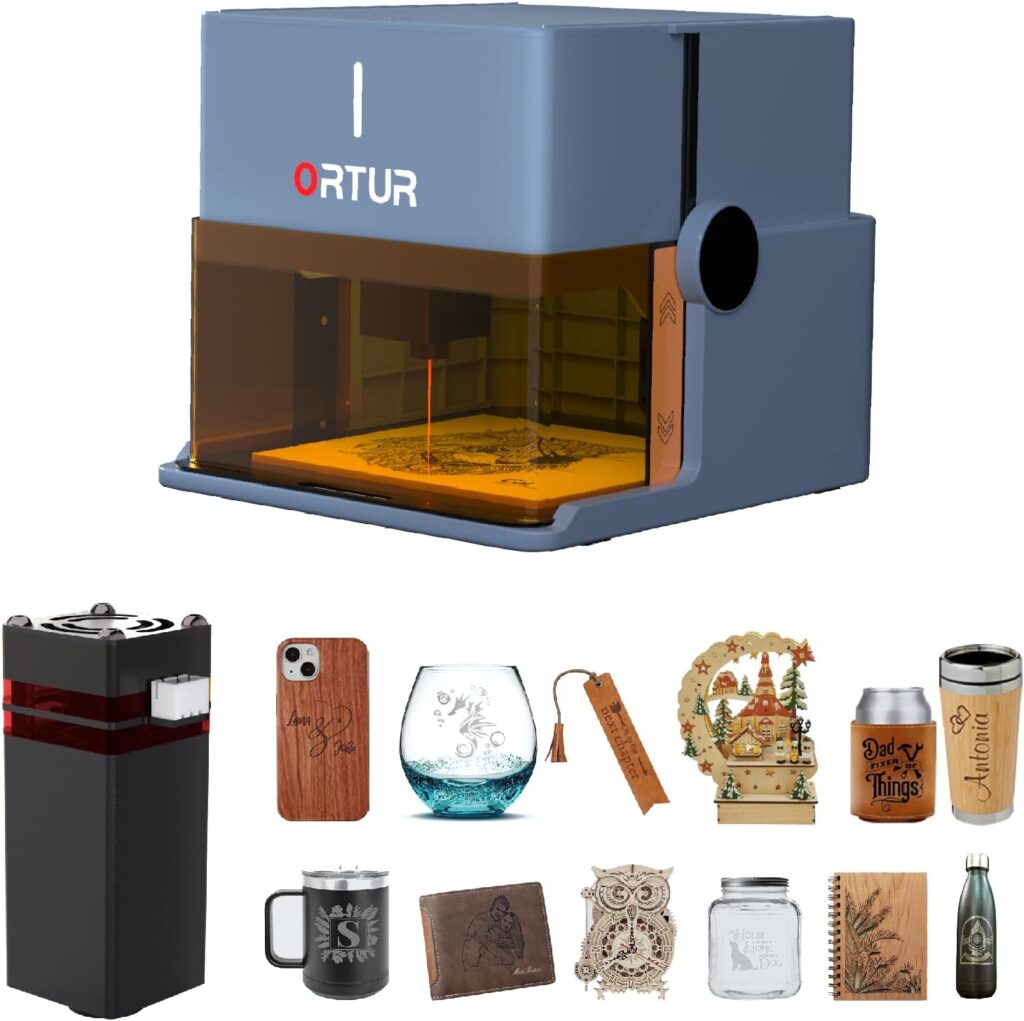
- Gifts: Leather keychains with names, wooden coasters with minimalist line art, glass jar lids etched with the contents so we stop guessing “oregano?” when it’s clearly cardamom.
- Classroom projects: Engraving class logos onto wooden badges, marking rulers for fractions because we like order, creating QR code plaques for digital art projects.
- Office sanity: Nameplates that don’t look like they were printed in 1998, cable tags so we stop unplugging the wrong thing.
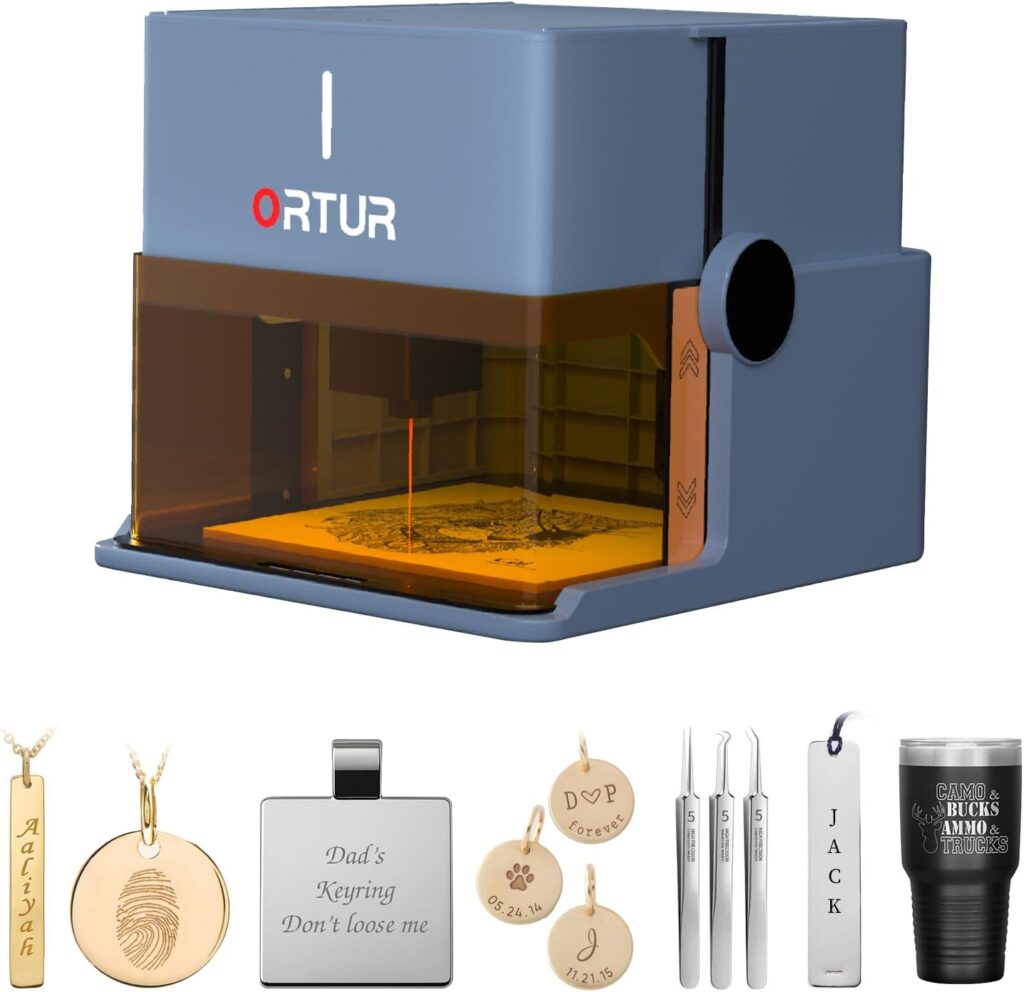
- Personal tokens: Dog tags with our phone number, bookmarks we promised to give away but kept instead, and tiny plaques for garden herbs that now feel important.
Noise, Fumes, and Common Sense
The Ortur R1 is quiet enough to run in a home office without creating drama. However, engraving and cutting always produce fumes—how much depends on the material. We run it near open windows or under a small desktop fan with a filter when we’re using smelly materials like leather or plywood. The enclosure helps contain particulates, but we still err on the side of “less lung mystery.”
We also keep a small brush and microfiber cloth nearby; soot happens, and it’s easier to clean right after a job than a day later.
Customer Service and Warranty
The brand offers a 365-day warranty from receipt, plus 24/7 customer service and lifetime technical support. We contacted support with a scenario we invented so we wouldn’t feel like we were bothering them—response was brisk and specific, not a cut-and-paste runaround. It’s not something we need daily, but knowing it’s there changes how comfortable we feel gifting the machine or recommending it to friends who aren’t hobbyists.
The Gift Factor: Packaging That Says You Thought This Through
If you’ve ever gifted someone art supplies that came in a bag that looks like it once carried produce, you’ll appreciate the Ortur R1’s gift-ready box. It feels celebratory. There’s something reframing about owning a tool that arrives like a present. It’s perfect for birthdays, holidays, “we survived another school year,” or the oddly specific “we need a shared hobby that fits on a side table.”
We also noticed we were more likely to use it because it looks nice. “Out of sight, out of mind” is real with creative tools. This one looks good enough to leave out.
Pros and Cons We Would Tell Our Best Friend
Because some of our best conversations happen over lists.
What We Love
- Truly foldable, no-install design. We open it and we’re working quickly.
- Class 1 safety with transparent enclosure and real protections (watchdog, auto shutdown, tilt detection, lid-stop, and USB interlock).
- 5W power with a tight spot size—clean detail and the ability to cut 3 mm basswood in one pass.
- App that makes sense—hand-drawn, AI assist, Puzzle Mode, quick-font engravings, and QR code stories.
- Gift-ready packaging in a sleek white design we’re not hiding.
- Offline mode and repeatable job flow that make small production painless.
- 100 x 100 mm area that suits personalizing more things than we realized.
What We’d Change
- Workspace size. We crave larger at times, though the portability is the tradeoff.
- Clear acrylic cutting isn’t its strength (this is a diode laser thing, not unique to this unit).
- Plywood variability means more testing; adhesive layers aren’t always friendly.
- Venting is still a thing we need to think about—less so than with open-frame lasers, but not zero.
Tips We Learned (and Sometimes Learned Twice)
- Test tokens are our best friends. We made a small grid of speed/power squares and engrave it on a corner of the material before committing.
- For glass, a thin layer of black tempera paint or a dedicated marking spray helps the beam couple with the surface. It cleans off with water or solvent after.
- On leather, we adjusted focus slightly and dialed back power for crisp marks without overburning.
- For cleaner wood cuts, a couple of faster passes sometimes beat one slow, scorching pass. We’d rather sand a whisper of soot than a charred canyon.
- Cotton engraves beautifully; synthetics melt, so we test first.
- We use a honeycomb bed or risers when cutting to reduce back reflection and improve airflow under the piece.
A Walkthrough of Our First Real Project
We started with a simple gift set: four 3 mm basswood coasters with a clean geometric pattern and two leather key fobs with monograms. Here’s how our process went:
- Design: We used the app’s Puzzle Mode to generate a repeating grid motif, then added initials for the key fobs in the quick text tool. It took five minutes, and no one cried.
- Material prep: We taped the basswood edges to limit smoke staining and gave the leather a quick wipe to remove any oils.
- Test pass: On scrap basswood, we engraved a small version of the pattern at several speed/power combos. We settled on medium power and medium speed for darker contrast without blowout.
- Cutting: We cut the coasters from the 3 mm basswood in a single pass as advertised. We sanded the edges lightly and sealed them with a food-safe oil.
- Leather: Veg-tan handled the monograms beautifully. We used low-to-medium power, a single pass, and got sharp, crisp letters with minimal dark edge.
- Finish: The entire set took around 45 minutes, we cleaned the lens and wiped ash from the base plate, and then basked in the suspiciously adult feeling of finishing something tidy.
We’ve made more polished projects since, but this first one still gets the most use. The coasters are under our coffee as we write this.
Maintenance and Care So It Keeps Loving Us Back
- Keep the lens clean. A soft, lint-free swab and the recommended cleaner do wonders. We check it every few sessions.
- Wipe the base plate and any rails gently; soot is clingy and surprisingly mobile.
- Vacuum crumbs and dust after cuts. It helps keep airflows clean and prevents stray scorch marks.
- Check for firmware/app updates occasionally—improvements arrive like small gifts.
- Don’t force the lid; hinges are sturdy, not invincible.
- Store it folded in a clean, dry place when not in use. We put a silica gel pack in the box to appease our inner humidity worrier.
Troubleshooting Notes We Actually Needed
- If an engrave comes out faint: slow the speed or increase power slightly. Rechecking focus usually saves the day.
- If edges char too much: bump speed up and reduce power or switch to multi-pass cutting.
- If software stalls mid-job: the watchdog tends to protect from weirdness, but we now save our settings as a profile and power-cycle if the app throws a tantrum.
- If alignment seems off: run a frame preview and gently reposition. We also make sure material sits flat; a scrap wood shim fixes a surprising number of problems.
- If smoke marks stain wood: painter’s tape over the engraving area helps; just peel post-engrave. It’s oddly satisfying.
Classroom, Home, and Office Use That Makes Sense
- Classroom: We’ve engraved awards, club logos, and QR codes linking to student portfolios. The safety features make us comfortable working with supervised older kids. Offline mode keeps stray Wi-Fi moments from derailing a lesson.
- Home: Personalized labels on storage jars and toy bins (the bins now feel judged and organized), pet tags, and housewarming gifts that look custom without the custom price.
- Office: Nameplates, cable tags, tasteful signage, and morale-boosting tokens for teams. We engraved a set of “meeting survivor” badges that became oddly popular.
Who It’s Perfect For
- New makers who want a real tool without a steep learning curve
- Parents who want to turn kid art into permanent, giftable keepsakes
- Teachers and clubs running small, supervised projects
- Small business owners personalizing products in short runs
- Anyone with a small workspace who appreciates fold-and-stow convenience
- Gift-givers who like to surprise people with practical wonders
What It Isn’t
- A large-format production machine
- A CO2 laser replacement for acrylic cutting or deep, fast cuts
- A metal engraving solution without marking agents
Value and Price Mindset
We don’t list numbers because prices move around like household socks, but the value proposition is clear: we get a safe, portable, Class 1 device that requires no assembly and actually produces sale-worthy results. The fact that it arrives in gift packaging and looks like something we want to keep out only adds to that value. For many of the things we engrave in real life, 100 x 100 mm is plenty.
A Few Project Ideas That Keep Paying Off
- Holiday ornaments cut from 3 mm basswood with names or dates
- Leather luggage tags with QR codes linking to contact info
- Etched glass spice jar lids so oregano is never mistaken for random green confetti
- Desk cable tags with icons instead of words because we’re visual creatures
- Pocket notebooks with wood veneer covers engraved with custom patterns
- Denim patches with monograms or small line art
- Classroom merit tokens and club badges that don’t look like they came from a vending machine
Comparisons and Context
We’ve tried open-frame 5W diode machines that feel like they want to annex the dining table, and we’ve used larger enclosed machines that demand a dedicated corner and fan system. The Ortur R1 sits somewhere kinder: compact, enclosed, foldable, and inviting. It trades a larger work area for genuine convenience and safety. If we needed to engrave cutting boards the size of a small continent, we’d choose something bigger. But for the items most of us actually personalize, this hits a sweet spot.
The transparent cover and Class 1 design set it apart. We’ve had machines that felt like they should come with a stern warning. This one feels modern and well-behaved.
The Nitty-Gritty Summary Table
| Feature | What It Means in Real Life |
|---|---|
| Class 1 enclosed design | We watch safely without goggles, and the lid interlock pauses when opened |
| Foldable, no-install body | From closed to engraving in minutes, no wrench-hunting required |
| 5W diode laser (0.025 x 0.11 mm spot) | Fine details, crisp text, and capable cutting for thin woods |
| 100 x 100 mm workspace | Ideal for small goods, tags, coasters, badges, and gifts |
| Up to 5000 mm/min | Fast raster engraving; we fine-tune for darker burns |
| Aluminum base plate | Protects our desk; easy cleanup after sooty adventures |
| App with AI, drawing, Puzzle Mode, QR | Creativity without suffering; fast personalization |
| Online/offline modes | Send jobs from phone/computer or run from USB stick |
| Safety suite: watchdog, auto shutdown, tilt, exposure limits, lid-stop, USB lock | Designed so we can use it in homes, classrooms, and offices with confidence |
| Exceptional support and 365-day warranty | Peace of mind when we get ambitious or clumsy |
Small-Batch Production Without Tears
We tried a mini run: 20 leather key fobs with monograms. After testing, we ran them in batches, repeating the job offline. Once dialed in, each cycle finished consistently. The time saved by not reinventing the wheel for each piece is the kind of efficiency we’ve chased with other tools but rarely caught.
We also appreciated the app’s repeatability—job parameters saved cleanly, and remounting blanks with a simple jig made for tidy alignment. We made a quick template from scrap basswood to hold the leather in the same spot every time. It worked like a charm.
Etiquette With a Laser: Our House Rules
- Never leave it unattended while running. Coffee refills are fine; naps are not.
- Ventilation isn’t optional, especially with leather, plywood, or synthetics.
- Test on scraps. It’s less heartbreaking than “winging it.”
- Keep the lens clean. A clear lens is a kind lens.
- Respect the lid interlock. It’s there for good reasons.
- Don’t engrave over unknown coatings. Mystery fumes are never a good plot twist.
Why the Enclosure Changed How Often We Use It
We’ve owned open-frame diode lasers. We can still taste the air from those. The Ortur R1’s enclosure with a transparent cover means we’re not hesitating to run a quick job because we don’t feel like masking half the room. We still ventilate, but the experience is calmer—more civilized. We don’t feel like we’re re-creating a scene from a sci-fi lab movie every time we make a luggage tag.
Our Take on the Learning Curve
It’s gentle. The tool meets us where we are and nudges us forward. We’ve run projects from the app alone, and we’ve also prepped graphics in external design software when we wanted something more complex. Both paths felt supported. If we were teaching someone who has never touched a laser, this would be at the top of our list.
The Part Where We Admit We Had Fun
We started as responsible reviewers, ready to be critical and impartial. Then we made a QR-coded leather tag that links to a birthday video, and a child we know squealed. We made coasters that looked store-bought, only better. We engraved an absurd cat drawing onto a denim patch and laughed harder than the situation warranted. This machine turned us into people who make things on weeknights, not just on weekends. We didn’t see that coming.
Final Verdict: A Friendly Power Tool Disguised as a Gift
The Ortur R1 5000mW Portable Laser Engraver and Cutter is more than a charming gadget. It’s a capable Class 1 enclosed laser that folds up, sets up in seconds, and produces clean, professional results on wood, leather, glass (with coating), cloth, paper, and more. It cuts 3 mm basswood in one pass, engraves with impressive precision, and has an app that gently coaxes us into creativity we thought we’d outsourced to greeting cards.
Is it for large projects? No. Is it for acrylic wizards? Not really. But for people who want to personalize, gift, prototype, and tinker safely and frequently in small spaces, it’s a winner. The thoughtful safety suite and gift-ready packaging make it as appropriate in a classroom as in a living room. The 365-day warranty and 24/7 support seal the deal.
We’ll keep using it, and that might be the best praise we can give a tool. It earns its place on the desk, and when we fold it away, we know we’ll open it again soon.
Disclosure: As an Amazon Associate, I earn from qualifying purchases.