Do we really need another compact CNC in our workshop, or do we need one that finally behaves like a grown‑up?

What We Got With the Lunyee 3018 Pro Ultra CNC Machine 500W All‑Metal CNC Router Machine
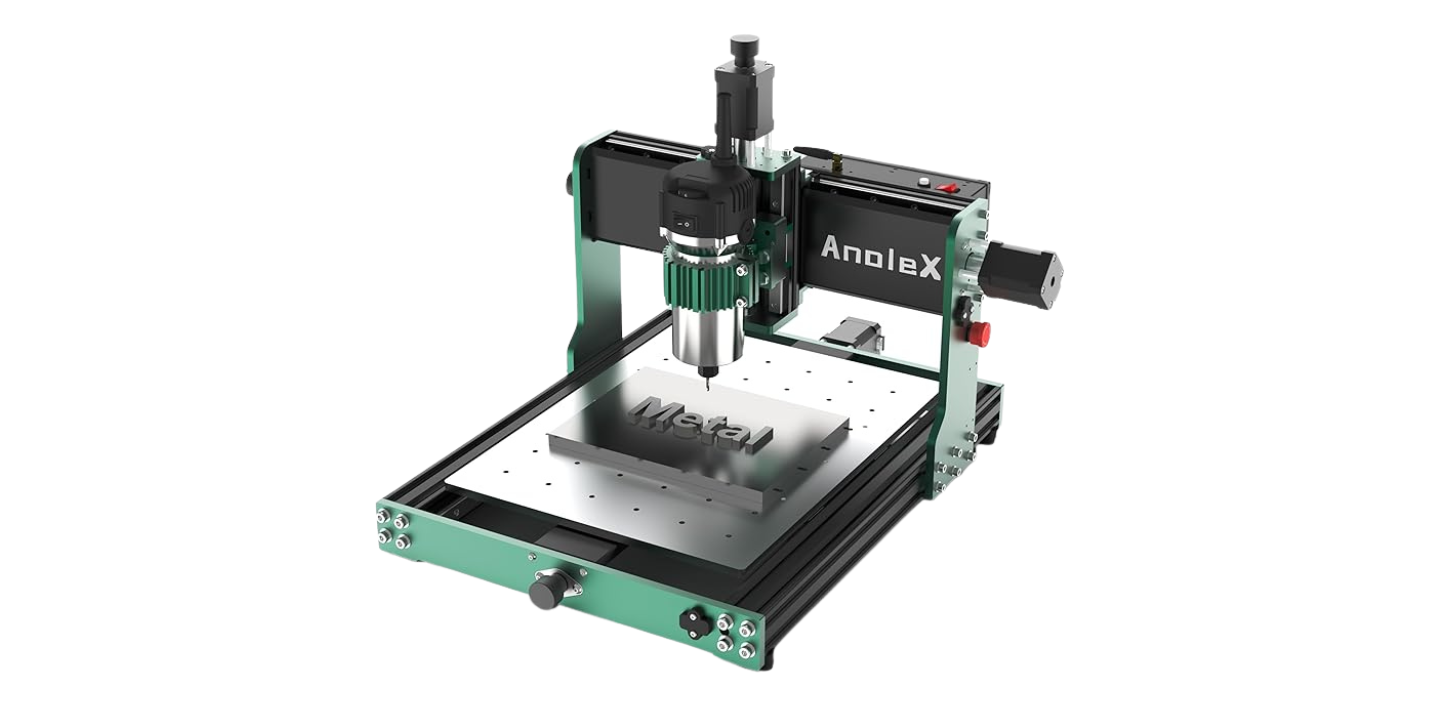
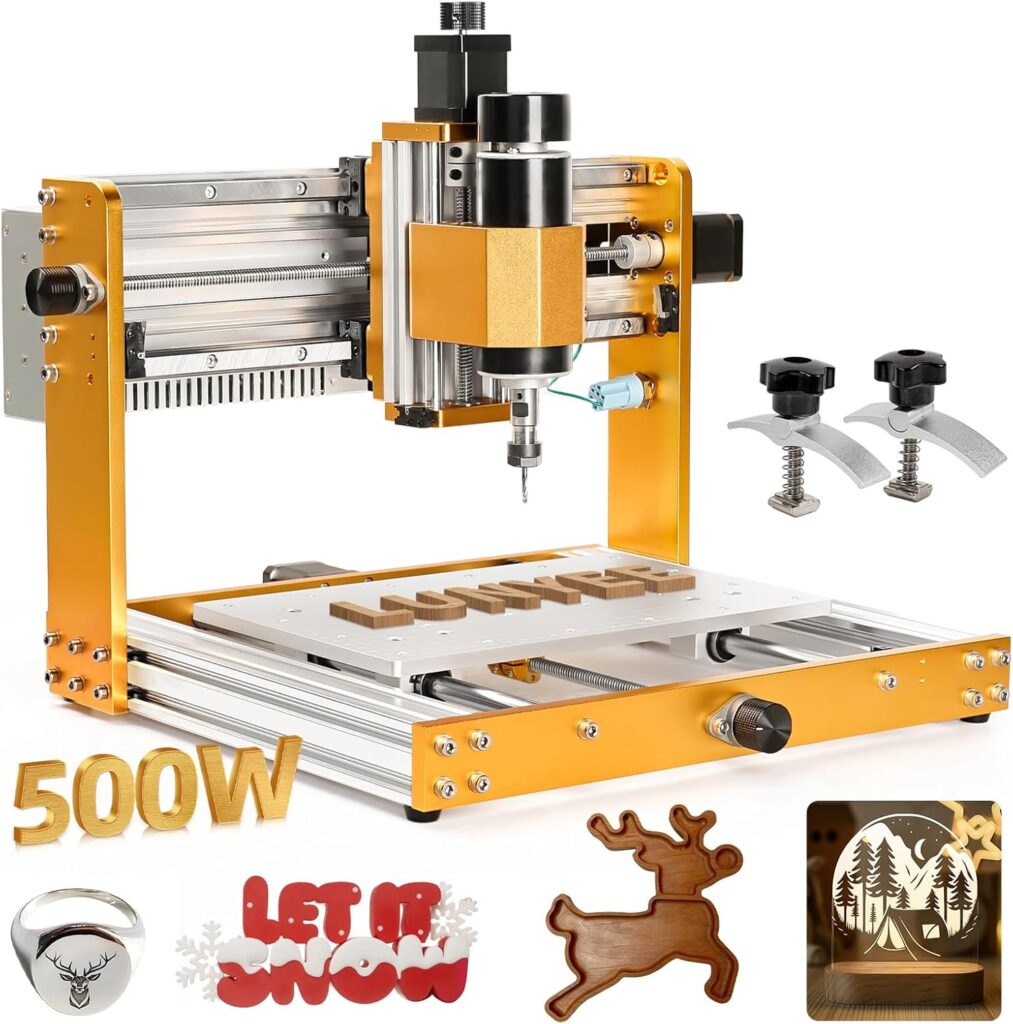
We unpacked the Lunyee 3018 Pro Ultra with the kind of restrained excitement we usually reserve for a three-day weekend and leftover birthday cake. It’s an all‑metal, 3‑axis CNC router that puts a 500W spindle together with an 80 mm Z‑axis height, upgraded linear guides, and the little touches that make a desktop machine feel less like a kit and more like a tool.
The model we tested includes limit switches on all axes, an emergency‑stop button, GRBL control with an offline controller, a one‑piece aluminum platform with a laser‑engraved scale grid, and an integrated switching power supply. On paper, it looks like the 3018 class finally learned some manners.

Lunyee 3018 Pro Ultra CNC Machine 500W All-Metal CNC Router Machine, Upgraded 3 Axis Engraver Machine Limit Switches & Emergency-Stop with GRBL Offline Control for Metal, Wood, Acrylic, PCB MDF
The Upgrades That Actually Matter
When we shop for a compact CNC, we’ve learned to look for upgrades that change how we work, not just how the spec sheet reads. On the 3018 Pro Ultra, several changes feel substantial rather than cosmetic, especially if we’re interested in metals like brass, copper, and 6061 aluminum.
X‑Axis HGH15 Linear Guide
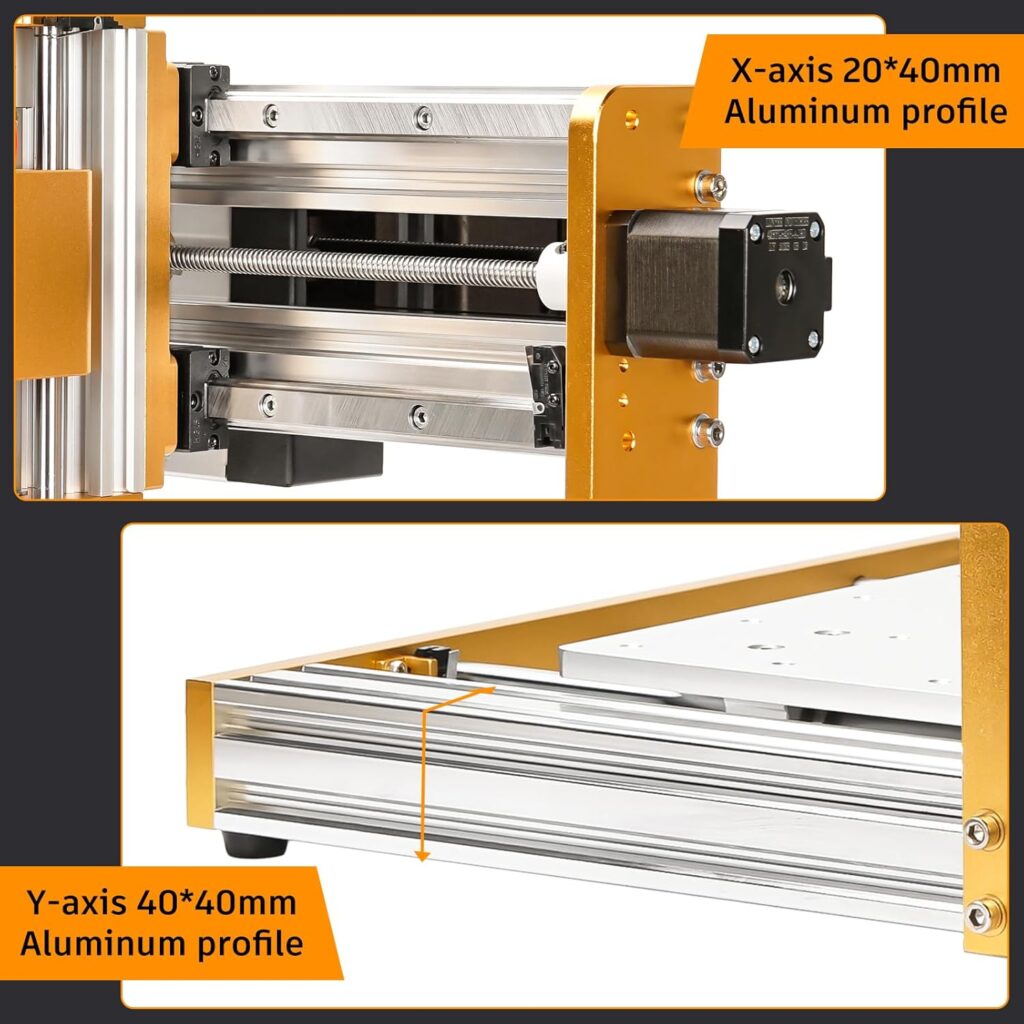
The X‑axis jumps from economy rails to an HGH15 linear guide, and we feel that difference immediately. Motion is smoother and more rigid, which shows up in surface finish and tool life. Instead of skittering over chatter marks like a nervous squirrel, we watch the spindle glide with a steadiness that keeps our cuts honest.
We’ve used 3018‑class machines with wobbly gantries that turned fine details into interpretive dance. This linear guide gives the X‑axis the backbone it needed, especially for narrow step‑overs in metals and crisp corners in wood inlays.
80 mm Z‑Axis Height and 500W Spindle
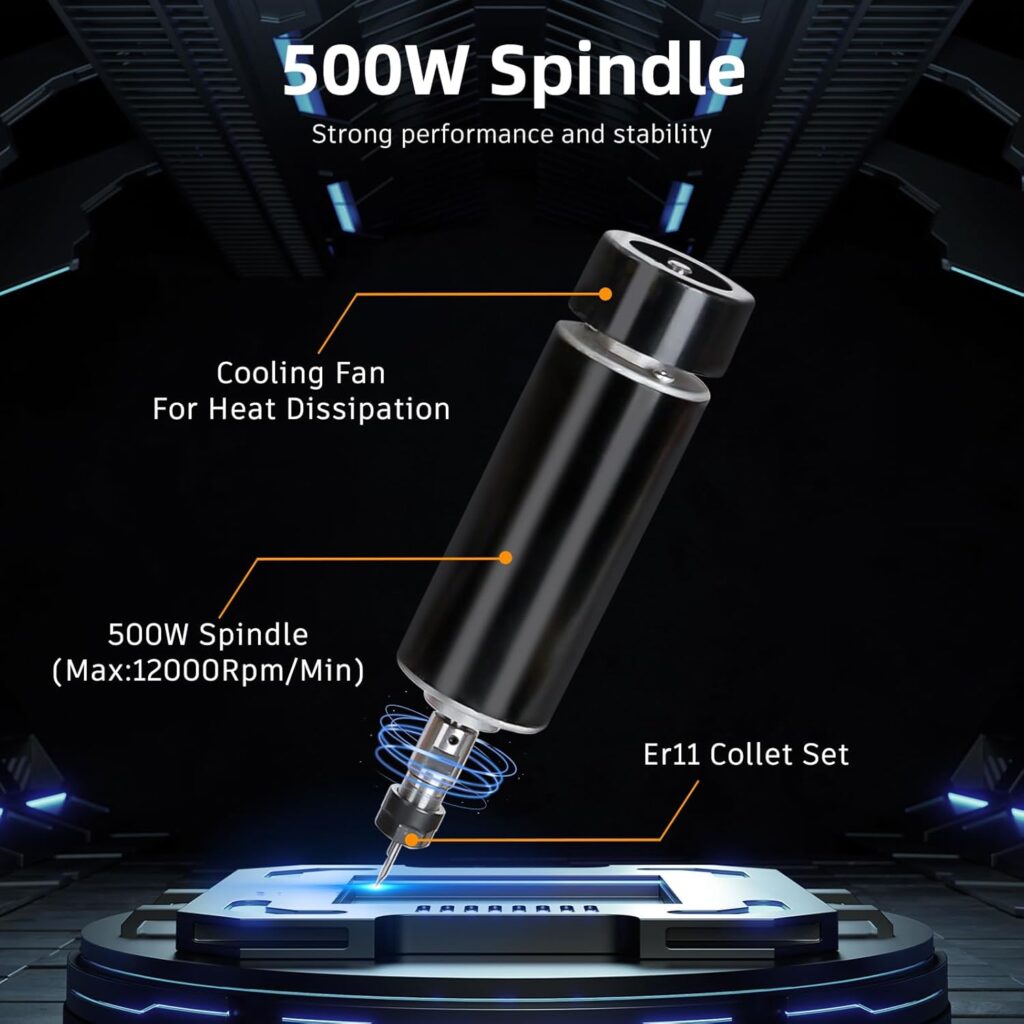
The Z‑axis travel and clearance, paired with a 500W spindle, let us use a wider assortment of tools and fixtures without playing Tetris every time we clamp a part. That additional headroom matters for v‑bits, longer end mills, or when we stack a spoilboard and still want room to breathe.
We’re not confusing 500W with a benchtop VMC, of course. But compared to 3018s with 120–300W spindles, the bump in torque helps us maintain chip load in aluminum and avoid rubbing in brass and copper. It turns “be careful” into “be methodical,” which is a much friendlier way to work.
2040 X Profiles and 4040 Y Profiles
The beefier 2040 and 4040 extrusions add stiffness to the frame, and it’s not just a feel‑good upgrade. A stiffer frame reduces deflection under load, which improves dimensional accuracy and the consistency of tool engagement. We notice fewer moments where the tool digs in at corners or leaves a whisper of a step where there should be none.
Lunyee calls out that this resolves the Z‑axis instability common in many desktop machines. We can’t promise a universal cure‑all, but in our projects, the Z held position like it meant it, even over longer runs in MDF and aluminum.
One‑Piece Aluminum Scale Grid Platform with T‑Track Clamps
We appreciate the platform more than any reasonable adults should. The one‑piece machined aluminum bed brings flatness and consistency, and the engraved measurement grid helps us square stock and return to known offsets. We like being able to say, “Let’s set zero at grid D3” and actually mean it.
The included 2‑piece T‑track mini hold‑down clamp kit is a welcome nod to reality. Yes, we still use blue tape and CA glue for thin stock, but having secure clamps that fit the bed out of the box made setup much quicker. We’d still add a sacrificial spoilboard on top for through‑cuts, but the base itself feels solid.
Integrated Switching Power Supply
Everything about the integrated power supply says, “We’ve assembled a machine before and we remember where the wires went.” It shortens assembly time, reduces cord spaghetti, and adds a bit of confidence. We’re not chasing a brick across the bench or second‑guessing polarity while the cat judges our life choices.
We also like the professional touch. It’s tidy, simple, and less to snag with a sleeve when we forget we’re not as graceful as we once were.
Limit Switches, Emergency Stop, and Cable Management
Limit switches on all axes and a big red emergency‑stop button are the difference between a hobby machine and a tool meant for real work. Homing is repeatable, soft limits can protect us from banging into the ends, and the E‑stop is there when our heart rate says “now” and our brain says “why.”
Cable management is clean and pre‑planned, which means fewer rubbing points and less interference. It also makes the machine feel purposeful rather than improvised.
GRBL Offline Control and the 4G USB Stick
We like GRBL because it’s a known quantity with broad software support. The offline controller lets us run jobs without tethering a laptop, which we reserve for days when the Wi‑Fi is being mysterious or our desk is already a compromise. The included 4G USB stick with pre‑installed software shortens the distance from box to chips.
We still run jobs from a PC for complex workflows, but the offline option is the kind of practical feature that earns its keep.
Setup and Assembly: From Box to First Chips
We’ve assembled enough small CNCs to know where the pain points usually live. On the 3018 Pro Ultra, the pre‑assembled main modules and an integrated power supply skip some of the curses we normally save for the wiring stage. We followed the assembly video linked on the product page and used the paper manual to double‑check.
We squared the gantry to the bed using a machinist’s square and loosened/retightened the mounting bolts to remove any racking. Then we trammed the spindle—light touch, small shims if needed—to get the bit perpendicular to the bed. It’s worth ten minutes now to save grief later.
- We homed the machine to verify limit switches.
- We set steps/mm in GRBL only if needed (ours came sensible out of the box).
- We surfaced a sacrificial spoilboard to match the machine to itself.
- We verified Z‑zero with a feeler or paper trick if no touch plate is handy.
Once everything looked aligned, we ran a small test engraving in MDF, then a pocket cut in acrylic to check chip evacuation, and finally a conservative facing pass in 6061 aluminum to feel out rigidity. Nothing fell off the table, which we take as a sign of progress.
Performance: Wood, Acrylic, PCB, and Metals
We prefer machines that don’t make us pick one material and change our personality to match. The 3018 Pro Ultra’s upgrades widen the workable envelope, especially with metals.
Wood and MDF
In MDF and hardwoods, the 500W spindle breezes through 2D profiles, v‑carving, and shallow pocketing with little drama. We keep step‑downs modest, and the linear guide helps keep chatter at bay. We watched edges for fuzzing on plywood and found that a climb cut finishing pass kept things clean.
We also enjoyed the grid bed for quick alignment. We could fixture a repeat run of coasters, re‑zero, and re‑run without much fiddling.
Plastics and Acrylic
Clear acrylic can be petty, but with a sharp O‑flute and appropriate chip load, the finish came out glossy with minimal polishing needed. We kept the chips evacuating—compressed air or a small brush pass—and reduced spindle speed to avoid melting. Cast acrylic gave prettier results than extruded, as usual.
Delrin/Acetal was a treat: crisp edges, easy chip ejection, and a surface that made us nod approvingly like we’d remembered a birthday.
PCB Milling
For PCB engraving, rigidity matters more than bravado. The linear guide upgrade helped keep 30° and 60° v‑bits where we set them, and the 80 mm Z clearance gave us space for low‑profile clamps while still getting the spindle down close to the board. We surfaced the spoilboard lightly to get consistent trace isolation.
We still prefer chemical etching for multi‑layer boards, but for quick single‑sided prototypes, this machine did the job without turning our copper into confetti.
Brass and Copper
Brass and copper are where the 3018 Pro Ultra starts pulling away from entry‑level kits. With the 500W spindle, we kept chip load consistent and avoided the squealing rub that turns tools into decorative objects. We used sharp single‑flute or 2‑flute end mills and a light spritz of lubricant, and we paid attention to chip clearing.
We found that conservative step‑downs paired with a slightly aggressive step‑over for roughing, then a light finish pass, gave surfaces we didn’t feel compelled to sand. It’s still a small machine, but it’s a small machine that behaves.
6061 Aluminum
Aluminum always tells the truth. Here the stiffer frame, the X‑axis linear guide, and the 500W spindle all show their value. We kept the toolpath gentle—adaptive clearing with small radial engagement is our baseline—and the machine rewarded us with clean chips and a surface that looked machined, not gnawed.
We avoided cutting fluids that leave a mess and used a mist of isopropyl or a drop of light oil administered with restraint. With good clamping and modest DOC, the machine made parts we were happy to use.
A Practical Starting Point for Feeds and Speeds
We hesitate to etch speeds in stone because tools, coatings, and setups vary. But as a starting point for a 1/8″ (3.175 mm) single‑flute cutter:
- 6061 aluminum: moderate spindle speed, shallow step‑down, small step‑over, steady feed to maintain chip thickness, air blast or light lube, and regular chip clearing.
- Brass: similar to aluminum but a hair slower on spindle, tidy chip evacuation, and very light finishing passes.
- Acrylic: lower spindle speed than wood, higher feed to avoid melting, O‑flute cutter, and a no‑melting rule enforced by clearing chips.
We test on scrap, tune by ear and chip color, and keep notes like responsible adults doing a science fair project.
Accuracy and Repeatability
We’re used to 3018‑class machines that do “okay” until the moment they don’t. The 3018 Pro Ultra steadied that line. The X‑axis linear guide and stronger frame reduced wobble and Z‑axis deflection during retracts and plunges. We noticed tighter corners in V‑carving, more circular holes with small end mills, and pockets that didn’t require surprise sanding.
Repeatable homing via limit switches let us run multi‑step jobs and return to zero without re‑indicating every time. Combined with the scale grid bed, we could fixture a small run of parts and iterate designs without losing alignment. We’re not claiming metrology lab numbers, but for small functional parts and detailed engravings, the machine produced results we could trust.
Software and Workflow with GRBL and Offline Control
GRBL keeps the control side recognizable. We can run G‑code from Candle (also known as Candle GRBL), Universal Gcode Sender (UGS), or similar senders, or we can copy files to the offline controller when we want the PC out of the splash zone. The included USB stick with software gets us moving quickly.
Our smoothest workflow looked like this:
- CAD in Fusion 360, FreeCAD, or similar.
- CAM toolpaths with adaptive clearing where appropriate, conservative ramping, and a separate finish pass.
- Post‑process to GRBL.
- Dry run above the stock to verify motion, then run with a hand near the E‑stop for the first minute, because life is exciting.
The offline controller is great for repeat runs or simple engravings. We prefer a full sender for probing routines, macros, and jogging with fine granularity. The nice thing is we don’t have to choose permanently; the machine accommodates both moods.
Safety, Maintenance, and Noise
We talk about safety not because we want to, but because we like having all our fingers. The big E‑stop is where we expect it to be, the limit switches do their preventative work quietly, and the integrated power supply banishes the loose brick that causes trip hazards.
Noise from the 500W spindle is what we expect for its class—easily headphone territory, less than a handheld router screamer, but not library quiet. The rigidity keeps the “angry‑bee” chatter at bay when we choose reasonable feeds and fresh tools.
Maintenance is basic but not optional:
- Keep rails and guides clean; a light, appropriate lubricant on linear components goes a long way.
- Check belt or leadscrew tension periodically.
- Verify squareness if you move the machine or after a hard crash.
- Surface the spoilboard as needed, and don’t be shy about replacing it after too many adventures.
Who the Lunyee 3018 Pro Ultra Is For—and Who Might Want More
We see this machine as a strong pick for:
- Hobbyists who actually make things, not just watch videos about making things.
- Small workshops that need to prototype brackets, plates, panels, and engraved parts in wood, plastics, brass, copper, and 6061 aluminum.
- Educators who want a machine that’s forgiving enough for students but capable enough to impress them.
- Jewelry makers and PCB tinkerers who care about fine detail and repeatable setups.
We’d look elsewhere if:
- We needed to cut steel or thick aluminum at production speeds.
- We wanted a large working area for furniture‑scale projects.
- We expected industrial cycle times or tool changers.
This machine lands where most of us live: the world of careful setups, sensible cuts, and parts we’re proud to hold up to the light.
Feature Breakdown and Our Take
Sometimes it helps to put it all in one place. Here’s how the headline features translate into everyday use for us.
| Feature | What It Is | Why It Matters | Our Take |
|---|---|---|---|
| 500W spindle | Higher‑power DC spindle | More torque, better chip load in metals | A meaningful upgrade over 120–300W spindles |
| 80 mm Z height | Taller Z clearance | Fits longer tools/fixtures, easier workflows | Practical headroom without contortions |
| HGH15 X‑axis linear guide | Stiff, smooth motion on X | Reduced wobble, cleaner finish | Biggest single rigidity win |
| 2040/4040 profiles | Beefed‑up frame | Less deflection under load | Contributes to accuracy across materials |
| Aluminum grid platform | One‑piece bed with scale | Flatness, easy alignment | Feels professional; we use it every session |
| T‑track clamp kit | Included hold‑downs | Secure fixturing out of the box | Useful, add more as projects grow |
| Limit switches | Homing and soft limits | Repeatability and protection | Essential for multi‑step jobs |
| Emergency stop | Instant power cut | Safety and sanity | The big red button we actually use |
| Integrated PSU | Built‑in power supply | Cleaner wiring, quicker setup | Tidy and confidence‑inspiring |
| GRBL + offline | Flexible control | Run with or without a PC | Broad software support, easy ramp‑up |
| 4G USB with software | Pre‑installed tools | Shorter path to first chips | Helpful for first‑time users |
We like when the spec sheet turns into a predictable day at the bench. This one mostly does.
Pros and Cons at a Glance
We don’t believe in perfect machines, but we do believe in transparent trade‑offs.
| Pros | Cons |
|---|---|
| Real rigidity gains from HGH15 X‑axis and beefy frame | Still a 3018 footprint; not for large stock |
| 500W spindle handles brass, copper, 6061 aluminum sensibly | Not designed for steel or deep metal stock removal |
| One‑piece aluminum bed with scale grid feels premium | We still recommend adding a spoilboard for through‑cuts |
| Limit switches and E‑stop included | Noise is present; plan for hearing protection |
| Integrated power supply reduces wiring hassle | No enclosure by default; chip management is on us |
| GRBL with offline controller is flexible | CAM learning curve if we’re new to CNC |
| Pre‑assembled modules and clear cable management | Fixturing extras beyond the included clamps are a future buy |
| Support promises 24‑hour responses | As with all desktop CNCs, patience beats brute force |
We’d take these pros and cons any day over a flashy spec that hides fussy behavior.
Tips, Tricks, and Projects We Loved
We collect small habits that make a machine feel bigger than it is. With the 3018 Pro Ultra, these tricks kept us smiling more than sighing.
- Surface a sacrificial spoilboard and bolt it to the aluminum bed. Now you can through‑cut without flinching, and you’ll have a reference plane that matches your machine.
- Use the grid engravings to standardize setups. “Top‑left corner at B2” sounds quaint until you can reproduce it without a second thought.
- For thin sheet, the tape‑and‑CA‑glue method remains magical. Blue painter’s tape on the bed and the workpiece, CA glue between, activator, and a gentle pry to remove. We still use clamps, but this trick earns its keep.
- Keep a dedicated set of 1/8″ shank cutters for this machine. Sharp tools make small spindles behave like larger ones. When in doubt, replace the bit and watch the machine relax.
- Learn to read chips. Dust means rubbing, and long stringers often mean melting in plastics. Chips that look like they should be in a snow globe typically mean we’re on the right track.
- Calibrate steps/mm and verify squareness after major moves or knocks. A little metrology prevents a lot of profanity.
- Make a toolbox of small fixtures: toe clamps, a low‑profile vise, cam clamps, and a corner square. We don’t need all at once, but each solves a problem before it becomes a mystery.
- For aluminum, use adaptive clearing strategies and keep radial engagement low. Let the tool dance around, not plow through.
- If we’re using the offline controller, keep filenames short and clear. We learned, once, that “Project_V2_Final_FinalReally.gcode” is a cry for help.
Among our favorite projects were a set of brass inlay coasters that looked far fancier than our coffee deserves, a batch of custom aluminum brackets for a camera rig, and a small run of engraved acrylic panels for a synthesizer case. None of them required a hero’s courage—just good setups and this machine’s quietly confident motion.
Troubleshooting and Support Experience
No machine is interesting until it misbehaves just enough to keep us humble. We ran into two small hiccups:
- Our first homing routine stopped short; we’d mis‑set the $23 homing direction in GRBL. A quick parameter tweak solved it.
- On an early aluminum pass, we heard chatter on plunges. We reduced plunge rate, added a ramp entry, and increased the retract height slightly. Silence returned, the good kind.
We reached out to Lunyee support with a question about recommended GRBL defaults and received a reply within 24 hours, as promised. The response was clear, not a copy‑paste novella. The assembly and wiring videos linked on the product page were concise, which we appreciated, because we can only watch a person tighten a bolt for so long.
The included 4G USB stick with pre‑installed software worked without ritual. We still downloaded updated versions from official sources later, but it’s nice to be productive while the rest of the internet is updating itself.
Day‑to‑Day Usability and Ergonomics
We sometimes judge a machine by how often we wander off while it runs. This one tends to keep us nearby, not out of fear, but because the cadence of the job is relaxing when things are dialed. The jog controls make sense, the homing is reliable, and the work envelope—while small—feels surprisingly roomy with the extra Z height.
Cable management means fewer snags, and the integrated power supply keeps the footprint tidy. We added a low‑cost enclosure later to control chips and sound; the machine fit easily inside and didn’t fight us on wiring.
Zeroing is painless with a paper‑under‑the‑bit trick or a probe if we bring our own. The scale grid encourages better habits than eyeballing. We felt less like we were improvising and more like we had a repeatable process, which is the point of CNC in the first place.
Material‑Specific Notes Worth Keeping
We like cheat sheets. Here are notes we kept nearby:
- MDF: Use a dust shoe or vacuum; MDF dust is fine and prolific. Climb cut finish pass for clean edges.
- Hardwood: Pay attention to grain direction; avoid tear‑out with a shallow final pass and sharp bits.
- Acrylic: O‑flute cutters, keep chips moving, avoid dwelling. If it smells like a chemistry lab, slow the spindle and speed up the feed.
- Delrin/Acetal: A joy. Good chip evacuation, sharp tools, and you’ll look more skilled than you feel.
- Brass: Keep tools sharp, avoid rubbing by maintaining chip load, and use a light lube if needed.
- Copper: Stickier than brass; lighten the step‑over and give chips every chance to escape.
- 6061 Aluminum: Adaptive strategies, small step‑overs, air blast if possible. Check runout if finishes look odd; dull tools exaggerate small errors.
We print notes because memory is a suggestion, not a guarantee.
Longevity and Care
We baby our tools until they prove they don’t need it, and even then, we keep a hand on the cradle. The linear guide benefits from being kept clean, and the aluminum bed appreciates not being used as a sacrificial surface unless we’ve added a spoilboard. Bolts settle after the first few jobs; a quick retorque keeps things square.
Belts or leadscrews (depending on axis design) deserve occasional attention. We listen for changes in sound more than anything; a new rattle usually means a loose fastener, and a new whine often signals friction. Small machines communicate if we bother to listen.
How It Compares in the 3018 Universe
In the land of 3018‑class routers, most machines share a silhouette and a long list of caveats. The Lunyee 3018 Pro Ultra stands out because the upgrades target the usual failure points: Z‑axis stability, X‑axis rigidity, and bed flatness. Limit switches and an E‑stop should be table stakes; here, they are.
We’ve used cheaper 3018 kits that require immediate tinkering: upgrading spindles, printing braces, replacing rails. With this model, the upgrades are already in place. We’re still free to mod, but we don’t have to spend the first month turning a kit into a tool. That difference has value we feel every time we sit down to run a part.
The Intangibles: Confidence and Rhythm
Our favorite thing about the 3018 Pro Ultra is that it encourages a rhythm. We plan a job, fixture the stock without a scavenger hunt, set zero against a visible grid, run a cautious first pass, and then let the machine hum while we sweep the bench and pretend it’s always been this tidy.
Confidence is hard to quantify, but we feel it when we stop hovering and start trusting. The linear guide and stiffer frame deliver that feeling in small ways: smoother corners, fewer “oops” marks, and an overall sense that the tool will go where we tell it to.
Value and Final Take
We think about value as the time between buying a tool and trusting it. With the Lunyee 3018 Pro Ultra, that distance is short. The 500W spindle and 80 mm Z height give us room to grow, the HGH15 X‑axis guide provides the backbone so many small machines lack, the one‑piece aluminum bed with a scale grid makes our setups consistent, and the integrated power supply and limit switches make everyday use less fussy.
No, it won’t replace a bigger gantry machine or a mill, and it’s not meant to. But for metal badges, brass inlays, aluminum brackets, wood signs, acrylic panels, and PCB prototypes, we built pieces that we’re proud to hand to someone without a monologue of excuses.
If we had to summarize our experience in one line, it would be this: the Lunyee 3018 Pro Ultra turns the 3018 format from a project into a partner. We spend more time making and less time convincing the machine to behave. For our bench and our patience, that’s the upgrade that matters most.
Disclosure: As an Amazon Associate, I earn from qualifying purchases.