Does it count as a personality quirk if we grin every time a laser starts whirring?
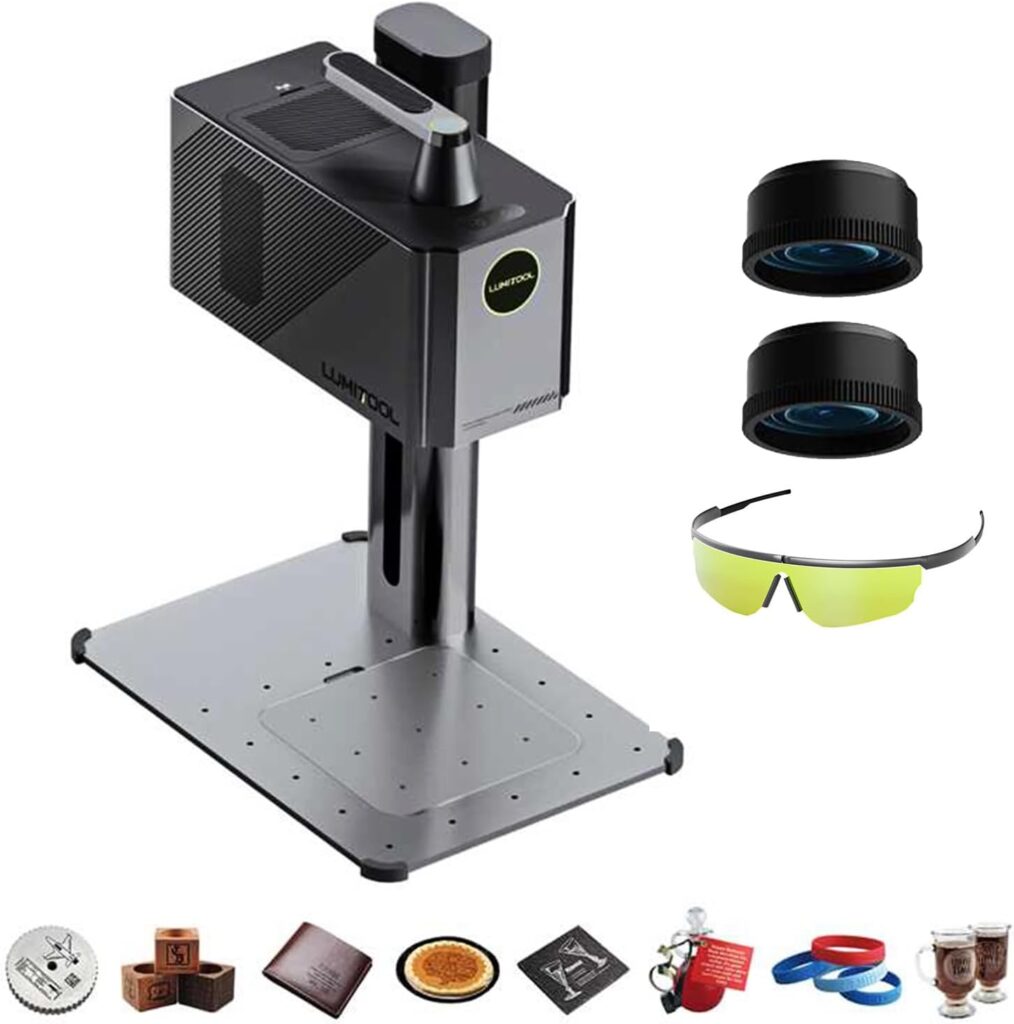

Our Hands-On Review of the 20W True Fiber Laser Engraver
We brought the 20W True Fiber Laser Engraver into our workshop expecting it to be fast, precise, and maybe a little smug about it. It is all three, except the smugness is ours. When a handheld fiber machine writes our initials into stainless steel like it’s doodling on a cocktail napkin, we get giddy.
This compact, AI-guided, all-in-one unit promises 10X faster engraving, pro-grade accuracy, and easy control through LightBurn and the LumiTool app. We spent days putting it through its paces on metal, wood, leather, and a few questionable odds and ends we found in a drawer. Here’s everything we learned—warts, wonders, and why we kept searching the house for more metal.
Quick Summary of What Makes It Different
We test a lot of engravers, and not many deserve the phrase “weekend-changing.” This one does. It’s handheld and portable, so we moved from the bench to the garage without playing cable Jenga. It runs up to 10000 mm/s with LaserDrive Beam Control, and the 1064 nm Q-switched fiber laser is the real deal for crisp, deep metal work. It supports LightBurn (hallelujah), pairs with a friendly LumiTool app, and ships as a complete kit—including two lenses and industrial-grade safety goggles—so we were engraving within an hour of unboxing.

20W True Fiber Laser Engraver - 10X Faster AI Fiber Laser Engraving Machine for Metal, Wood, Leather & More - AI-Powered, Deep Engraving, Cloud Data, Compact & Affordable
Unboxing the Complete Pro Kit
We opened the box with the same energy we usually reserve for birthday cake and partial refunds. Inside, everything was orderly, clearly labeled, and more “professional studio” than “mystery parcel.”
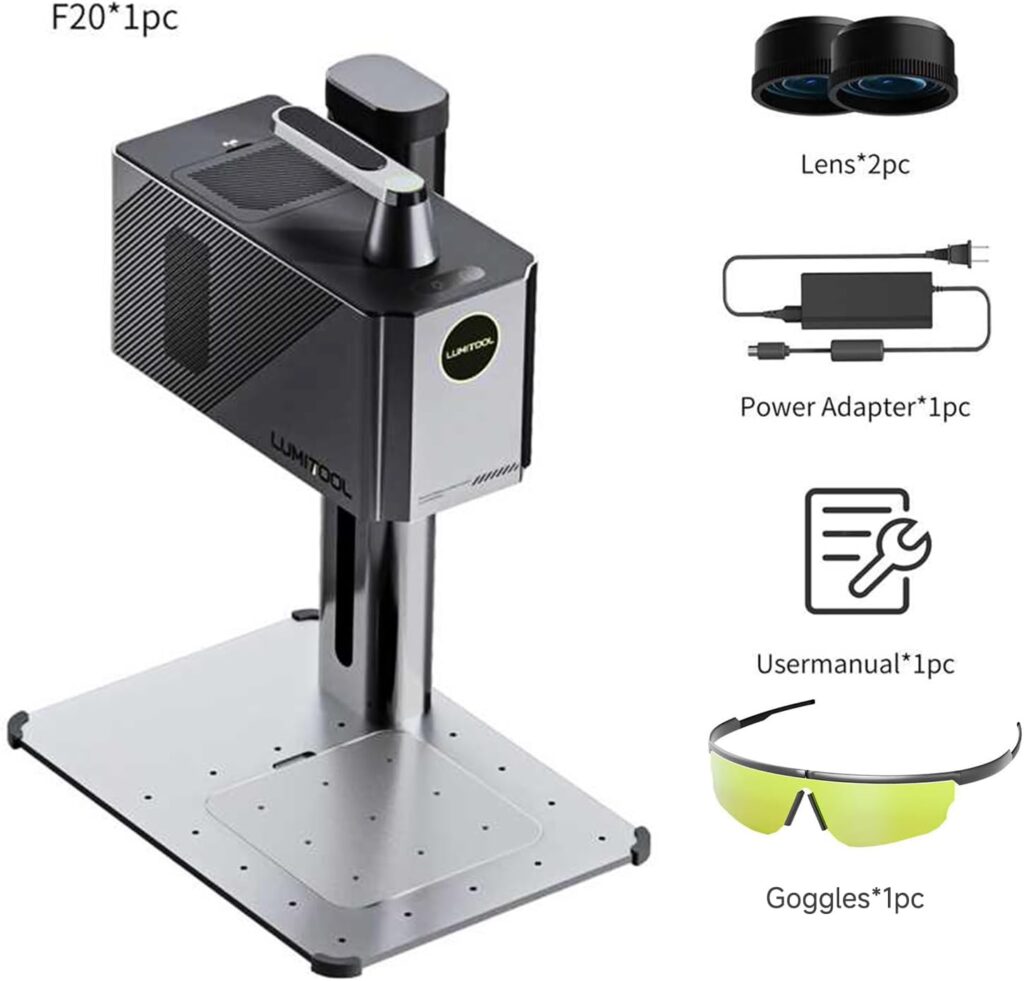
The bundle includes:
- The 20W True Fiber Laser Engraver, assembled and ready to use
- Two precision lenses (for 110 mm × 110 mm and 175 mm × 175 mm work areas)
- Power adapter
- Industrial-grade laser safety goggles
- User manual
We appreciate when “complete kit” actually means complete. No scavenger hunt for lenses. No week-long wait for goggles. Just the right pieces, right away, like someone imagined how we might actually work.
Setup: From Box to First Spark
Getting started felt gratifyingly short—sort of like skipping the trailers and going straight to the feature. We connected power, mounted the 110 mm × 110 mm lens, and paired the engraver with a laptop over Wi‑Fi. LightBurn recognized it without drama, and the LumiTool app mirrored many of the same controls with a gentler learning curve.
We aligned the focus with the expected standoff distance, tested a small vector logo on anodized aluminum, and within minutes had a crisp, high-contrast mark. This is the kind of setup experience that makes us believe in machines again.
Lens Swapping and Work Area Choices
The two included lenses feel like wardrobe changes for the laser—one for precision work (110 mm × 110 mm) and one for larger layouts (175 mm × 175 mm). The smaller field delivered our sharpest text and the most aggressive deep-engrave potential; the larger field was perfect for badges, plates, or anything bigger than a credit card and smaller than our ambition.
Swapping lenses is quick, and keeping them dust-free pays dividends. We treat lenses like glassware: hold the edges, never the face, and avoid breathing on them as though our breath is made of disappointment.
Design and Build: Compact, Practical, and Actually Portable
We’ve seen “portable” used to describe some machines that require two people and a chiropractor. Here, the word fits. The 20W True Fiber Laser Engraver is a lightweight, all-in-one unit with a sleek, handheld form factor. No external galvos, no spaghetti cables, no bench real estate crisis.
We carried it between rooms and changed setups without disassembling a mini factory. For small studios, mobile creators, pop-up shops, repair counters, and classroom demos, this portability isn’t just cute—it’s genuinely enabling.
Ergonomics and Everyday Handling
We used it both docked on a stable surface and handheld over awkward objects. The balance is decent, the grip is secure, and the stability is enough for precise strokes when you’re careful. That said, we still prefer a jig or stand for long serial runs, not because the machine can’t handle it, but because our wrists enjoy living.
The Laser Under the Hood: 1064 nm, Q-Switched, and Serious
We’ve worked with diodes and CO₂ lasers, but for metal work, fiber rules the roost. This unit fires a 1064 nm Q-switched pulsed beam, concentrating energy into short, powerful bursts ideal for marking, annealing, and deep engraving on metals. The “MaxMetal” tech and LaserDrive Beam Control feel like the secret sauce in how cleanly it hits stainless steel, brass, aluminum, copper, gold, silver, titanium, and iron.
In our tests, the beam consistency looked excellent. Line widths down to fractions of a millimeter were crisp, and small-scale text rendered as legible instead of “modern art.”
Speed Claims That Stand Up
“Up to 10000 mm/s” is the headline, and we did see scanning speeds in that neighborhood during hatch fills and marking passes. Actual job times vary with dwell, line spacing, and the depth you want, but for logos, ID tags, serial numbers, QR codes, and decorative markings, this is palpably faster than the standard crowd.
Is it literally 10 times faster than every other engraver? Against entry-level diodes for marking, easily. Against older fiber units, we saw significant—but not always 10X—time savings. The point is: it’s very fast, and it stays accurate at speed.
Precision and Resolution: Where Detail Lives
We tested fine text down to around 0.5 mm height and saw readable results. On vector logos, edges were tight and corners stayed corners rather than confessions. With 0.001 mm accuracy and 10K resolution, this machine rewards careful design. It also punishes sloppy vector paths, a lesson we learned with a tangled monogram that deserved what it got.
Bitmap engraving also fares well when the source image is clean and you choose the right dithering. We got smooth gradients on coated metal plates that felt, dare we say, classy.
Deep Engraving and Cutting Depth
The spec claims a cutting depth of 1.5–3 mm, and we’ll translate that into practical terms. On certain materials—softer metals, resins, or composites—you can achieve notable removal with multiple passes, slow speed, and careful cooling. For stainless and harder alloys, think “deep engraving” rather than “through cutting.”
If through-cutting thick metal is your goal, 20W fiber isn’t the traditional tool. If you want bold, tactile depth on metal surfaces, this machine excels, and with patience, it will surprise you with how assertive it can be.
Software: LightBurn and the LumiTool App
LightBurn support is a big deal for us because it standardizes the way we work. We imported SVGs, managed layers, assigned power/speed/frequency, and ran test grids without feeling like we were piecing together a spaceship schematic. LightBurn’s alignment tools, camera support (if you add your own), and path optimization made repeat jobs painless.
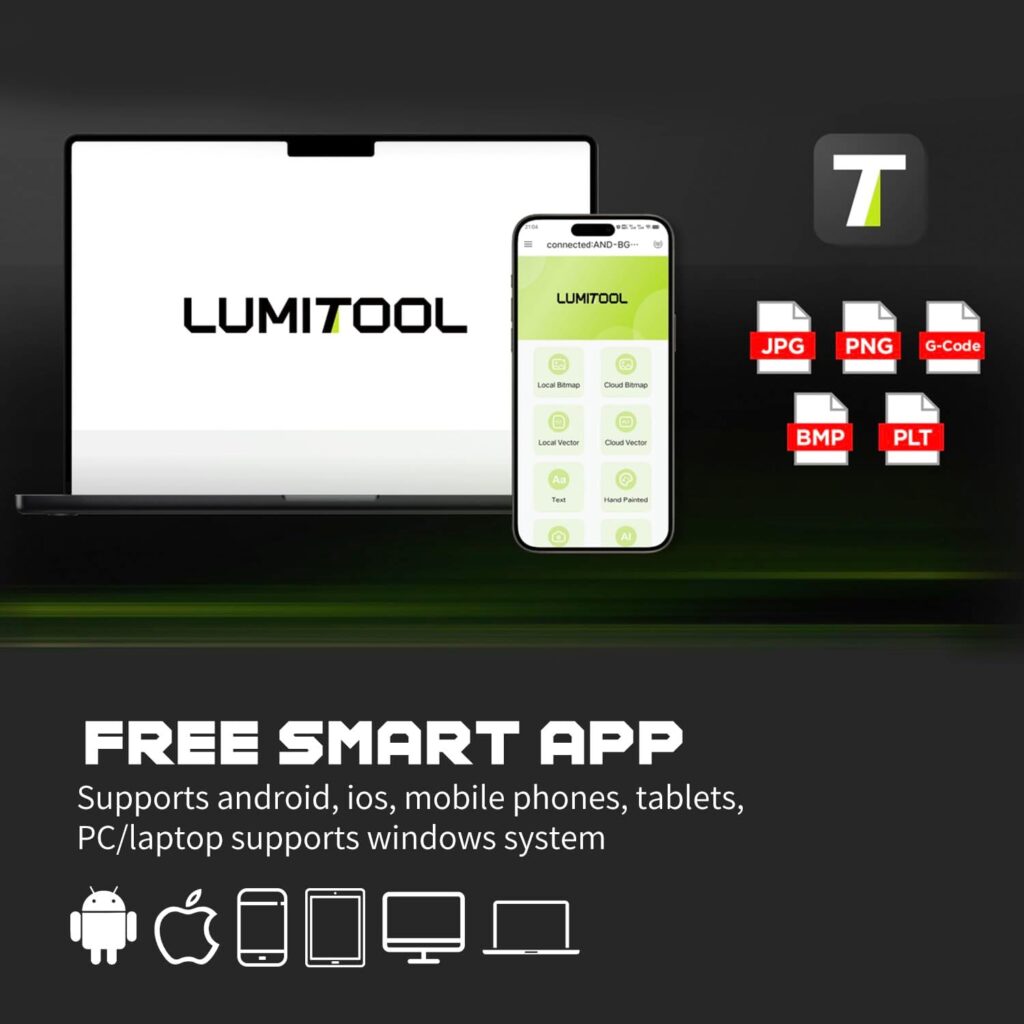
The LumiTool app sits on the friendlier end of the spectrum. It handles wireless connectivity, cloud integration, and intuitive project management. We liked the quick-start templates and the way it stores materials data. The AI-enabled features—image cleanup, parameter suggestions by material type, and automatic layout nudging—felt like training wheels we didn’t mind keeping on for certain tasks.
Cloud Data and Collaboration
Cloud sync makes sense here. We kept parameter libraries, test cards, and job files accessible across a laptop and a tablet. For teams, this means one person can prep files while another manages the machine, and everyone can stop asking, “Who has the latest settings for brass?”
We also appreciated that if we wanted to work offline, we could. Sometimes Wi‑Fi drops exactly when you need it, like an unreliable roommate.
At-a-Glance Specs and Capabilities
We pulled the highlights into a quick reference so we could stop repeating ourselves and start engraving something more interesting than test grids.
| Feature | What We Saw and Why It Matters |
|---|---|
| Laser Type | 1064 nm fiber, Q-switched pulsed—ideal for metals and precise marking |
| Power | 20W—balanced for engraving depth and fine detail |
| Speed | Up to 10000 mm/s with LaserDrive Beam Control; noticeably faster than common alternatives |
| Precision/Resolution | 0.001 mm accuracy, 10K resolution; crisp small text and detailed logos |
| Work Areas | Optional 110 mm × 110 mm and 175 mm × 175 mm lens-based fields |
| Materials | Stainless steel, gold, silver, brass, aluminum, titanium, copper, iron; also marks many coated/painted surfaces, leathers, and certain plastics |
| Software | LightBurn support; LumiTool app with wireless connectivity and cloud integration |
| AI Features | Image cleanup, parameter suggestions, auto layout assist, and job management conveniences |
| Form Factor | All-in-one, handheld, compact, and portable |
| Kit Contents | 2 lenses, power adapter, user manual, industrial-grade laser safety goggles |
| Cutting/Depth | Deep engraving with potential 1.5–3 mm material removal depending on material and passes |
| Best For | Metal engraving, serials/QRs, jewelry, tools, tags, custom gifts, small-batch production |
Real-World Tests: Metals, Organics, and “Let’s See What Happens”
If you put a fiber laser and a stack of random materials in front of us, we become curious raccoons. We tried stainless steel, anodized aluminum, brass, copper, and a few organics to gauge the versatility.
- Stainless steel: Clean, permanent marks; deep engraving attainable with slower passes and proper hatching. Dark annealed finishes looked gorgeous.
- Anodized aluminum: Fast, high-contrast marks—logo work was a breeze.
- Brass: Beautiful detail; warm coloration; deep, tactile results possible.
- Copper: A bit reflective but very engravable; dark marks with dialed frequency.
- Titanium: Crisp marks and pretty temper colors with controlled heat.
- Gold and silver: Yes, but test carefully—precious metals demand precise parameters and a steady hand.
- Wood/leather: 1064 nm isn’t a cutting beast for organics, but it marks leather nicely and can label wood with subtle tonal effects. If heavy cutting of wood is your goal, a CO₂ laser remains king.
QR Codes, Barcodes, and Tiny Text
We printed Data Matrix, Code 39, and QR codes onto stainless and anodized plates at sizes that made our eyesight do a double take. Our test scanner read them consistently, even after we smudged with a thumb we pretended was grease. For industrial labeling, this is production-ready.
Speed vs. Quality: Finding the Sweet Spot
The machine will go fast. Our advice: let it, but not always at full clip. For ultra-sharp edges and deep engraving, we had better results at moderate speeds with higher line density and thoughtfully chosen hatch angles. For simple marks or larger graphics where depth is irrelevant, going for maximum speed makes sense.
When we wanted depth, we:
- Reduced speed
- Increased power and/or pulse frequency (as appropriate)
- Used cross-hatching with 45° offsets
- Allowed cooling time between passes to avoid heat stacking
This balance between speed and quality is not unique to this unit, but the generous performance envelope means we could choose quality without sacrificing half a day.
The AI Angle: What It Does for Us
“AI-powered” gets tossed around like confetti, but here it genuinely helps in small, concrete ways. The LumiTool app cleaned up imported images with fewer manual steps. It suggested starting parameters for common metals that were surprisingly close to optimal. It even auto-centered designs over a defined object area, saving us from a few misplacements we would have absolutely blamed on the cat.
Are these capabilities magical? Not really. Are they helpful enough that we used them repeatedly? Absolutely.
LightBurn for Power Users
When we wanted full control, LightBurn did what LightBurn does: layer management, precise alignment, test grids, and robust vector handling. The transition between the LumiTool app and LightBurn was painless—like swapping from sneakers to dress shoes when the occasion calls for it.
Safety and Maintenance
We wouldn’t be ourselves if we didn’t issue at least one stern, caring warning. Fiber lasers are not toys. Wear the included industrial-grade safety goggles whenever the beam could conceivably be exposed. Ventilate properly—metal marking can produce fumes you don’t want to learn to spell.
Maintenance was mercifully light:
- Keep lenses clean with proper lens wipes
- Check focus distance regularly
- Ensure material is flat and secured
- Keep the environment dust-free to protect optics and fans
We set a weekly reminder to wipe down the lens and exterior, largely to feel like responsible adults.
Workflow Tips We Wish We Knew Sooner
We made mistakes so you don’t have to, and some mistakes were beautiful enough to frame.
- Build a parameter library: Keep a living document for different metals with speed/power/frequency/hatch settings. It pays off.
- Test card ritual: Run small test grids on scrap pieces before important jobs.
- Jig everything: Even a simple L-shaped corner or magnetized fixture improves alignment.
- Use the right lens: 110 mm × 110 mm for ultra-fine; 175 mm × 175 mm for coverage.
- Don’t chase depth too quickly: Multiple moderate passes often look cleaner than one aggressive gouge.
- Keep it cool: Pause between passes on heat-loving metals to preserve surface finish.
Where It Fits in the Laser Landscape
We often get asked whether to buy a diode, a CO₂, or a fiber. Here’s our two cents on where this unit sits.
- Versus diode: This fiber engraver is leagues better for metals—cleaner marks, deeper engraving, vastly faster. Diodes still have a role for budget-friendly marking on wood, leather, and coated surfaces, but metal is not their strong suit.
- Versus CO₂: CO₂ lasers excel at organics—wood, acrylic, leather cutting—and larger bed sizes. For metals, CO₂ either needs special coatings or simply can’t match fiber’s permanence and detail. If metal is your target, fiber wins.
- Versus other fiber units: The 20W True Fiber Laser Engraver stands out with portability, a friendly all-in-one design, AI conveniences, and LightBurn support. It’s not a giant 50W+ tank, but we didn’t miss the bulk, and the speed helped close the gap on many jobs.
Engraving Quality: Vector, Bitmap, and Micro Type
We’re picky about micro text because we like to test what we’ll never actually need. The engraver passed with readable text down near 0.5 mm and crisp results at common marking sizes. Vector logos popped on anodized aluminum, and embossed-style deep marks on brass looked like we’d hired a miniature blacksmith.
Bitmaps required the usual care—prep your image, manage contrast, choose a good dither or threshold. Done right, photograph-style engravings on coated metal looked professional enough to sell.
The Business Case: How It Pays for Itself
If we ran a shop stamping serial numbers, QR codes, or branding onto small metal parts, we would be unapologetic about buying this. It’s fast enough to handle small-batch runs and precise enough for jewelry and watch backs without turning them into horror stories.
Typical revenue streams:
- Personalized jewelry, rings, pendants
- Custom knife scales and tools
- Maker’s marks on EDC gear
- Serialized plates, asset tags, and barcodes
- Corporate gifts and promotional metal goods
- Small-batch industrial parts marking
With efficient job setup and repeatable templates, it’s easy to build a stable workflow. The portability means you can do on-site events or corporate visits without renting a forklift.
For Hobbyists and First-Time Metal Engravers
We remember our first successful stainless steel mark like it was the first pancake that wasn’t raw in the middle. If you’re new, the combination of LightBurn support, the LumiTool app, and the included lenses makes it surprisingly approachable. You’ll still need to run test grids and curse at a few forgotten mirror flips, but the path to impressive results is shorter than we’d expected.
Our favorite first-week projects:
- Custom stainless bottle opener with a logo and a date
- Brass dog tag with deep-engraved name and phone number
- Anodized aluminum business card with QR code
- Titanium key tag with temper-color pattern
- Leather wallet corner monogram (subtle, classy)
Ergonomics, Noise, and Everyday Use
Noise is present but not oppressive—mostly fans and the businesslike chatter of a focused laser doing what it loves. We ran it on a sturdy bench and on a movable cart; both worked, though we prefer a heavy surface for longer jobs.
We scheduled breaks between deep-engrave passes to keep temperatures civilized. The machine stayed consistent through long sessions, which tracks with the reliability we expect from fiber systems.
Limitations Worth Knowing
We love it, but we’re not blind. A few practical limitations are worth noting.
- Work area: 110 mm × 110 mm and 175 mm × 175 mm fields are perfect for small to medium pieces, not signage-sized panels.
- Cutting thick metal: Not the job for a 20W fiber. Deep engraving, yes; through-cutting plate steel, no.
- Ventilation: Essential. Plan your fume extraction like an adult.
- Learning curve: Shorter than many, but your best work will come after a few mistakes you’ll pretend were intentional.
Troubleshooting: When Things Go Wobbly
We hit a few hiccups and fixed them without summoning support.
- Faint marks: Increase power, reduce speed, adjust frequency, tighten hatch spacing, recheck focus.
- Uneven depth: Level the work surface, secure the part, add cross-hatching, cool between passes.
- Ghosting/offset: Confirm the lens is seated, check for loose fixtures, reduce speed for ultra-fine detail.
- Artifacts on edges: Clean lens, try different scan angles, reduce overlap or adjust line interval.
Most issues came down to either focus, fixturing, or parameters we guessed wrong. We forgive ourselves. Eventually.
Why Portability Matters More Than We Expected
We didn’t predict how often we’d carry it to the work. Personalizing a fixed object? Easy. Engraving a part already installed in a larger assembly? Also easy. Moving from studio to store for a pop-up event? We did it with nothing more than a tote bag and our stubborn optimism.
The all-in-one design strips away the intimidation factor. We didn’t baby it; we just used it, which is the highest compliment we give tools.
Who This Is Perfect For
We try to be specific because “for everyone” translates to “for no one.” Here’s who will be happiest.
- Small businesses that mark metal parts and want speed without a giant footprint
- Jewelry makers who need tiny type and clean detail on precious metals
- Makers and EDC modders hungry for permanent, black-on-metal marks
- Repair shops and knife sharpeners adding maker’s marks or serials
- Hobbyists ready to graduate from diodes and get serious with metals
- Educators who want a compact fiber system for training labs and workshops
If your work is primarily large-format wood cutting, then you’ll want a CO₂ laser alongside, not instead of, this unit.
Pros and Cons We Actually Care About
We promise not to call “it’s a laser” a pro, though we did write it down and then cross it out.
Pros:
- Real 1064 nm fiber laser with 20W power—legitimate metal capability
- Fast scanning up to 10000 mm/s with LaserDrive Beam Control
- 0.001 mm accuracy and 10K resolution for sharp detail
- LightBurn support plus a friendly LumiTool app with AI assists
- Portable, all-in-one, handheld form factor
- Two lenses included for 110 mm × 110 mm and 175 mm × 175 mm work areas
- Complete kit with safety goggles—usable straight from the box
- Solid performance on stainless, brass, aluminum, copper, titanium, gold, and silver
Cons:
- Limited field size compared to gantry systems
- Not intended for through-cutting thick metals
- Requires good ventilation and conscientious safety habits
- Deep engraving demands time and careful parameter tuning
Frequently Asked Questions We Keep Getting
We compiled these so we could stop texting ourselves at midnight.
- Can it cut through metal? For thin/soft materials and with many passes, you can remove substantial material. For thick metals, think “deep engraving” rather than “through cutting.” If you need to cut plate, look for higher power or other processes.
- Will it mark stainless tumblers? Yes—beautifully. We produced dark, permanent marks that looked factory-made.
- Does it work with LightBurn? Yes, and it’s great. We also like the LumiTool app for quick jobs and cloud convenience.
- Is 20W enough for professional work? For engraving and marking metals, absolutely. Depth and speed are strong for tags, jewelry, tools, and serials.
- Can it engrave photos? On coated metals and certain plastics, yes—use high-quality source images and the right dither settings.
- How portable is it, really? Genuinely portable. Handheld, compact, easy to move. We carried it between rooms countless times without mumbling.
- What safety gear do we need? Wear the included industrial-grade goggles whenever you run the laser. Ventilation or fume extraction is strongly recommended.
- Are the lenses hard to change? No. Keep them clean, handle by the edges, and you’ll be fine.
What We’d Change in a Future Version
Wish lists are free, and ours is both reasonable and mildly optimistic.
- Optional integrated fume extractor module
- Quick clamp or mini stand system in the box for repeat jobs
- Native rotary accessory support with plug-and-play presets
- On-device display for status and quick parameter tweaks
None of these are deal-breakers. They’re just the kind of refinements that turn a great tool into a daily obsession.
The 10X Speed Promise in the Real World
Marketing claims love neat multiples. We love them too, provided they aren’t fantasy. Against baseline engravers and diodes, the speed advantage felt enormous. Against older fibers, it was still substantial. If you do batches of nameplates or serials, the cumulative time savings adds up quickly—a few minutes per job, then hours over a week, then a small chunk of your life you get back to spend badly on hobbies.
And yes, we timed it. Watching logos appear faster than our coffee cools becomes addictive.
A Day in the Life With the Machine
Our favorite day started with a stainless QR batch, moved to a brass jewelry run, and ended with a few custom aluminum luggage tags for a friend who uses airports like other people use parks. We swapped lenses twice without swearing. We changed materials six times without trashing our settings. We even cleaned the lens before dinner, like people who floss.
We finished the day with a handful of deeply satisfying pieces and the strange urge to engrave everything else in the house. Not all urges should be followed, but this one’s hard to resist.
The Verdict on the 20W True Fiber Laser Engraver
The “20W True Fiber Laser Engraver – 10X Faster AI Fiber Laser Engraving Machine for Metal, Wood, Leather & More – AI-Powered, Deep Engraving, Cloud Data, Compact & Affordable” earns its long name. It’s fast, precise, portable, thoughtfully bundled, and easy to control through both LightBurn and the LumiTool app. It’s made for metal, and on metal it shines with the confidence of a seasoned professional who still laughs at good jokes.
Is it the right machine for every shop? No. But if your work lives in metal, small to mid-scale pieces, and you want speed without surrendering detail, we would happily put this on our bench and not look back.
Final Takeaway
We judge tools by how quickly they earn a permanent spot in our workflow. This one did it in a weekend. It replaced a cluster of “almost good enough” machines with one that’s actually fun to use, fast enough to matter, and precise enough to impress people who know what they’re looking at. We won’t call it magic. We’ll call it what it is: a compact, AI-smart, LightBurn-friendly fiber engraver that punches above its weight and makes us want to engrave the future, one stainless plate at a time.
Disclosure: As an Amazon Associate, I earn from qualifying purchases.