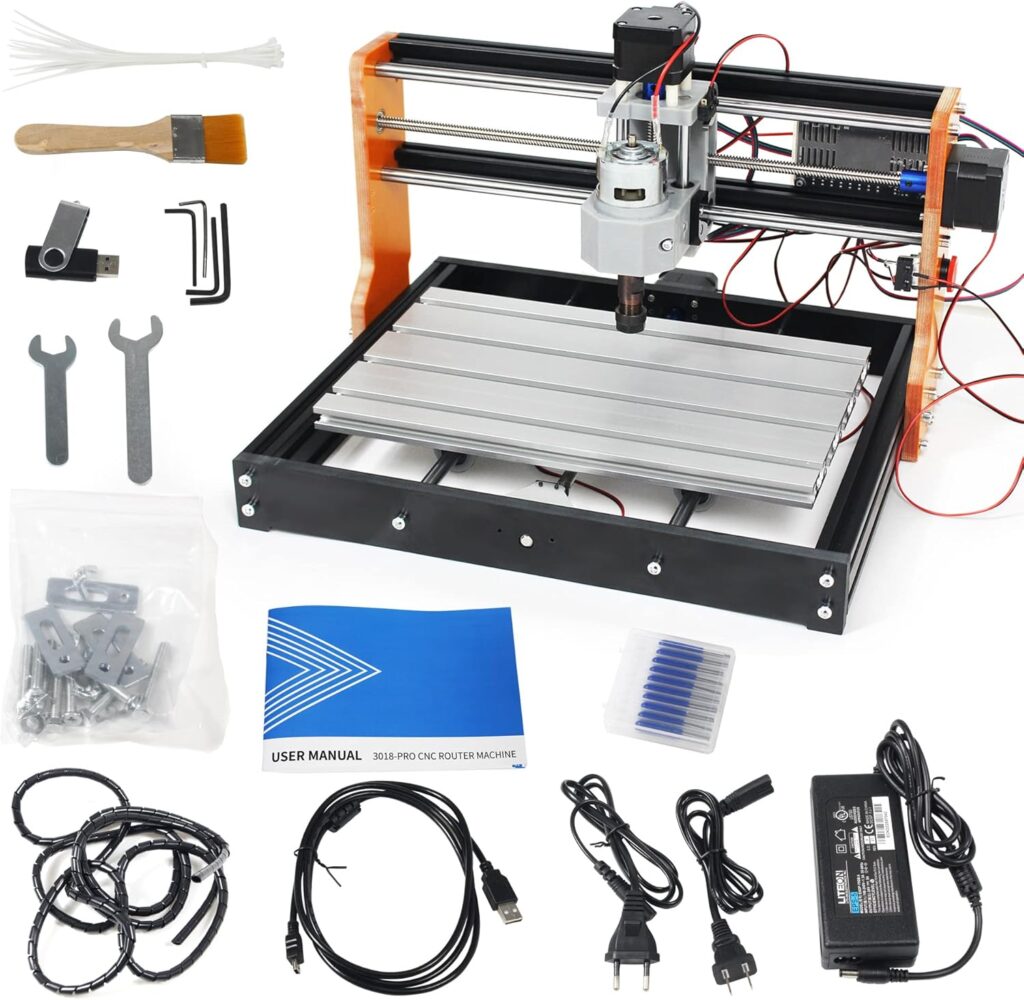
Have we ever wished our kitchen table could double as a tiny, well-behaved factory without the shouting foreman or the mysterious smell of cutting fluid? We certainly have. Which is how we found ourselves assembling, calibrating, and generally making a modest spectacle of ourselves with the CNCTOPBAOS Upgraded 3018-PRO CNC Router Engraving Machine 300x180x45mm with Limit Switches, E-Stop, 10000rpm Spindle for Wood Acrylic PCB Aluminum Desktop DIY Mini GRBL Control 3 Axis Milling Machine.

What the CNCTOPBAOS Upgraded 3018-PRO Is (and Why We Wanted It)
We’ve all seen the larger, heavier CNC mills that look ready to eat small furniture and spit out sawdust confetti. This isn’t that. The CNCTOPBAOS Upgraded 3018-PRO is a compact, desktop-friendly 3-axis CNC for carving and engraving wood, plastics, PCBs, and even soft metals like aluminum, brass, and copper—if we’re patient and moderately sensible. It’s the kind of machine that makes us feel just dangerous enough to be interesting at a dinner party, but not so dangerous that we end up there with a bandaged hand.
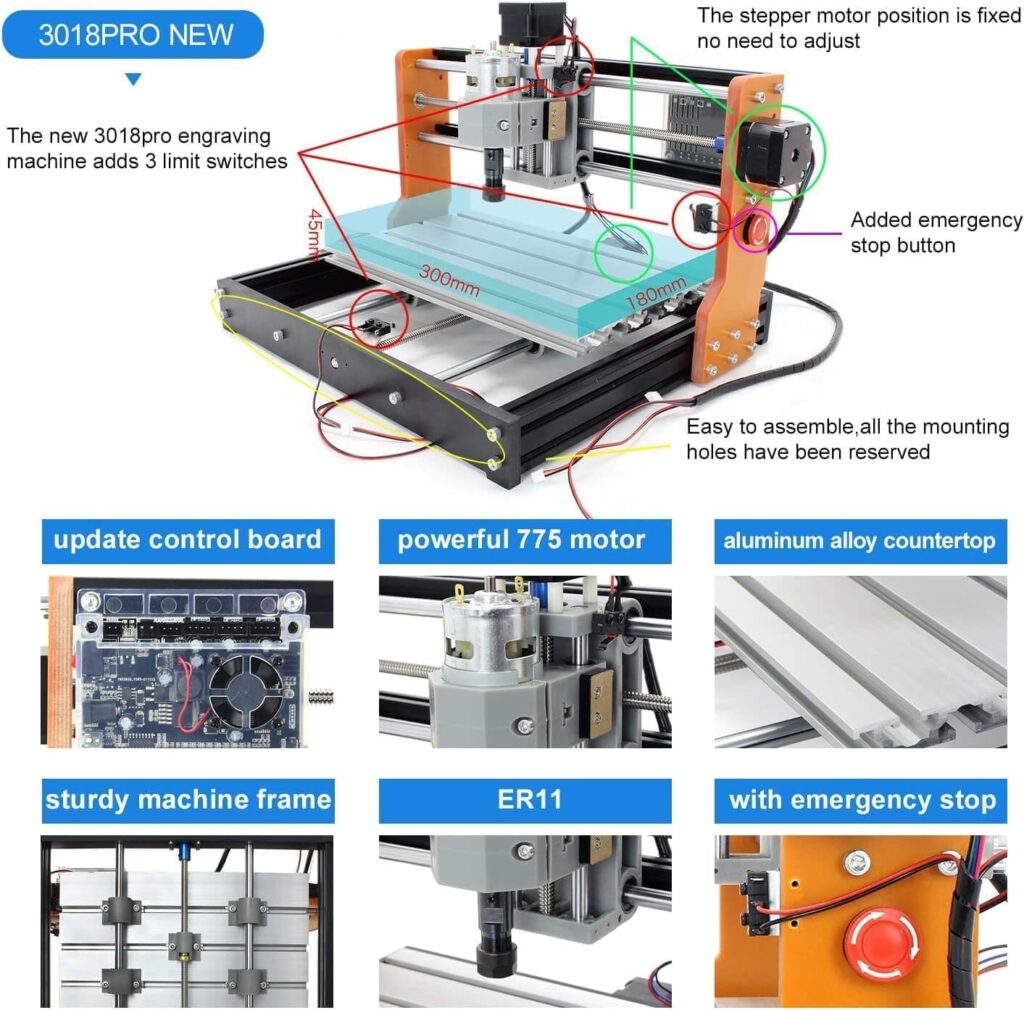
This upgraded version adds the two features we’ve learned to love and lightly obsess over: actual limit switches on all three axes, and an honest-to-goodness emergency stop button. It also swaps some structural bits for resin components and outfits the control board with more connectivity, better cooling, and broader compatibility—Windows XP through Windows 11 and Linux. If our computer can remember a time before social media, it can probably run this CNC.
Key Specifications at a Glance
We know some of us want the raw facts, ideally organized like a grocery list with all the chocolate items starred. Here’s a tidy breakdown.
| Feature | Specification |
|---|---|
| Model | CNCTOPBAOS Upgraded 3018-PRO |
| Working Area | 300 x 180 x 45 mm (11.8 x 7.1 x 1.8 in) |
| Frame Size | 420 x 350 x 270 mm (16.53 x 13.78 x 10.63 in) |
| Spindle | 775 motor, 120W, 12–36V; 10,000 rpm at 24V |
| Max Supported Spindle via Board | Up to 20,000 rpm |
| Motors | NEMA 17 stepper motors, 1.33A, 42 x 42 x 34 mm, 0.3 N·m (43 oz-in) |
| Control | GRBL-based control board with casing, fan, enhanced spindle drive |
| Safety | E-Stop button, X/Y/Z limit switch ports (limit switches included) |
| OS Compatibility | Windows XP SP3, 7, 8, 10, 11 (32/64 bit), and Linux |
| Work Surface | Aluminum alloy table |
| Frame Materials | Sturdy resin outer frame; Y-axis sides replaced by orange electric wood resin boards |
| Leadscrews | Stainless steel |
| Software & Docs | 4G USB with installation instructions, GRBL software, tutorials |
| Laser Compatibility | Supports 0.5W–20W 12V PWM/TTL engraver modules (3-pin) |
We don’t judge a machine by specs alone, but they do set expectations. Here, our expectations were of a steady little workhorse—more cardigan than cape. Solid. Approachable. Nicely mannered.
What’s Upgraded vs. a Standard 3018-PRO
The CNCTOPBAOS upgraded model makes a handful of practical improvements that, for many of us, are the difference between “we hope it works” and “we trust it.”
- E-Stop button: We press it, everything stops. Our heart rate returns to normal. Our dignity remains intact.
- Limit switches on X/Y/Z: They keep the axes from outrunning the rails. It’s like giving the machine a sense of spatial awareness—an underrated virtue.
- Strengthened control board: Cased, fan-cooled, improved spindle driver, and a sensible array of ports for emergency stop, probe, limits, and power.
- Material upgrades: Resin frame elements and stainless-steel screws lighten the machine and help fend off corrosion, while the aluminum alloy table keeps things flat and practical.
- Compatibility: From the era of dial-up to the era of “why won’t my laptop grow another USB port,” it runs on Windows and Linux.

CNCTOPBAOS Upgraded 3018-PRO CNC Router Engraving Machine 300x180x45mm with Limit Switches,E-Stop,10000rpm Spindle for Wood Acrylic PCB Aluminum Desktop DIY Mini GRBL Control 3 Axis Milling Machine
Unboxing and First Impressions
The box greets us like a compact promise. Inside, we find carefully packed components, labeled hardware, a 4G USB stick with GRBL software, instructions, and video tutorials. It’s all very “we can do this” and not at all “call someone with a mustache and a multimeter.”
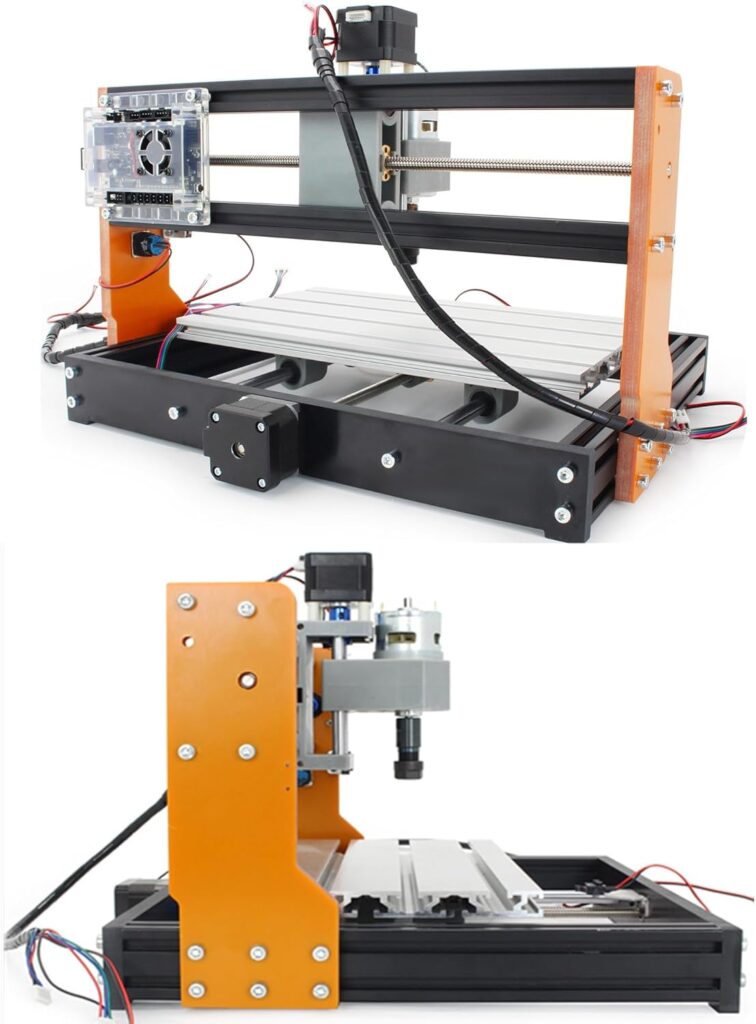
What struck us first was how tidy the resin components looked—particularly the orange electric wood resin boards on the Y-axis—contrasted with the aluminum table. We don’t necessarily expect a machine this size to look chic, but this one does in a friendly, workshop-chic sort of way. Not too flashy, but not ashamed to be seen.
Build Quality and Materials
We’ve built our share of desktop CNCs, and this one feels carefully thought out. The aluminum table is reassuring. The resin frame pieces keep the weight down while lending a certain visual pep. Stainless-steel screws are a small but welcome touch—less rust, fewer excuses.
This is not the machine we’d choose to machine steel beams (nor should we), but as a light-duty CNC intended for wood, plastics, PCBs, and carefully approached soft metals, the build hits a sweet spot: stable enough to keep chatter in check, light enough to live on a desk.
Footprint and Work Area
If our desk can host a printer and a stack of magazines we’ve been pretending we’ll read, it can host this. The footprint is about 420 x 350 mm with a height of 270 mm. The working envelope—300 x 180 x 45 mm—feels honest and capable. It’s enough space for signs, boxes, plaques, coasters, photo frames, PCB boards, and the occasional “we need a custom bracket and we need it now” situation.
Assembly: Our Experience
We approached the assembly like assembling anything else in life—start with optimism, continue with patience, and keep snacks within reach. The 4G USB drive’s instructions and tutorial videos are genuinely helpful, and we never once had to explain to the cat why we were Googling “why is my Y-axis crying.”
With a basic set of hex keys and a screwdriver, we had it together in an afternoon. We took our time squaring the frame and tightening the screws well, which pays off later in smoother motion and straighter edges.
Tools Needed and Time
- Hex keys (included with some kits; we prefer using our own for better feel)
- Screwdrivers
- Small adjustable wrench or nut drivers
- Zip ties for cable management
- A square (for alignment)
- A marker and painter’s tape (for staging and marking)
We budgeted 2–3 hours. If we’ve built a 3D printer before, it might take less; if this is our first machine, we might spend longer but end up more confident.
Pitfalls and Tips
- Square everything. We cannot emphasize this enough. The squarer the frame, the happier the cuts.
- Cable management matters. Keep wires away from the spindle and moving assemblies to avoid snags.
- Set the limit switches to trigger early, not late. It’s their job to be cautious.
- Check the couplers on the leadscrews after a few hours of operation; minor settling happens.
- Don’t overtighten the V-wheels/bearings or anti-backlash nuts (if included). Free, smooth motion is the goal.
Software and Control
We appreciate a machine that plays nicely with the software we already know. GRBL is the heartbeat here, which means we can use familiar senders like Candle or Universal Gcode Sender (UGS). The included USB drive’s GRBL software gets us cutting quickly, and the control board’s ports for E-Stop, probe, and limits are clearly labeled.
GRBL and Daily Use
GRBL is ubiquitous in hobby CNC for good reason—lean, reliable, and widely supported. We homed the machine with the limit switches, set work zeros, and nudged our way through first toolpaths with Candle. If we want macros for probing Z or running job prep sequences, GRBL takes it in stride.
Over Windows XP through Windows 11 and Linux, we found nothing surprising—just install the drivers (if needed), select the COM port, and the sender of choice should connect.
The 4G USB and Tutorials
We’re not always fans of included software (we have trust issues), but the package here was thoughtfully assembled. The videos show the same machine we’re holding, not a distant cousin. They cover assembly, GRBL basics, and running first cuts. Even if we’ve done this before, a quick skim saves time.
Control Board Details
Beyond GRBL compatibility, the control board boasts:
- A protective casing and a forced-air fan to keep temperatures in check
- An enhanced spindle driver that can support spindles up to 20,000 rpm
- Ports for the emergency stop, limit switches on all axes, a probe/tool-setting sensor, and a power control button
- Support for 12V PWM/TTL laser modules from 0.5W up to 20W (3-pin)
In practical terms, it means the board grows with us. We can start with the included 120W 775 spindle, then later consider a higher-rpm spindle or add a laser module to open up a whole new set of materials.
Performance: Wood, Plastics, PCBs, and Soft Metals
Let’s talk about what we can make, and what we can make without crying. Because a good relationship with a CNC is part ambition, part boundaries.
Wood and Acrylic
This is where the machine truly shines. In softwoods and hardwoods, we got clean lettering and crisp pockets with a 1/8-inch end mill. The trick, as always, is balance: modest depth of cut, reasonable feed rate, plenty of passes. We prefer upcut for clearing and downcut for clean edges on plywood and MDF. For acrylic, single-flute bits and slower feeds help usher chips out without melting the part. If we hear squealing or see gummy edges, we’re cutting too slow or spinning too fast.
We carved signs, coasters, and an unnecessarily elegant holder for our equally unnecessary pens. The results were tidy, and with a finishing pass, downright smug.
PCB Engraving
For PCB isolation routing, the 3018-PRO is a known quantity: steady and serviceable. The Z-axis repeatability matters most here. We set a careful Z-zero using a probe plate, taped the PCB to a flat spoilboard, and used a shallow V-bit with a gentle depth of cut. We also took time to level the spoilboard with a facing operation, which pays immediate dividends in consistent trace isolation.
Soft Metals: Aluminum, Brass, Copper
Yes, it can cut aluminum—slowly and politely. The 120W spindle at 10,000 rpm is plenty for engraving and shallow pockets in aluminum, brass, and copper, provided we keep our expectations in check:
- Secure workholding is non-negotiable. Double-sided tape plus clamps works; a parallel vise or low-profile clamps are better.
- Keep depth of cut conservative (thin chips, many passes).
- Consider a light lubricant for aluminum to reduce built-up edge; apply sparingly.
- Expect to sand or finish the edges afterward if we want that “shiny and competent” look. We milled a few engraved tags from aluminum and a small brass badge—both came out well after slow feeds and careful finishing. We wouldn’t make an engine block, but we can make the nameplate for one.
Noise, Vibration, and Dust
The spindle is not loud in a “call the neighbors” way, but it is audible in a “we are definitely doing something in here” way. We’d call it apartment-friendly with the door closed and reasonable daytime hours. Vibration depends on the cut and material; the resin frame holds up well for the machine’s size, and we saw minimal chatter in wood and plastics. Dust is inevitable. We used a small shop vac and a 3D-printed boot—highly recommended if we value lungs and relationships.
Spindle and Motion Components
The included spindle is the classic 775 motor, rated at 120W, with about 10,000 rpm at 24V. It’s reliable and easy to run for hours so long as we don’t bog it down with hero cuts. The control board can handle spindles up to 20,000 rpm, which leaves us room to upgrade later.
Motors, Leadscrews, and Limits
The NEMA 17 stepper motors (1.33A, 0.3 N·m torque) paired with stainless-steel leadscrews move the axes smoothly. We adjusted couplers and verified each axis ran freely before our first cut. Limit switches on X, Y, and Z let us home consistently. We can’t say enough nice things about homing; it makes every session feel civilized. We set soft limits too, so we never plow into the ends like a zucchini on a cutting board.
Safety and Reliability
We value our fingers and our dignity. This machine respects both.
The E-Stop in Practice
The big red E-Stop is there for one reason: to stop everything in an instant. We tested it like a fire drill—paused mid-cut, hit the button, and the spindle and motion halted. Resetting is simple. Once we’ve used a machine with a real E-Stop, it feels reckless to go back.
Limit Switches
Having limit switches on all three axes means we can home the machine, use consistent work offsets, and avoid accidental “crashes.” They also catch us if we forgot to reset a soft limit or misjudged a toolpath. We set them up with a little cushion so they trigger early rather than at the bitter end.
Thermal and Electrical Calm
The control board’s fan keeps temperatures in the boring range, which is exactly where we want them. We mounted the board where it gets airflow and keeps clear of chips. The casing protects the electronics from rough handling and stray bits of debris.
Best Practices We Follow Religiously (Mostly)
- Safety glasses on; hair and sleeves away from the spindle’s gossip.
- Vacuum running or dust collection attached for wood and plastic.
- Enclosure if cutting materials that shed fine dust or odors.
- Stick to sharp tools and appropriate speeds/feeds; burnt bits cut like butter knives.
- Keep a hand near the E-Stop for the first moments of any new toolpath.
Accuracy, Repeatability, and Calibration
If we want square parts, we must start with a square machine. After assembly, we trammed the spindle to be perpendicular to the table and faced the spoilboard. Not only did this level our workspace, it gave us that satisfying “glass smooth” surface we want when milling PCBs and acrylic.
We measured backlash by jogging the axis a millimeter at a time and confirming actual movement. We tightened anti-backlash nuts or couplers as needed. Once dialed in, small engravings lined up reliably. We wouldn’t swear under oath that it’s a metrology-grade instrument, but for hobby work and light-duty fabrication, it’s confidence-inspiring.
Workholding and Accessories
The aluminum table is both our friend and our blank canvas. We used:
- T-slot clamps and step blocks for wood and acrylic
- Blue tape and CA glue for thin sheets and PCBs
- A small machinist’s vise for aluminum and brass
- A sacrificial MDF spoilboard on top of the table to protect it from our occasional lapses in Z judgment
If we don’t have a pile of clamps yet, we can start with a modest kit. Good workholding turns “fingers crossed” machining into “okay, let’s run it.”
Who It’s For
We see three likely households for the CNCTOPBAOS Upgraded 3018-PRO:
- Beginners and hobbyists who want a capable, learning-friendly CNC with safety features like limit switches and an E-Stop. This is a gentle on-ramp to CNC without feeling like training wheels.
- Makerspaces and classrooms needing a compact, reliable CNC for wood, plastics, and PCBs. Homing and limit switches reduce chaos; GRBL and wide OS support make it accessible.
- Tinkerers who want to fabricate custom brackets, small fixtures, signs, and PCBs at home. It’s enough machine to solve real problems without a garage-mounted hoist.
Pros and Cons
We like lists. They help us feel organized and occasionally decisive.
Pros:
- E-Stop and limit switches included, not optional or hypothetical
- Lightweight yet sturdy resin frame with stainless-steel hardware and aluminum table
- Thoughtful control board with cooling, probe port, and upgrade headroom for spindles and lasers
- Works with Windows XP–11 and Linux
- Clear documentation plus a 4G USB with software and video tutorials
- Perfectly sized for desktops, with a genuine 300 x 180 x 45 mm work area
- Capable on wood, plastics, PCBs, and careful soft metal jobs
Cons:
- The 120W spindle limits how aggressive we can be in aluminum or hardwoods
- Assembly requires patience and squaring; not hard, but not “plug and cut”
- Open-frame design benefits from an enclosure to manage dust and noise
- Workholding hardware is something we’ll likely need to supplement for trickier jobs
Comparison With Alternatives
The 3018 family is crowded with look-alikes and not-quite-alikes. What sets the CNCTOPBAOS Upgraded 3018-PRO apart is the inclusion of limit switches on all axes, an actual E-Stop, and a better-appointed control board with fan cooling and accessory ports. Some base models cut corners on these points, which is fine until we discover that the corners are where the problems live.
There are also larger machines (3020, 3040, and beyond) that offer bigger work envelopes and heavier spindles. Those may be better for consistent aluminum work or large projects. But they also take more space, more money, and more commitment. If our main interest is in small projects, signage, PCBs, and occasional metal engraving, this 3018 class is the right size. And within that class, the CNCTOPBAOS upgraded feature set hits the sweet spot for safety and expandability.
Maintenance and Longevity
If we treat it like a real tool, it behaves like one. We schedule a little maintenance like we schedule coffee—regularly and with respect.
- Keep the leadscrews clean; a light lubrication makes motion smoother and reduces wear.
- Brush chips off the rails and wipe the table. Chips love to stage ambushes under our next workpiece.
- Check set screws on couplers and pulleys after the first few hours and occasionally thereafter.
- Inspect wiring and connectors. A loose plug can masquerade as a ghost in the machine.
- Replace worn end mills promptly; dull tools cause heat, chatter, and emotional distress.
We expect many seasons of weekend projects out of this machine if we stick to routine care and reasonable cuts.
Upgrades We’d Consider
Part of the fun is tinkering. Part of the wisdom is tinkering for a reason.
- Enclosure: Reduces dust, improves safety, quiets the whine. Even a simple acrylic box helps.
- Spoilboard: An MDF spoilboard secured to the aluminum table makes zeroing and workholding easier, and gives us something we don’t mind cutting into.
- Better clamps and a low-profile vise: Transform workholding from “that’ll probably stay” to “that’s not going anywhere.”
- Collets and bits: Quality ER11 collets and sharp single-flute end mills for plastics; V-bits and PCB mills for boards; downcut bits for clean plywood.
- Higher-rpm spindle: The control board can support up to 20,000 rpm; a future upgrade makes acrylic cutting cleaner and aluminum work more flexible.
- Laser module (0.5W–20W, 12V PWM/TTL, 3-pin): For engraving leather, rubber, paper, and light wood burning. We use proper glasses and run it in an enclosure with ventilation.
Troubleshooting and FAQ
Our Axis Hits the Limit Switches Before the Cut Starts. What Gives?
We likely need to:
- Home the machine first
- Set soft limits and the correct machine travel in GRBL
- Double-check our origin in the CAM software (is the zero in the wrong corner or above the stock?) Homing establishes a consistent reference that keeps our toolpaths inside the rails and out of trouble.
The Spindle Stalls or Burns the Wood.
Three likely culprits:
- Dull or inappropriate bit (swap to a sharp one, possibly a single-flute for plastics)
- Depth of cut too aggressive (take more, lighter passes)
- Feed too slow or spindle too fast (melting rather than cutting—raise feed, reduce rpm)
Our PCB Traces Aren’t Consistent.
We’ve been there. We:
- Face the spoilboard and tape the PCB down flat
- Use a probing routine to set a precise Z-zero
- Consider a height map in the sender if available
- Go shallow on the isolation pass and take multiple passes if needed
GRBL Won’t Connect.
We remind ourselves to:
- Install the USB serial driver (if required)
- Check the COM port in Device Manager (Windows) or dmesg (Linux)
- Confirm only one sender is open at a time
- Try another cable or port (they do go bad with mysterious dignity)
Can We Cut Aluminum?
Yes, within reason:
- Small tools, thin chips, many passes
- Excellent workholding, minimal tool stick-out
- Consider a lubricant for aluminum; for copper and brass, light passes still rule
What About Leather and Rubber?
Engraving or cutting leather, rubber, kraft paper, and similar materials is ideal for a compatible 12V 3-pin laser module. With the spindle, we can mark leather with a V-bit, though the laser does it with more grace.
Real-World Projects We’ve Made
We’re always happier when our tools make objects that feel like wins.
- A set of hardwood coasters with a subtle monogram. We used a downcut bit for crisp edges and a finishing pass that made us nod with satisfaction we didn’t entirely earn.
- A PCB breakout board for a little sensor project. Two passes on isolation, meticulously flat spoilboard, and a generous rinse in pride.
- A brass nameplate that, while small, carried outsized drama. We went slow, polished lightly, and pretended it was for a yacht.
- Acrylic house numbers—clean edges with a single-flute bit and a chamfer that made the neighbors think we paid a professional, which we sort of did: ourselves.
Value and Verdict
We like tools that get us to projects without asking us to become a machine whisperer first. The CNCTOPBAOS Upgraded 3018-PRO is exactly that: approachable, capable, and thoughtfully safe. The inclusion of limit switches and an E-Stop transforms the experience from tentative to confident. The control board’s cooling and accessory support mean we’re not painting ourselves into a corner.
Is it the right machine for heavy-duty aluminum production? No. Is it an excellent desktop CNC for wood, acrylic, PCBs, and careful soft-metal work? Yes, emphatically. For beginners and experienced hobbyists alike, it’s the sort of tool that earns its spot on our desk—and keeps it.
Tips for Better Cuts (and Calmer Nerves)
- Home every time. Consistency is your friend.
- Use the right bit for the material. Single-flute for plastics, downcut for surface veneer, V-bits for engraving.
- Don’t rush aluminum. Thin chips, light lubrication, and patience.
- Face your spoilboard. It’s the quickest route to predictable Z.
- Keep the E-Stop within reach and your attention on the first seconds of a new toolpath.
- Maintain your machine. Clean, lube, tighten. Repeat.
What Makes This CNC Feel “Upgraded” in Daily Use
There’s the official list—E-Stop, limits, cooled control board—and then there’s how it all feels. Homing to a known origin saves time every single session. The E-Stop moves anxiety from our shoulders to the machine’s big red button. The fan-cooled board and casing add a sense of permanence. And the resin frame, matched with the aluminum table, hits a nimble-yet-stable balance that suits the machine’s mission.
Safety and Responsibility, Without the Lecture
We don’t want to be scolded. But we do want to keep our eyes, fingers, and furniture intact. Safety glasses, dust management, and an enclosure make the whole endeavor calmer and cleaner. If we use a laser, we follow the rules: proper eye protection, proper ventilation, no rogue beams bouncing around like a party we didn’t plan.
The Bottom Line We Tell Our Friends
We think the CNCTOPBAOS Upgraded 3018-PRO CNC Router Engraving Machine is the right-sized introduction to CNC that doesn’t condescend. It’s good at the things it should be good at—wood, acrylic, PCBs—and honest about the rest. It makes the process feel accessible, giving us upgrades we’ll actually use, not just upgrades we’ll post about. We’ve built projects that look store-bought, and a few that look “lovingly handcrafted,” which is our polite phrase for “we learned something.”
A Few Final Project Ideas to Get Us Moving
- Personalized cutting boards with engraved initials (light passes, keep it classy)
- Acrylic LED edge-lit signs (single-flute bits; flame polish edges afterward, carefully)
- PCB prototypes for our next harebrained sensor project
- Custom drawer pulls or badges from brass and aluminum (patience and polishing)
- Leather wallet monograms (laser module or a V-bit engraving for a subtle mark)
- Rubber stamps for that small business we’re always almost starting
If we’ve been waiting for a CNC that respects our space and our budget, and doesn’t make us choose between features and friendliness, this is it. We set it up, we squared it, and then we got to work. And it worked—cleanly, safely, and with that simple, satisfying hum that says we’re making something, right here on the desk where we also keep our coffee and aspirations.
Disclosure: As an Amazon Associate, I earn from qualifying purchases.