Can we really turn a half-baked sketch into something that looks like it belongs in a boutique window, without selling a kidney or earning a degree in laser physics?

The Case for the Carverall K15 Pro 5W
We came to the Laser Engraver, Carverall K15 Pro 5W Laser Engraving Machine for Beginners DIY High Accuracy 200x300mm (Near A4) Portable CNC Laser Cutter for Wood Coated Metal Acrylic Leather, 5000mW, Class 1 with a laundry list of hopes and an equally long list of excuses ready if things went poorly. We wanted something compact, competent, and—most daring of all—pleasant to live with.
What It Is, In Plain English
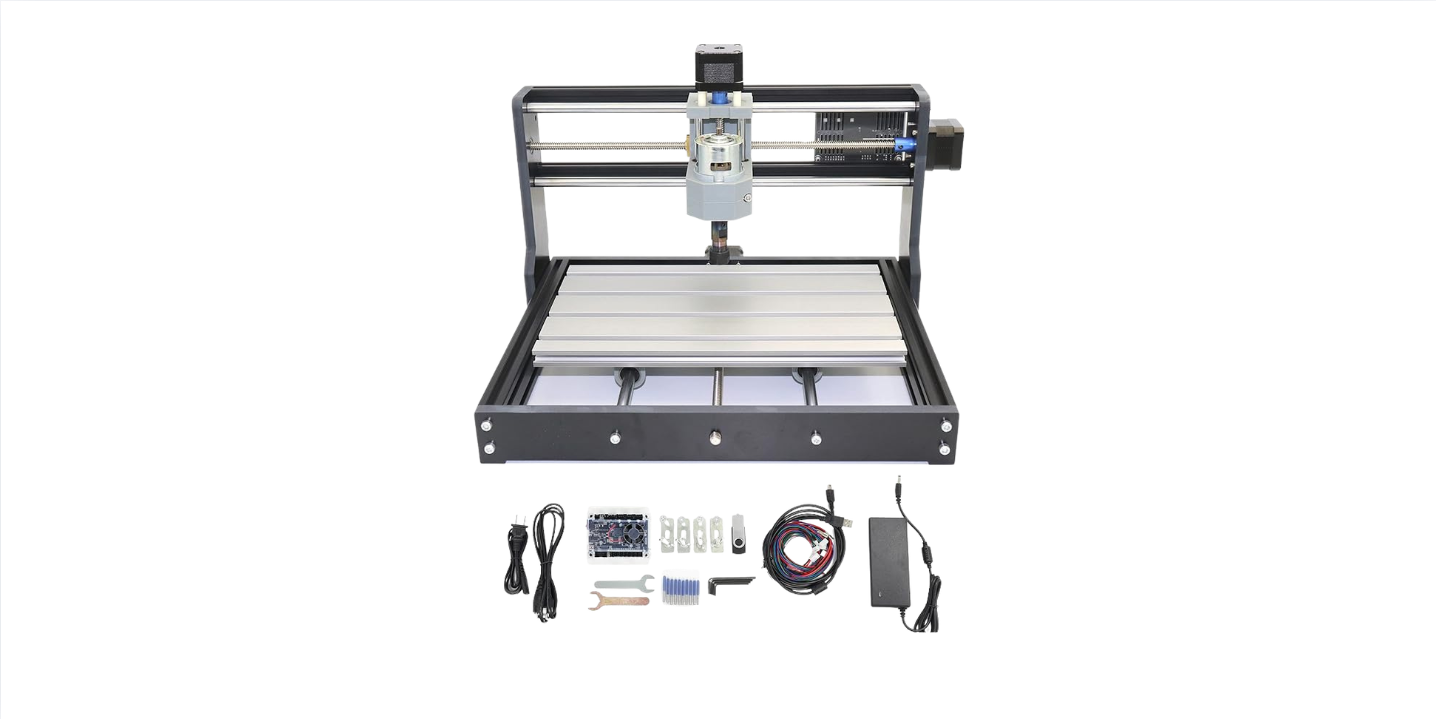
We’re looking at a true 5W+ diode laser engraver, rated Class 1 for safety, with a working area of 200 x 300 mm (close to A4 paper). It’s designed to be portable, to set up in minutes, and to run with free software on pretty much any device we own. It’s built for engraving on wood, leather, acrylic, and coated metals, and cutting through 6 mm wood or 3 mm acrylic with clean edges.
What Stood Out Right Away
What grabbed us isn’t just the spec sheet—it’s the way the Carverall K15 Pro moves us from idea to finished piece without demanding ritual sacrifices. The promise: 0.01 mm precision, speeds up to 15,000 mm/min, and cross-platform, zero-fee software. The unspoken subtext: we can make polished gifts and products that don’t look like they were made during a power outage.
Laser Engraver, Carverall K15 Pro 5W Laser Engraving Machine for Beginners DIY High Accuracy 200x300mm (Near A4) Portable CNC Laser Cutter for Wood Coated Metal Acrylic Leather, 5000mW, Class 1
$159.99 In Stock
Unboxing and Setup: From Box to Burn in Minutes
We won’t sugarcoat it—we’ve assembled a fair share of machines that came with the emotional weight of an IKEA couch. This wasn’t that.
Six Screws, Ninety Seconds, No Belts
The Carverall K15 Pro goes together with just six screws. There are no belts to thread or tension, which is our favorite number of belts: zero. We set it on a flat surface, dropped in the included test materials, and reached for the safety glasses included in the box.
First Power-On
The first dance is always awkward, but here it was mostly just polite. We plugged in the power, connected over USB to a laptop (Bluetooth and Wi-Fi via the app are also on the table), opened Carverall’s free CutLabX, and ran a small test pattern. The machine homed smoothly, and the laser fired up with the crisp blue point of a diode laser that means business.
Design and Build: Compact, Clever, and Actually Portable
We’re not minimalist purists, but we do respect machines that respect our space. The K15 Pro’s frame is solid without being hulking, and the working envelope feels perfectly tuned for home workshops, classroom benches, and pop-up studio tables.
Class 1 Safety With Practical Touches
The Class 1 rating signals that Carverall prioritized safety, which we appreciate when there are pets, kids, or just our clumsy elbows in the room. We still wear the included protective glasses and maintain good ventilation because engraving fumes are not aromatherapy. The machine’s build inspires confidence—no rattly parts, no “don’t breathe too hard” components.
The Near-A4 Sweet Spot
The 200 x 300 mm working area is a quiet stroke of genius. That space handles most personalized gifts: coasters, wallets, phone cases, notebook covers, plaques, jewelry cards, and small signage. It’s the kind of footprint that nudges us toward actually making things instead of overthinking them.
Specs and Capabilities at a Glance
We love a good cheat sheet, especially when it saves us from repeating ourselves at craft fairs and family dinners.
| Feature | What We Get | Why It Matters |
|---|---|---|
| Laser Type | Diode laser (blue) with real 5W+ output | Reliable engraving on wood, leather, acrylic, coated metals |
| Safety Class | Class 1 | Added safety when used as directed; still use proper ventilation |
| Precision | 0.01 mm | Clean details on small text and intricate patterns |
| Max Speed | Up to 15,000 mm/min | Fast engraving; cutting speed depends on material |
| Work Area | 200 x 300 mm (near A4) | Big enough for most hobby/business items; small enough to travel |
| Materials (Engrave) | Wood, acrylic, leather, coated metals, more than 100 surface types | Versatile for gifts and shop products |
| Materials (Cut) | Up to 6 mm wood; up to 3 mm acrylic | Good throughput for a 5W machine |
| Software | CutLabX (Windows/Mac/Android/iOS), compatible with LightBurn and LaserGRBL | Zero-fee app; pro workflows supported |
| Setup | Six screws; ~90 seconds | We went from box to test piece over a cup of coffee |
| Upgrades | 10W diode module; 1064 nm IR module for stainless and bare metals | Scale capability without changing machines |
| Reliability | Engineered for 10,000+ hours | Built for long-term use in homes, schools, and small shops |
| Support | US-based support team | Real humans when we need them |
Software and Workflow: Zero Fees, Zero Fuss
We’ve done the dance where the hardware is good but the software feels like an escape room with a timer. Not here.
CutLabX: Free and Cross-Platform
Carverall’s CutLabX runs on Windows, Mac, Android, and iOS, which means we’re not locked to a single machine or OS. We sketch on an iPad, tweak on a laptop, and run jobs from a phone while juggling packaging tape. It imports common formats—SVG, PNG, JPG—and makes material setup less mysterious.
Works With Industry Favorites
We’re LightBurn fans for certain jobs, and we’re glad Carverall made the K15 Pro compatible with LightBurn and LaserGRBL. If we want layers, offsets, and advanced vector tricks, we have them. If we want simple and quick, CutLabX does just fine—and the price is our favorite: free.
Performance: How It Engraves, Marks, and Cuts
This is where most good intentions go to burn marks. With the K15 Pro, we were pleased—and at times, downright smug—about how finished our pieces looked.
Wood Engraving: Crisp and Consistent
On hardwoods like maple and cherry, we see clean, dark marks with sharp edges and consistent fill. Small type stays legible down to 6–8 pt, and detailed logos carry their finer lines without breaking up. Plywood varies, but with a bit of calibration and masking tape, our cuts stay tidy and our engravings don’t fuzz out.
Acrylic: Glossy Engraves and Clean Cuts
Cast acrylic yields frosty, sharp engravings that look like etched glass. For 3 mm acrylic, the K15 Pro slices with smooth edges at sensible speeds, and the finish takes on that professional look that makes us pretend we know someone at a gallery. We keep a gentle airflow over the cut for cleaner edges.
Leather: Deep Contrast Without Slop
Vegetable-tanned leather engraves beautifully, with a satisfying darkening that looks intentional and upscale. We watch power levels to avoid overburn, and sometimes finish with a light conditioner to keep things soft and avoid soot transfer. It’s a great machine for wallets, belts, and minimalist cardholders.
Metals: Coated Good, Bare Metal With IR Upgrade
Out of the box, the K15 Pro marks coated or anodized metals with excellent permanence. Stainless steel, brass, and aluminum that are bare need the optional 1064 nm IR module to engrave directly. We like that we can upgrade when we’re ready rather than replacing the whole machine.
Paper, Cardstock, and Bamboo: Quick Wins
Paper and card take delicate engraves and clean kiss-cuts for packaging, tags, and invitations. Bamboo engraves with strong contrast, which makes cutting boards and kitchen items crowd-pleasers. We use masking and a food-safe finish for cutting boards to keep things neat and practical.
Real-World Settings We Found Useful
Every material batch is a little different, and local ventilation and focus play a part. Still, we appreciate ballpark numbers when we’re starting out. These got us close, fast.
| Material | Operation | Power | Speed | Passes | Notes |
|---|---|---|---|---|---|
| 3 mm Basswood | Cut | 100% | 300–500 mm/min | 2–3 | Airflow helps edge quality |
| 6 mm Poplar | Cut | 100% | 150–250 mm/min | 3–5 | Keep lens clean; slow and steady |
| 3 mm Cast Acrylic | Cut | 95–100% | 300–400 mm/min | 2–3 | Avoid PVC; ventilate well |
| Maple (engrave) | Engrave | 35–55% | 3000–5000 mm/min | 1 | Adjust for darkness vs. crispness |
| Leather (engrave) | Engrave | 25–45% | 3500–6000 mm/min | 1 | Mask for soot; test scraps |
| Anodized Aluminum | Mark | 45–65% | 3000–7000 mm/min | 1 | Beautiful, permanent marks |
| Photo on Birch | Engrave | 18–35% | 3000–8000 mm/min | 1 | Use dithering; test small first |
We keep a small test grid file handy to run on any new material. It’s five minutes of setup that saves us from twenty minutes of creative regret.
The Upgrade Path: Capability Without Waste
We like tools that grow with us and don’t punish us for ambition. The K15 Pro fits that bill with two meaningful upgrade tracks.
10W Diode Module for Faster Cuts
If we start doing lots of thicker woods or batch jobs, the 10W diode module is a natural step. It won’t turn the K15 Pro into a lumber mill, but it does shorten cut times and increases our material options within the same compact frame.
1064 nm IR Module for Bare Metals
When we’re ready to engrave stainless steel, titanium, brass, and other bare metals directly, the IR module unlocks that door. It’s a smarter, more affordable way to work with metals than jumping to a full fiber machine before we need one.
Everyday Use: What Our Workflow Actually Looks Like
We’ve found that the K15 Pro adapts to our chaos without judgment. It’s content to run a one-off monogram on Tuesday and a 30-piece keychain order on Thursday, taking both with the same level of calm.
In the Home Workshop
We keep it near a window with a compact fume fan and a honeycomb panel underneath for airflow and cleaner cuts. It’s quiet enough that we can run it while we’re drafting next week’s designs or trimming labels, and it doesn’t try to colonize the entire desk.
In the Classroom or Makerspace
The near-A4 bed makes it a good fit for student projects: notebook covers, badges, award plaques, and ornament designs. The Class 1 rating is reassuring, and the cross-platform app means students can bring their files on any device and get moving quickly.
Where the Carverall K15 Pro Shines
We’re not shy about putting our machines to work. These are the jobs where the K15 Pro earns its keep.
Personalized Gifts and Keepsakes
From engraved cutting boards to bespoke leather tags and family-name ornaments, the K15 Pro gives us tight detail and repeatable results. We end up with gifts that get the long pause and the sincere thank you, which is all we really wanted.
Small Shop Products
If we’re running a micro business—coasters, signs, pins, business card holders—the K15 Pro is a great balance of size, cost, and throughput. We appreciate machines that help us hit deadlines without requiring a forklift or a second mortgage.
Prototyping and Brand Collateral
Mockups for packaging, branded desk signs, and engraved notebook covers look polished. The fine detail makes logos crisp, and we don’t have to fight the machine to get there. Changes are quick, batching is easy, and the result feels like it came from a much bigger setup.
Limitations and Quirks Worth Knowing
We admire a machine more when it’s honest. The K15 Pro doesn’t pretend to be something it’s not.
Cutting Thick Hardwood Is Slow on 5W
A true 5W diode laser will cut 6 mm wood, but it’s not going to blast through oak in one pass. The results are clean, and the path is patience. For frequent thicker cuts, the 10W module helps, but physics is still physics.
Bare Metals Require the IR Module
We can mark coated metals beautifully, but engraving bare stainless or brass demands the 1064 nm upgrade. We see that as a fair boundary—better than pretending a blue diode can do something it can’t.
Ventilation Is Not Optional
Engraving smells. Cutting can smoke. That’s just how materials behave when they meet coherent light. We run a vent or fume extractor and crack a window. This is not a scented candle situation.
Small Bed by Industrial Standards
While 200 x 300 mm covers most of our use cases, large signs and big panels aren’t the K15 Pro’s territory in a single pass. For those, we tile designs or shift the material mid-job with jigs. It’s doable, but not as seamless as a larger bed.
Safety, Care, and Common Sense
We’re fond of our eyebrows and intend to keep them. The K15 Pro’s safety design works best when we meet it halfway.
Protective Gear and Safe Practices
We use the included glasses, especially when the machine isn’t fully enclosed. We keep the workspace clean and flammable clutter away. We don’t cut PVC or unknown plastics because chlorine gas is not on our wish list.
Ventilation, Airflow, and Clean Lenses
A small fan or air assist aimed at the cut improves edge quality and helps with smoke. We wipe the lens periodically with a proper lens wipe; a dirty lens turns crisp engraves into fuzzy ones and makes the diode work harder than necessary.
Working With Photos and Fine Detail
One of the pleasures of a precise machine is seeing photographs and tiny text hold up under scrutiny.
Dithering and Contrast
For photo engraves on wood, we convert images to grayscale and use dithering patterns to get smoother gradients. A quick test strip on the actual wood batch tells us which settings will keep faces friendly and shadows rich.
Tiny Type, Big Smiles
With 0.01 mm precision, small serials and micro text on product tags are impressively legible. We keep line weights sensible and avoid ultra-thin strokes that vanish on uneven grain, but overall, the K15 Pro makes “small and tidy” look easy.
The Zero-Fee Advantage: CutLabX in Practice
We’ve paid for software that leaves us feeling morally gray, like we purchased espresso with a twenty and got change for a ten. CutLabX isn’t that.
Design, Preview, Go
We can import SVGs from Illustrator or Inkscape, adjust scale, set power and speed per layer, and preview the toolpath. The live framing feature lets us jog the laser around the material area so we know the job will fit exactly where we want it.
Cross-Device Convenience
We often do quick edits on a phone: adjust size, flip or mirror, and go. It’s a small thing that becomes a big thing over time. The machine feels less like a diva and more like a teammate.
Reliability and Support: The Long Haul
We judge machines not just by the first week but by the thousandth hour. Carverall’s pitch is 10,000+ hours of engineered life, and the build makes that plausible.
Consistent Results Over Time
Repeatability shows up most in batch jobs. When our tenth keychain looks like the first, we breathe easier. The K15 Pro’s motion system and laser module consistency give us that “we can promise delivery” confidence.
US-Based Help When We Need It
We don’t call support often, but when we do, we’d like to talk to someone who understands both the machine and the mood. Carverall’s US-based support has a solid reputation, and that’s part of why we’d choose this for classrooms or small businesses.
Projects That Make This Machine Shine
We had a running list of “someday” projects that mysteriously began turning into “done” projects once the K15 Pro showed up.
Jewelry and Wearables
- Wood and acrylic earrings with intricate filigree patterns that don’t snap under normal wear.
- Leather cuff bracelets with names or coordinates that look like something you buy from a fancy pop-up shop.
- Dog tags on anodized aluminum that survive the park with dignity.
Home Decor and Cook-Friendly Items
- Bamboo cutting boards engraved with recipes in grandma’s handwriting. We seal the engraving with a food-safe finish.
- Acrylic LED edge-lit signs with family names, stars maps, or quotes from novels we pretend we’ve read twice.
- Coasters that match the living room science of “don’t wreck the table.”
Business Branding and Packaging
- Engraved notebook covers for client gifts that don’t look like swag.
- Custom keychains for Airbnb hosts and boutique hotels.
- Packaging tags with crisp logos that tell customers we tried hard and didn’t settle.
Crafting Clean Edges and Smoke-Free Surfaces
If we could go back in time and whisper in our own ears, we’d share these little practices that make work look better.
Masking, Jigs, and Test Tiles
Blue painter’s tape over light woods keeps scorching down. Simple MDF jigs with L-shaped corners cut our alignment time in half. Test tiles engraved with power/speed grids become our secret weapon—humble little oracles of good judgment.
Focus and Cleanliness
We always confirm focus using the module’s built-in tool or gauge. A clean lens and proper focus turn a good engrave into a great one. It’s like trimming bangs—half a millimeter matters.
Portability Without Compromise
We’ve moved this machine short distances more times than we’d admit, and it never complains.
Pop-Up Shops and Fairs
We bring a laptop or tablet, a small vent fan, and a selection of blanks. Live personalization is a crowd magnet, and the compact footprint means we’re not that vendor—the one who needs three outlets and a pep talk to the breaker box.
Shared Spaces and Studios
When a machine is easy to set up and tear down, we actually use it more. We tuck the K15 Pro onto a shelf when it’s not working and pull it down without developing feelings of dread or needing a buddy system.
How It Stacks Up Against Other Options
We believe in choosing the right tool for the actual job, not the theoretical one we might do in a distant future where we’re all better rested.
Versus Higher-Power Diode Machines
A 10W or 20W diode machine will cut thicker stock faster. But they’re often larger, louder, or pricier, and we don’t always need the extra brawn. For engraving quality and material variety, the K15 Pro covers a surprising amount of ground for a 5W.
Versus CO2 Lasers
CO2 lasers excel at cutting thicker acrylic fast and clean and offer larger beds, but they add cost, maintenance, and a steeper setup. The K15 Pro gives us 80% of what we want for a fraction of the commitment, especially when space and budget are real constraints.
Versus Fiber for Metals
If our whole business is stainless tumblers and knives, a dedicated fiber is king. For many of us, though, the IR upgrade on the K15 Pro is the smarter halfway house—great results on bare metals without adopting a whole new machine ecosystem.
Pros and Cons, The Honest Version
We wrote this list with our practical hats on and our optimistic hearts in the same room.
| What We Love | What Gives Us Pause |
|---|---|
| True 5W+ output with 0.01 mm precision | Cutting thick hardwood is slow on 5W |
| 200 x 300 mm near-A4 workspace | Bed size limits large signs without tiling |
| Cuts 6 mm wood / 3 mm acrylic cleanly | Bare metals require 1064 nm IR upgrade |
| Class 1 safety and included glasses | Ventilation still required |
| Free CutLabX app across devices | Advanced iOS/Android editing is basic compared to desktop |
| Works with LightBurn and LaserGRBL | Learning curve exists, as with any laser |
| No belts; fast 90-second setup | Material variability requires regular test runs |
| Upgrade path (10W diode, 1064 nm IR) | Not a replacement for industrial CO2/fiber if that’s your need |
| Engineered for 10,000+ hours | Plan on lens cleaning and occasional maintenance |
| US-based support | None of this will turn us into a genius overnight |
Learning Curve: Manageable, Not Menacing
We’ve been on the receiving end of tech that makes us feel like a substitute teacher without a lesson plan. This isn’t that.
From First Cut to First Product
Give us a couple of afternoons and some scrap material, and we’re making gift-worthy items. The routine becomes second nature: focus, frame, run, admire, repeat. We build muscle memory and confidence in equal proportions.
Calibrating Expectations
We don’t feed it oily woods or unknown plastics, and we don’t expect it to slice oak like butter. We line up our jobs, use good ventilation, and keep the lens clean. With those simple promises kept, the K15 Pro delivers attractive, predictable results.
Maintenance, Longevity, and Peace of Mind
We treat tools kindly because we plan to have them around a while. The K15 Pro makes that easy.
Light but Real Maintenance
We clean mirrors and lenses when needed, check for debris, and make sure the module’s cooling airflow isn’t obstructed. We keep the rails free of dust. That’s about it. Nothing here sounds like a Sunday we’d dread.
The Long View
A machine engineered for 10,000+ hours isn’t looking for a fling. It’s the type we could take to meet our parents. We value not having to replace a machine just because our skills improved or our product line changed.
Little Joys and Quality-of-Life Touches
The more we used the K15 Pro, the more we noticed the small graces that add up.
Fast Framing, Confident Placement
We love using framing to outline the job area on the material surface. It removes guesswork and rescues us from that feeling when a monogram lands one centimeter too far left and looks like it’s trying to escape.
Quiet Competence
The motion is smooth and unremarkable in the best way. We can think while it works. That’s when the good ideas sneak in—when the machine isn’t screaming for attention.
Classroom and Workshop Etiquette with Lasers
We’ve learned some rules to keep everyone happy and the fire extinguisher bored.
Keep Materials Labeled
We stash “safe to cut” bins: plywood (no MDF near the kids), cast acrylic, leather, bamboo, anodized tags, paperboard. We label the “do not cut” bin like it owes us money—PVC, mystery plastics, and anything we wouldn’t want to smell on purpose.
Supervision and Sequencing
One operator at a time, a second pair of eyes for new users, and a checklist: glasses on, focus set, fan running, frame verified. Laser work rewards people who love rituals.
The A4 Sized Advantage in Real Life
We underestimated how often we need a space just big enough for the everyday.
Batching With Templates
We laser a simple jig with circular cutouts for coasters or rectangular slots for wallets. Drop, engrave, swap, repeat. Batch work becomes less dreary when pieces register perfectly and we’re not babysitting alignment for each one.
Tiling for Larger Projects
When we do need more space, we tile in software and shift the workpiece using alignment marks. It’s not magic, but it’s doable, and it lets us say “yes” to projects we’d otherwise turn down.
A Few Favorite Use Cases We Keep Coming Back To
We tried a wide spread of projects; these kept us smiling.
The Handwriting Cutting Board
We scan a recipe card and engrave it on bamboo. Oil it, tie a twine bow, and watch someone go quiet for a minute. It’s a simple project that lands like a hug.
The Leather Minimalist Wallet
We cut and engrave a small pattern, stitch by hand, and finish the edges with a bit of wax. It looks boutique and carried none of the usual boutique pricing for us.
The “We Pretend We’re Architects” Acrylic Sign
Engraved acrylic with an LED base gives us that clean, modern look that sells well at markets. It’s not complicated—just clear, bright, and satisfying.
Practical Buying Questions, Answered
We always end up asking the same things; we’ll answer them so you don’t have to draft a spreadsheet.
Will It Cut What We Need?
If “what we need” is 3 mm acrylic, 6 mm softwood, cardstock, and leather, yes. Hardwoods cut more slowly; thicker stock needs multiple passes or the 10W module. For bare metals, plan on the 1064 nm upgrade.
Is the Software a Headache?
No. CutLabX is free and friendly. If we crave more control, LightBurn compatibility means we’re covered. We appreciate not being locked into a paywall for basic functionality.
Does It Travel?
Absolutely. The K15 Pro is compact, sets up quickly, and doesn’t bring a pile of belts and tensioners that make a mess of our day.
For Whom This Machine Makes the Most Sense
Not every tool is for everyone, and that’s fine. Here’s who we think will be happiest.
Beginners With Taste
If you’re new to lasers but you want clean results without a pricey, industrial setup, this is a great fit. The learning curve is gentle, and the output looks polished.
Side Hustlers and Small Shops
If your store or stall thrives on personalization, the K15 Pro earns its keep quickly. The bed size fits most products, cut quality is good, and upgrades exist if you need to grow.
Educators and Makerspaces
It’s safe, compact, and cross-platform. Students can bring their own designs, and the machine won’t monopolize the room or the budget.
Tips We Wish We’d Known on Day One
We’ve made mistakes so you don’t have to. We consider that a public service.
Keep a Material Notebook
Log what worked for each material: power, speed, passes, thickness, and brand. Future you will thank past you for this kindness.
Mask Before Engraving Light Woods
A simple layer of tape prevents smoke stains. Peel it afterward for a crisp edge that suggests higher craftsmanship and lower stress.
Frame Every Single Run
It’s a five-second habit that reduces the “oops” moments to almost zero. Our scrap bin misses us, but not enough to complain.
The Intangibles: Why We Reach for It First
We own other tools. Yet this is the one we use most for gift projects and quick-turn shop work.
It Respects Our Time
The combination of near-A4 capacity, quick setup, and zero-fee software means we spend our minutes on design rather than wrangling. It’s a machine that makes creativity feel frictionless.
It Makes Us Look Good
The detail and cut quality lend a professional sheen to our work, even on the days we’re wearing paint-stained sweatpants and talking to ourselves.
Final Verdict: A Friendly, Capable Workhorse With Room to Grow
We came to the Laser Engraver, Carverall K15 Pro 5W Laser Engraving Machine for Beginners DIY High Accuracy 200x300mm (Near A4) Portable CNC Laser Cutter for Wood Coated Metal Acrylic Leather, 5000mW, Class 1 hoping for a compact laser that could turn ideas into sellable, giftable, admirable objects. We stayed because it did exactly that, and it didn’t make us suffer to get there.
The real 5W+ output, 0.01 mm precision, and up to 15,000 mm/min speed combine to make engraves crisp and cuts clean. The zero-fee, cross-platform CutLabX app means we can run jobs from whatever device is nearby, and compatibility with LightBurn and LaserGRBL gives us room to be fussy when we want to be. Setup is laughably quick—six screws, ninety seconds—and the machine’s Class 1 design and US-based support inspire the kind of trust we appreciate when deadlines approach.
It isn’t a miracle worker; thick hardwood cutting is slow on a 5W, and bare metal engraving needs the 1064 nm IR upgrade. But the K15 Pro is honest about what it is and generous in what it gives. It’s a portable, reliable, near-A4 laser engraver that helps us turn sketches into objects, hobbies into products, and ordinary afternoons into proof that we can make the world a little more personal.
If you’ve been waiting for a machine that rewards curiosity without punishing your wallet or your workspace, this is the one we’d recommend first. It’s the rare tool that shows up, gets to work, and makes us feel just a bit more capable every time we use it—and that, for us, is the whole point.
Disclosure: As an Amazon Associate, I earn from qualifying purchases.