Are we ready to turn a pile of weekend project ideas into sawdust and finished parts without turning our garage into a machine shop?

Axiscreat CNC Router Machine 6060: What We’re Getting Ourselves Into
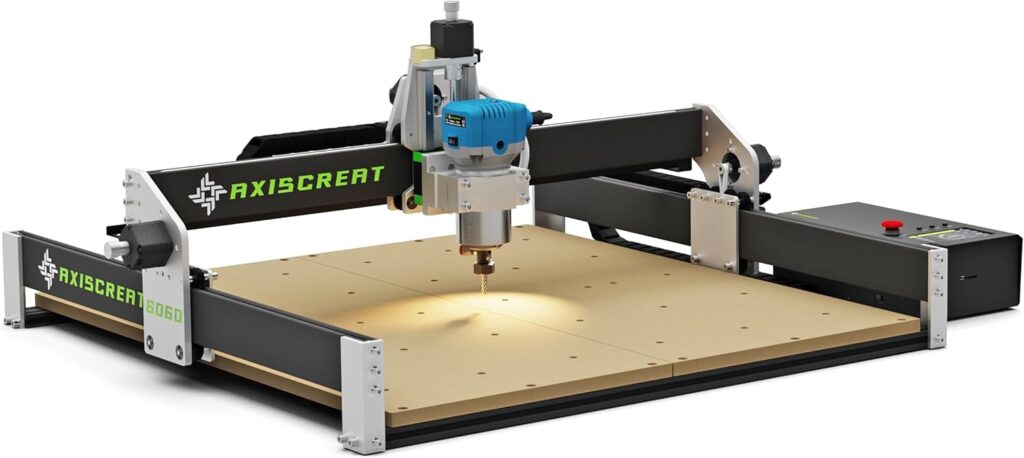
We’re talking about a hobby-grade CNC that has the audacity to feel a bit bigger than “hobby.” The Axiscreat CNC Router Machine 6060 gives us a 600 × 600 × 75 mm working space, a 710W trim router spindle, and a setup process that won’t require a two-day silent retreat and a set of calipers taped to our forehead. It’s friendly to beginners and forgiving enough for those of us who can’t resist “just one more pass.”
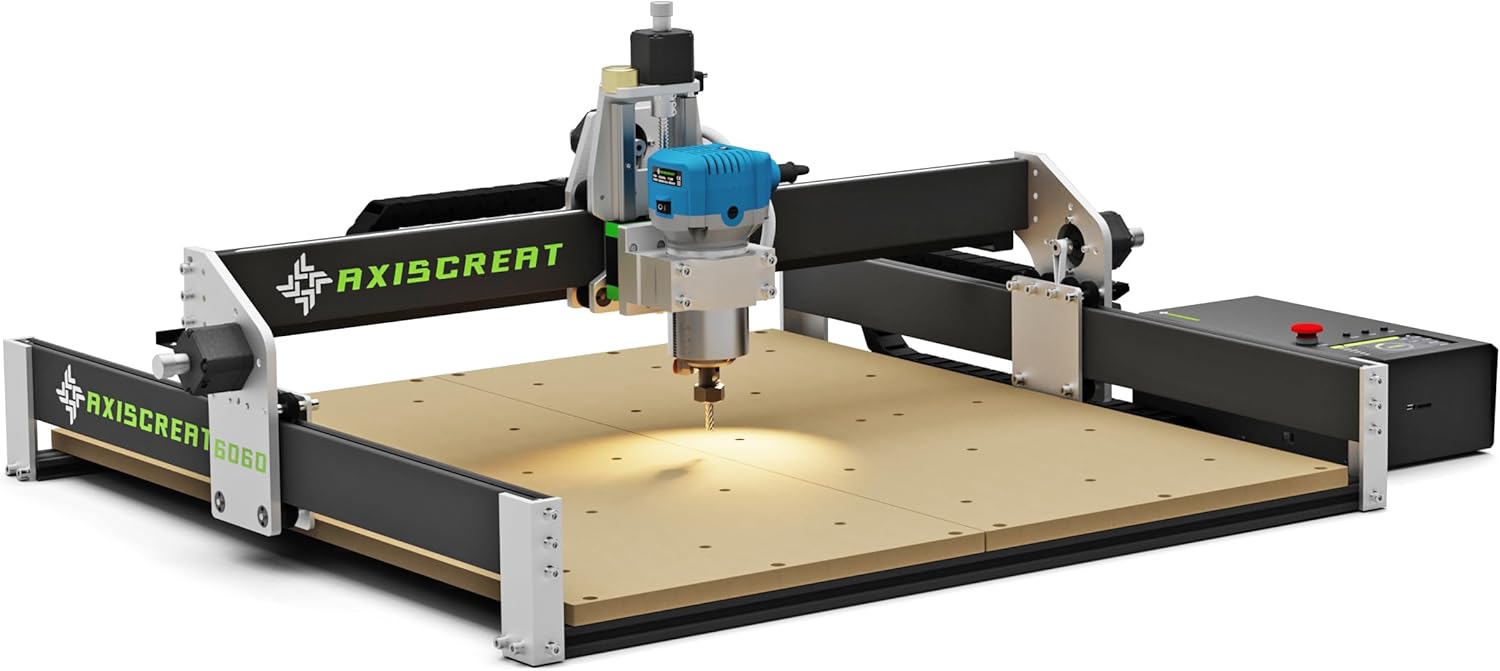
Axiscreat CNC Router Machine 6060, Beginner Hobby Engraving Machines, 710W Power Trimmer Router, Linear Rails and Belt Driven, 3-Axis Cnc Milling Machine for Wood, Acrylic, and MDF Carving
What We Unboxed
Opening the boxes, we found a thoughtfully packaged kit with a pre-assembled modular structure. The components feel substantial where they need to (Z-axis linear rail, aluminum extrusions) and easygoing where it helps (belt-driven X and Y). We also uncovered the 4.3-inch touchscreen offline controller and a power control box with two 110V sockets we can toggle from the controller—convenient for turning the router and vacuum on and off.
The automatic tool setter made us feel a little spoiled—an optical touch device that lets us set our tool length without powering the spindle. For those of us who’ve used paper shims and crossed fingers, this is a calm, reassuring upgrade.
Setup: From Box to First Shavings in 20 Minutes?
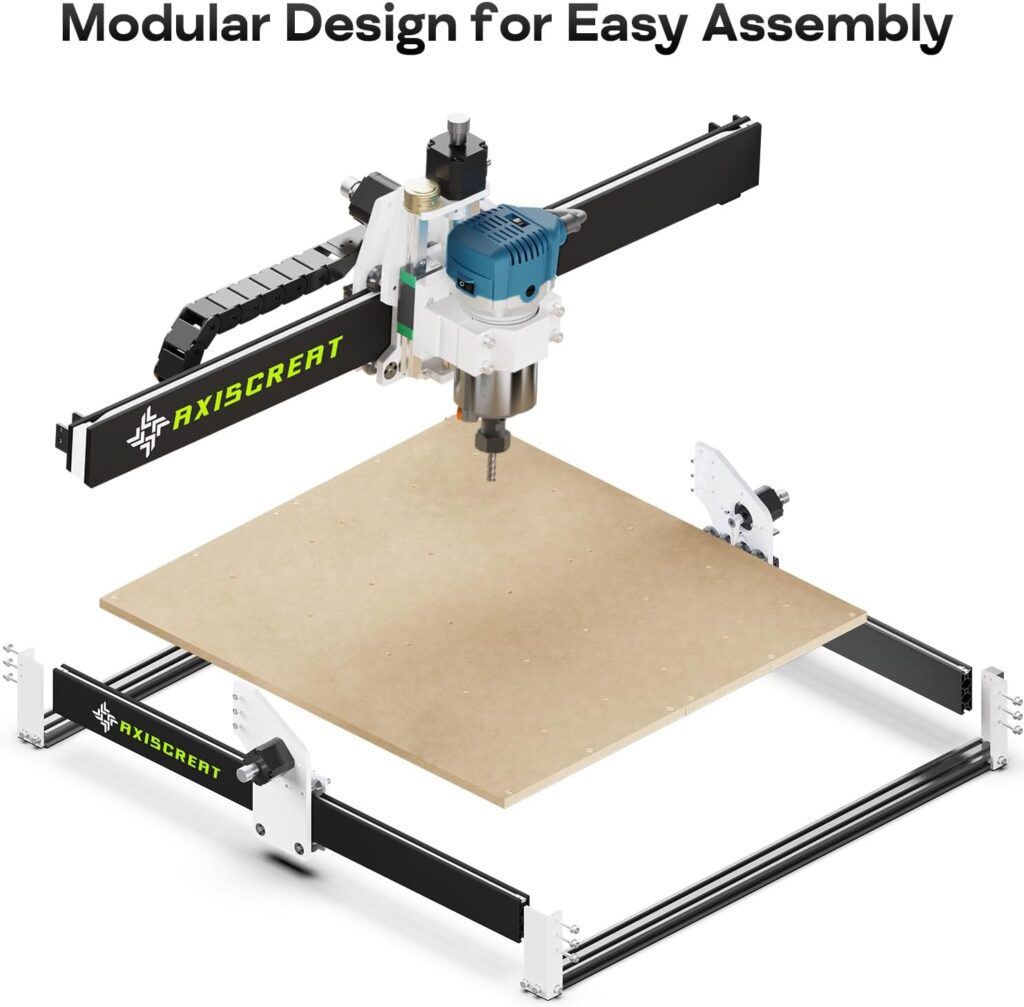
We’ll admit we doubted the “20 minutes” claim at first. That said, the modular design keeps the assembly list mercifully short. We mounted the gantry, connected the motors and limit switches, secured the trim router, plugged in the controller and power box, and verified the belt tension. If we’ve ever assembled a flat-pack shelf and come out the other side still believing in humanity, we can handle this.
There’s a wiring and assembly video available via the listing, and we recommend giving it a quick look before we tighten the last screw. Take five minutes to confirm the power switch setting on the control box (110V at the factory), especially if we’re in a 220V region. The router spindle itself is 110V only, so where our mains are 220V, we’ll want a step-down transformer for both the control box and the spindle. It’s not glamorous, but it’s necessary.
The Work Area: Room to Breathe
At 23.6 × 23.6 × 2.95 inches (600 × 600 × 75 mm), the Axiscreat A6060 gives us space to work on real projects: signs, wall art, custom boxes, instrument panels, cutting boards with logos, and all those three-word Etsy phrases that make our siblings ask if we’ve learned pyrography. Compared to the 3018 and 4030-sized machines, this broader stage reduces the need for tiling, jigging, or apologizing to ourselves for starting small.
The Z travel of 75 mm is enough for most woodworking and acrylic jobs. Deeper stock or tall fixtures are possible if we think ahead, but we’ll want to keep a clear routing plan so the bit length and toolpath play nice together.
The 710W Trim Router: Power, Speed, and That Familiar Whirr
A 710W spindle with a 6000–30000 RPM range and six preset speeds gives us confidence without demanding a machinist’s license. On wood, MDF, and acrylic, that range covers the bases: slower for larger bits and delicate materials, faster for small end mills and crisp edges.
Most trim routers accept 1/4-inch and 1/8-inch collets (confirm what’s included with ours), and that flexibility opens doors to a broad library of bits. V-bits for lettering, downcut bits for clean top faces on plywood, and O-flutes for acrylic—each has its place. The motor is punchy enough to do deeper cuts with the right bit and sane feed rates. And yes, it makes noise. With a vacuum, it sounds like our garage is giving itself a haircut. We’d recommend hearing protection, and if we have close neighbors, a box of cookies.
Motion System: Belts Where It’s Smart, Linear Rails Where It Counts
We appreciate the combination here: belt-driven X and Y for speed and simplicity, and a linear rail Z axis for rigidity and smoothness. Belts, when properly tensioned, are fast and relatively quiet. The Z-axis linear rail helps keep the router steady, which is a major boon for carving detail and keeping chatter at bay.
Let’s be realistic: belts aren’t ball screws. If our ambitions include aerospace tolerances or tramming to one-tenth of a whisper, we’ll need different equipment. But for woodworking, MDF signage, and acrylic panels, belts deliver snappy motion and more than enough accuracy to make us feel like precision is our middle name.
Control Options: Touchscreen, PC, or the Phone in Our Pocket
The 4.3-inch touchscreen offline controller lets us load jobs and run them without a computer tethered to the machine. The power box includes two 110V sockets operable from the controller—one for the router and one for our shop vacuum. We can start and stop both without doing a power-strip ballet.
The machine also supports control via a PC application and even a smartphone or tablet. If we’re used to GRBL-style workflows, this won’t feel foreign, and if we prefer to keep our laptop out of the dust, the offline controller takes the role of traffic cop quite nicely. We’ll want to refer to the manual for connection specifics, but we appreciate that there are multiple ways to run a job, depending on whether we feel retro (USB) or modern (mobile device).
Automatic Tool Setting: A Small Feature That Feels Big
Having an automatic tool setter with an optical touch signal feels like a reward for living in the future. We can set our tool without powering the spindle—safer, calmer, and less guesswork. It speeds up job changes and takes away the “am I pressing too hard on this scrap of paper?” anxiety.
We set the Z-zero to the top of our stock or to the spoilboard, depending on our CAM setup, and off we go. This is especially handy when we’re doing multiple tool changes in the same job—less fumbling, more cutting.
Safety and Power: The Things We Learn Before We Smell Smoke
Let’s get practical. The control box is factory set to 110V. If our mains are 220V, we must switch the power selector on the control box to 220V before powering on. The included trim router is 110V only, so in 220V regions, using a step-down transformer for both the control box and spindle is strongly recommended.
We like that the offline controller can toggle both the router and a vacuum plugged into the two 110V sockets. That means fewer trips to the cord octopus and one less excuse to leave the vacuum off. Add basic PPE—hearing protection, safety glasses, and a dust mask—and we’ll stay on the right side of the evening.
Materials and Performance: Wood, Acrylic, and MDF
This machine’s comfort zone includes softwoods, hardwoods, plywood, MDF, and acrylic. For wood, we start with conservative feeds and speeds and increase gradually. MDF cuts like a dream but creates an enthusiastic dust storm, which we tame with a decent vacuum and, ideally, a dust shoe (if we add one separately).
Acrylic likes sharp O-flute bits, higher spindle speeds, and moderate feed rates to avoid melting. The 710W spindle’s upper RPM range helps reduce chip welding and keeps edges cleaner. For signage and decorative inlays, the machine holds tight enough tolerances for snug-fitting V-carve and pocketed inserts when our CAM is dialed in.
Noise and Dust: Our Twin Frenemies
Trim routers make a racket. Even at moderate RPMs, they hum like a contented jet ski. The vacuum we pair with the power box brings in its own chorus. Between them, noise is part of the trade-off for portability and power. We like to work when the house is awake and no one is on a video call.
Dust, especially from MDF, is relentless. A dust shoe (if we add one) and a shop vac go a long way. If we’re running acrylic, chips can be staticky and cling to everything. We keep a soft brush and a light-duty air blower handy for post-job cleanups. Nothing says “romance” like brushing tiny plastic confetti from the laundry sink trap.
Software Workflow: From Sketch to Sawdust
We take our design from a CAD/CAM tool we’re comfortable with—anything that exports G-code compatible with a GRBL-style controller is usually workable. For many of us, that could be a friendly 2D/2.5D program for signage or something more robust for 3D relief carving. The routine is simple:
- Sketch or import the design.
- Create toolpaths (pockets, profiles, V-carves, contours).
- Select cutters and set speeds/feeds.
- Simulate, adjust, and export G-code.
- Transfer to the offline controller or connect via PC/phone.
- Set zero on the machine, secure the stock, and run the job.
The offline controller frees our computer. We’ve run projects from USB or SD with fewer opportunities for notifications to interrupt our attention.
A Quick Look at Features and Specs
We like seeing things side by side. It keeps us honest, and it’s easier to share with friends who are “CNC-curious” but allergic to tech brochures.
| Feature | What It Is | Why It Matters | Our Take |
|---|---|---|---|
| Work Area | 600 × 600 × 75 mm (23.6 × 23.6 × 2.95 in) | Larger projects without tiling; comfortable space for signage and panels | Feels roomy for a hobby machine; fewer workarounds |
| Spindle | 710W trim router, 6000–30000 RPM, 6 preset speeds | Power for deep cuts in wood, clean edges in acrylic | Strong, familiar, easy to manage with presets |
| Motion | Belt-driven X/Y; linear rail Z | Balanced speed and rigidity; smoother Z motion | A smart combo for hobby wood and plastics |
| Auto Tool Setter | Optical touch, usable with spindle off | Safer, faster tool zeroing | One of our favorite quality-of-life features |
| Controller | 4.3-inch touchscreen offline controller | Run jobs without a PC tether | Friendly UI for everyday projects |
| Power Box | Two 110V sockets controllable via controller | Toggle router and vacuum from the same interface | The convenience we didn’t know we needed |
| Control Methods | Offline, PC app, smartphone/tablet | Multiple ways to run jobs | Good flexibility; fewer cables to babysit |
| Assembly | Modular, pre-assembled sections; ~20 minutes | Low barrier to first cut | Minimal fuss if we follow the video |
| Maintenance | Regular belt inspection/tension; replace 2GT 6mm if frayed | Reliability and accuracy depend on it | Easy routine, very doable at home |
| Power Notice | Factory set 110V; use step-down transformer for 220V; spindle 110V only | Prevents damage and keeps us safe | Read the sticker, do the right thing |
Calibration and Tuning: Laying the Groundwork
Before we cut anything special, we square and check. We loosen the gantry mounts slightly, gently coax them into alignment with a carpenter’s square, then retighten. We verify belt tension—not guitar-string tight, but firm and even across both X and Y. Loose belts can cause wavy lines and missed steps; too tight, and we put strain on bearings and motors.
We also like to tram the router as best we can, ensuring the bit is perpendicular to the work surface. On a trim-router-style Z, this is usually a matter of subtle adjustments and shims. Perfect is not required for clean results, but better tramming pays dividends in smooth pockets and even bottom finishes.
Workholding: How We Keep Things Put
A good spoilboard is our friend. We surface it lightly to make sure the top is co-planar with the gantry, and then we add threaded inserts or T-tracks to accept clamps. For delicate or thin material, double-sided tape is a superhero—clean, fast, and surprisingly strong when paired with an even surface. We avoid clamping so close to the toolpath that we live in daily fear of a collision. A little planning saves a clamp and a chunk of our sanity.
Tooling Choices: The Bits That Do the Work
We keep a small kit:
- 1/4-inch upcut for clearing material fast in wood and MDF
- 1/4-inch downcut for plywood and clean top edges
- 1/8-inch upcut for finer detail
- V-bits (60° and 90°) for lettering and chamfers
- O-flute bits for acrylic
We start conservative: modest stepdowns and moderate feeds. With the 710W spindle, we can increase depth per pass on soft woods confidently. On acrylic, we go faster on the feed and keep the chip load healthy to avoid melting. The six preset speeds help us return to reliable settings without second-guessing.
Everyday Projects: What We Can Realistically Make
This machine shines on home décor signs, custom cutting boards with engraved inlays, shop jigs, drawer fronts, instrument panels, and acrylic light panels. We batch small items—coasters, key racks, decorative tiles—using the working envelope to run multiples at once. For MDF lithophanes and relief carvings, the Z linear rail keeps things steady while small stepovers reveal fine detail.
It’s not a metal shop. If we’re looking to carve thick aluminum brackets or machine steel, this isn’t the right tool for the job. But for wood, MDF, and acrylic, the sweet spot is big, and the results can be exceptionally polished.
Maintenance: Belts, Rails, and Common Sense
Our belts do the heavy lifting. We check them monthly if we run the machine often:
- Look for fraying or curling. Replace with 2GT 6mm timing belts when needed.
- Verify tension. If loose, loosen the mounting screws, tension the belt firmly, and then resecure the screws.
- Clean rails and lead screws of dust. A little dry lube on the Z rail (if recommended by the manufacturer) helps.
We also periodically check pulleys for tightness. If we hear a twitchy squeak or see repeatability suffer, a set screw might have slipped. And of course, we keep the electronics dust-free and give the control box some breathing room.
Power and Grounding: Quiet Signals, Happy Motors
If we notice odd behavior—motors missing steps, a controller reset when the vacuum turns on—we look to power and grounding. We keep the vacuum and machine on dedicated circuits where possible, or at least use a surge protector. Cable management matters. EMI hates order, and we aim to give it as little chaos as possible. If we add LED lights to the spindle mount, we route wires away from signal cables.
The Learning Curve: Start Slow, Save Wood
Axiscreat explicitly reminds us not to crank feed rates too high out of the gate. We’re thankful for the friendly nudge because we’ve all been tempted. Pushing the machine too hard leads to missed steps, positional drift, and the sort of carving that looks like it had a stressful day. We start conservative, observe the chips (flakes vs. dust), and tune from there. The machine will let us know when it’s happy.
Pros and Cons: What We Loved and What We Noted
We like to be honest with ourselves, even when we’re smitten. Here’s where we ended up after several projects and more than a little vacuuming.
Pros:
- Spacious 600 × 600 × 75 mm work area makes projects easier and reduces tiling
- 710W spindle with six preset speeds works well across wood, MDF, and acrylic
- Linear rail on Z adds confidence for detailed work
- Offline 4.3-inch touchscreen controller is easy to use
- Two controllable 110V sockets simplify router/vacuum management
- Automatic tool setter helps with safe, consistent Z-zeroing
- Modular design genuinely reduces setup time
Cons:
- Belt-driven X/Y require consistent tension maintenance
- Noise is part of life with a trim router
- Power configuration for 220V regions needs attention and a step-down transformer
- Not intended for metals; stay in wood, MDF, and plastics territory
Troubleshooting: Common Gotchas and Quick Fixes
Every machine has a personality, and we learned a few of this one’s quirks right away.
- Missed Steps or Skewed Cuts: Usually belt tension or feeds too aggressive. Re-tension belts and reduce depth per pass.
- Poor Edge Quality in Acrylic: Try an O-flute bit, increase feed slightly, and avoid overly slow spindle speeds that melt chips.
- Z Inconsistency: Check the tool setter calibration and ensure the collet is clean and tight. A speck of dust can cause slippage.
- Controller Resets or Weird Pauses: Check power source and cable routing. Make sure the vacuum and spindle aren’t introducing noise into the control lines.
- Inaccurate Tool Zero: Make sure the tool setter is on a clean, flat surface and confirm the probe thickness setting in the controller.
Project Planning: The Part We Pretend Isn’t Fun
We plan material sizing so the bit can reach all pockets and edges without hitting clamps. We mark safe zones and double-check zero. We use tabs for parts that might get loose at the end of a profile cut. We prefer shorter bits for rigidity and only go longer when we have to. And when a job is particularly delicate, we’ll run a dry simulation at a safe Z height to confirm the path.
Upgrades and Accessories: What We’d Consider
Not everything has to be added on day one, but a few accessories make life easier:
- Dust shoe (if not included) to pair with our vacuum
- Additional collets and quality bits for the materials we use most
- A surfaced spoilboard with threaded inserts or T-tracks
- Clamp set suited to the larger work area
- LED task lighting on the gantry to spot details
Each addition helps reduce friction. The fewer little headaches we have, the more likely we’ll be to use the machine regularly.
Repeatability and Accuracy: What We Observed
Within the realm of woodworking and acrylic panels, repeatability was solid. Pocket dimensions came out as programmed when the belts were properly tensioned, and the Z rail kept depth consistent across the surface. For inlays and tight-fitting parts, we nudged offsets in CAM to get “press fit” results—standard fare for dialing in any CNC. Most of what we consider accuracy here comes down to setup: squareness, tramming, belt tension, and making sure the workpiece is firmly secured.
Batch Jobs and Workflow: Scaling Without Melting Down
That big 600 × 600 bed begs for batch jobs. We space out multiples, use fixtures or dowel pins to index material, and surface our spoilboard for a known reference. The two socket outputs on the control box help us keep the spindle and vacuum synchronized without walking laps. If we’re running the same program repeatedly, the offline controller keeps things consistent. There’s a calm satisfaction in watching identical parts appear in neatly arranged rows, as long as we remember where we put the broom.
Edge Finishing and Post-Processing: The Last 10 Percent That Looks Like 50
Even a good cut benefits from a bit of sanding or scraping. For wood, a quick once-over with 220-grit makes edges feel purposeful rather than pointy. For acrylic, a deburring tool or flame polish (careful, small adjustments only) can restore that glossy edge. MDF loves primer and paint; we use shellac-based primer to seal fibers before applying color, and we cut painting time by masking areas in CAM or with painter’s tape.
Who It’s For: Matching Machine to Maker
We see the Axiscreat A6060 as ideal for:
- Beginners who want room to grow and don’t want to outgrow a tiny 3018
- Hobby woodworkers who want to add signage, inlays, and repeatable parts
- Makers selling small batches of MDF or acrylic goods
- Anyone who appreciates belt speed and a sturdier Z assembly
If our goal is aluminum milling or industrial tolerances, this isn’t the tool. If we want a versatile, approachable CNC for wood, MDF, and acrylic with a larger-than-usual work area, this is a smart match.
Value: Where the Money Goes
We’re paying for a generous work area, a strong trim router, quality-of-life features (offline controller, tool setter, controllable sockets), and a setup that reduces the time from curiosity to results. That combination makes sense for anyone who plans to use the machine regularly. We like that it doesn’t feel finicky. It simply asks for regular belt checks and sensible feeds. In return, it produces consistent work and keeps us out of the weeds.
Creative Confidence: Turning Ideas Into Things We Can Hold
There’s a particular joy in watching designs we sketched become tangible. We tell ourselves we’re making gifts or shop jigs, and sometimes we are. But sometimes we’re just making a carefully carved piece of MDF with a saying that sounds wiser when rendered in walnut. The A6060 makes that process feel attainable, repeatable, and, if we’re honest, pleasantly addictive.
Practical Tips We Wish Someone Had Whispered to Us
We like a short list taped next to the controller. It’s a reminder system for our future selves.
- Tighten collets like we mean it, but don’t get heroic
- Re-zero after tool changes, even if we’re certain we don’t need to
- Use tabs on small parts, stray stock is surprisingly mischievous
- Start slow on feeds for new materials; adjust based on chips, not vibes
- Vacuum and wipe rails at the end of each day
- Check belt tension weekly if we’re in production mode
Longevity and Care: Keeping It Happy
Routine matters. Belts don’t stay perfect forever, but they give a lot of warning before they misbehave. We replace as soon as we see fraying or curling. We keep the Z rail clean, and we avoid hosing anything down with lubricant that will attract dust. We treat the control box like a computer: clean air, no sawdust dunes, and no extended sunbathing.
Community and Learning: We’re Not Alone
Hobby CNC has a large, generous community. Whatever CAM program we choose, there’s a forum or group where someone has solved a similar problem at 2 a.m. The Axiscreat’s straightforward setup makes it easier to apply general CNC knowledge. We still read the manual—twice when it comes to power configuration—and we treat YouTube as our second mentor.
The Part Where We Admit Our Favorites
We love the auto tool setter more than we expected. We also like the two controllable 110V sockets on the power box, because tiny conveniences add up to a smoother day. The larger work area changes what we’re willing to attempt. The combination of belt-driven XY and a linear rail Z feels well judged for this class of machine.
If we could tweak anything, we’d ask for quieter routing—but that’s like asking a blender to whisper. We accept the ear protection as a part of the uniform.
Final Verdict: A Calm, Capable CNC for Real Projects
The Axiscreat CNC Router Machine 6060 lands in the sweet spot for a serious hobbyist or a beginner who wants to skip the training wheels. It’s spacious, powerful enough to take real bites out of wood and MDF, and gentle enough with the right bit to do clean acrylic work. The setup is quick, the control options are flexible, and the built-in touches—auto tool setter, controllable sockets—make the whole experience smoother.
If we’re patient with feeds and attentive to belt tension, the A6060 rewards us with consistent results and a forgiving learning curve. It doesn’t pretend to be an industrial machine, and it doesn’t have to. It’s the kind of tool that sneaks into our routine until we realize we’ve designed our own cabinet handles and customized every cutting board in our kitchen.
We started with a question and ended with a garage that looks suspiciously like a tiny workshop. That seems like a fair trade: an approachable CNC that turns Saturday coffee into carved walnut by afternoon, and leaves us with just enough energy to vacuum the last of the MDF dust before dinner.
Disclosure: As an Amazon Associate, I earn from qualifying purchases.