Axiscreat 3030 Beginner CNC Machine Review: Is This 710W Plug-and-Play CNC Worth $499?
The Axiscreat 3030 Beginner CNC Machine arrives with a promise that most CNC kits in this price bracket can’t match: true plug-and-play setup, no assembly required. Pair that with a 710W spindle (0.95 HP) reaching 30,000 RPM, a 4.3-inch touchscreen offline controller, 3-axis limit switches plus an emergency stop, and a 300 × 300 × 75mm work area, and you have one of the easiest entry points into desktop CNC work available right now.
Most beginner CNCs at this price point ship as flat-pack kits requiring 3–6 hours of assembly before you can power on. Axiscreat skipped that ritual entirely. The machine arrives integrated, calibrated, and ready to home — most users hit their first jog within five minutes of unboxing.
This review contains affiliate links. If you buy through them, we may earn a commission — at no extra cost to you.
- Current price: $499.99 (Amazon, “Only 1 left in stock — order soon” as of 2026)
- Brand: Axiscreat (Model: 3030, Part #AT-CNC-I3030-1)
- Spindle: 710W router, 0.95 HP, 6,000–30,000 RPM with 6 preset speeds
- Work area: 300 × 300 × 75mm
- Motion: T10 lead screw with extended 75mm Z-axis
- Controller: 4.3-inch touchscreen offline controller (Candle/GRBL compatible)
- Safety: 3-axis limit switches + large emergency stop
- Voltage (control box): Switchable 110V/220V
- Voltage (spindle): 110V only — 220V users need a step-down transformer
- Setup: Truly plug-and-play, ~5 minutes to first jog
Who should buy: First-time CNC owners, makers upgrading from a 3018-class kit, Etsy sign shops, supervised school labs, and small prototyping benches that prize reliability over raw metal removal rates.
Who should skip: Buyers planning hardened steel work, unattended overnight production runs, or anyone uncomfortable dialing in conservative feeds for aluminum.

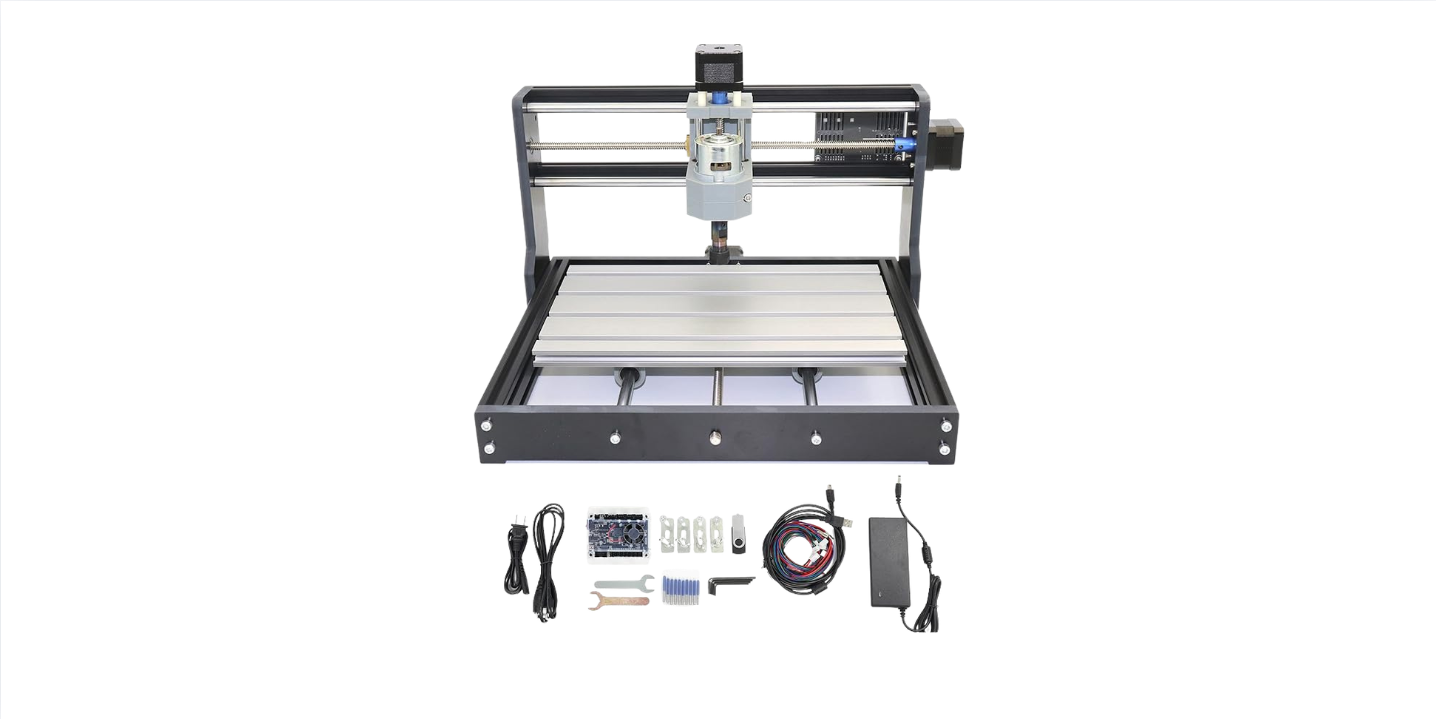
3030 Beginner CNC Machine, 710W Router, Touch Offline Control, 3-Axis Limit Switches & E-Stop, Plug and Play, Ideal for Cutting Metal, Wood, Acrylic, MDF, and Plastic, 300x300x75mm Work Area
Quick Verdict: Axiscreat 3030 Beginner CNC Machine (2026)
For $499.99, the Axiscreat 3030 is the plug-and-play desktop router we’d hand to a first-time CNC owner who plans to carve wood and plastics regularly and tiptoe into aluminum on weekends. The 710W spindle and five-minute setup are the real draws; entry-level tolerances and conservative feeds in metals are the trade-off you accept at this price.
Compared to assembling a 3018-class kit, the time savings alone are worth real money. Compared to higher-priced benchtop CNCs, you give up rigidity and metal removal rates — but gain a machine that genuinely behaves on day one without an engineering-degree learning curve.
- Best for: Beginners who want to start carving today, not next weekend
- Skip it if: Production aluminum or steel cutting is your goal
- Value verdict: Strong at $499.99 — plug-and-play alone justifies most of the price
- Main compromises: Entry-level rigidity, 110V-only spindle, modest aluminum feeds
Product Overview: What the Axiscreat 3030 Actually Is
The Axiscreat 3030 is a fully integrated desktop CNC router built around four standout features:
- True no-assembly design — arrives ready to plug in
- 710W spindle with six preset speeds spanning 6,000–30,000 RPM
- 4.3-inch touchscreen offline controller for laptop-free operation
- Comprehensive safety suite: 3-axis limit switches plus a large E-stop
The extended 75mm Z-axis travel is unusual at this price — most beginner CNCs offer 40–50mm Z, which constrains workholding options. The extra Z gives you room for proper vises, taller jigs, and stacked spoilboards without panic-inducing clearance issues.
| Brand | Axiscreat |
| Model | 3030 (Part #AT-CNC-I3030-1) |
| Spindle power | 710W (0.95 HP) |
| RPM range | 6,000–30,000 RPM (6 preset speeds) |
| Working area | 300 × 300 × 75mm |
| Z-travel | 75mm extended |
| Motion system | T10 lead screw |
| Controller | 4.3-inch touchscreen offline (Candle/GRBL compatible) |
| Safety | 3-axis limit switches + emergency stop |
| Control box voltage | Switchable 110V / 220V |
| Spindle voltage | 110V only (step-down transformer required for 220V regions) |
| Setup time | ~5 minutes plug-and-play |
| Compatible materials | Wood, MDF, acrylic, carbon fiber, soft metals (aluminum, brass) |
Material claims include “soft titanium,” but treat that as experimental engraving territory — micro-passes only, not production work.
Key Features Tested: Where the Axiscreat 3030 Earns Its Price
The 710W Spindle: Real Capability with Realistic Limits
The 710W spindle (0.95 HP) is the centerpiece. It delivers six preset speeds from 6,000–30,000 RPM, which covers most material requirements for hobby work. In wood and plastics, the spindle is genuinely confident. In aluminum and brass, it works well with sharp single-flute bits, short stick-out, and aggressive chip evacuation.
| Material | Realistic capability | Recommended settings (1/8″ tooling) |
| Wood / MDF | Excellent | 18,000–22,000 RPM, 1,000–1,500 mm/min, 0.8–1.2mm DOC |
| Acrylic | Excellent with O-flute | 18,000–22,000 RPM, 900–1,200 mm/min, 0.6–0.8mm DOC |
| Aluminum 6061 | Capable with light passes | 18,000–22,000 RPM, 250–350 mm/min, 0.2–0.4mm DOC + air blast |
| Carbon fiber | Possible with diamond-coated bits | Conservative feeds, dust extraction mandatory |
| Brass | Capable | Light passes, sharp bits |
| Soft titanium | Engraving only | Micro-passes, not production work |
| Steel | Not recommended | Wrong machine class |
Extended 75mm Z-Axis with T10 Lead Screw
The 75mm Z travel is genuinely useful. Most beginner CNCs cap at 40–50mm, which forces compromises on workholding height. With 75mm, you can use proper vises, stacked fixtures, and longer tools without clearance panic. The T10 lead screw favors predictable positioning over raw speed — exactly what beginners need for repeatable results.
Setup Tips for Best Z-Axis Performance
- Tram the spindle with a tram bar until X and Y sweep within 0.05–0.10mm across 100mm
- Square X/Y to the bed using a 50mm test square pattern
- Surface the spoilboard before any project, then run a touch-off routine
- Log Z repeatability — aim to keep variance under 0.05–0.10mm for hobby work
4.3-Inch Touchscreen Offline Controller
The offline controller is one of the standout features at this price point. You prep G-code in Candle on your PC, save to USB, and run jobs directly from the touchscreen. No laptop sitting in a dust storm, no USB cable failures mid-cut, no system updates interrupting a 90-minute carve.
Recommended Workflow
- Design in CAD/CAM (Fusion 360, Carbide Create, EstlCAM, etc.)
- Set post-processor to GRBL with arcs enabled
- Export G-code in millimeters with safe Z above clamps
- Save to USB with clear filename
- Load on touchscreen, jog, zero, dry-run, then cut
Keep a “known-good” test file on your USB stick — a simple 50mm square pocket — so you can verify motion any time you change a setting or after the machine gets bumped during cleanup.
Safety Suite: Limit Switches and a Real E-Stop
The 3-axis limit switches and front-and-center emergency stop aren’t decorative. They genuinely change first-time CNC operation from anxious hovering to focused observation. Limits prevent the most common beginner mistake (overrun crashes), while the E-stop gives you a fast, obvious way to cut power if a clamp lets go or a bit snaps.
First-Run Safety Routine
- Test all limit switches during initial setup — confirm alarms and homing behavior
- Keep one hand near the E-stop during your first runs
- Simulate toolpaths in Candle before sending to the machine
- Watch the first 30 seconds of every cut — that’s when most issues surface
Plug-and-Play: The Real Five-Minute Setup
This isn’t marketing wishful thinking. The Axiscreat 3030 ships fully integrated, with the gantry pre-mounted, electronics pre-wired, and the spindle pre-installed. Realistic time from unboxing to first jog:
- Unbox and place on a stable surface
- Connect power (verify voltage selector first if on 220V mains)
- Install Candle on your PC and confirm COM port
- Home the axes
- Load a sample G-code file, jog, zero, and you’re cutting
This is dramatically faster than 3018-class kits, which typically require 3–6 hours of assembly before you can even power on.
Critical Voltage Setup: 110V vs 220V Buyers Read This Twice
The Axiscreat 3030 ships factory-set to 110V. The control box has a 110V/220V switchable selector, but the included spindle is 110V only.
If you’re on 220V mains:
- Flip the control box selector to 220V before powering on (this protects the electronics)
- Use a reputable step-down transformer for the 110V spindle — this is non-negotiable
- Verify transformer output with a meter before connecting the machine
Skip these steps and you’ll fry the electronics or the spindle. This is the single most common installation mistake on this machine in 220V regions.
Setup and First Cut: Step-by-Step Path to Success
- Level the machine on a firm bench; shim if needed
- Mount and surface a spoilboard — 0.5–1.0mm light pass
- Tram the spindle lightly; re-tighten everything
- Install a 1/8″ flat end mill with short stick-out
- Zero X/Y/Z on the front-left corner of your surfaced spoilboard
- Dry-run your toolpath 5–10mm above the surface
- Test cut in MDF: a 50mm square pocket and profile
- Measure with calipers — note any deviation from 50.00mm
- Dial in feeds in ±10% increments based on sound and chip quality
- Save a Candle profile with steps/mm, max rates, and your verified feeds
Quality Check Standards
- Good chips look like confetti, not powder — adjust feed rate if you’re producing dust
- 50mm test should land within ±0.10–0.25mm for new users
- Square the gantry if X vs Y dimensions drift more than that
Performance by Material
Wood and MDF: The Comfort Zone
Crisp engraving and clean pocketing at mid-to-high RPM. Use sharp upcut bits for pocketing, compression bits for plywood (tames tear-out on top edges), and seal MDF edges if you want a more finished look. The 710W spindle handles hardwoods with confidence — start at 18,000–22,000 RPM and 1.0mm DOC.
Acrylic and Plastics: O-Flute Required
Single-flute O-flute tooling is non-negotiable for clean acrylic edges. Climb-cut produces cleaner finishes than conventional. Keep chips clearing — if they start to smear, bump feed slightly or drop RPM a hair to prevent chip-weld. Cast acrylic finishes more cleanly than extruded.
Aluminum and Soft Metals: Patience Wins
Aluminum work requires shallow stepdowns (0.2–0.4mm DOC), narrow width-of-cut (20–40% of diameter), single-flute carbide cutters, and steady air blast or occasional wax. Rigid workholding matters as much as feeds and speeds. Listen for chatter — silver chips are good, smoky chips mean you’re pushing too hard.
The “soft titanium” claim on the listing is experimental territory only. Take micro-passes, use lubrication, and limit yourself to engraving rather than excavation.
Software and Workflow
Candle is the recommended GRBL sender. You’ll work across four screens: jog for movement, zero for work origins, console for GRBL messages, and the visualizer for previewing toolpaths before sending them to the machine.
Alternative GRBL senders also work — OpenBuilds CONTROL, UGS, and bCNC are all compatible. The key requirement is setting your CAM post-processor to GRBL with arcs enabled.
Export Hygiene Checklist
- Work in millimeters
- Enable arcs (G2/G3) with sensible tolerance
- Set a safe Z above clamps in your post-processor
- Run a dry-run in Candle before committing to material
- Verify origin matches your G-code assumption when running offline
What Customers Are Saying
| What buyers love | True no-assembly setup, 5-minute first jog, offline touchscreen controller, real E-stop, 75mm Z-travel |
| What buyers caveat | Missed steps when pushing aluminum feeds too hard, noise without dust shoe, 110V-only spindle for international buyers |
| Common phrases | “Plugged in and cut a sign before dinner,” “Touch controller keeps my laptop clean,” “Light passes win in aluminum” |
The most consistent praise centers on the genuinely fast time-to-first-cut and the offline controller’s convenience. The most consistent caveat is around aluminum — buyers who push feed rates too aggressively report missed steps, while those who run conservative settings get reliable results.
Pros and Cons
✅ Pros
- Truly no-assembly setup — five-minute first jog is realistic, not marketing hype
- 710W spindle (0.95 HP) with six preset speeds from 6,000–30,000 RPM
- Extended 75mm Z-travel on a T10 lead screw — rare at this price
- 4.3-inch touchscreen offline controller reduces laptop dependency
- 3-axis limit switches and front-mounted E-stop for genuine beginner safety
- Candle/GRBL compatibility with abundant tutorials and community support
- Switchable 110V/220V control box works internationally
- Strong material range: wood, MDF, acrylic, carbon fiber, soft metals
- Massive time savings over assembly-required competitors at the same price
❌ Cons
- Entry-level rigidity compared to heavier benchtop mills
- Conservative feed rates required in aluminum and brass to avoid missed steps
- Spindle is 110V only — 220V users need a step-down transformer
- Noise at 18,000–30,000 RPM without an enclosure or dust shoe
- Offline controller can be picky about non-standard G-code; post with GRBL defaults
- “Soft titanium” claim is misleading — engraving only, not real cutting
- Tooling and dust collection not included — budget extra for accessories
Value Analysis: Is the Axiscreat 3030 Worth $499.99?
The sticker reads $499.99 on Amazon with current “Only 1 left in stock — order soon” availability. For 2026, this is competitive given the 710W spindle, 75mm Z-travel, offline touchscreen, and integrated safety suite. You’re paying for time-to-first-chip, not a pile of extrusions and an evening of assembly.
| Cost line item | Budget |
| Machine | $499.99 |
| Step-down transformer (220V regions) | $30–$80 |
| Starter end mill kit | $30–$60 |
| Workholding clamps | $25–$50 |
| Dust shoe + hose | $40–$80 |
| Spoilboard MDF | $15–$25 |
| All-in budget (110V regions) | ~$610–$715 |
| All-in budget (220V regions) | ~$640–$795 |
Who gets the most value? Beginners stepping up from 3018-class machines, laser owners crossing into subtractive work, and small benches where repeatable setups matter more than raw metal removal rates. If your priority is “how quickly can I stop reading and start carving,” this machine grades exceptionally well.
Axiscreat 3030 vs Alternatives
| Machine | Spindle | Setup | Best For | Price |
|---|---|---|---|---|
| Axiscreat 3030 | 710W (0.95 HP) | 5-minute plug-and-play | Beginners, fast first cut | $499.99 |
| Genmitsu 3030-Evo Max | 800W trim router | Several hours assembly | Aluminum-focused work | $700–$900 |
| LUNYEE PRO MAX | 500W | Entry-level assembly | Budget-first, smaller projects | $300–$400 |
| Genmitsu 3018-PROVer V2 | ~300–500W | 30–45 min assembly | Very compact projects | $300–$400 |
Axiscreat 3030 vs Genmitsu 3030-Evo Max
The Genmitsu 3030-Evo Max delivers more spindle power (800W trim router) and is positioned for serious aluminum work, including stainless steel claims. Trade-off: significantly more setup time and a higher price. Pick the 3030-Evo Max if metal production is your main goal and you don’t mind several hours of assembly. Pick the Axiscreat 3030 if faster setup and the dedicated touchscreen offline controller matter more than raw spindle power.
Axiscreat 3030 vs LUNYEE PRO MAX
LUNYEE wins on price and compact footprint. Axiscreat wins on power (710W vs 500W), Z-travel (75mm vs typically 80mm), the dedicated touchscreen, and faster setup. For badges, PCB isolation, and tiny craft pieces, LUNYEE is nimble. For bigger signs, trays, and fixtures, the Axiscreat’s larger work area saves real frustration.
Axiscreat 3030 vs Genmitsu 3018-PROVer V2
The 3018-PROVer V2 is a categorical step down — smaller work area, less spindle power, smaller Z-travel. The Axiscreat 3030 represents the next tier: more workspace, more power, more Z, and dramatically faster setup. If you’ve outgrown 3018-class projects, the 3030 is the natural upgrade path.
Maintenance Essentials
- Weekly: Wipe rails, vacuum chips, apply light lubricant to T10 lead screws
- Weekly: Check collet for dust accumulation — a dirty collet causes runout
- Monthly: Inspect lead-screw couplers for play, verify all frame bolts are snug
- Monthly: Re-tram if you’ve had any crash, even minor
- Monthly: Back up GRBL settings to a text file
- After any crash: E-stop, power down, inspect tool/collet/clamps/couplers, re-home, re-tram, re-surface if needed, run known-good test file before continuing
Final Verdict: Should You Buy the Axiscreat 3030?
Verdict
For beginners and pragmatic prototypers who value fast setup, predictable behavior, and a real safety net, the Axiscreat 3030 Beginner CNC Machine at $499.99 is an easy yes in 2026.
The combination of true plug-and-play setup, a capable 710W spindle, extended 75mm Z-travel, dedicated touchscreen offline controller, and proper safety suite delivers exactly what first-time CNC owners need: a machine that behaves on day one without an engineering-degree learning curve.
Buy the Axiscreat 3030 if: You want to stop reading about CNC and start carving, you’re upgrading from a 3018-class kit, or you run a small workshop where reliable beginner-friendly operation matters more than maximum metal removal rate.
Skip the Axiscreat 3030 if: You need to mill steel, plan on production aluminum work, want unattended overnight operation, or require the rigidity of a heavier benchtop mill.
Critical reminder: Keep metal passes light, feeds conservative, and a finger near the E-stop. The machine performs exactly as advertised when you respect its capability envelope.
This review contains affiliate links. If you buy through them, we may earn a commission — at no extra cost to you.
Frequently Asked Questions
Can the Axiscreat 3030 cut aluminum or titanium?
Yes for aluminum, with caveats. The 710W spindle handles aluminum if you keep passes shallow (0.2–0.4mm DOC), use sharp single-flute carbide bits, and clamp rigidly. Conservative feeds (250–350 mm/min on 1/8″ tooling) prevent missed steps. The “soft titanium” claim on the listing should be treated as engraving territory only — micro-passes, tiny badges, not production parts. Realistic capability: small aluminum brackets, plates, and prototype parts.
What software does the Axiscreat 3030 use?
Candle is the primary GRBL sender. Prep toolpaths in your CAM software (Fusion 360, Carbide Create, EstlCAM, etc.), set the post-processor to GRBL, export G-code in millimeters with arcs enabled, then either send through Candle or save to USB and run from the 4.3-inch touchscreen offline controller. Alternative GRBL senders like UGS, OpenBuilds CONTROL, and bCNC also work.
Do I need a computer to run the Axiscreat 3030?
Not at the machine itself. The 4.3-inch touchscreen offline controller lets you jog, zero, and run G-code from a USB drive without a tethered laptop. You will still need a computer to design parts and generate G-code before walking the file over to the machine. The offline capability is genuinely useful in dusty environments where laptops don’t belong.
Is assembly really required?
No — this is one of the very few desktop CNCs at this price that ships fully integrated. Realistic time from unboxing to first jog is about five minutes: unbox, place, plug in, install Candle, select COM port, home axes, load a test file. Compared to 3018-class kits that require 3–6 hours of assembly, the time savings alone are worth real money.
What’s the difference between this and a Genmitsu 3018?
The Axiscreat 3030 gives you a larger 300 × 300mm work area versus ~300 × 180mm on most 3018s, an extended 75mm Z-travel, a stronger 710W spindle, a dedicated 4.3-inch touchscreen offline controller, and true plug-and-play setup. If you’ve outgrown name signs the size of a paperback novel, the 3030 class feels noticeably roomier and more capable.
What do 220V users need to know?
The control box ships factory-set to 110V. You must flip the selector to 220V before powering on, otherwise you’ll damage the electronics. The included spindle is 110V only, so you’ll also need a step-down transformer ($30–$80) to convert 220V mains to 110V for the spindle. This is non-negotiable safety setup — skip it and you’ll fry components.
How loud is the Axiscreat 3030?
The 710W spindle at 18,000+ RPM is roughly hair-dryer level — louder than ideal for shared spaces. Wear hearing protection on long jobs. Adding an enclosure and a dust shoe with a shop vac dramatically reduces both noise and dust. For apartment use, an enclosure is practically mandatory unless you have very forgiving neighbors.
Does it come with bits, clamps, or accessories?
Plan to budget extra for tooling and workholding. You’ll want at minimum: an ER11 collet set, a starter end mill kit (1/8″ 2-flute upcut, O-flute for plastics, single-flute for aluminum, V-bits for engraving), workholding clamps, a spoilboard, and a dust shoe with shop vac. Total accessory budget: roughly $100–$200 for a complete starter setup.
Can I use the Axiscreat 3030 for PCB engraving?
Yes. The T10 lead screw provides reasonable repeatability for PCB isolation milling, especially with a Z-touch probe and bed-mapping software. The 75mm Z-travel gives plenty of clearance for fixturing copper-clad boards. For serious PCB work, a machine with ball screws will produce more consistent isolation widths — but for hobby PCB prototyping, the Axiscreat 3030 handles it well.
Is the Axiscreat 3030 worth $499.99 in 2026?
For the right buyer, absolutely. The combination of true plug-and-play setup, 710W spindle power, extended 75mm Z-travel, dedicated touchscreen offline controller, and integrated safety suite delivers exceptional value at $499.99. If you’ll work primarily on wood, plastics, and occasional light aluminum, the value math is clearly in your favor. If you need production aluminum capability or steel cutting, look at higher-tier machines instead.
Key Takeaways
- The Axiscreat 3030 delivers true plug-and-play setup — five-minute first jog is realistic, not marketing hype
- 710W spindle (0.95 HP) with six preset speeds excels on wood and plastics; handles aluminum with conservative feeds
- Extended 75mm Z-travel and T10 lead screw are unusual at this price point
- 4.3-inch touchscreen offline controller eliminates laptop-in-dust scenarios
- Factory default is 110V — 220V users must flip the selector AND use a step-down transformer for the spindle
- 3-axis limit switches and front-mounted E-stop reduce early mistakes for first-time CNC owners
- At $499.99, value is strong for beginners stepping up from 3018-class routers and laser owners adding subtractive capability
- Plan for ~$100–$200 in tooling and accessories on top of the machine cost
Disclosure: As an Amazon Associate, I earn from qualifying purchases.