Twotrees TTC3018 CNC Router Review: Is This WiFi-Enabled Desktop CNC Worth It in 2026?
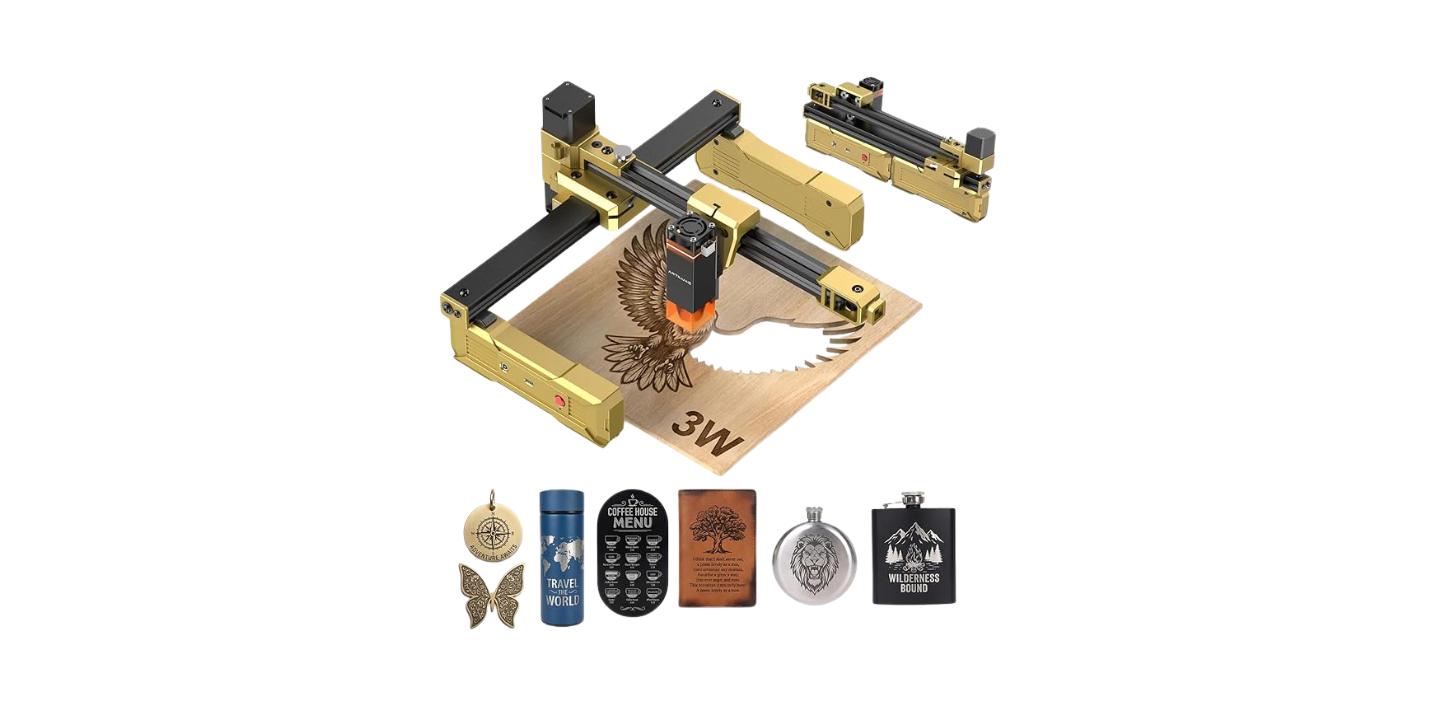
The Twotrees TTC3018 CNC Router is what happens when a 3018-class desktop CNC adds the modern conveniences hobbyists actually want: 32-bit STM32 processor, built-in WiFi, GRBL control, an ER11 collet supporting 0.5–7mm bits, and a 775 spindle motor at 7,000–9,000 RPM. Pair that with a 300 × 180 × 40mm work area, 0.1mm engraving accuracy, and multiple international safety certifications (CE-EMC, CE-LVD, CE-MD, CE-RED, ROHS, FCC), and you have one of the more thoughtfully equipped beginner CNC routers in this class.
For new CNC users, classroom labs, and hobbyists who want to prototype tonight rather than wait for a fab service, the TTC3018 hits a practical sweet spot. It’s not trying to outmuscle a benchtop mill — it’s designed for makers who want a friendly, accurate desktop tool for wood, acrylic, plastics, soft metals, and PCB work.
Important availability note: The current Amazon listing shows the TTC3018 as “Currently unavailable.” Stock and pricing change frequently — verify current availability before buying. This review covers the machine’s capabilities and value when it’s in stock.
This review contains affiliate links. If you buy through them, we may earn a commission — at no extra cost to you.
- Brand: Twotrees (Model: TTC3018, Part #584226)
- ASIN: B0FLDL8VJQ
- Controller: 32-bit STM32 with GRBL firmware
- Spindle: 775 motor, 7,000–9,000 RPM
- Collet: ER11 supporting 0.5–7mm bit shanks
- Working area: 300 × 180 × 40mm
- Machine dimensions: 420 × 355 × 280mm
- Engraving accuracy: 0.1mm
- Max feed rate: 1,500 mm/min
- Connectivity: Built-in WiFi, TF card, USB
- Software: Compatible with ArtCAM, Fusion 360, and standard GRBL senders
- OS support: Windows XP through Windows 10
- Materials: Wood, acrylic, plastics, aluminum, copper, PCB
- Certifications: CE-EMC, CE-LVD, CE-MD, CE-RED, ROHS, FCC-SDoC, FCC-ID
- Support: 24-hour technical assistance
Who should buy: First-time CNC users, educators and school labs, PCB prototyping hobbyists, small craft sellers making personalized signs and tags, and tinkerers who value a wide tooling range and modern connectivity.
Who should skip: Anyone needing steel cutting, heavy-duty hardwood production, full-sheet projects, or higher-RPM spindle requirements for very small bits.

TTC3018 CNC Router Machine 3-Axis Engraving Machine Metal Engraver GRBL Control with Built-in WiFi, 775 Spindle Motor, Engraver Desktop CNC for Wood, Acrylic, Plastic, Aluminum, PCB Milling & Carving
Quick Verdict: Twotrees TTC3018 CNC Router (2026)
The Twotrees TTC3018 is a thoughtfully balanced 3018-class desktop CNC that punches above the typical beginner kit. The combination of 32-bit STM32 control, built-in WiFi, comprehensive safety certifications, and an ER11 collet supporting up to 7mm shanks delivers more flexibility than older 3018 designs. For PCB work, V-carving, sign making, and light aluminum prototyping, it earns its spot on a small bench.
The trade-offs match the price tier: the 775 spindle’s 9,000 RPM ceiling is lower than ideal for very small tooling, the 40mm Z-travel limits taller stock and bulky fixtures, and steel cutting is firmly off the table. Match the machine to its intended use cases and the value math works clearly.
- Best for: Beginners, classrooms, PCB hobbyists, small craft sellers
- Skip it if: You need steel, large work areas, or high-RPM precision tooling
- Standout features: WiFi connectivity, 32-bit GRBL, full international certifications
- Main compromises: Modest spindle RPM range, 40mm Z-travel, currently unavailable on Amazon
Product Overview: What the Twotrees TTC3018 Actually Is
The TTC3018 is a 3-axis desktop CNC router and light-duty mill built around four standout features that distinguish it from typical 3018-class machines:
- 32-bit STM32 controller running GRBL firmware for smoother motion than older 8-bit boards
- Built-in WiFi alongside TF card and USB for flexible file transfer
- ER11 collet supporting 0.5–7mm bit shanks for genuine tooling versatility
- Multiple international safety certifications (CE, ROHS, FCC) that many budget machines skip
The 300 × 180 × 40mm work envelope is well-chosen for coasters, nameplates, small panels, PCB designs, and pocketed signage. The compact 420 × 355 × 280mm machine size fits a standard desk or small bench without dominating the workspace.
| Brand | Twotrees |
| Model | TTC3018 (Part #584226) |
| Working area | 300 × 180 × 40mm |
| Machine size | 420 × 355 × 280mm |
| Controller | 32-bit STM32 with GRBL |
| Spindle | 775 motor, 7,000–9,000 RPM |
| Collet | ER11 supporting 0.5–7mm shanks |
| Engraving accuracy | 0.1mm with proper setup |
| Max feed rate | 1,500 mm/min |
| Connectivity | WiFi, TF card, USB |
| OS support | Windows XP through Windows 10 |
| Materials | Wood, plastics, acrylic, aluminum, copper, PCB |
| Certifications | CE-EMC, CE-LVD, CE-MD, CE-RED, ROHS, FCC-SDoC, FCC-ID |
| Setup | Pre-assembled main components, labeled cables |
| Support | 24-hour technical assistance |
| Best Sellers Rank | #369 in Power Milling Machines |
Key Features Tested: Where the TTC3018 Earns Its Price
32-Bit STM32 Controller with GRBL Firmware
The 32-bit STM32 controller is a meaningful upgrade over the 8-bit boards still common on budget 3018-class machines. Higher step rates and improved arc interpolation produce noticeably smoother motion on curves, fillets, and complex toolpaths. The open-source GRBL firmware ensures broad compatibility with senders like Candle, Universal G-code Sender (UGS), and bCNC.
Practical benefits show up most on V-carving and PCB isolation milling — both demanding applications where smoother motion translates directly to better results. Photo engraving, dense pocket toolpaths, and detailed reliefs all benefit from the 32-bit processing headroom.
Built-In WiFi: Modern Convenience
Built-in WiFi is unusual at this price point and genuinely useful. Instead of carrying USB drives between your design computer and the machine, you can transfer G-code wirelessly. For shared spaces and educational labs where USB cables tend to disappear, the WiFi option removes a real workflow friction.
The machine also supports traditional connectivity:
- TF card: Run G-code offline without any tethered device
- USB: Direct connection to your computer for live control
- WiFi: Wireless file transfer and control
775 Spindle and ER11 Collet
The 775 spindle motor delivers 7,000–9,000 RPM — adequate for woods, plastics, and light aluminum work with appropriate cutter selection. The RPM ceiling is the main limitation: very small tooling (sub-1mm bits) prefers higher speeds for clean cuts, so PCB engraving with tiny V-bits requires patience and conservative feeds.
The ER11 collet supporting 0.5–7mm bit shanks is a real strength. Most beginner CNCs lock you into a narrow shank range. With ER11, you can run:
- Tiny PCB drill bits and V-bits
- Standard 1/8″ (3.175mm) end mills
- 1/4″ (6mm) shanks for larger profiling cutters
- Specialty cutters in metric sizes
0.1mm Engraving Accuracy
The 0.1mm accuracy claim is realistic when you square the machine, fixture stock properly, and use sharp cutters. For inlay work, V-carved lettering, and PCB isolation routing, this level of repeatability produces clean, professional-looking results.
Three setup steps that make the difference between marketing accuracy and real accuracy:
- Square and tram the gantry — verify perpendicularity within 0.05mm across 100mm
- Surface your spoilboard for a true reference plane
- Calibrate steps/mm with a 50mm test pattern in scrap
Safety Certifications
The TTC3018 carries CE-EMC, CE-LVD, CE-MD, CE-RED, ROHS, FCC-SDoC, and FCC-ID certifications. This matters most for classroom and makerspace deployments where compliance documentation may be required. Many budget 3018-class machines skip these certifications entirely, so this is a real differentiator.
Performance by Material
| Material | Performance | Settings (1/8″ tooling) |
| Soft wood (pine, basswood) | Excellent | 0.5–1.5mm DOC, 600–1,200 mm/min, 9,000 RPM |
| Hardwood | Good | Smaller stepdowns, conservative feeds |
| MDF / Plywood | Excellent | Use compression bits for plywood top finish |
| Acrylic (cast) | Very good | Single-flute, 0.3–0.8mm DOC, 300–800 mm/min |
| PCB (FR-1, FR-4) | Standout use case | 0.1–0.2mm V-bit, very shallow passes |
| Aluminum 6061 | Light passes only | 0.05–0.3mm DOC, 150–500 mm/min, max RPM |
| Copper | Capable | Light passes, sharp single-flute bits |
| Steel | Not recommended | Wrong machine class |
PCB Work: A Standout Use Case
The TTC3018 is particularly well-suited to PCB prototyping. The 0.1mm accuracy combined with the ER11 collet’s small-bit support handles isolation milling, drilling, and edge profiling for hobbyist boards. With proper Z-probing and a flat spoilboard, trace isolation comes out clean and consistent.
For best PCB results: surface the spoilboard meticulously, use a Z-touch probe for consistent depth, and run autoleveling software if your sender supports it. FR-1 boards mill more easily than FR-4 due to softer composition.
Aluminum: Patience Required
Aluminum work on the TTC3018 demands shallow stepdowns (0.05–0.3mm DOC), single-flute carbide cutters, max RPM, and conservative feeds. Listen for chatter and watch chip color — silver chips are good, smoky chips mean you’re pushing too hard. Light lubrication or air blast helps with chip evacuation.
Realistic capability: small aluminum brackets, nameplates, custom fixture parts. Don’t expect production rates or mirror finishes in one pass.
Software and Workflow
Standard CAM workflow:
- Design in Fusion 360, Inkscape, or Illustrator (export DXF for vectors)
- Generate toolpaths in Fusion 360 or ArtCAM
- Post-process for GRBL output
- Send via WiFi, TF card, or USB
- Verify origin, run an air pass, then cut
Compatible senders include Candle (free, beginner-friendly), Universal G-code Sender, and bCNC. For offline runs, the TF card option lets you skip the computer entirely once your G-code is prepared.
Setup and First Cuts
The TTC3018 ships with main components pre-assembled and clearly labeled cables. Realistic setup time: 1–2 hours for first-time users, faster for experienced makers.
Day-One Setup Checklist
- Unbox and inventory components
- Square the gantry to the base
- Tighten mechanical fasteners gently but firmly
- Mount and surface the spoilboard with a flat end mill
- Verify spindle perpendicularity (tram)
- Test all cable routing for snag-free travel
- Jog the machine through full range at low speed
- Clean the ER11 collet before installing your first cutter
- Set Z zero using paper or a touch plate
- Run a dry pass above your stock before cutting
Recommended First Project
Engraved wooden coaster with a V-bit. Use a 60° V-bit, basswood or pine blank, 0.5mm depth, 9,000 RPM, 800 mm/min feed. This builds confidence, exercises the machine’s strengths, and produces a usable result on the first day.
What Customers Are Saying
| What buyers love | WiFi connectivity, 32-bit smooth motion, ER11 versatility, safety certifications, accessible support |
| What buyers caveat | 40mm Z-travel limits taller stock, 9,000 RPM ceiling on small bits, modest aluminum throughput |
| Common phrases | “WiFi makes a real difference,” “PCB results are clean,” “Treat aluminum gently” |
Buyers who match expectations to the machine’s intended scope (beginners, education, PCB prototyping, light hobby work) are generally satisfied. Buyers expecting heavy production or industrial capability are disappointed — but that’s a category mismatch, not a machine fault.
Pros and Cons
✅ Pros
- 32-bit STM32 controller with GRBL produces smoother motion than older 8-bit beginner kits
- Built-in WiFi for wireless file transfer — unusual at this price tier
- ER11 collet supports 0.5–7mm shanks — genuine tooling flexibility
- 0.1mm engraving accuracy achievable with proper setup
- Multiple international safety certifications (CE, ROHS, FCC) suitable for classrooms
- Pre-assembled main components with labeled cables for faster setup
- 24-hour technical support for first-time CNC owners
- Compatible with ArtCAM and Fusion 360 plus standard GRBL senders
- Multiple connectivity options: WiFi, TF card, USB
- Standout PCB capability at this price point
❌ Cons
- 9,000 RPM ceiling is low for very small tooling and aggressive aluminum work
- 40mm Z-travel limits taller stock and bulky fixtures
- Not for steel or heavy hardwood production
- OS support officially limited to Windows XP–Win 10 (Mac/Linux DIY)
- Currently unavailable on Amazon at time of review — verify stock before planning purchase
- Noise is noticeable in small apartments — plan for schedules and soft surfaces
- Tooling not included — budget for ER11 collet set, end mills, and V-bits
Setup Tips for Best Results
Recommended Starter Tooling
- ER11 collet set in metric and imperial sizes
- 1/8″ 2-flute upcut for wood pocketing
- Single-flute O-flute for acrylic
- Single-flute ZrN-coated for aluminum
- V-bit set (20°, 30°, 60°) for lettering and inlays
- 0.1–0.2mm V-bit for PCB isolation
- 1″ surfacing bit for spoilboard maintenance
Workholding Essentials
- Spoilboard with screw mounting for direct, reliable hold-down
- Low-profile clamps that won’t collide with the spindle
- Blue tape + CA glue for thin stock and PCBs (genuinely effective)
- Double-sided tape for light cuts in wood or plastic
Maintenance for Long-Term Reliability
- After each session: Brush or vacuum chips from rails and lead screws
- Weekly: Light lubricant on lead screws (don’t over-lubricate)
- Monthly: Check belt tension and coupler tightness, verify squareness
- Per project: Clean ER11 collet before each tool change
- After any crash: E-stop, power down, inspect tool/collet/clamps, re-square, re-tram
Final Verdict: Should You Buy the Twotrees TTC3018?
Verdict
For beginners, educators, and hobbyists who want a thoughtfully equipped 3018-class desktop CNC with modern conveniences, the Twotrees TTC3018 represents strong value when available.
The combination of 32-bit STM32 control, built-in WiFi, ER11 collet versatility, comprehensive safety certifications, and 24-hour technical support makes this one of the better-rounded entry-level CNCs in the 3018 category. PCB prototyping and educational use cases are particularly well-served.
Buy the Twotrees TTC3018 if: You’re new to CNC work, you teach in a classroom or makerspace setting, you focus on PCB prototyping or small craft sales, or you want a 3018-class machine with real connectivity options and safety certifications.
Skip the Twotrees TTC3018 if: You need steel cutting, heavy production aluminum work, larger work areas (the 40mm Z is the main limitation), or higher-RPM precision tooling for very small bits.
Important caveat: Verify current Amazon availability and pricing before planning your purchase. The listing shows “Currently unavailable” at time of review. If stock returns, the value proposition is strong; if it remains unavailable, look at comparable 3018-class machines from Genmitsu, FoxAlien, or similar brands.
This review contains affiliate links. If you buy through them, we may earn a commission — at no extra cost to you.
Frequently Asked Questions
Can the Twotrees TTC3018 cut aluminum?
Yes, with realistic expectations. Use sharp single-flute carbide bits, shallow stepdowns (0.05–0.3mm DOC), max spindle RPM (9,000), and conservative feeds (150–500 mm/min on 1/8″ tooling). Light lubrication or air blast helps with chip evacuation. Realistic capability: small aluminum brackets, nameplates, prototype parts. Don’t expect production rates or one-pass mirror finishes.
What software works with the Twotrees TTC3018?
The machine is officially compatible with ArtCAM and Fusion 360 for CAD/CAM. For sending G-code, use any GRBL-compatible sender — Candle (free, beginner-friendly), Universal G-code Sender, or bCNC. Operating system support officially covers Windows XP through Windows 10. Mac and Linux setups work with community tools but aren’t officially supported.
How does the WiFi feature actually work?
Built-in WiFi allows wireless G-code transfer from your design computer to the machine, eliminating the need to walk USB drives back and forth. Implementation details vary, but the practical benefit is reduced cable wrangling and easier integration into shared workspaces. The machine also supports traditional TF card and USB connectivity for users who prefer those workflows.
Is the TTC3018 good for PCB engraving?
Yes — this is one of the machine’s standout use cases. The 0.1mm accuracy combined with the ER11 collet’s small-bit support handles isolation milling, drilling, and edge profiling for hobbyist boards. Pair it with a Z-touch probe and autoleveling software for consistent results across uneven copper-clad boards. FR-1 boards mill more easily than FR-4.
How long does setup take?
1–2 hours for first-time CNC users, faster for experienced makers. Main components arrive pre-assembled with labeled cables, so you’re squaring the frame, mounting the spoilboard, tramming the spindle, and verifying motion rather than building from scratch. The 24-hour technical support is genuinely useful during initial setup if you hit problems.
What’s the difference between this and other 3018 CNCs?
The Twotrees TTC3018 differentiates itself with: 32-bit STM32 controller (vs older 8-bit on many competitors), built-in WiFi (rare at this price), ER11 collet supporting 0.5–7mm shanks (broader range than typical), and full international safety certifications including FCC. These additions matter most for educational settings, PCB hobbyists, and anyone who values modern connectivity.
Can I use it without a computer?
Yes. The TF card option lets you load G-code and run jobs offline without any tethered device. Built-in WiFi also enables wireless control. You’ll still need a computer to design parts and generate G-code — the offline capability is for running pre-prepared jobs in dusty environments or shared spaces.
How loud is the 775 spindle?
Noticeable but not extreme. At 7,000–9,000 RPM, the 775 spindle is louder than a desktop 3D printer but quieter than a trim router. Plan to wear hearing protection during long jobs, and avoid running it during shared sleeping hours in apartments. A simple foam mat under the machine reduces vibration transfer to neighbors.
Is the Twotrees TTC3018 worth buying for beginners?
For the right buyer, yes. The combination of modern controller, WiFi connectivity, comprehensive certifications, ER11 versatility, and accessible support delivers genuine value over older 3018-class designs. If you’re new to CNC and want a thoughtfully equipped beginner machine — and the listing is in stock — the TTC3018 earns its place. Verify current Amazon availability before planning your purchase, since the listing shows “Currently unavailable” at time of review.
Key Takeaways
- The Twotrees TTC3018 brings modern features (32-bit STM32, WiFi, full certifications) to the 3018 class
- Excellent for beginners, classrooms, PCB prototyping, and small craft work
- ER11 collet supporting 0.5–7mm bits delivers genuine tooling flexibility
- 0.1mm engraving accuracy and 1,500 mm/min feed rate are realistic with proper setup
- 40mm Z-travel and 9,000 RPM ceiling are the main capability limits
- Currently shows as “Unavailable” on Amazon — verify stock before planning purchase
- 24-hour technical support and pre-assembled main components ease first-time setup
- Plan to budget extra for tooling, workholding, and dust collection accessories
Disclosure: As an Amazon Associate, I earn from qualifying purchases.