Do we really need another desktop CNC router, or is this the one we’d actually keep on our bench?

What We Wanted From a Desktop CNC Router
We wanted a machine that actually earns its square footage. If it can’t hit accurate cuts, keep its cool over long sessions, and be kind to beginners without boring advanced users, it’s just furniture.
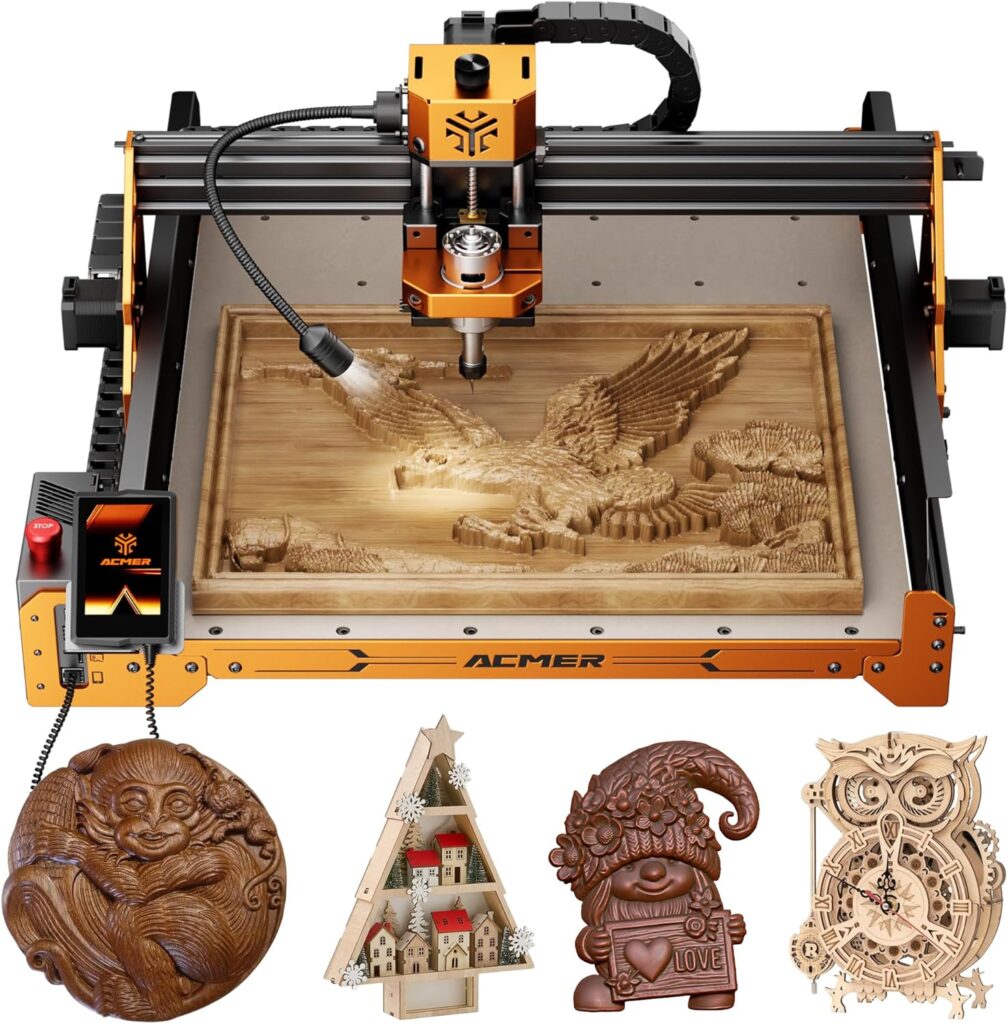
We also wanted a tool that doesn’t make us feel like we’ve adopted a tiny dragon—temperamental, needy, and likely to scorch our eyebrows. The CNC Router Machine, ACMER Ascarva 4S CNC Milling Machine, promises precision of ±0.1 mm, a 15.7” x 15.7” x 3.7” work envelope, and a 70W, 24V spindle with a pathway to a 500W upgrade, and we wanted to see whether those claims hold up in our workshop.

CNC Router Machine,ACMER Ascarva 4S CNC Milling Machine,70W 24V Spindle Power,15.7” x 15.7” x 3.7”,120W Whole Machine Power for Wood Plastic Acrylic MDF Carving Cutting
Meet the ACMER Ascarva 4S: What It Is
This is a compact, modular CNC router for cutting and carving wood, plastics, acrylic, MDF, and epoxy tooling board. It ships with a 70W spindle (24V), runs up to 8000 RPM, and moves with a maximum carving speed of 1000 mm/min and a rapid speed of 5000 mm/min, with acceleration rated at 100 mm/s².
The whole machine draws about 120W, which is kind to both home circuits and our conscience. It’s compatible with 5W and 10W laser modules (optional), has a 3.5-inch touchscreen, a multilingual UI (EN/ES/FR/DE, among others), and a delightfully manual Z-height knob that saves us from our own menu-diving tendencies.
Unboxing and First Impressions
We’ve had our share of flat-pack dread, so the partial pre-assembly here felt like a small act of mercy. The cable management is orderly and clearly labeled, which avoids the time-honored ritual of pretending we know which plug goes where while silently Googling.
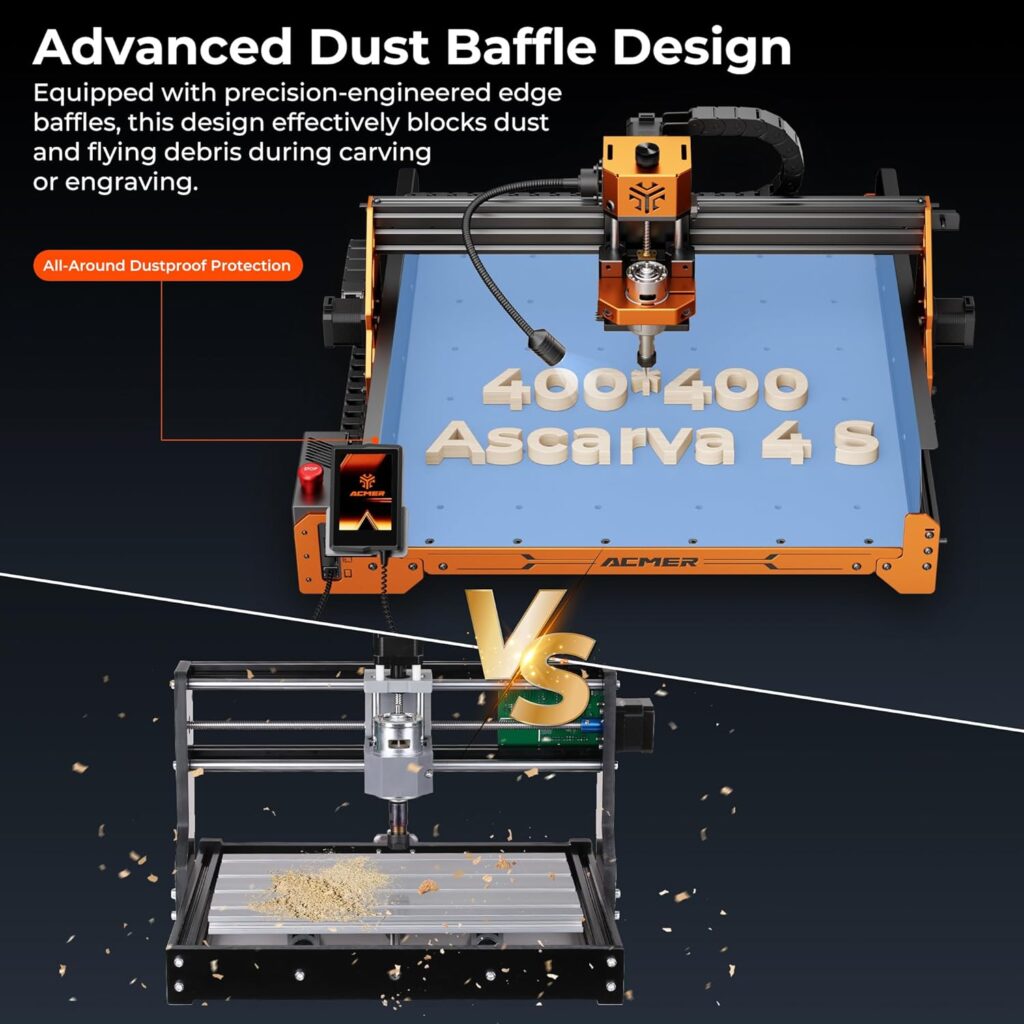
Parts feel solid; there’s no rubber wheel lottery because ACMER uses steel wheels on the X and Y axes. The Y-axis dust cover and Z-axis motor cover are not just polite gestures—they’re practical protections that signal this machine intends to work for a living, not pose for product photos.
Setup: Assembly, Firmware, and First Homing
Assembly took less time than we’d budgeted for snacks, which says something about good design or our poor pacing. The modular components bolt up with little fuss, and the gantry squared up without a shim cabaret.
Initial homing was straightforward. The control interface is intuitive and doesn’t make us feel like we should call an engineer to jog X ten millimeters. Set your steps, probe your zero (or nudge it with the Z knob), and you’re off to the races—well, the careful trot.
Modular Design and Upgrades
We love that the Ascarva 4S is built like a thoughtful kit rather than a sealed mystery. When a part wears out or an upgrade beckons, we can actually get in there, fix it, and be back in business before our coffee gets cold.
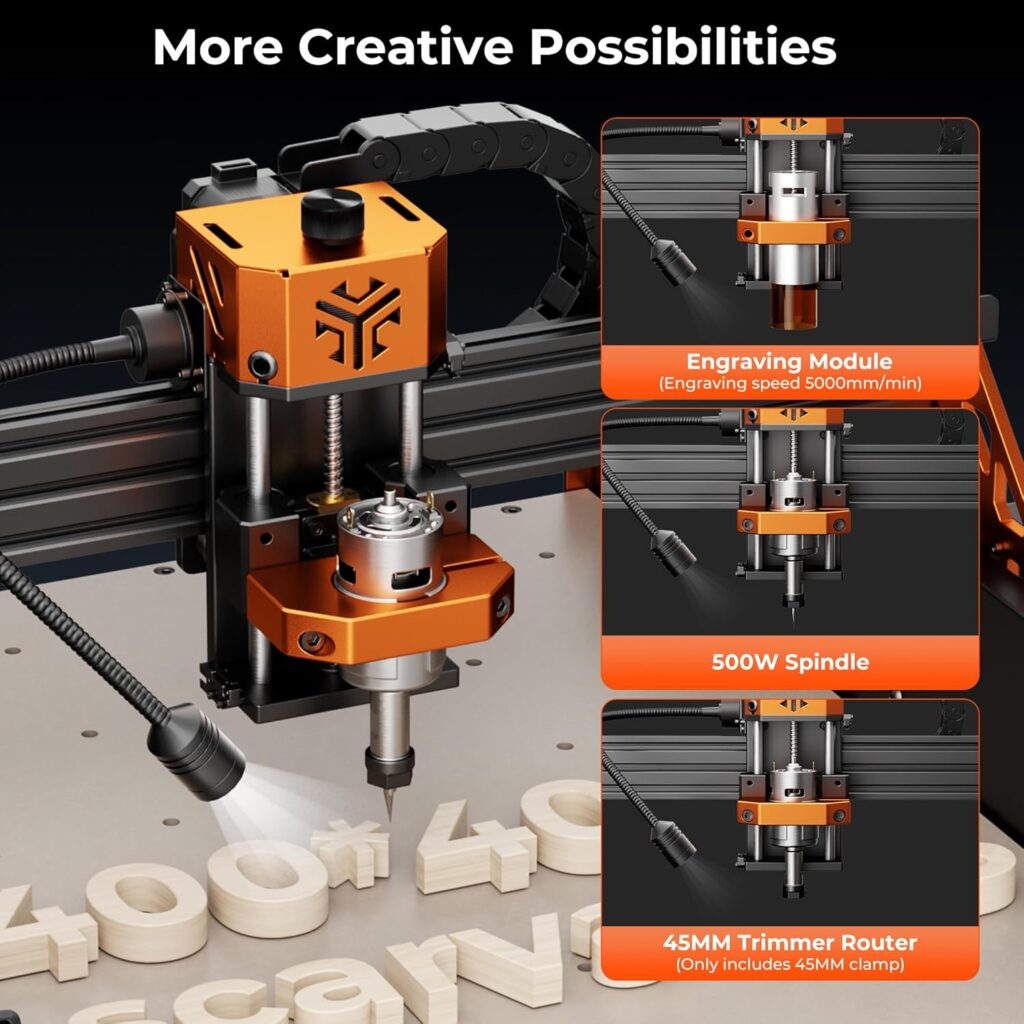
Most notable is the spindle upgrade path—from the included 70W to a 500W unit that transforms the machine’s capability. If you need the newly upgraded automatic tool alignment function, ACMER’s customer service can provide a free replacement of the original module with a new tool module; we appreciate a brand that turns “optional” into genuinely helpful. If you want that feature, reach out proactively, because apparently, good things really do come to those who ask.
Safety and Workspace
Even with the lower power consumption, this is a real tool that makes real chips. A small enclosure or at least a dust shoe plus a shop vacuum goes a long way toward making sure the only thing we breathe is relief.
Hearing protection is wise, as spindle whine plus vacuum roar equals a duet nobody requested. Proper clamping and a flat spoilboard round out the housekeeping, preventing flying stock and flying expletives.
Build Quality and Engineering
The high-rigidity structure reads as “grown-up” compared to many hobby-class routers. There’s far less flex than we expected at this size, and the machine doesn’t shimmy when the tool meets the work.
Steel wheels on the X and Y axes are a big deal for longevity and accuracy. Where rubber wheels can slowly compress into a personality of their own, steel keeps the movement truer over time, which we’re guessing is the point of computer-controlled cutting.
Motion System and Accuracy
The published accuracy is ±0.1 mm, and in our probing tests—simple pattern pockets and alignment bores—we stayed inside that window with room to spare when the tooling and feeds were chosen sensibly. It’s not a metal mill, but it’s not trying to be; for wood and plastics, the tolerances are excellent.
Repeatability matters more in real life than one perfect part, and here the Ascarva 4S behaves consistently. Multiple passes line up, pockets intersect where they should, and our clamps don’t suddenly become percussion instruments because the gantry has the jitters.
Control and Interface
The 3.5-inch touchscreen feels like a pleasant nod to modernity rather than an afterthought. We could start, pause, home axes, jog, and adjust quickly without wishing for a magnifying glass or a more patient version of ourselves.
We also appreciated the multilingual interface, with English, Spanish, French, and German front and center. The manual Z-axis height knob is a quiet hero, especially for fast touch-offs and shallow planing passes where we want to nudge instead of program.
Software Workflow
We ran test files through Candle and UGS, and both behaved predictably. On the CAD/CAM side, we used Fusion 360 and Carbide Create for toolpaths and had no trouble exporting GRBL-compatible G-code.
If you’re on macOS, Windows, or Linux, you’re in luck—support is broad and well tested. A habit that pays off is labeling your CAM presets per material; when the clock says “Saturday afternoon,” your MDF pocketing recipe should not be whispering to your acrylic panel.
Performance Benchmarks
We tested the machine in several materials using conservative feeds and speeds—and then nudged settings upward until chatter or surface finish told us to stop. We stayed inside the 1000 mm/min max carving speed, which is where this machine is happiest in stock trim.
In wood, we saw smooth edges and surprisingly crisp V-carves. In plastics and acrylics, chip evacuation and tool geometry made all the difference, and the Ascarva 4S obliged with steady motion that spared us the dreaded melty gummy edges.
Wood Carving: Pine and Hardwood
Using a 1/4″ two-flute end mill on pine at 600–800 mm/min, 1 mm stepdown, and 40–60% stepover, we got clean pockets and tidy edges. V-carving with a 60° bit at shallow passes yielded letterforms sharp enough to make us feel briefly artistic.
In hardwoods like maple, keeping pass depth conservative (0.5–0.8 mm) prevented strain on the 70W spindle while still delivering precise contours. Surface finish improved noticeably when we used a single-flute or straight-flute cutter, which reduces load and heat.
MDF Pocketing: Flatness Without Fuzz
MDF is both forgiving and annoying, like a cat that will sit on your laptop during meetings but purr the rest of the time. We got great surface uniformity with a 1/4″ upcut, 500–700 mm/min, 0.8 mm stepdown, and 50% stepover.
The dust cover on the Y-axis helps keep the belts from wearing the MDF fluff as a sweater. With a decent shop vacuum attached, chip evacuation keeps cutting pressure low, and we didn’t observe any alarming belt dust or wheel wear, even during multi-hour jobs.
Acrylic Engraving and Cutting
For cast acrylic, a single-flute O-cut at 300–500 mm/min with 0.3–0.5 mm passes gave clean, glossy edges. The machine’s stable motion helped us avoid re-cutting chips, which is crucial because melted acrylic smells like regret.
We noticed that the ±0.1 mm claim stays very achievable when you control heat and chip load. Our inlays seated with only a whisker of persuasion, which is the ideal amount for acrylic—too loose and it looks sloppy, too tight and it cracks along your ambition.
Plastics and Epoxy Tooling Board
HDPE responded well at modest speeds; a polished single-flute bit prevented stringing and produced a satisfyingly smooth surface. Epoxy tooling board carved like a dream, almost eager, with edges that made us reach for a camera before remembering nobody else cares about edges this much.
The 70W spindle handled these materials without drama as long as we respected pass depth and didn’t ask the machine to pretend it’s a bulldozer. If you routinely need deeper cuts in one go, the 500W upgrade becomes compelling rather quickly.
Spindle Power: 70W Reality and 500W Temptation
The included 70W spindle at 24V is a careful match for the frame, rails, and motion system. For engraving, shallow 2.5D pockets, small carvings, and dimensioning thin stock, it’s great—and quiet compared to beefier units.
If you’re aiming at aggressive hardwood machining or faster cycle times, the 500W upgrade turns this from an “artful chiseler” into a “confident carver.” Power doesn’t replace good toolpaths, but it does widen the lane for pass depth and feed rate, which can halve job times on thicker workpieces.
Laser Module Compatibility
Drop a 5W or 10W laser module onto the machine and it becomes a capable engraver for wood, leather, and coated metals, and a cutter for thin balsa and some plastics (check material safety—some plastics release hazardous fumes). The precision makes alignment jobs much easier than on generic diode laser frames.
If you’ve ever wished your logo could land exactly where you think it should, G-code-based laser jogging and the stable gantry will make your day. Remember: laser goggles, ventilation, and a non-reflective surface aren’t negotiable.
Noise, Dust, and Vibration
Let’s be honest: a router and a vacuum making music together is a soundtrack best kept in the garage. The 70W spindle mitigates the symphony somewhat, but we still recommend hearing protection during long cuts.
The dust situation is manageable with a shoe and extraction, especially in MDF, which otherwise attempts to colonize every surface in the house. We appreciated the Y-axis dust cover because it means maintenance stays about the machine and not the mess.
Maintenance and Longevity
We’d rather be making than maintaining, but neglect is how machines learn to complain. A quick weekly wipe-down, a monthly check on wheel tension, and periodic lubrication will keep the Ascarva 4S feeling spry.
The steel wheels on linear rails are a relief for long-term use, as is the Z-axis motor cover that keeps particulates out of the moving bits that matter. Belts stretch over time, but tensioning is easy, and replacements are inexpensive if you ever need them.
The Learning Curve: From “What’s a Pocket?” to “Where’s My Chamfer?”
We’ve all watched a beginner send a 6 mm end mill into a part like it owes them money. This machine nudges you toward restraint with its sensible speeds and forgiving behavior when feeds are conservative.
CAM fundamentals matter more than gear bravado. Tool diameter, stepover, pass depth, and climb vs. conventional cutting are not just trivia—they’re the difference between a great finish and a cry for sandpaper. The Ascarva 4S rewards learning with repeatable, confident cuts that look like your plans on a good day.
Real Projects We Cut and Liked
We carved a 12-inch hardwood sign with V-carved text and a shallow pocket background, and the result looked like we bought it from a boutique that also sells artisanal bread. The corners were crisp, the lines even, and the finish required little more than a light sanding.
We also made a small acrylic inlay panel for a control box, and the part nested in with a precision that felt expensive. Running a multi-hour MDF tool organizer didn’t faze the machine: no missed steps, no belt squeal, and we didn’t have to apologize to the neighbors.
Pros and Cons in Plain Speak
We like to live in the complicated middle, but sometimes a list helps us see the forest through the chips. Here’s where the Ascarva 4S shines and where it nudges you to think twice.
Pros:
- Excellent precision for wood and plastics at ±0.1 mm.
- Thoughtful engineering: steel wheels, dust covers, and a rigid frame.
- Friendly controls: touchscreen plus a manual Z knob we didn’t know we needed.
- Modular design with a clear upgrade path to 500W and optional tool alignment module (contact ACMER to get the newly upgraded module).
- Cross-platform software compatibility (Windows, Mac, Linux) with common GRBL senders like Candle and UGS.
- Laser module compatibility broadens capabilities without a second machine.
Cons:
- The 70W spindle requires patient, shallow passes in hardwoods and thicker stock.
- Max carving speed of 1000 mm/min means cycle times aren’t race-winning in stock form.
- Dust shoe is essential but not included; plan for extraction accessories.
- The best results still require CAM literacy—this isn’t a push-button miracle.
Comparison With Alternatives
Compared to bargain-basement 3018-style kits, the Ascarva 4S feels sturdier, runs more accurately, and doesn’t give us buyer’s remorse when we push it beyond engraving keychains. It’s genuinely capable of useful parts in wood and plastic without an immediate litany of mods.
Against larger, more industrial machines, it obviously can’t match raw rigidity or material removal rates. But those machines also cost and weigh several times more and often demand a workspace and dust setup that would unionize our garage.
Who This Machine Is For
If you’re a hobbyist with serious intentions, a small-shop craftsperson, or a prototyper working in wood, plastics, acrylic, MDF, or epoxy tooling board, we think this hits a sweet spot. It invites careful craft while leaving room to grow into faster, deeper cuts with the 500W spindle upgrade.
If you need to mill aluminum every weekend or run production all day, this isn’t your forever machine. But as a compact, dependable router that produces beautiful, accurate work, it’s a keeper.
Price, Value, and Upgrades
We judge value by results and time saved. With decent CAM habits, the Ascarva 4S returns clean finishes, consistent dimensions, and a lack of panic—meaning fewer re-cuts, fewer do-overs, and fewer midnight questions about whether you’re actually cut out for this.
Add in the upgrade path to a 500W spindle and the option to enable automatic tool alignment by contacting ACMER for the upgraded module, and the machine ages gracefully with you. That’s not just value; that’s insurance against outgrowing your gear too quickly.
Troubleshooting Tips and Support
Most gremlins live in feeds, speeds, and clamping. If your cuts look hairy, reduce pass depth, lighten stepover, slow the feed, and check your bit’s sharpness. If you hear chatter, check your workholding, ensure your wheels and belts are tight, and verify your Z zero.
If the machine misbehaves beyond the usual tinkering, ACMER’s support is refreshingly reachable. They manufacture the unit, offer pre- and post-sales support, and explicitly invite you to contact them for failures or to get the newly upgraded tool alignment module—free replacement of the original module, which counts as the sort of generosity we notice.
Specifications at a Glance
We like a tidy summary, especially when our hands are dusty and our patience is thin. Here’s the Ascarva 4S in a simple snapshot.
| Feature | Details |
|---|---|
| Product Name | CNC Router Machine, ACMER Ascarva 4S CNC Milling Machine |
| Work Area | 15.7” x 15.7” x 3.7” (approx. 400 x 400 x 95 mm) |
| Precision | ±0.1 mm (materials: wood/planar/acrylic/epoxy tooling board) |
| Spindle | 70W, 24V (upgradeable to 500W high-power spindle) |
| Spindle Speed | Up to 8000 RPM |
| Whole Machine Power | 120W |
| Max Carving Speed | 1000 mm/min |
| Max Movement Speed | 5000 mm/min |
| Acceleration | 100 mm/s² |
| Axes Hardware | Steel wheels on X and Y; high-rigidity structure |
| Protection | Y-axis dust cover; Z-axis motor protective cover |
| Control | 3.5-inch touchscreen; manual Z-axis height knob |
| Interface Languages | English, Spanish, French, German, others |
| Software Compatibility | Candle, UGS, Base (GRBL-compatible senders) |
| OS Compatibility | Windows, Mac, Linux |
| Materials | Wood, plastics, acrylic, MDF, epoxy tooling board |
| Laser Module | Compatible with 5W/10W modules (optional) |
| Upgrade Options | 500W spindle, newly upgraded automatic tool alignment module (contact ACMER) |
| Assembly | Modular design; pre-assembly reduces setup time by ~50% |
| Support | Manufacturer-backed pre- and after-sales service |
Everyday Usability: The Little Things That Matter
The touchscreen isn’t cute; it’s useful. We reached for it reflexively to jog and pause because it felt faster than software when our attention was glued to the cut.
The manual Z height knob became our small ritual before a job, like checking a front door lock. Quick zeroing, quick sanity checks, and we felt more in control than when a tiny modal dialog box asks us to trust it with our stock.
Material-Specific Notes and Recipes
Wood wants sharp tools and reasonable stepover. We found a 40–50% stepover with a 1/4″ bit in softwoods and 30–40% in hardwoods kept finish clean while respecting the 70W spindle’s strength.
Acrylic prefers single-flute cutters, lower feeds, and higher RPMs to prevent heat buildup. We added a little air assist—just a quiet puff—to move chips away, and that kept edges glossy rather than foggy and sad.
Workholding and Spoilboards
We keep a sacrificial MDF spoilboard surfaced flat to the machine. Clamps went around the perimeter whenever possible, and for small parts we used double-sided tape with judicious force, because the only thing worse than a part shifting mid-cut is having your tape judgment judged publicly.
Cam clamps and low-profile hold-downs let the toolpath roam freely without flirting with metal. We set z-zeros at the top of the stock for precise depths on sensitive parts and at the spoilboard for through-cuts to guarantee separation.
Tooling: What Worked for Us
For general pocketing in wood, a 1/4″ two-flute upcut or downcut was our go-to; downcuts handled veneer and surface fibers with grace. For finishing passes or tight corners, a 1/8″ tool with light stepdowns traced details cleanly.
In plastics, single-flute cutters in sizes 1/8″ and 1/4″ shine. Their larger chipload at a given feed avoids rubbing, and rubbing is the gateway to melted spaghetti and tears.
Post-Processing: Sanding, Sealing, and Smiles
We love when the machine reduces sanding to a hobby rather than a job description. With the Ascarva 4S, a light 220-grit pass and a quick chamfer often took us from “CNC part” to “actual product.”
On acrylic, we flame-polished edges sparingly and only after practicing on scrap. On MDF, an early sealing coat kept edges from fuzzing in high-traffic parts like drawer organizers and jigs.
What Surprised Us
The steel wheels offered a tangible feeling of confidence during longer jobs. There’s something comforting about seeing chips fly and knowing the motion system isn’t silently wearing a groove through its own patience.
We also didn’t expect to use the touchscreen as much as we did. A simple, responsive interface makes a bigger difference in daily use than a spec sheet line item suggests, and the manual Z knob felt like finding a light switch exactly where your hand reaches in the dark.
Where We’d Invest Next
If we were kitting this machine for long-term small-shop use, we’d budget for a dust shoe and a decent vacuum right away. Next, we’d add the upgraded automatic tool alignment module from ACMER because life is short and homing probes are wonderful.
Finally, we’d plan for the 500W spindle if hardwood thickness or production volume crept upward. It’s an upgrade path that matches the machine’s personality: sensible, capable, and more than a little satisfying.
Support Experience and Warranty Comfort
Knowing ACMER manufactures the machine and stands behind it is reassuring. When brands say “contact us” and actually mean it, we take note—and when they offer to replace the original module with the newly upgraded tool module at no charge, we take that as a sign they understand how we use these tools.
If anything fails, the instruction is clear: get in touch. That attitude turns a purchase into a relationship, and we prefer our shop romances to come with actual follow-through.
Limitations to Keep in Mind
You won’t win feed-rate contests with the stock 70W spindle, and thick hardwoods will demand patience. Deep pockets or aggressive roughing are possible, but they’re a multi-pass affair where strategy beats speed.
Also, while the machine is sturdy for its class, it still lives in the realm of wood and plastics. For aluminum or anything more demanding, you’ll want to temper expectations or look at a machine built specifically for that task.
Responsible Use: Safety Isn’t Boring
We set max travel and soft limits to avoid surprise collisions, because nobody enjoys the creative choreography of a gantry meeting a clamp. We also double-check toolpaths for Z entry and exit moves when entering pockets—small insurance against upward spirals of chaos.
Eye, ear, and lung protection turn long sessions from tolerable to comfortable. We prefer a calm, unexciting workshop; the drama should happen in the design, not the ER.
Our Favorite Project Workflows
For signage: rough with a 1/4″ upcut, detail with a 60° V-bit, then a light finishing pass with a small straight bit where letters deserve crisp shoulders. For jigs and inserts: pocket the cavity in MDF or epoxy tooling board, use shallow ramps, and leave a tiny finishing allowance for a clean final pass.
For acrylic panels: tab gently, use onion-skin passes, and finish with a contour at a slightly lower feed to polish the edge. When in doubt, test on scraps first; offcuts are the kindly teachers of the CNC world.
What It’s Like to Live With
The Ascarva 4S fits into our workflow without demanding new rituals. We start it up, load our code, check Z, and let it run while we fuss amiably with sandpaper or a fresh pot of coffee.
After a few weeks, we began to trust it with projects that mattered—gifts, fixtures, parts that must actually fit. That trust is the best compliment we can give a machine: it lets us think about what we’re making rather than how we’ll rescue it.
Final Verdict
We came to the ACMER Ascarva 4S looking for accuracy, reliability, and a hint of future-proofing, and we found all three. The precision is real, the structure is honest, and the user experience leans helpful rather than clever for clever’s sake.
If you’re working in wood, plastics, acrylic, MDF, or epoxy tooling board and you want a steady partner that cuts what you design without drama, this machine deserves a place on your bench. Add a dust shoe, ask ACMER for the upgraded tool alignment module, and consider the 500W spindle as your ambitions grow—then settle in and make something you’ll be proud to show off.
Disclosure: As an Amazon Associate, I earn from qualifying purchases.